

Estimated reading time: 18 minutes
Key Takeaways
- AI misconceptions often lead to misunderstanding AI as either all-powerful or useless.
- AI is a useful tool that requires human judgment, clear instructions, and ongoing verification.
- Common myths include AI always telling the truth, the belief it will replace jobs overnight, and fears of draining power or creating live databases.
- To use AI effectively, focus on practical workflows, critical evaluation, and building skills.
- Beginners should start simple, using AI for repetitive tasks while maintaining their own creative input.
Quick Answer
The biggest AI misconception is that AI is either magic or a threat that will replace everyone overnight.
In reality, AI is a tool. It can help you write, research, plan, organize, create images, automate tasks, summarize documents, and learn faster. But it still needs human judgment, clear instructions, fact-checking, and responsible use.
Another common misconception is that every AI request drains huge amounts of power or that AI tools are secretly building a live database of everything you type. AI does use electricity, especially in large data centers, but a single prompt is not “draining the grid.” The bigger issue is responsible infrastructure, efficient models, clean power, and smart usage at scale. Data center electricity demand is rising, and the International Energy Agency projects global data center electricity use could roughly double by 2030, reaching about 945 TWh, or just under 3% of global electricity use.
Introduction
AI is everywhere right now.
Some people think it will replace every job.and some think it is just a toy. Some think it always tells the truth. Others think using AI means cheating, copying, or giving up your own creativity.
Then there are the newer fears.
People hear that AI is draining all the power. They hear that every prompt trains the model instantly. They hear that AI is building a giant searchable database of everything users type.
The truth is more practical.
AI is not magic. It is not perfect. And It is not useless either.
It is a tool. And like any tool, the results depend on how you use it.
This guide breaks down the biggest AI misconceptions beginners run into. More importantly, it explains what you should actually do instead.
What Are AI Misconceptions?
AI misconceptions are common misunderstandings about what artificial intelligence can and cannot do.
Some come from hype,fear.
Some come from bad examples online.
The problem is that both extremes can hurt you.
If you believe AI can do everything, you may trust bad answers.
If you believe AI is useless, you may miss tools that could save you hours every week.
The smart path is in the middle.
Learn what AI is good at. Learn where it fails. Then build workflows that use it safely and practically.
That fits the TechnofluxAI approach: AI tools are useful when they are part of a workflow, not when they are treated like magic buttons.
1. Misconception: AI Always Tells the Truth
This is one of the most dangerous AI myths.
AI can sound confident even when it is wrong. It may give outdated information, mix facts together, or make something sound official when it is not.
That does not mean AI is useless.
It means you should not treat every answer as verified truth.
What to do instead
Use AI for drafts, summaries, outlines, brainstorming, and first-pass research. Then check important facts with reliable sources.
For high-stakes topics like health, law, money, safety, or technical setup, verify before acting.
AI can help you move faster. It should not remove your responsibility to think.
2. Misconception: AI Will Replace Everyone Overnight
AI will change work. That part is real.
But “AI will replace everyone tomorrow” is too simple.
Most businesses still need people who understand goals, customers, context, taste, trust, judgment, and strategy.
AI can generate content. But it does not automatically know your audience.
AI can create a plan. But it does not know your business unless you teach it.
AI can automate tasks. But someone still needs to design the workflow.
What to do instead
Learn how to use AI as a skill multiplier.
The future belongs to people who can combine human judgment with AI tools.
That does not mean every job stays exactly the same. It means the most useful skill is not “AI did it for me.” The useful skill is knowing where AI fits, where it fails, and how to guide it toward a real outcome.
3. Misconception: AI Is Only for Tech Experts
A lot of beginners avoid AI because they think they need to understand coding, machine learning, or advanced software.
You do not.
Most modern AI tools are built for regular people.
You can use AI to:
- Write email drafts
- Plan content
- Summarize documents
- Create outlines
- Generate ideas
- Organize tasks
- Build checklists
- Analyze simple data
- Create social posts
- Improve titles and descriptions
What to do instead
Start with one simple task.
Do not try to master every AI tool. Pick one repeated problem in your day and use AI to make that easier.
A creator might start with blog outlines.
A small business owner might start with customer reply templates.
A marketer might start with content briefs.
A student might start with study summaries.
Simple wins build real confidence.
4. Misconception: Better Prompts Fix Everything
Prompts matter. But prompts are not the whole game.
A good prompt can improve the answer. But if your goal is unclear, your source material is weak, or your workflow is messy, the output will still be limited.
Prompting is only one part of AI work.
The better skill is workflow design.
That means knowing:
- What you want
- What information the AI needs
- What format the output should follow
- What needs to be checked
- What should happen next
What to do instead
Think in workflows, not one-off prompts.
Instead of asking:
“Write me an article.”
Use a system:
- Research the topic.
- Build the outline.
- Draft the article.
- Improve the title.
- Add internal links.
- Create FAQs.
- Suggest schema.
- Create social posts.
That is how AI becomes useful.
A prompt can get you an answer. A workflow can help you repeat good results.
5. Misconception: AI Content Is Always Bad
AI content can be bad.
It can be thin, generic, repetitive, and boring.
But that usually happens when people publish raw AI output with no strategy, editing, or human insight.
AI-assisted content can be useful when it includes:
- Clear structure
- Real examples
- Practical steps
- Human editing
- Original perspective
- Accurate information
- Helpful formatting
- Strong internal links
- A clear next action
What to do instead
Do not use AI to replace thinking.
Use AI to speed up the parts that slow you down. Then add your own experience, examples, judgment, and editing.
For TechnofluxAI-style content, the reader should leave with a workflow, not just a list of tools or vague advice.
6. Misconception: AI Is Creative by Itself
AI can generate creative ideas. It can suggest angles, headlines, scripts, images, stories, and hooks.
But creativity still needs direction.
AI does not know your taste unless you guide it. It does not know your brand unless you define it. It does not know what feels right to your audience unless you provide context.
What to do instead
Build a brand guide.
Give AI your tone, audience, examples, visual style, do-not-use words, content goals, and favorite formats.
For TechnofluxAI, that means using a practical, futuristic, creator-focused style with clear workflows and FluxBot branding when it fits. DataFlux is the right mascot for SEO, GEO, analytics, automation, workflows, productivity, and strategy content.
7. Misconception: AI Tools Are All the Same
They are not.
Some AI tools are better for writing.
And Some are better for images.
Some are better for video.
And Some are better for automation.
Some are better for research.
And Some are better for project management.
Choosing the wrong tool makes AI feel weaker than it really is.

What to do instead
Pick tools based on the job.
Use writing tools for drafts and outlines.
image tools for visuals and thumbnails.
automation tools for repeated tasks.
project tools for planning and workflows.
SEO tools for keywords, structure, and optimization.
The right tool depends on the task.
A beginner does not need fifty tools. A beginner needs one clear problem and one tool that helps solve it.
8. Misconception: AI Removes the Need to Learn
This one sneaks up on people.
AI can make learning faster. But it should not make you stop learning.
If you rely on AI without understanding the basics, you may not notice when the output is wrong.
This matters for coding, SEO, recipes, business, finance, marketing, and publishing.
What to do instead
Use AI as a tutor, not a crutch.
Ask it to explain concepts.
for examples.
for mistakes to avoid.
for step-by-step breakdowns.
Then test what you learn.
The goal is not to avoid learning. The goal is to learn faster.
9. Misconception: AI Automation Should Run Without Supervision
Automation sounds exciting.
But bad automation can create problems fast.
It can publish weak content, send the wrong email, make messy updates, duplicate tasks, or move too quickly without review.
AI agents and automations work best with guardrails.
What to do instead
Start with supervised automation.
Let AI draft before it publishes.
Then Let AI suggest before it edits.
Maybe Let AI summarize before it sends.
Let AI organize before it deletes or changes anything important.
Automation should save time, not remove responsibility.
10. Misconception: AI Has No Place in Small Businesses
Small businesses may benefit from AI the most.
Why?
Because small teams have limited time.
AI can help with:
- Content planning
- Customer replies
- Lead follow-ups
- Social media ideas
- Blog outlines
- Local SEO pages
- Email drafts
- Proposal templates
- FAQ pages
- Workflow checklists
- Training documents
What to do instead
Use AI on repeated tasks first.
If you do something every week, it may be worth turning into an AI-assisted workflow.
Do not start with the flashiest AI trend. Start with the task that wastes your time every Monday.
11. Misconception: AI Is Draining All the Power Every Time You Use It
This myth needs a careful answer.
AI does use electricity. Big AI models run in data centers, and data centers require power for servers, cooling, storage, networking, and backup systems. AI demand is also one reason data center electricity use is growing.
So the concern is not fake.
But the beginner misconception is thinking every single AI prompt is like turning on a power plant.
That is not how it works.
A prompt uses computing resources inside a larger data center system. The real energy issue is scale: millions of people and businesses using AI, companies training large models, and data centers expanding to support growing demand. The IEA projects global data center electricity consumption could double by 2030, but still represent just under 3% of global electricity use in its base case.
Google’s 2025 Environmental Report also shows the mixed reality: energy demand is increasing, but major AI infrastructure companies are also investing in cleaner energy, efficiency, and water replenishment efforts. Google reported reducing data center energy emissions by 12% in 2024 while also procuring more than 8 GW of clean energy.
What to do instead
Do not panic over every prompt.
Use AI intentionally.
That means:
- Avoid generating endless throwaway outputs.
- Use smaller, focused prompts when possible.
- Reuse good templates.
- Batch related tasks together.
- Choose tools that fit the job.
- Support companies that publish serious energy and sustainability reporting.
The practical view is simple: AI has an energy footprint, but beginners should not think responsible AI use means never using AI. The better goal is smarter usage, better infrastructure, cleaner power, and less waste.
12. Misconception: AI Is Secretly Building a Live Database of Everything You Type
This is another common beginner fear.
People imagine AI like a giant spreadsheet that instantly saves every prompt, adds it to a searchable database, and then repeats it back to other users.
That is not the same as how large language models work.
AI models are trained on large amounts of data before they are released. OpenAI explains that its foundation models are developed using a mix of publicly available information, licensed information, and information created by human trainers.
A model does not usually “learn” from one prompt in real time the way a person might memorize a sentence. When you chat with an AI tool, it may use your current conversation as context for that session or workspace, depending on the product settings. Some tools may also use user content to improve services unless privacy settings, business terms, or opt-out controls say otherwise. The exact rules depend on the tool.
What to do instead
Treat AI like a professional software tool, not a private diary.
Do not paste sensitive information unless you understand the tool’s privacy settings and terms.
Avoid sharing:
- Passwords
- Private keys
- Confidential client files
- Medical records
- Legal documents
- Unreleased business plans
- Private personal data
- Anything you would not want stored by a third-party service
Use business or enterprise settings when privacy matters. Check the tool’s data controls. Read the official privacy page for the product you are using.
The smarter view is not “AI instantly steals everything.” The smarter view is: know what you are sharing, know the tool’s data policy, and use the right settings for the job.
13. Misconception: AI Usage Means the Model Is Training on You Instantly
This is related to the database myth, but it is slightly different.
Many beginners think every AI answer means the model just updated itself.
That is usually wrong.
Most AI models do not permanently change their core training every time one person sends a prompt. Your conversation may influence the current response because it is part of the context window. But that is not the same as retraining the whole model.
Training a major AI model is a separate process. It requires large datasets, compute, evaluation, safety work, and deployment. Regular usage is usually inference, which means the model is generating an answer from what it has already learned.
What to do instead
Understand the difference:
Training is how a model is built or improved.
Inference is when the model responds to your prompt.
Memory or saved context is a product feature that may remember certain preferences or details, depending on the tool and settings.
Data retention is how long the company stores user data under its policies.
Those are not all the same thing.
Once you understand that, AI feels less mysterious.
Common AI Mistakes to Avoid
AI can save time, but it should not replace editing. Before you publish anything AI helps create, read it closely, improve the structure, and make sure it sounds like you.
Facts still need a second look. AI can give helpful summaries, but important claims should be checked against reliable sources before you trust them.
Use AI to support your own work, not copy someone else’s. It is fine to brainstorm, outline, and rewrite with AI, but do not use it to imitate another creator or steal their ideas.
Be careful with automation. Do not let AI publish, delete, send, or update important work until you understand the process and have reviewed the output.
You do not need to chase every new AI tool. Pick one tool that solves a real problem in your workflow, learn it well, and add more only when there is a clear reason.
Vague prompts usually lead to vague results. Give AI a clear goal, audience, context, format, and example when you want a better answer.
Your audience still matters most. AI can help with structure and speed, but your content should be shaped around what your readers actually need.
Do not let AI erase your voice. Use it to organize ideas, improve clarity, and speed up drafts, then add your own examples, opinions, and judgment.
Privacy matters. Avoid pasting sensitive information into AI tools unless you understand the platform’s data settings, privacy policy, and account controls.
Every prompt is not automatically training the model. Still, it is smart to treat AI tools like third-party software and be careful with anything private or confidential.
AI energy concerns are real, but they should be understood in context. A single prompt is not a grid crisis; the bigger issue is responsible AI use, efficient data centers, and cleaner infrastructure at scale.
Founder’s Insight
One of the biggest mistakes I see is people treating AI like a finished answer machine.
That is the wrong mindset.
AI works best when you treat it like a working assistant. It can draft, organize, compare, summarize, brainstorm, and speed things up. But you still need to guide it, check it, and make the final call.
The same applies to AI fears.
Do not trust every hype post. Do not trust every panic post either.
Learn the workflow. Learn the limits. Use the tool with judgment.
That is where AI becomes useful.
What Should You Actually Do?
Start simple.
Pick one task you repeat often.
Examples:
- Writing blog outlines
- Creating social captions
- Planning YouTube Shorts
- Summarizing research
- Building checklists
- Improving SEO titles
- Creating content briefs
- Finding internal link ideas
Then build a small repeatable workflow.
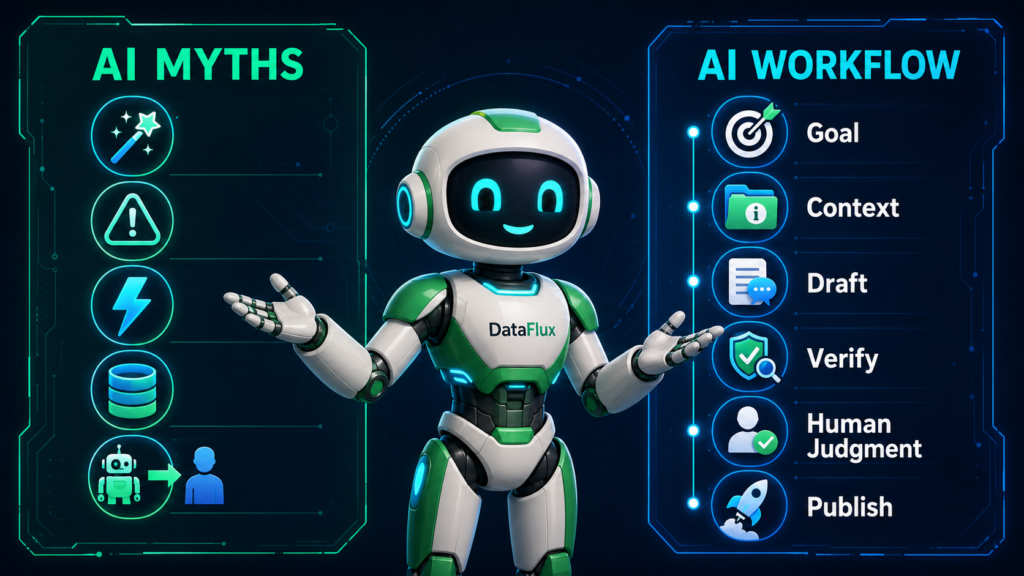
A beginner AI workflow could look like this:
Step 1: Tell AI the goal
Tell the tool what you are trying to create or solve.
Example:
“I need a beginner-friendly blog outline about AI misconceptions.”
Step 2: Give it the audience
AI gives better answers when it knows who the content is for.
Example:
“This is for small business owners and creators who are new to AI.”
Step 3: Give it examples or context
Add your brand rules, notes, sources, or previous examples.
Example:
“Use a practical tone. Avoid hype. Include myths about power usage and data privacy.”
Step 4: Ask for a structured output
Do not ask for a vague answer.
Ask for headings, steps, examples, FAQs, or a checklist.
Step 5: Review the result
Look for missing details, weak claims, outdated information, and generic sections.
Step 6: Improve it with human judgment
Add examples. Remove fluff. Verify claims. Make the piece sound like your brand.
Step 7: Save the best version as a reusable template
When the workflow works, save it.
That is how AI becomes practical.
? Creator AI Tools Update
AI creator tools are evolving quickly in 2026. Content creators now use AI systems for video editing, voice generation, thumbnails, workflow automation, scripting, image generation, social media planning, and AI-assisted publishing across multiple platforms.
Modern creators are combining AI tools with workflow systems to publish content faster, stay more consistent, improve engagement, and scale content production without large teams.
- AI video tools speed up content creation workflows
- Workflow automation helps creators stay consistent
- Short-form video content continues dominating social traffic
- AI image systems improve thumbnails and visual branding
- Cross-platform publishing workflows are becoming essential
FAQ
Is AI always accurate?
No. AI can make mistakes and sound confident while doing it. Always check important facts.
Will AI replace my job?
AI may change many jobs, but people who learn how to use AI tools wisely can become more valuable.
Is using AI cheating?
Not always. It depends on how you use it. AI is best used for support, drafting, planning, learning, and improving workflows.
Can beginners use AI?
Yes. Beginners can use AI for simple tasks like outlines, summaries, emails, checklists, research planning, and idea generation.
What is the best way to start with AI?
Start with one repeated task. Build a simple workflow. Review the output before using it.
Does AI drain power every time I use it?
AI uses electricity because it runs on data center infrastructure, but a single prompt is not the same as draining the grid. The real issue is total usage at scale, data center growth, energy sources, model efficiency, and infrastructure planning.
Is AI building a database from my prompts?
Not in the simple way many people imagine. AI models are trained through separate training processes, while normal use is usually inference. However, tools may store or use data depending on their privacy settings and terms, so do not paste sensitive information unless you understand the product’s data policy.
Does AI learn from me instantly?
Usually, no. Your current conversation can shape the current answer, but that is not the same as permanently retraining the model. Training, inference, memory, and data retention are different things.
Use official sources first for product claims. Use the International Energy Agency, company environmental reports, and credible research institutions for energy and infrastructure claims.
Final Thoughts
AI is not magic.
It is not useless.
Definately It is not always right.
And It is not replacing human judgment.
It is not draining the power grid because you asked for one outline.
It is not automatically turning every prompt into a live public database.
The real opportunity is learning how to use AI with clear goals, smart workflows, privacy awareness, and honest review.
The people who win with AI will not be the ones who believe every hype post.
They will be the ones who learn how to use AI carefully, creatively, and practically.
That is the real shift.
- AI tools for creators: https://technofluxai.com/ai-tools-for-creators/
- Ultimate AI Tools Directory: https://technofluxai.com/ultimate-ai-tools/
- AI Blogging: https://technofluxai.com/ai-blogging/
- AI Creator Hub: https://technofluxai.com/ai-creator-hub/
- Make Money with AI Beginner Guide: https://technofluxai.com/how-to-use-ai-to-make-money-beginner-guide/

About the Author
Jon Hicks
Founder of TechnofluxAI.
I’m the creator behind TechnofluxAI, focused on breaking down powerful AI tools, emerging trends, and practical strategies to help creators and entrepreneurs stay ahead in a rapidly evolving digital world.
Follow TechnofluxAI for the latest AI tools & strategies