
Estimated reading time: 15 minutes
Key Takeaways
- The best AI image generators in 2026 include ChatGPT Images, Midjourney, Flux, and Canva, each serving different creative needs.
- AI image creation is vital for creators, enabling them to produce diverse content like blog graphics, YouTube thumbnails, and marketing visuals.
- Choose an AI image generator based on your specific needs, such as conversational editing with ChatGPT or artistic styles with Midjourney.
- A clear workflow guides creators through deciding image purpose, writing effective prompts, selecting the right tools, and editing for platforms.
- Avoid common mistakes like using generic prompts or neglecting to edit images before publishing for best results.
Quick Answer
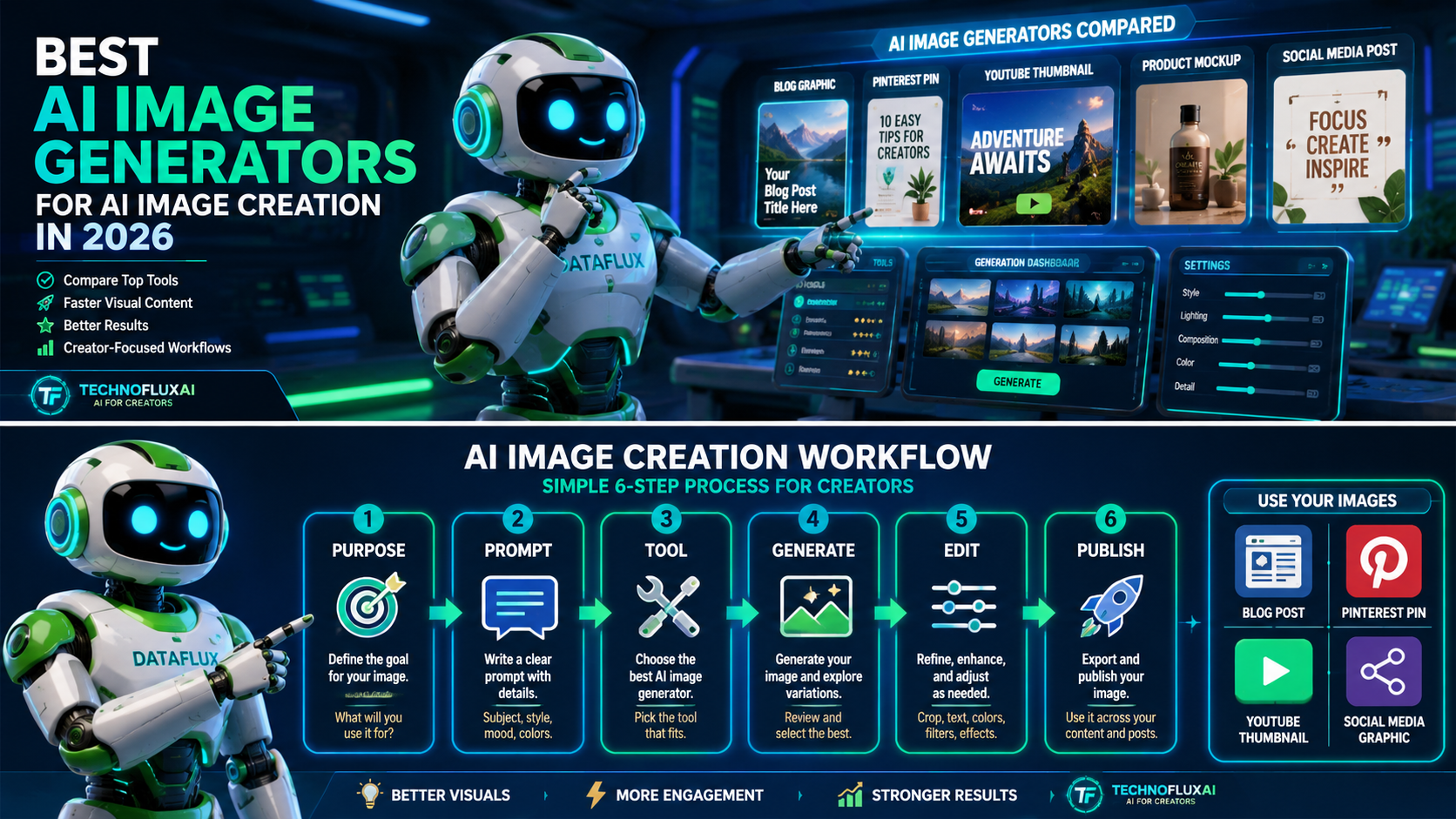
The best AI image generators for AI image creation in 2026 include ChatGPT Images, Midjourney, Flux, Canva, Gemini / Nano Banana, Leonardo, Bing Image Creator, and getimg.ai. Each tool fits a different creative workflow.
ChatGPT Images for conversational image creation and editing. Midjourney for cinematic and artistic images. Flux for advanced model-based image generation. Use Canva when the image needs to become a social post, Pinterest pin, or branded design.Gemini / Nano Banana for Google-connected image generation and photo editing. Leonardo for creative production. Bing Image Creator for quick free image creation. getimg.ai when you want access to multiple AI image and video models in one workspace.
The best tool is not always the most powerful one. The best AI image creator is the one that fits the job you need the image to do.
Not sure how image generators fit into a complete creator stack? Browse the Best AI Tools Directory, then use the AI Tool Hierarchy guide to understand the difference between models, apps, platforms, agents, and workflows.
Table of contents
- Quick Answer
- Why AI Image Creation Matters for Creators
- What Is AI Image Creation?
- How Does AI Create Images?
- Best AI Image Generators for 2026
- Quick Comparison Table
- Which AI Image Generator Should You Use?
- Practical AI Image Creation Workflow for Creators
- AI Image Generation Examples
- Common Mistakes to Avoid
- TechnofluxAI Take
- What Should I Actually Do?
- FAQ
Why AI Image Creation Matters for Creators
AI image creation is no longer just about making random fantasy art. Creators now use AI image generators for blog graphics, YouTube thumbnails, Pinterest pins, Instagram posts, product mockups, recipe visuals, ad concepts, brand assets, and full content campaigns.
That is why the better question is not just “what is the best AI image generator?” The better question is:
What image do I need, where will it be published, and how much editing control do I need after it is generated?
A blog featured image, a Pinterest pin, a YouTube thumbnail, and a product mockup all need different outputs. Some creators need artistic images. Others need clean text, brand templates, realistic product shots, or fast social graphics.
This is where choosing the right AI image creation tool matters.
What Is AI Image Creation?
AI image creation is the process of using artificial intelligence to generate or edit images from a text prompt, uploaded image, reference photo, or design instruction.
A simple AI image creator prompt might describe:
- The subject
- The setting
- The style
- The lighting
- The camera angle
- The mood
- The size or platform
- What should be avoided
For example:
Create a 16:9 blog featured image showing a futuristic creator desk with AI-generated image previews, soft neon lighting, clean composition, no text, no watermark.
That prompt gives the AI image generator a clear job. It explains the purpose, visual direction, and limits.
How Does AI Create Images?
AI image generators create images by learning patterns from large image and text datasets, then using a model to generate a new image that matches the user’s prompt. In simple terms, the tool reads your description, predicts what visual elements should appear, and builds an image from those instructions.
For creators, the technical details matter less than the workflow. A weak prompt usually creates a weak image. A clear prompt with purpose, style, layout, and constraints gives the tool a much better chance of creating something useful.
Best AI Image Generators for 2026
1. ChatGPT Images
Best for: conversational AI image creation, prompt refinement, image editing, blog graphics, thumbnails, content ideas, and fast creative iteration.
ChatGPT Images is useful because the image workflow happens inside a conversation. You can brainstorm an idea, ask for a better image description, generate the image, and request changes without jumping between several tools.
OpenAI’s image generation documentation says the API can generate and edit images from text prompts using GPT Image models, including gpt-image-2. OpenAI also introduced ChatGPT Images 2.0 in April 2026 with improvements for image generation inside ChatGPT.
Use ChatGPT Images for:
- Blog featured image concepts
- Social media graphics
- YouTube thumbnail drafts
- Pinterest image ideas
- AI image creator prompts
- Brand mascot concepts
- Editing existing images
- Turning rough ideas into clearer image descriptions
Avoid it if you need a full design canvas with layers, templates, and brand kits. In that case, Canva may be better for the final layout.
2. Midjourney
Best for: artistic images, cinematic visuals, fantasy scenes, stylized graphics, moodboards, character concepts, and dramatic social media artwork.
Midjourney is one of the most recognizable AI image generators for high-impact visuals. Its official getting started guide explains how users can create images, modify creations, use variations, and even turn images into videos.
Use Midjourney for:
- Cinematic image concepts
- Stylized blog graphics
- Fantasy or sci-fi art
- Character design
- Visual branding ideas
- Scroll-stopping social images
- Pinterest graphics with strong visual style
Avoid it if you mainly need simple design templates, exact brand layouts, or a beginner-friendly blog graphics workflow.
3. Flux
Best for: advanced AI image generation, realistic visuals, image editing, open-weight workflows, API-based image creation, and technical experimentation.
Flux comes from Black Forest Labs. The company describes itself as a frontier AI lab building visual intelligence, with FLUX models available through its API. The official FLUX GitHub repo also describes image generation and editing with Flux open-weight models.
Flux is especially interesting because it appears in both creator tools and technical workflows. Some people use Flux through apps. Others use it through APIs, local setups, or platforms that include Flux as one of several model options.
Use Flux for:
- Realistic AI image creation
- Advanced prompt testing
- Image editing workflows
- Technical AI image experiments
- API-based creative workflows
- Creator tools that use Flux underneath
Avoid it if you want the simplest possible interface and do not want to think about models, settings, or deployment options.
4. Canva AI Image Generator
Best for: social media graphics, Pinterest pins, blog graphics, thumbnails, presentations, simple ad creatives, and beginner-friendly design.
Canva’s AI image generator lets users create AI-generated images and art from text prompts inside Canva’s design environment.
The real advantage is what happens after the image is generated. You can place the image into a Pinterest pin, Instagram graphic, YouTube thumbnail, flyer, presentation, or blog image layout without leaving Canva.
Use Canva for:
- Pinterest pins
- Blog graphics
- YouTube thumbnails
- Instagram posts
- Facebook graphics
- Branded templates
- Simple content marketing visuals
Avoid it if you want the deepest standalone image model controls or highly advanced AI art settings.
5. Gemini / Nano Banana
Best for: Google-connected image generation, photo editing, visual brainstorming, diagrams, image iteration, and multimodal creative workflows.
Gemini’s image generation and editing experience is connected to Nano Banana. Google describes Nano Banana 2 as Gemini’s AI image generator and photo editor for creating high-quality images and editing photos into new creations. Google’s developer documentation also describes Nano Banana as Gemini’s native image generation capability for conversational image creation and editing.
For creators, Gemini is worth watching because it connects image generation with Google’s broader AI ecosystem.
Use Gemini / Nano Banana for:
- AI image creation from text
- Photo editing
- Visual brainstorming
- Diagrams and explainers
- Infographic concepts
- Google-connected workflows
- Image generation inside a broader assistant experience
Avoid it if you want a tool focused almost entirely on stylized AI art and a long-established art community.
6. Leonardo
Best for: creative production, marketing visuals, design assets, AI art, game-style assets, campaign graphics, and image-to-video workflows.
Leonardo describes itself as a creator-first generative AI platform for images, art, and video. Its image generator page says it can generate, refine, and scale images for projects from text or visual inputs.
Leonardo fits creators who want more than a one-off image generator. It is better for building sets of assets, testing styles, scaling visual ideas, and creating production-style creative work.
Use Leonardo for:
- Marketing images
- Game-style assets
- AI art sets
- Brand visuals
- Campaign concepts
- Video-related AI visuals
- Creative production workflows
Avoid it if you only need one quick blog image and do not want to learn a more complete creative platform.
7. Bing Image Creator
Best for: quick image creation, free AI image creator searches, simple text-to-image prompts, and beginner-friendly experiments.
Bing Image Creator is Microsoft’s AI-powered image creation tool. Microsoft says it transforms words into visuals and is available for free with a Microsoft account in supported locations.
This makes it a practical starting point for beginners who search for an AI image creator free option and want to test image prompts without building a complicated workflow.
Use Bing Image Creator for:
- Quick image ideas
- Beginner prompt testing
- Free AI image creation
- Simple text-to-image visuals
- Basic creative experiments
Avoid it if you need advanced production tools, deeper model controls, or a full content design workflow.
8. getimg.ai
Best for: multi-model AI image creation, model testing, image editing, AI video tools, and creators who want several models in one workspace.
getimg.ai describes itself as an AI creative platform with access to 48+ leading AI models through one subscription, including FLUX, GPT Image, Google Veo, Nano Banana, Kling, Qwen Image, and others.
That makes it useful when you do not want to commit to one model immediately. You can test different AI image generators from one workspace and compare which model works best for your style.
Use getimg.ai for:
- Testing multiple AI image models
- Realistic images
- Image editing
- AI video model access
- Style testing
- Multi-model creative workflows
Avoid it if you already know the exact tool you prefer and want to work directly in that tool’s native platform.
Quick Comparison Table
| Tool | Best For | Best User |
|---|---|---|
| ChatGPT Images | Conversational image creation and editing | Bloggers, creators, marketers |
| Midjourney | Artistic, cinematic, stylized images | Visual creators and artists |
| Flux | Advanced model-based image generation | Technical creators and AI experimenters |
| Canva | Social graphics and blog layouts | Bloggers, beginners, social creators |
| Gemini / Nano Banana | Google-connected image generation and editing | Gemini and Google ecosystem users |
| Leonardo | Creative production and asset creation | Designers, marketers, creative teams |
| Bing Image Creator | Quick free image creation | Beginners and casual creators |
| getimg.ai | Multi-model image workspace | Creators testing several AI models |
Which AI Image Generator Should You Use?
For most creators, the best AI image generator depends on the job.
ChatGPT Images when you want to brainstorm, generate, and revise images through a conversation.
Midjourney when the image needs to feel artistic, cinematic, or visually dramatic.
Flux when you want advanced image generation quality, technical flexibility, or model-based experimentation.
Canva when the final image needs to become a Pinterest pin, thumbnail, presentation, blog graphic, or social post.
Gemini / Nano Banana when you want image generation and editing connected to Google’s AI ecosystem.
Leonardo when you are building creative assets at scale.
Bing Image Creator when you want a simple free AI image creator for quick experiments.
getimg.ai when you want to compare several AI image models in one place.
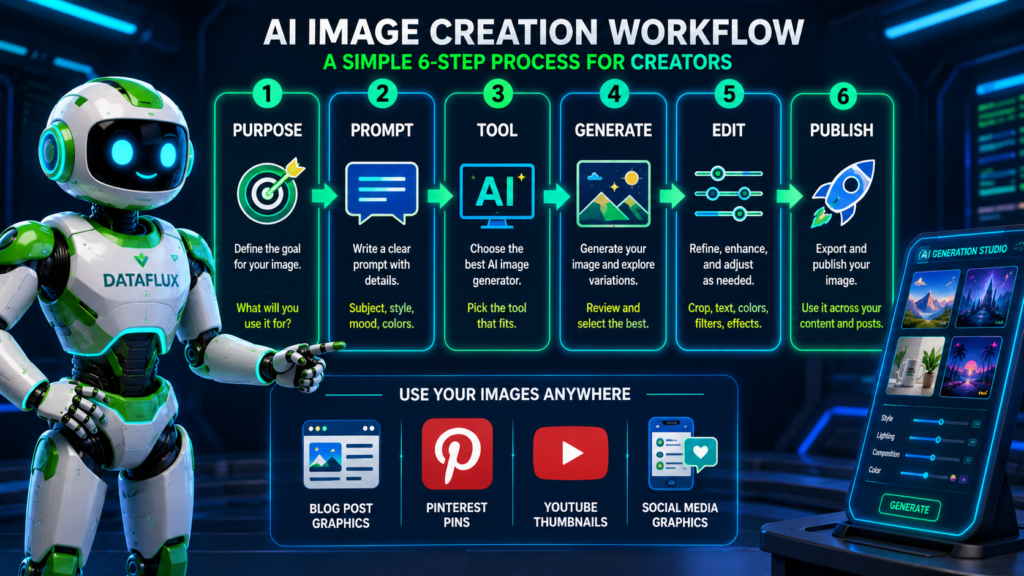
Practical AI Image Creation Workflow for Creators
Step 1: Decide what the image is for
Do not start by choosing the tool. Start by choosing the job.
Ask:
- Is this for a blog post?
- Is this for Pinterest?
- Is this for YouTube?
- Is this for a product mockup?
- Is this for an ad concept?
- Is this for a social post?
The platform changes the image requirements.
Step 2: Write a clear AI image description
A strong AI image description includes the subject, style, setting, lighting, mood, camera angle, and output format.
Weak prompt:
Create an AI image about blogging.
Better prompt:
Create a 16:9 futuristic blog featured image showing a creator desk with AI image previews on a laptop, clean neon blue lighting, organized workspace, modern tech style, no text, no watermark.
The second prompt gives the AI image generator a clearer job.
Step 3: Choose the right tool
Pick the tool based on the output.
For example:
- Need a Pinterest pin? Start with Canva.
- Need cinematic art? Try Midjourney.
- Need conversational editing? Use ChatGPT Images.
- Need Google-style multimodal editing? Try Gemini.
- Need to test several models? Use getimg.ai.
- Need a simple free option? Try Bing Image Creator.
Step 4: Generate several versions
The first image is rarely the final image. Generate a few variations, then compare them based on the goal.
Look for:
- Clear subject
- Good composition
- No weird text
- No distorted hands or faces
- Strong lighting
- Useful empty space if you plan to add text later
- Correct aspect ratio
Step 5: Edit for the platform
A blog image, Pinterest pin, Instagram post, and YouTube thumbnail should not all use the same layout.
Resize, crop, compress, and brand the final image before publishing.
Step 6: Add image SEO
Before uploading the image to WordPress, add:
- A descriptive filename
- Useful alt text
- A clear image title
- A compressed WebP file when possible
- A caption if it helps the reader
Example filename:
best-ai-image-generators-2026.webp
Example alt text:
DataFlux comparing AI image generators for blog graphics, thumbnails, and social media visuals
AI Image Generation Examples
Here are a few practical AI image creator prompts creators can adapt.
Blog Featured Image Prompt
Create a 16:9 futuristic blog featured image showing a creator workspace with AI-generated image previews on floating panels, a laptop on the desk, clean neon blue and emerald lighting, organized composition, professional tech illustration style, no text, no watermark.
Pinterest Pin Background Prompt
Create a vertical Pinterest-style background image for an article about AI image creation tools, modern creator desk, soft gradient lighting, clean space for text overlay, colorful image previews, no words, no watermark.
YouTube Thumbnail Concept Prompt
Create a bold YouTube thumbnail background showing a creator comparing multiple AI image generators on a futuristic dashboard, dramatic lighting, clear focal point, high contrast, no text, no watermark.
Product Mockup Prompt
Create a realistic product mockup scene showing a blank white skincare bottle on a clean bathroom counter, soft natural lighting, minimal modern style, realistic shadows, no logo, no text, no watermark.
Common Mistakes to Avoid
The biggest mistake is treating every AI image generator like it does the same thing. They do not.
Another mistake is using raw AI images without editing. For blog posts, thumbnails, and Pinterest pins, the image often needs cropping, resizing, compression, and branding before publishing.
Also avoid putting too much text inside the image prompt. Some tools are improving at text rendering, but image text can still come out wrong. For important titles, add the text later in Canva, Photoshop, or another design editor.
Do not forget trust. If an AI-generated image could confuse readers into thinking it is a real photo, use clear labeling where appropriate.
TechnofluxAI Take
Most creators do not need ten AI image tools. They need one repeatable image workflow.
For a creator website, I would use ChatGPT Images for brainstorming and image prompt building, Canva for final social and blog layouts, Midjourney for dramatic visual ideas, and getimg.ai or Flux when testing advanced model styles. Gemini / Nano Banana is worth watching for image editing, diagrams, and Google-connected workflows.
The smart move is not chasing every new AI image generation app. The smart move is matching the tool to the job.
What Should I Actually Do?
Start with one image type.
Do not try to build a complete AI visual system in one day. Pick one use case, such as blog featured images, Pinterest pins, or YouTube thumbnails. Then choose one tool that fits that use case.
A simple starting workflow:
- Use ChatGPT to write a strong AI image creator prompt.
- Generate the image in ChatGPT Images, Canva, Midjourney, Gemini, Bing Image Creator, or another tool.
- Edit the final layout in Canva if the image needs text or branding.
- Compress the image as WebP.
- Upload it with a descriptive filename and alt text.
- Track which image style gets clicks, shares, or saves.
That gives you a workflow you can improve instead of a pile of random images.
FAQ
What is the best AI image generator for beginners?
ChatGPT Images, Canva, and Bing Image Creator are strong beginner options because they are easy to use and do not require much technical setup.
What is the best AI image generator for 2026?
The best AI image generator for 2026 depends on the workflow. ChatGPT Images is useful for conversational creation, Midjourney is strong for artistic images, Canva is best for designed content, Flux is useful for advanced model workflows, and Gemini / Nano Banana is useful for Google-connected image generation and editing.
What is the best free AI image creator?
Bing Image Creator is one of the easiest free AI image creator options to try with a Microsoft account. Canva and Leonardo may also offer free or limited plans, but current plan details should be checked before publishing.
How does AI create images?
AI creates images by using a trained model to turn text prompts, uploaded images, or editing instructions into new visuals. The clearer the prompt, the better the AI image generator can match the intended subject, style, and layout.
Can AI create images from text?
Yes. Most AI image generators can create images from text prompts. This is often called text-to-image generation.
What is an AI image description?
An AI image description is the prompt or written instruction that tells the AI image generator what to create. A good description includes the subject, style, setting, lighting, mood, aspect ratio, and anything to avoid.
Is Canva good for AI image creation?
Yes. Canva is useful because you can generate an image and then immediately place it into a social post, Pinterest pin, presentation, thumbnail, or blog graphic.
Are Gemini and Nano Banana the same thing?
Not exactly. Gemini is Google’s broader AI assistant ecosystem. Nano Banana refers to Gemini’s native image generation and editing capabilities.
What is Flux used for?
Flux is used for advanced AI image generation and image editing. It is often used through APIs, technical workflows, open-weight setups, or creative platforms that include Flux models.
Should I use AI-generated images on my blog?
Yes, AI-generated images can work well on blogs when they are relevant, edited carefully, compressed properly, and labeled when needed. Use descriptive filenames and alt text for better image SEO.
? Creator AI Tools Update
AI creator tools are evolving quickly in 2026. Content creators now use AI systems for video editing, voice generation, thumbnails, workflow automation, scripting, image generation, social media planning, and AI-assisted publishing across multiple platforms.
Modern creators are combining AI tools with workflow systems to publish content faster, stay more consistent, improve engagement, and scale content production without large teams.
- AI video tools speed up content creation workflows
- Workflow automation helps creators stay consistent
- Short-form video content continues dominating social traffic
- AI image systems improve thumbnails and visual branding
- Cross-platform publishing workflows are becoming essential

About the Author
Jon Hicks
Founder of TechnofluxAI.
I’m the creator behind TechnofluxAI, focused on breaking down powerful AI tools, emerging trends, and practical strategies to help creators and entrepreneurs stay ahead in a rapidly evolving digital world.
Follow TechnofluxAI for the latest AI tools & strategies