
Estimated reading time: 0 minutes
The AI Tool Hierarchy Explained
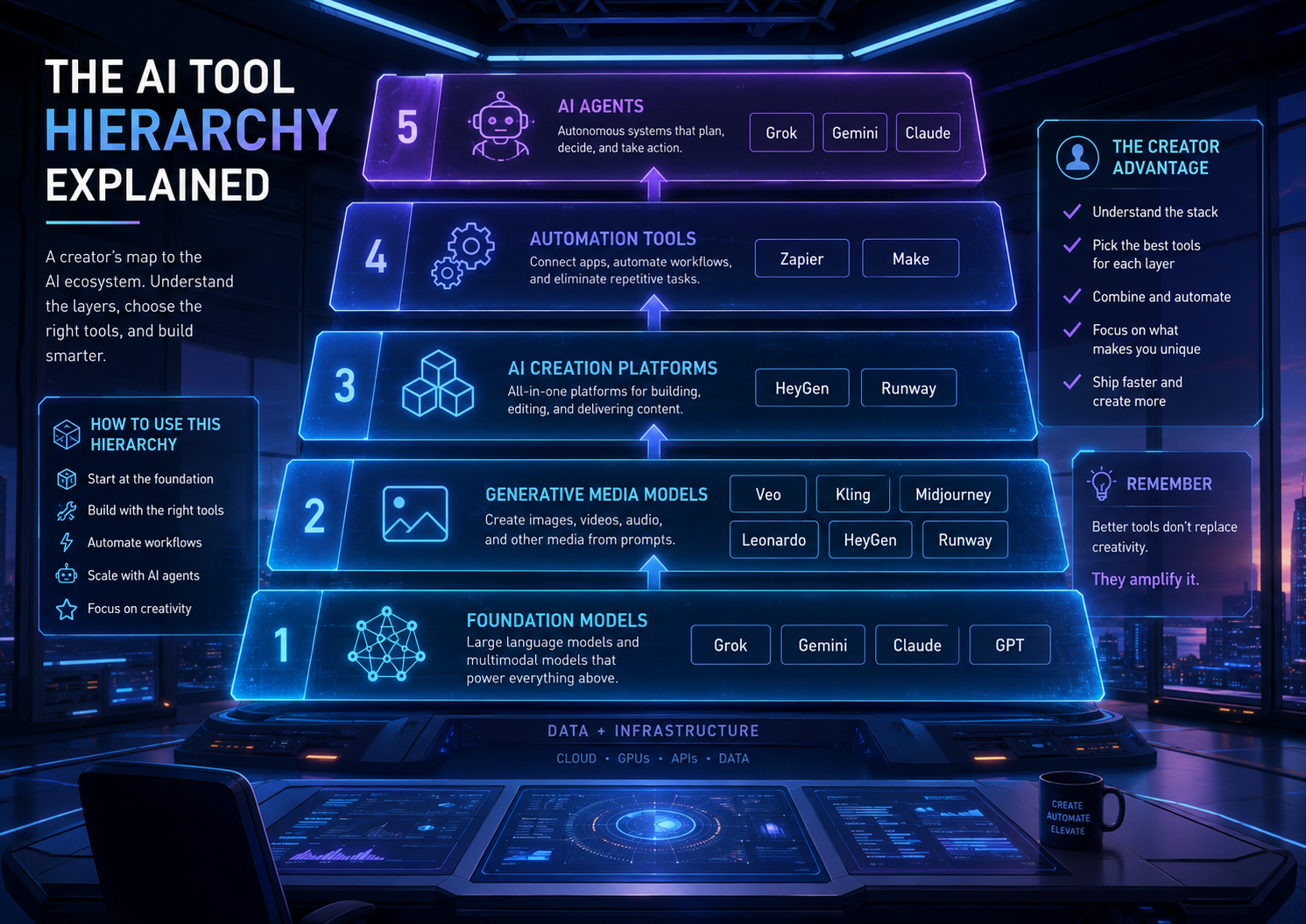
Grok, Gemini, Veo, Seedance, Kling, Wan, Midjourney, Leonardo, HeyGen, and Creator Studio all use AI, but they are not the same kind of tool. Some are foundation models. Some are apps. Some are video engines. Some are creator platforms. This guide explains the difference in plain English.
Quick Answer
An AI model is the engine. An AI app is the interface. An AI platform is the workspace. An AI agent is the worker. A creator tool is the production layer that helps you turn AI output into something publishable.
The Big Pain Point
Most beginners compare AI tools incorrectly. They ask, “Is Veo better than HeyGen?” or “Is Midjourney better than Gemini?” But those tools often live in different layers of the AI stack.
The Simple Hierarchy
Think of AI like a creative production studio:
The AI engines that reason, write, generate images, create video, code, or understand data. Examples: Gemini, Grok, Veo, Kling, Wan, Seedance.
The interface regular users interact with. Examples: ChatGPT, Gemini app, Grok app, Claude, Perplexity, Midjourney.
Workspaces that combine tools, templates, editors, storage, brand kits, exports, and production features. Examples: Leonardo, Runway, Canva, HeyGen, Adobe Firefly.
The complete process: research, prompt, generate, edit, publish, measure, and improve.
This article will help you understand what the major AI names actually are, how they fit together, and which type of tool you should use for writing, images, video, avatars, automation, coding, research, and content creation.
Link this guide to related TechnofluxAI posts such as “Behind the Flux: My AI Creator Stack,” “Best AI Image Generators for AI Image Creation,” “Best Free AI Tools for Creators,” and “The New AI Marketing Stack.”
Why AI Tool Names Get So Confusing
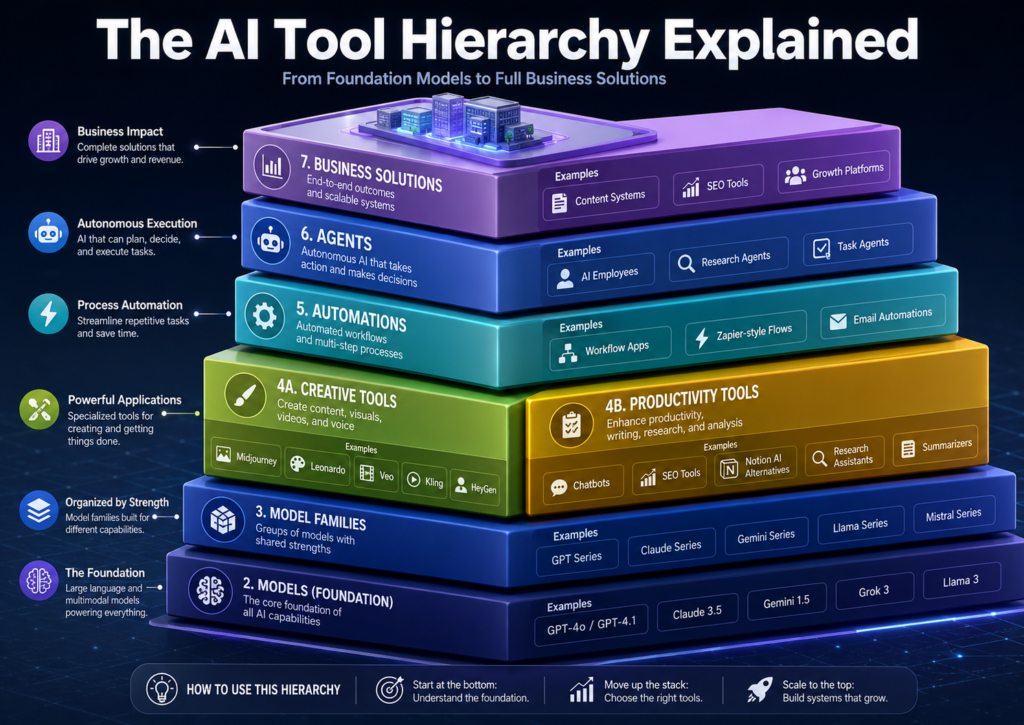
AI feels confusing because people use the same words for different layers. One person may say “Gemini” and mean Google’s model family. Another may mean the Gemini app. Someone else may mean Gemini inside Google Workspace or the Gemini API. The same thing happens with video tools, image tools, coding tools, and avatar platforms.
The better question is not “Which AI tool is best?” The better question is: “What layer of the stack am I talking about?”
| Layer | What It Means | Examples | Beginner Translation |
|---|---|---|---|
| Foundation model | The core AI brain or generator | GPT, Gemini, Claude, Grok, Llama, Qwen, Mistral | The engine under the hood |
| Media model | A model made for images, video, audio, or music | Veo, Kling, Wan, Seedance, Midjourney, Flux, Suno, ElevenLabs | The generator for creative assets |
| App | The user-facing product you log into | ChatGPT, Gemini app, Grok app, Claude, Perplexity, Midjourney | The dashboard or chat window |
| Platform | A workspace with tools, templates, editors, exports, and collaboration | Leonardo, Runway, HeyGen, Canva, Adobe Firefly, Descript, CapCut | Where you make something usable |
| Agent | An AI system that can plan and take multiple steps | Coding agents, research agents, browser agents, automation agents | The AI worker |
| Workflow | The process that combines several tools to finish a job | Research → script → image → video → voice → edit → publish | The full content machine |
Where Grok, Gemini, Veo, Seedance, Kling, Wan, HappyHorse, and Sora Fit
The AI tools listed below are only a few examples from the larger AI ecosystem. There are hundreds of active models, apps, platforms, and creator tools, and new ones appear constantly. This section is not trying to name every AI product. It is showing how different types of AI tools fit into the bigger hierarchy.
Grok and Gemini are usually discussed as general AI assistant or model ecosystems. Veo, Seedance, Kling, Wan, HappyHorse, and Sora are more closely connected to AI video generation. Midjourney and Leonardo are often used for image creation. HeyGen is more of an avatar video platform. They all use AI, but they do not all solve the same job.
Grok
Grok is xAI’s model and app ecosystem, closely tied to X. It fits mostly in the general assistant category because people use it for conversation, brainstorming, writing, reasoning, and real-time social context. It may also connect to creative features through Grok Imagine and related media tools.
Gemini
Gemini is Google’s multimodal AI model family and product ecosystem. It fits in the foundation model layer because it can support text, image understanding, code, audio, reasoning, assistant workflows, and developer/API use cases.
Veo
Veo is Google’s AI video generation model family. It belongs in the video model layer, not the normal chatbot layer. Creators may use Veo-style tools to generate cinematic scenes, animate images, extend video clips, create B-roll, and produce visual content from prompts.
Seedance
Seedance is a ByteDance AI video generation model family. It belongs in the video generation layer and is often discussed around short-form content, camera movement, cinematic social clips, creator-style visuals, and prompt-to-video workflows.
Kling
Kling is Kuaishou’s AI video generation model and tool family. It fits in the video model/platform category. Creators may use Kling for text-to-video, image-to-video, cinematic shots, multi-shot scenes, native audio-visual output, and character motion.
Wan
Wan is Alibaba’s AI video generation model family. It fits in the generative video layer and is associated with text-to-video, image-to-video, reference-to-video, video editing, lip-sync, character animation, and action-based video workflows.
HappyHorse
HappyHorse is a newer AI video model name that has appeared in online discussion around next-generation video systems. Treat it as a model to watch, not necessarily a beginner’s first workflow tool. Before using it seriously, check availability, pricing, licensing, API access, output rights, and whether it is actually accessible in your region.
Sora
Sora is OpenAI’s video generation product/model line. It belongs in the AI video generation category rather than the normal chatbot category. Because Sora’s public product availability has changed, creators should verify current access before planning a workflow around it.
Important takeaway
These names are examples, not the whole list. The AI world includes general chat models, image models, video models, voice models, music models, coding agents, automation tools, avatar platforms, design apps, editing suites, SEO tools, analytics tools, and publishing systems. The smartest way to understand AI is to ask what layer a tool belongs to before asking whether it is “better” than another tool.
A Practical Map of AI Tool Categories
Text, chat, and reasoning
Used for writing, planning, summarizing, coding help, research support, outlines, scripts, strategy, and decision-making. Examples include ChatGPT, Gemini, Claude, Grok, Perplexity, Mistral, Qwen, Llama, and DeepSeek-style systems.
Image generation
Used for thumbnails, blog images, concept art, product mockups, social graphics, ads, logos, and brand visuals. Examples include Midjourney, Leonardo, GPT Image, DALL-E, Imagen, Flux, Firefly, Ideogram, Krea, Recraft, and Stable Diffusion tools.
Video generation
Used for AI scenes, product clips, cinematic B-roll, image-to-video, storyboards, short-form clips, and motion experiments. Examples include Veo, Kling, Wan, Seedance, Runway, Luma, Pika, Hailuo, PixVerse, Vidu, Higgsfield, and Adobe Firefly Video.
Avatar and presenter video
Used when you want a person, host, or character speaking on screen. Examples include HeyGen, Synthesia, Captions, D-ID, Colossyan, Elai, Hour One, DeepBrain AI, and Hedra.
Voice, audio, and music
Used for narration, dubbing, podcasts, voice cloning, sound effects, and background music. Examples include ElevenLabs, Suno, Udio, Stable Audio, Murf, PlayHT, Resemble AI, Descript, Adobe Enhance Speech, and Rask AI.
Editing and publishing
Used to turn raw AI outputs into finished content. Examples include Canva, CapCut, Descript, VEED, Adobe Express, Premiere Pro, DaVinci Resolve, Kapwing, OpusClip, YouTube Studio, WordPress, and Creator Studio tools.
Automation and agents
Used to connect apps, move data, trigger tasks, update sheets, draft replies, monitor workflows, and perform multi-step jobs. Examples include Zapier, Make, n8n, Lindy, Gumloop, CrewAI, LangChain, LlamaIndex, Flowise, Dify, and custom AI agents.
Business and SEO tools
Used for content optimization, campaigns, customer support, analytics, sales, and operations. Examples include Surfer SEO, Frase, Semrush, Ahrefs, Jasper, Copy.ai, Notion AI, Airtable AI, Microsoft Copilot, Google Workspace AI, Fireflies, and Fathom.
How to Choose the Right AI Tool
- Start with the output: Are you making an article, image, video, voiceover, app, ad, email, presentation, or automation?
- Pick the category: Writing, image, video, avatar, audio, coding, automation, SEO, or editing.
- Choose one main tool: Do not subscribe to five tools that solve the same problem.
- Check the production features: Look for export quality, editing controls, commercial rights, watermarks, speed, pricing, and ease of use.
- Build a repeatable workflow: The tool matters, but the workflow is what turns AI output into real content.
Example Creator Workflows
Blog post workflow
Use a text model for research and drafting, an SEO tool for topical coverage, an image tool for visuals, and WordPress for publishing.
YouTube Shorts workflow
Use an AI assistant for the script, a video model for scenes, ElevenLabs or another voice tool for narration, and CapCut or Descript for final editing.
Thumbnail workflow
Use Midjourney, Leonardo, Firefly, or GPT Image for the base visual, then use Canva or Photoshop for readable text, layout, contrast, and branding.
Avatar video workflow
Use ChatGPT, Gemini, Claude, or Grok for the script, then use HeyGen or Synthesia for the presenter video, then edit captions and pacing before publishing.
Warning: Do Not Buy Every AI Subscription
The biggest beginner mistake is subscribing to five tools that do the same job. Build your stack by category: one writing and research assistant, one image tool, one video tool, one editor, one publishing platform, and one automation tool. Add more only when your workflow actually needs it.
Advanced Tip: Build a Stack, Not a Random Tool Collection
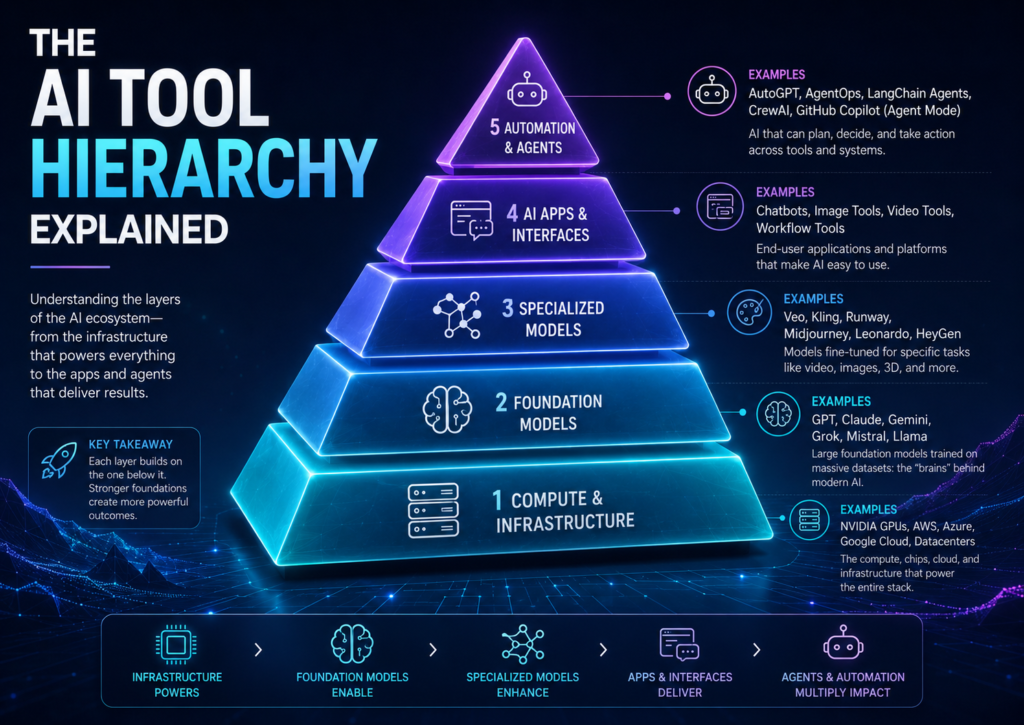
The best AI creators do not ask, “What is the best AI tool?” They ask, “What job am I trying to finish?” Then they build a stack around that job. A YouTube creator, a blogger, an agency owner, and an ecommerce brand do not need the same setup.
Beginner Creator Stack
- ChatGPT, Gemini, Claude, or Grok for ideas and scripts
- Leonardo, Canva, Midjourney, or Firefly for visuals
- CapCut, Descript, or VEED for editing
- YouTube Studio, WordPress, or Creator Studio tools for publishing and analytics
AI Video Stack
- Use a chat model for the script and shot list
- Use Veo, Kling, Seedance, Wan, Runway, Luma, Pika, or Hailuo for clips
- Use ElevenLabs, OpenAI audio tools, Murf, or PlayHT for voice
- Use Descript, CapCut, Runway, or Premiere Pro for final editing
Website and SEO Stack
- Use an AI assistant for article structure and drafting
- Use Surfer, Frase, Semrush, Ahrefs, or NeuronWriter for SEO support
- Use Midjourney, Leonardo, Firefly, or Canva for images
- Use WordPress for publishing, formatting, internal links, and updates
Common Mistakes Beginners Make
Mistake 1: Comparing different layers
Midjourney is not the same kind of thing as Gemini. HeyGen is not the same kind of thing as Veo. One may be an app or platform; the other may be a model.
Mistake 2: Chasing leaderboards
The top benchmark model may not be the best tool for your workflow. Access, cost, editing features, speed, licensing, and output quality for your exact use case matter more than hype.
Mistake 3: Ignoring post-production
AI output is rarely the finished product. You still need editing, captions, formatting, thumbnails, descriptions, metadata, and publishing strategy.
Mistake 4: Thinking one tool does everything
All-in-one platforms are useful, but serious creators still use specialized tools for writing, images, video, voice, editing, analytics, and automation.
FAQ: AI Tool Hierarchy
What is the difference between an AI model and an AI tool?
A model is the underlying AI engine. A tool is the software interface that lets you use that engine. For example, a video platform may let you use multiple video models inside one dashboard.
Is Gemini a model or an app?
Both, depending on context. Gemini can refer to Google’s model family, the Gemini app, API access, and Gemini-powered features inside Google products.
Is Midjourney a model or a platform?
Midjourney is best understood as an image generation app and model ecosystem. Creators use it through an interface, but the image quality comes from Midjourney’s underlying model versions.
Is HeyGen the same as Veo or Kling?
No. Veo and Kling are video generation model families. HeyGen is an avatar video platform designed around presenters, scripts, voices, translations, and business or creator video workflows.
Which AI video model should beginners try first?
Start with the option that is easiest to access and edit. Runway, Kling, Luma, Pika, Hailuo, Leonardo video tools, and Canva-style workflows may be easier for beginners than API-only model access.
Should I use one AI tool or many?
Use a small stack. One tool for research and writing, one for images, one for video, one for editing, one for publishing, and one for automation is usually enough for most creators.
Are free AI tools good enough?
Free tools are good for learning and testing. Paid tools usually matter when you need higher resolution, commercial usage, faster generation, team features, more credits, fewer watermarks, or better exports.
What is the best AI tool category for beginners?
Start with a general AI assistant first. Once you understand prompting and content planning, add one image tool, one video or editing tool, and one publishing platform.
Final Takeaway
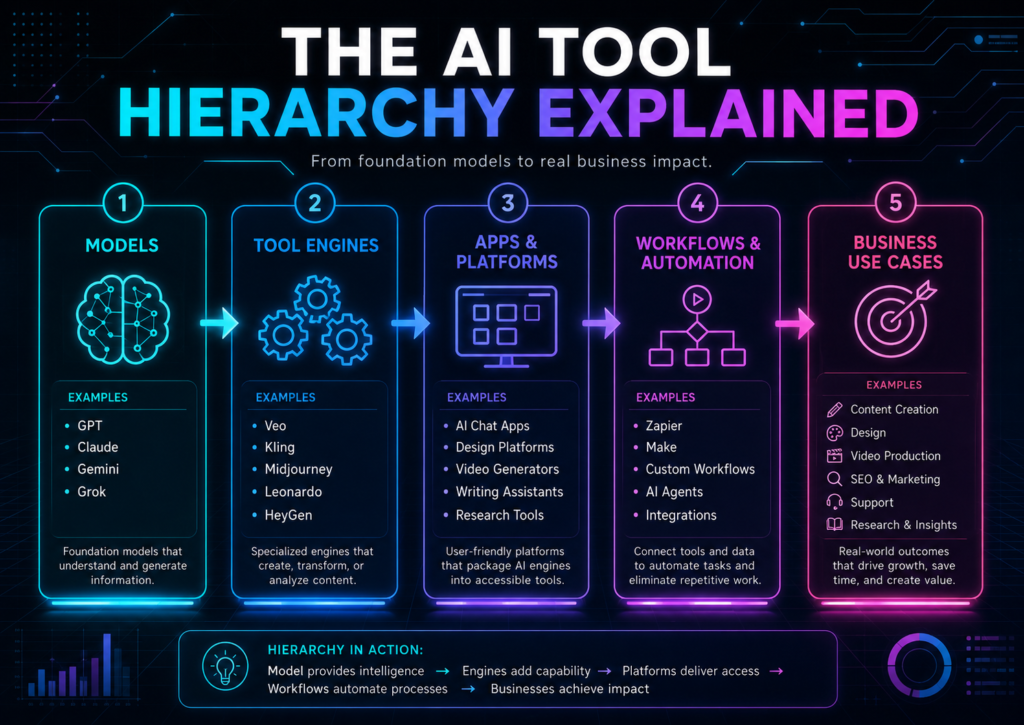
The AI world gets easier when you stop memorizing random tool names and start sorting them by layer. Models generate. Apps give access. Platforms help you produce. Agents do steps. Workflows turn outputs into something people can actually watch, read, buy, or share.
CTA: Build Your AI Stack the Smart Way
Before buying another AI subscription, write down what you are trying to produce: blog posts, YouTube Shorts, thumbnails, client videos, product ads, coding projects, podcasts, or automation workflows.
Then choose one tool per layer. That is how you build a clean, affordable, creator-friendly AI system without getting buried under subscriptions.
Want more TechnofluxAI in Google?
Add TechnofluxAI as a Preferred Source to help Google show you more of our AI guides, tests, workflows, and research.