
Estimated reading time: 49 minutes
Key Takeaways
- The AI creator stack includes essential tools like ChatGPT for scripting, Leonardo for images, and CapCut for editing.
- TechnofluxAI emphasizes a focused workflow that avoids tool overload, helping to create concise and impactful content.
- Different content types require tailored tool combinations, from AI entertainment videos to business tutorials.
- Creators should prioritize understanding their workflow, not just accumulating tools, for effective content creation.
- Beginners benefit from starting small with one tool per job and gradually expanding based on needs.
AI content can look complicated from the outside. Understanding the right AI creator stack can make the process much simpler for beginners and professionals alike.
Table of contents
- Workflow
- A Quick Note About Similar AI Tools
- My Core AI Creator Tool Stack
- The Simple Workflow Behind Most TechnofluxAI Videos
- Why I Do Not Use 500 AI Tools
- How I Use These Tools for Different Content Types
- My Beginner Recommendation: Start With One Tool Per Job
- Tool Alternatives Worth Knowing
- Practical Checklist: Build Your Own AI Creator Tool Stack
- Mistakes to Avoid
- Founder’s Insight: The Stack Is Not the Strategy
- How This Page Will Change Over Time
- Final Thought: Build a Workflow, Not a Tool Collection
- FAQ
You see the final video, the talking avatar, the music, the captions, and the polished visuals. You may see AI cats, robots, cinematic clips, blog posts, Pinterest graphics, or short-form videos.
Behind the scenes, most AI content does not come from 500 tools.
It usually comes from a small group of tool categories.
Ideas. Scripts. Images. Video. Avatars. Voice. Music. Editing. Publishing. Tracking.
Workflow
That is the real workflow.
This page is the master Behind the Flux tool stack for TechnofluxAI. It explains the AI tools I currently use most often to create videos, avatars, music, images, tutorials, social posts, and workflow content.
One important note before we start.
These are my current preferences. They fit my budget, workflow, visual style, and the type of content I make right now. Other creators may use different tools and get great results.
Older TechnofluxAI videos may also use different combinations. I did not always track every exact model or tool used in early experiments. Going forward, this page acts as the main reference for the current Behind the Flux workflow.
The goal is not to say my stack is the only stack.
The goal is to show how a focused AI creator tool stack works in real life.
Quick Answer: What Tools Do I Use to Make AI Content?
The main TechnofluxAI creator workflow uses a focused stack of tools.
Here is the simple version.
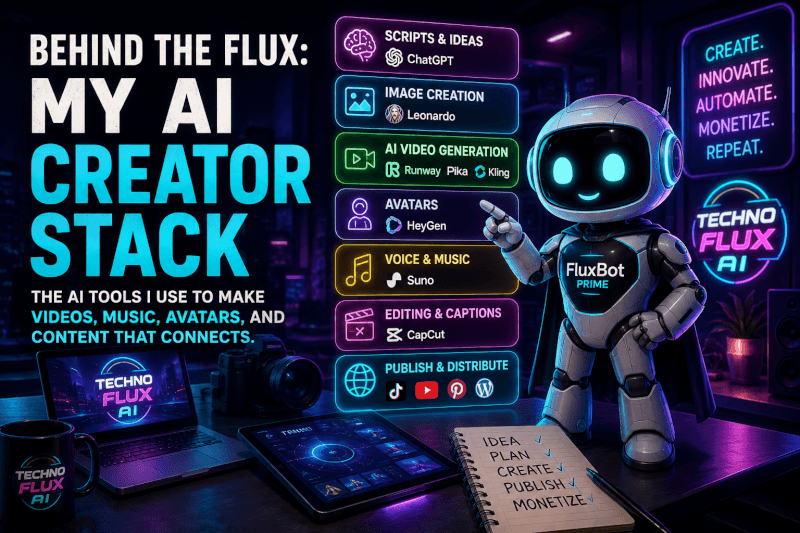
ChatGPT helps with ideas, scripts, hooks, outlines, captions, blog drafts, and workflow planning.
Leonardo helps create FluxBot characters, featured images, thumbnails, Pinterest graphics, and visual scenes.
Runway, Pika, Kling, and similar AI video tools help turn images and prompts into motion clips, cinematic scenes, and experimental short-form videos.
HeyGen helps create avatar-style explainers and branded talking presenter clips.
Suno helps create AI songs, comedy music, character themes, and cinematic music ideas.
CapCut helps with vertical video edits, captions, pacing, overlays, backgrounds, and final social polish.
WordPress is the home base for publishing evergreen articles and building the TechnofluxAI content library.
Google Search Console, Site Kit, Yoast, and Link Whisper help with SEO, indexing, internal links, tracking, and content improvement.
That is the core stack.
Not every video uses every tool. The idea comes first, and the tool comes second.
A Quick Note About Similar AI Tools
Many AI tools can do similar jobs.
That is why this page is not a “these are the only tools you should ever use” list. It is a snapshot of my current AI creator stack.
Another creator may prefer Claude over ChatGPT. Someone else may use Midjourney instead of Leonardo. A video editor may choose Premiere Pro or DaVinci Resolve over CapCut.
That is fine.
The best AI creator stack depends on your budget, platform, content style, editing skill, posting schedule, and tolerance for learning new tools.
Most importantly, it depends on your actual workflow.
The mistake is thinking you need every tool.
You do not.
A small stack you use every week is more valuable than a giant stack you barely understand.
My Core AI Creator Tool Stack
| Category | What I Currently Use | What I Use It For | Other Similar Tools |
|---|---|---|---|
| Ideas and scripts | ChatGPT | Hooks, scripts, captions, outlines, blog drafts, workflow planning | Claude, Gemini, Perplexity |
| Image creation | Leonardo | FluxBot characters, featured images, thumbnails, Pinterest graphics, visual scenes | Midjourney, Ideogram, DALL-E, Adobe Firefly, Canva AI |
| AI video generation | Runway, Pika, Kling, Leonardo video tools when available | Motion clips, cinematic scenes, AI character moments, experimental short-form content | Luma, Hailuo, Kaiber, PixVerse |
| Avatars | HeyGen | Talking avatar clips, FluxBot explainers, branded presenters | Synthesia, D-ID, Captions AI, Colossyan |
| Voice and music | Suno | AI songs, character themes, comedy music, cinematic music ideas | Udio, ElevenLabs, Murf, PlayHT, Kits, Audimee |
| Editing and captions | CapCut | Vertical edits, captions, pacing, overlays, backgrounds, final social polish | DaVinci Resolve, Premiere Pro, Final Cut, Descript, Canva |
| Publishing and distribution | TikTok, YouTube, Pinterest, WordPress | Short-form reach, long-form trust, evergreen traffic, website publishing | Instagram Reels, Facebook Reels, Reddit, X |
| SEO and tracking | Google Search Console, Site Kit, Yoast, Link Whisper | Impressions, clicks, indexing, internal links, SEO improvements, content tracking | Rank Math, Ahrefs, Semrush, Ubersuggest |
This table is the clean version.
The real workflow is messier.
Sometimes a video starts with a song. Other times, it starts with a character, tutorial idea, or weird AI experiment that later becomes a blog post.
That is normal.
A creator stack should support the way you actually create. It should not trap you inside a perfect system that only looks good on paper.
The Simple Workflow Behind Most TechnofluxAI Videos
Most TechnofluxAI videos follow a simple path.
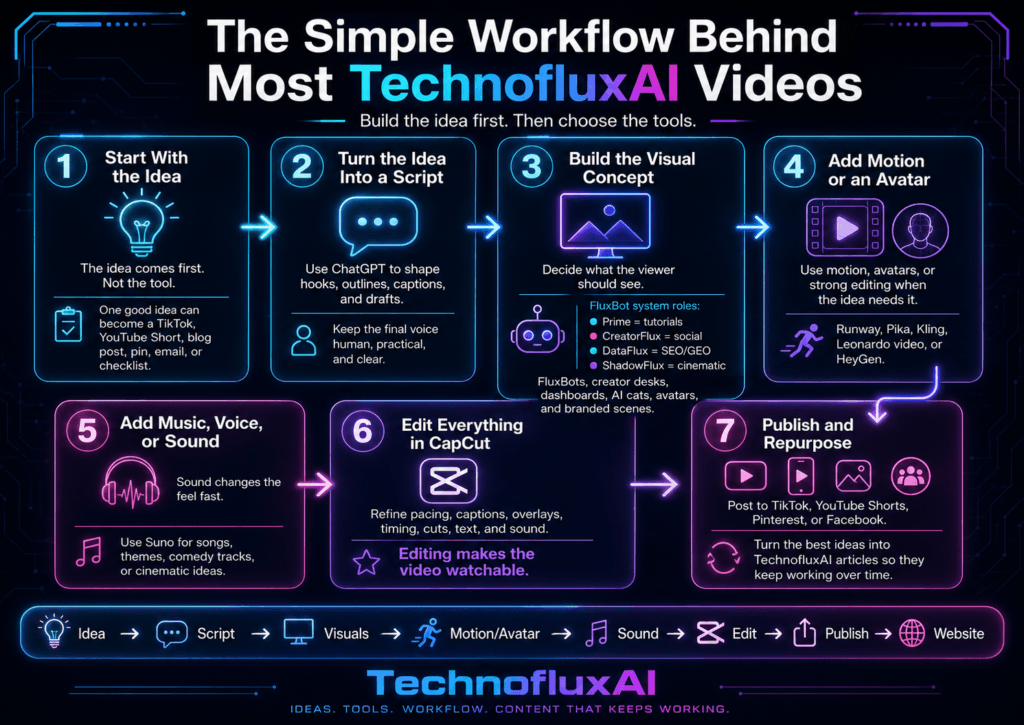
Idea → Script → Image or visual concept → Video generation or avatar → Voice or music → Edit in CapCut → Publish to TikTok, YouTube, or Pinterest → Create or update a TechnofluxAI article → Add internal links and affiliate links where useful.
That is the system.
Here is how it works in practice.
1. Start With the Idea
The idea comes first.
Not the tool.
This matters because AI tools are tempting. You can open a video generator and start creating random clips right away.
Random clips do not build a brand.
A stronger starting point is a clear idea.
For example:
“I want to explain how creators can use AI tools without buying too many subscriptions.”
That one idea can become a TikTok video, YouTube Short, blog post, Pinterest pin, Facebook discussion post, email, or workflow checklist.
One useful idea can create several assets.
That is the real advantage.
2. Turn the Idea Into a Script
ChatGPT helps turn rough thoughts into hooks, outlines, short scripts, captions, and article sections.
The key is not to let AI remove the personality from the content.
I use it more like a workflow partner. It helps shape the idea, then I edit the draft into the TechnofluxAI voice.
That usually means making it clearer, more practical, and less robotic.
The final version should sound like a real creator explaining what actually works.
3. Build the Visual Concept
Once the script is clear, I decide what the viewer should see.
That visual could be a FluxBot character, futuristic creator desk, dashboard, cinematic AI cat scene, branded avatar, product workflow, or before-and-after example.
Leonardo often fits into this part of the workflow.
For TechnofluxAI, image creation is not just decoration. It helps build brand recognition.
The FluxBot system keeps the visuals organized:
FluxBot Prime is for tutorials and beginner guides.
CreatorFlux is for social media, TikTok, YouTube, and creator content.
DataFlux is for SEO, GEO, dashboards, analytics, and workflow strategy.
ShadowFlux is for storytelling, cinematic content, horror, and darker creative ideas.
Each character has a job.
That keeps the brand from feeling random.
4. Add Motion or an Avatar
Some ideas need motion.
Others need a talking avatar.
Plenty of posts only need strong editing.
For AI entertainment videos, I may use tools like Runway, Pika, Kling, or Leonardo video features when available.
Avatar explainers usually work better with HeyGen.
The goal is not to use the most impressive tool. A better goal is to match the tool to the content.
A funny AI cat song does not need the same workflow as a business tutorial. An SEO explainer does not need the same treatment as a cinematic scene.
The tool should serve the idea.
5. Add Music, Voice, or Sound
Music can change the feel of a video fast.
Suno is useful for AI songs, comedy tracks, character themes, and cinematic music ideas.
Still, every post does not need a full song.
Sometimes music is the content. In other cases, it only supports the message.
Tutorials need clear voice and pacing first. Entertainment content can let music carry more of the concept.
That choice depends on the format.
6. Edit Everything in CapCut
CapCut is where the final video comes together.
This is where I adjust pacing, captions, overlays, backgrounds, timing, cuts, text, and sound.
The edit is where a video becomes watchable.
AI can create assets, but editing still matters.
A good edit can save an average idea. Poor pacing can weaken a strong one.
That is why the editing step is not optional.
7. Publish and Repurpose
Once the video is finished, it can go to TikTok, YouTube Shorts, Pinterest, or Facebook.
The best ideas can also become TechnofluxAI articles.
That part matters.
Social content moves fast. Website content gives the idea a longer life.
A video may get attention today. An article can keep working in search over time.
That is why the workflow should not stop at posting.
It should lead back to the website.
Why I Do Not Use 500 AI Tools
New creators are often told they need a new AI subscription every week.
A new video tool.
writing tool.
image tool.
avatar tool.
Another automation tool.
Then comes the next “secret” tool that supposedly changes everything.
That gets expensive fast.
It also gets confusing.
TechnofluxAI takes the opposite approach.
A small stack is easier to learn, maintain, repeat, teach, and improve.
Most creators do not need more tools. They need a better system for using the tools they already have.
That is the real issue.
When your workflow is messy, adding five more AI tools usually makes it worse. You end up testing instead of publishing. You watch demos instead of creating. Subscriptions pile up, but finished assets do not.
That is not the goal.
The goal is to create useful, entertaining, and monetizable content with a stack you can actually use.
How I Use These Tools for Different Content Types
Different content needs different combinations.
Here is how the stack changes depending on the project.
AI Entertainment Videos
AI entertainment is where the workflow gets more playful.
This includes Flux Malone, James Kitty, Romulus, AI cats, comedy songs, cinematic experiments, character-based clips, and strange short-form ideas.
The typical stack looks like this:
ChatGPT + Suno + Leonardo + AI video tool + CapCut
ChatGPT helps shape the concept. Suno can create the song or theme. Leonardo builds the character or scene. An AI video tool adds motion. CapCut turns everything into a finished short-form video.
This content can be weird, funny, dramatic, or experimental.
Still, it needs structure.
The best entertainment clips usually have a clear hook, mood, character, and payoff.
AI Avatar Explainers
Avatar explainers work well for teaching.
This is where FluxBot Prime, DataFlux, CreatorFlux, and other avatar-style presenters fit the brand.
The typical stack looks like this:
ChatGPT + Leonardo + HeyGen + CapCut
ChatGPT helps create the explainer script. Leonardo supports the branded visual style. HeyGen creates the talking avatar segment. CapCut adds pacing, captions, overlays, and final polish.
This format works well for beginner AI guides, tool explainers, SEO tips, GEO tips, creator workflow breakdowns, and short educational videos.
The key is to keep the script simple.
An avatar should not read a boring essay. It should explain one useful thing clearly.
Business Tutorials and Workflow Content
Business tutorials are where the TechnofluxAI site becomes more practical.
These posts focus on AI workflows, SEO, GEO, affiliate marketing, content creation, and small business use cases.
The typical stack looks like this:
ChatGPT + WordPress + screenshots + CapCut or YouTube
ChatGPT helps outline the guide. WordPress becomes the publishing home base. Screenshots make the tutorial easier to follow. CapCut or YouTube can turn the article into video content.
This type of content should answer one question:
What should I actually do next?
That is why workflow content works better than generic tool lists.
A beginner does not just need to know that a tool exists. They need to know how to use it inside a real process.
Amazon and Creator Lifestyle Content
Creator lifestyle content fits into the broader TechnofluxAI ecosystem.
This includes Tina Trends, creator gear, Amazon finds, setup ideas, desk tools, video accessories, and content creator products.
The typical stack looks like this:
Product research + custom visuals + TikTok/Pinterest + TechnofluxAI page
This content should not feel random.
It needs to connect back to the creator workflow.
For example:
Gear for filming.
Desk tools for better productivity.
Lighting for short-form videos.
Apps for planning content.
Tools for building a better creator setup.
The stronger angle is not “buy this thing.”
A better angle is:
“Here is how this fits into a creator workflow.”
That keeps the content useful. It also makes affiliate links feel more natural.
My Beginner Recommendation: Start With One Tool Per Job
Beginners do not need a huge stack.
Start smaller.
A simple beginner AI creator stack could include:
- One writing tool
- One image tool
- One video or avatar tool, only if needed
- One editing tool
- One publishing home base
- One tracking tool
That is enough.
For example, a beginner could start with ChatGPT for scripts, Leonardo or Canva for visuals, CapCut for editing, TikTok or YouTube for posting, WordPress for evergreen content, and Google Search Console for tracking.
That is a real system.
You can add tools later, but do not buy everything at once.
Start with the content type you actually plan to make.
For tutorials, focus on scripts, screenshots, editing, and publishing.
AI songs, focus on lyrics, music, visuals, and video editing.
blogging, focus on writing, SEO, internal links, and tracking.
Match the tool stack to the output.
That is how you avoid tool overload.
Tool Alternatives Worth Knowing
Alternatives matter.
Prices change. Features shift. Interfaces get redesigned. Some tools improve, while others stop fitting your workflow.
Here are the main alternatives worth knowing.
Writing Tools
ChatGPT is my main tool for ideas, scripts, outlines, captions, and workflow planning.
Similar tools include Claude, Gemini, and Perplexity.
Use writing tools to think better, not to remove your voice.
Image Tools
Leonardo is my current image tool for FluxBot visuals, thumbnails, featured images, scenes, and branded graphics.
Similar tools include Midjourney, Ideogram, DALL-E, Adobe Firefly, and Canva AI.
Pick the tool that fits your style and editing comfort.
Video Tools
Runway, Pika, Kling, and Leonardo video tools can help create motion clips, cinematic scenes, and AI character moments.
Similar tools include Luma, Hailuo, Kaiber, and PixVerse.
AI video is changing fast, so this category is the most likely to shift over time.
Avatar Tools
HeyGen is my current avatar tool for branded presenter clips and talking explainers.
Similar tools include Synthesia, D-ID, Captions AI, and Colossyan.
Use avatar tools when the presenter format makes the idea easier to understand.
Do not use them just because they look futuristic.
Music and Voice Tools
Suno is my current tool for songs, themes, comedy tracks, and cinematic music ideas.
Similar tools include Udio, ElevenLabs, Murf, PlayHT, Kits, and Audimee.
Use music with intention.
A song can carry entertainment content. A tutorial may only need clean voice and light background sound.
Editing Tools
CapCut is my current editing tool for short-form videos, captions, pacing, overlays, and quick social edits.
Similar tools include DaVinci Resolve, Premiere Pro, Final Cut, Descript, and Canva.
Use the editor you can move fast in.
The best editing tool is the one that helps you publish consistently.
SEO and Tracking Tools
Google Search Console, Site Kit, Yoast, and Link Whisper help with search visibility, indexing, internal links, and content tracking.
Similar tools include Rank Math, Ahrefs, Semrush, and Ubersuggest.
Tracking matters because it shows what is working.
Without tracking, you are guessing.
Practical Checklist: Build Your Own AI Creator Tool Stack
Use this checklist before buying another tool.
Ask yourself:
- What type of content am I making most often?
- Do I need scripts, images, videos, avatars, music, editing, publishing, or tracking?
- Which tool do I already have that can do the job?
- Am I buying this because I need it, or because I saw a cool demo?
- Will this tool help me publish more often?
- Can it save time in a real workflow?
- Can I afford it every month?
- Will I learn it without slowing down everything else?
- Does it support my brand style?
- Can I use it across more than one content type?
A tool may not belong in your stack yet if it does not help you create, publish, repurpose, or track content.
Mistakes to Avoid
Buying Tools Before Building a Workflow
This is the big one.
Do not build your content around random tools. Build your tool stack around your content workflow.
The workflow should decide the tool.
Not the other way around.
Testing Forever
Testing feels productive.
Publishing teaches you more.
Pick a simple stack, create with it, and improve from real feedback.
That is how you learn faster.
Using AI Without Editing
AI can speed things up, but it still needs human taste.
Edit the script.
Check the captions.
Fix the pacing.
Make sure the final post sounds like your brand.
AI should support the creator. It should not replace the creator’s judgment.
Making Every Video Too Complicated
Not every post needs avatars, AI video, music, captions, effects, and a blog post.
Some ideas work better when they are simple.
Clarity beats clutter.
Ignoring the Website
Social platforms are useful, but they are not your home base.
A website gives your best ideas a place to live longer.
That is why TechnofluxAI connects videos back to articles, guides, and internal links.
Founder’s Insight: The Stack Is Not the Strategy
The biggest lesson I have learned is simple.
The tool stack is not the strategy.
The workflow is the strategy.
It is easy to get excited about a new AI tool. I still do. But the tools only matter if they help me create something useful.
For TechnofluxAI, the real system is the content flywheel.
A video can become a blog post. That blog post can become a Pinterest pin. The Pinterest idea can become a TikTok. A TikTok can become a YouTube Short.
One strong idea can create more than one asset.
That is where the leverage is.
Not in chasing every new subscription.
Not in pretending one tool solves everything.
The goal is to build a repeatable creator system that can produce useful content, grow traffic, build trust, and create monetization paths over time.
That is why this page exists.
It gives the stack a home.
How This Page Will Change Over Time
This is a living page.
The TechnofluxAI stack will change because AI tools change.
Prices move. Features get added. Some platforms become more useful, while others stop fitting the workflow.
When a tool becomes a regular part of the TechnofluxAI process, this page should be updated.
That matters because older videos may use different combinations. Some experiments may not be fully documented.
Going forward, this page becomes the main reference for the current Behind the Flux workflow.
The goal is transparency.
Not perfection.
Final Thought: Build a Workflow, Not a Tool Collection
You do not need 500 AI tools to create good content.
You need a clear workflow.
A small stack you understand will take you further than a huge stack you never use.
Each tool should have a reason.
You also need a way to publish and track what works.
That is how you build momentum.
Tools do not build the brand by themselves.
The workflow does.
Start with one content type. Build the simplest stack that supports it. Publish. Learn. Improve.
Then add tools only when the workflow actually needs them.
FAQ
What AI tools do you use to make videos?
TechnofluxAI currently uses ChatGPT for scripts, Leonardo for visuals, Runway/Pika/Kling or similar tools for AI video, HeyGen for avatars, Suno for music, CapCut for editing, and WordPress for publishing.
Do I need all of these tools to start creating AI content?
No. Most beginners should start with one writing tool, one editing tool, one publishing platform, and one visual or video tool only if they need it.
Are there free alternatives to these AI tools?
Yes. Many tools offer free plans, trials, or lower-cost alternatives. The best choice depends on your content type, budget, and workflow.
What is the best beginner AI creator stack?
A simple beginner stack could be ChatGPT for ideas, Canva or Leonardo for visuals, CapCut for editing, TikTok or YouTube for posting, WordPress for a home base, and Google Search Console for tracking.
Why does TechnofluxAI use a small tool stack?
A small stack is easier to learn, cheaper to maintain, and better for repeatable content production. Most creators do not need more tools. They need a better system.
A simple affiliate note could say:
Some links on this page may be affiliate links. That means TechnofluxAI may earn a commission if you choose to use them, at no extra cost to you. I only include tools that fit the workflow or are useful alternatives.

About the Author
Jon Hicks
Founder of TechnofluxAI.
I’m the creator behind TechnofluxAI, focused on breaking down powerful AI tools, emerging trends, and practical strategies to help creators and entrepreneurs stay ahead in a rapidly evolving digital world.
Follow TechnofluxAI for the latest AI tools & strategies