

Estimated reading time: 11 minutes
Is Suno AI Legit? Honest Review for Creators
Yes, Suno AI is legit as an AI music generator for creators who want to turn prompts, lyrics, melodies, or rough ideas into full songs quickly. It is not a scam tool. It has real plans, real music-generation features, mobile apps, and a large creator base.
However, “legit” does not mean “risk-free.” Suno is useful for demos, social content, background music ideas, songwriting experiments, and creator workflows, but creators should be careful with commercial use, copyright assumptions, distribution rules, and prompts that imitate real artists.
DataFlux note: Use Suno like a music sketchpad first. Generate ideas, compare directions, rewrite lyrics, document your process, and verify rights before publishing anything tied to your brand or revenue.
What Suno AI does
Suno AI is an AI music generator that creates songs from prompts. You can describe a genre, mood, theme, lyrical idea, or scene, and Suno can generate music with vocals and instrumentation.
That makes Suno different from a basic beat maker. It is closer to an idea-to-song tool. A creator can type something like “upbeat indie pop song about starting over after burnout” and get a finished-sounding track instead of only a loop or instrumental bed.
Suno is especially useful when you need speed. Instead of opening a digital audio workstation, choosing plugins, recording vocals, and mixing from scratch, you can test multiple directions in minutes. That does not replace a producer, but it can help creators move from vague concept to usable reference faster.
Who Suno AI is best for
Video creators
YouTubers, TikTok creators, Reels creators, and Shorts creators can use Suno to test intro music, themed audio, background beds, and content hooks.
Songwriters
Songwriters can turn rough lyrics into demos, test hooks in different genres, and compare creative directions without starting from a blank session.
Marketers and podcasters
Creators can brainstorm jingles, podcast intros, segment music, and campaign audio ideas before hiring production help or finalizing a release.
Suno is less ideal for creators who need guaranteed copyright ownership, label-safe commercial releases, exact stem-level production control, or music that must sound emotionally human without editing. A generated track can sound impressive, but it can still feel too polished, too generic, or too close to common genre patterns.
What Suno AI is good at
Suno’s biggest strength is speed. It can take a plain-English idea and produce a structured song faster than most creators could mock up one section manually.
It is also strong at accessible creativity. You do not need music theory, a studio, a vocalist, or production software to test a song idea. For creators, that lowers the barrier to entry.
Suno is also useful for testing different versions of the same concept. For example, a creator can try the same lyric idea as synth-pop, acoustic folk, cinematic trailer music, lo-fi hip-hop, or country-pop. This is where the tool becomes valuable: not because every output is perfect, but because it helps you compare creative directions quickly.
Suno AI pricing, limits, and commercial-use risks
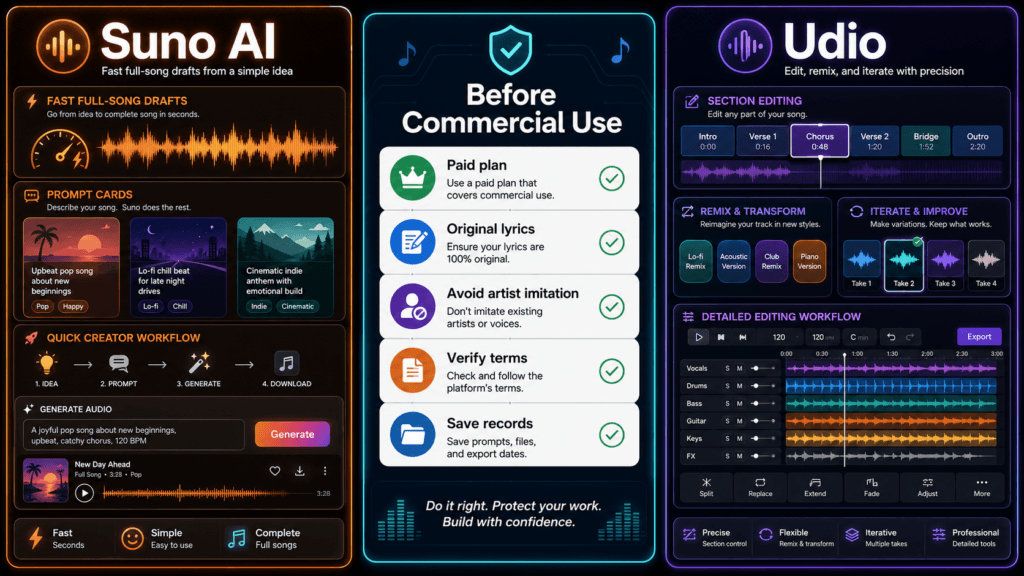
Pricing and limits can change, so always verify Suno’s pricing page before publishing, updating, or monetizing a song. The important part for creators is not just the price. It is the rights attached to the plan used when the song was created.
| Plan | Current creator-facing limits | Commercial-use note |
|---|---|---|
| Free | $0/month, 50 credits that renew daily, access to the free model, shared queue, and limited creation features. | No commercial use. Good for testing, learning, and non-commercial idea generation. |
| Pro | 2,500 monthly credits, access to advanced models and editing tools, priority queue, stem features, and longer audio uploads. | Commercial use rights for new songs made while subscribed. |
| Premier | 10,000 monthly credits, Suno Studio access, advanced creation/editing features, and maximum credit volume. | Commercial use rights for new songs made while subscribed. |
Important: Do not use free-plan songs in monetized videos, ads, client projects, Spotify releases, podcasts with sponsors, or commercial brand content unless Suno’s current terms clearly allow your specific use.
Is Suno AI safe to use commercially?
Suno can be used commercially under the right conditions, but creators should be cautious. Suno’s current pricing and rights pages separate free-plan use from paid-plan commercial use. Songs created while subscribed to Pro or Premier receive commercial-use rights, while songs created on the free plan are for non-commercial use.
There are three practical warnings.
- A paid plan does not make every use risk-free. Avoid copyrighted lyrics, recognizable melodies, protected samples, brand names, and prompts that try to copy a living artist’s voice or style.
- Copyright protection is complicated. Suno says 100% AI-generated music may not qualify for copyright protection in the U.S. Human-written lyrics or other human contributions may change the analysis.
- The AI music legal landscape keeps moving. Treat Suno as a creative assistant, not a legal shortcut. For major releases, client work, ads, or high-value commercial projects, get proper legal review.
Where Suno AI still falls short
Emotion can feel synthetic
AI-generated vocals can capture the surface of a genre without the small imperfections that make human performances feel personal.
Prompt control is not perfect
You can request a specific mood, structure, instrument, or energy level, but the result may not follow every instruction.
It is not a full DAW replacement
You may still need editing, mixing, mastering, lyric cleanup, arrangement changes, or human performance for serious releases.
Rights need documentation
Save the plan used, creation date, prompt, lyrics, edits, and exports if a track might be monetized later.
Suno AI vs Udio: quick comparison
Suno and Udio are two of the most talked-about AI music generators for creators. Both can generate music from text prompts, and both are useful for testing song ideas quickly.
For a deeper comparison, read: Suno AI vs Udio: Which AI Music Generator Is Better?
| Category | Suno AI | Udio |
|---|---|---|
| Best for | Fast full-song ideas, creator workflows, demos, and social content. | Detailed music experiments, extensions, remixing, and more controlled iteration. |
| Ease of use | Very beginner-friendly. | Slightly more workflow-oriented. |
| Commercial use | Free plan has no commercial use; paid plans include commercial rights for new songs made while subscribed. | Verify Udio’s current terms and plan rules before commercial release. |
| Creator fit | Better for speed and simple idea-to-song workflows. | Better for users who enjoy shaping sections and testing variations. |
If your main question is Udio vs Suno, the short answer is this: choose Suno for fast full-song drafts, and choose Udio when you want to spend more time shaping sections and testing variations.
Best prompts to test Suno
The best Suno prompts are specific without being overloaded. Give the tool a genre, mood, use case, lyrical theme, tempo or energy level, and a simple production direction.
For a larger prompt list, read: 75 Suno AI Prompts for Better Songs
YouTube intro music
Create a short upbeat electronic intro song for a technology YouTube channel. The mood is confident, futuristic, and friendly. Use clean synths, a strong beat, and no aggressive vocals.
Creator theme song
Create an indie pop song about building a creative business from scratch. The mood is hopeful and energetic. Use warm guitars, modern drums, and a catchy chorus.
Podcast background bed
Create a calm instrumental background track for a podcast about AI tools and productivity. Use soft synth pads, light percussion, and a steady but relaxed pace.
Cinematic product reveal
Create cinematic electronic music for a product launch video. Start minimal, build tension, then add a powerful chorus with drums and wide synths.
Sample Suno prompt to test
Create a 30-second futuristic electronic theme for a creator who reviews AI tools. The mood should feel confident, curious, and optimistic. Use clean synths, a steady beat, subtle bass, and a memorable hook. Avoid sounding like any specific real artist.
Sample result
TechnofluxAI test track: This short rave-style example was generated with Suno and preserved from our earlier hands-on review.
The result demonstrates how quickly Suno can produce a complete musical idea. It is useful as a starting point, but creators should still review composition, repetition, audio quality, and current commercial-use terms before publishing.
TechnofluxAI take: Suno is legit, but use it like a workflow tool
Suno AI is legit, but creators should use it with a workflow mindset, not a magic-button mindset.
The smart creator workflow: generate rough ideas, pick the strongest direction, rewrite lyrics, edit the structure, avoid artist imitation, verify rights, keep records, and use human production or legal review for serious releases.
Mistakes to avoid with Suno AI
- Do not use Suno like a legal shortcut. A paid plan can grant commercial-use rights, but it does not remove every copyright, likeness, platform, or distributor issue.
- Do not prompt it to sound like a specific artist. Instead, describe tempo, instrumentation, era, mood, vocal energy, and production style.
- Do not publish the first good result without review. Listen for awkward lyrics, strange pronunciation, repetitive structure, muddy mixes, generic choruses, or accidental similarity to known songs.
- Do not forget documentation. Save the prompt, plan level, creation date, lyrics, edits, and export files.
What should creators actually do?
If you are curious
Start with the free plan and test prompts. Use it for learning, demos, and idea generation.
If you plan to monetize
Do not use free-plan tracks. Create the song under the correct paid plan, check Suno’s current terms, and avoid copyrighted or artist-specific inputs.
If you are comparing tools
Use this review as your Suno baseline, then compare it with Udio before choosing a paid plan.
Helpful next clicks
Final verdict
So, is Suno AI legit? Yes. Suno AI is a real and useful AI music generator for creators, especially if you want fast song ideas, demos, social audio concepts, or creative experiments.
But Suno is not a guaranteed copyright shield, a human producer replacement, or a tool you should use carelessly for commercial music. The free plan is not for commercial use, and even paid commercial rights should be treated as one part of a bigger safety checklist.
For most creators, Suno is worth testing. Use it for speed, inspiration, and rough drafts. Then bring in human judgment before publishing anything that represents your brand, client, or business.
FAQ
Is Suno AI legit?
Yes. Suno AI is legit as an AI music generator. It can create full songs from prompts and offers free and paid plans. However, creators should understand the commercial-use and copyright limitations before publishing or monetizing songs.
Can I use Suno AI songs commercially?
Suno’s current pricing page says free-plan songs have no commercial use, while Pro and Premier include commercial-use rights for new songs made while subscribed. Always verify the current terms before publishing.
Does Suno own my music?
Suno’s help center says songs made on the free plan are owned by Suno and can be used for non-commercial purposes. It also says songs made while subscribed to Pro or Premier are owned by the user and include a commercial-use license.
Can Suno AI music be copyrighted?
Not always. Suno says music made 100% with AI may not qualify for copyright protection in the U.S. because copyright law protects human-created material. Human-written lyrics or other human contributions may change the analysis.
Is Suno AI better than Udio?
Suno is usually better for fast, beginner-friendly full-song drafts. Udio can be better for creators who want more section-by-section iteration. For a detailed breakdown, read Suno AI vs Udio.
Is Suno AI good for YouTube creators?
Yes, Suno can be useful for YouTube creators who want intro music ideas, background tracks, parody concepts, or custom audio experiments. Monetized use should be created under the correct paid plan and reviewed before publishing.
What is the best way to prompt Suno?
The best Suno prompts include genre, mood, use case, energy, instrumentation, and lyrical theme. Avoid vague prompts like “make a good song.” Use specific creative direction instead.
Should I release Suno songs on Spotify?
You can consider it if the song was created under a paid plan that grants commercial use, but you should also check distributor rules, copyright eligibility, and whether the track contains any risky lyrics, melodies, samples, or artist-like elements.