
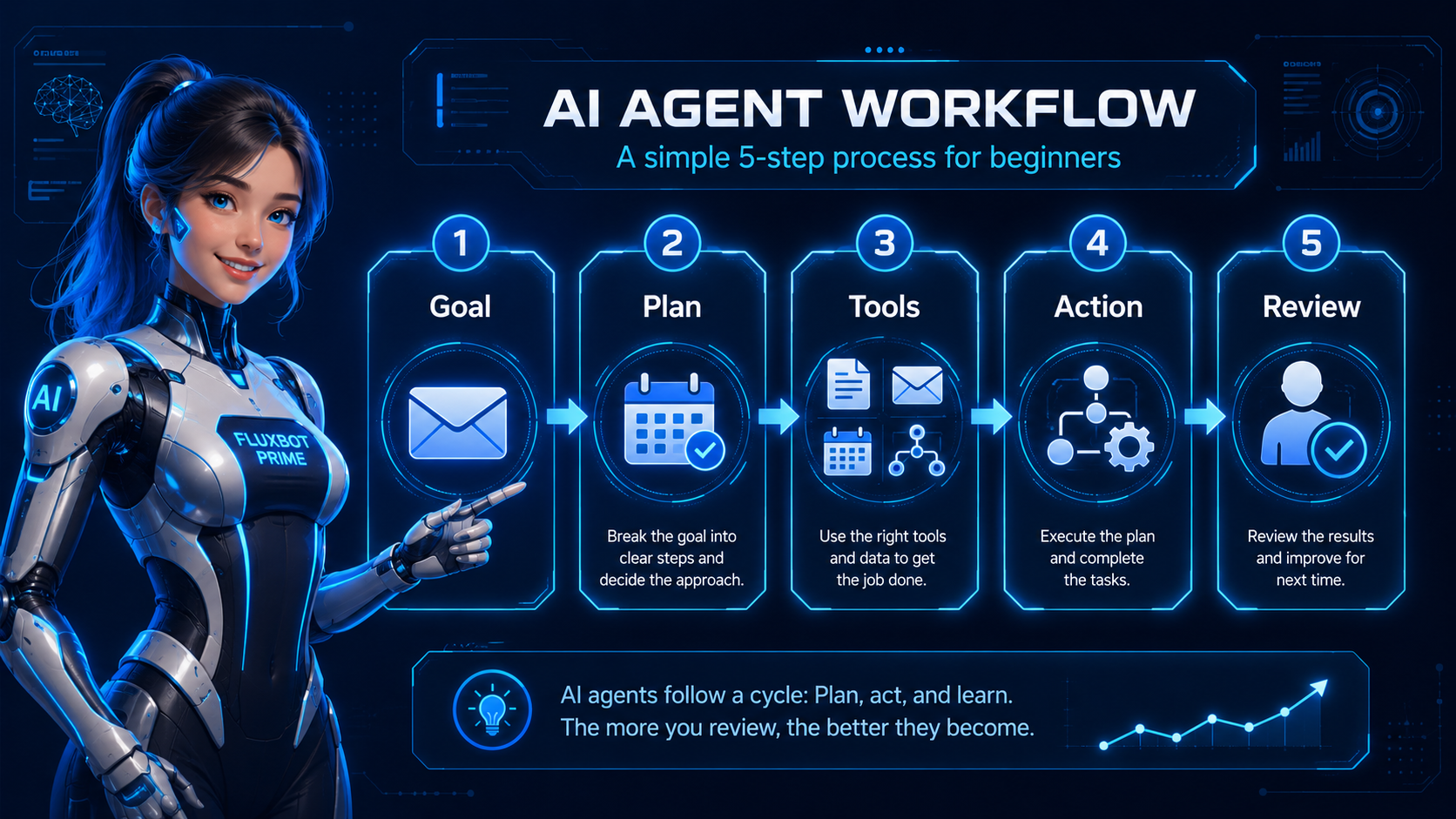
AI Agents Explained for Beginners: What They Are and What to Try First
AI agents sound futuristic, but beginners do not need hype. Instead, this guide explains what agents do, how they differ from chatbots and automations, and which low-risk workflows are worth trying first.
Quick Answer: What Is an AI Agent?
An AI agent is a software system that uses artificial intelligence to work toward a goal, choose steps, use tools, and complete tasks on behalf of a user.
In plain English: think of it as AI with a job, a goal, and access to tools.
Chatbots answer questions, while automations follow rules. In comparison, agent-style workflows help move tasks forward.
Why AI Agents Matter for Beginners
The first wave of beginner AI was mostly chat. People asked ChatGPT to write something, used Claude to summarize something, or prompted an image tool to create a picture. After that, the result usually had to be copied somewhere else.
That was useful. However, most of the workflow still stayed on your plate.
This is why agents matter: they point toward a shift from “give me an answer” to “help me get this task done.”
For creators, bloggers, solopreneurs, and small businesses, the useful question is not whether AI agents will change everything. A better question is: what task do I repeat every week that AI could help prepare, organize, or draft?
AI Agents vs Chatbots vs Automations
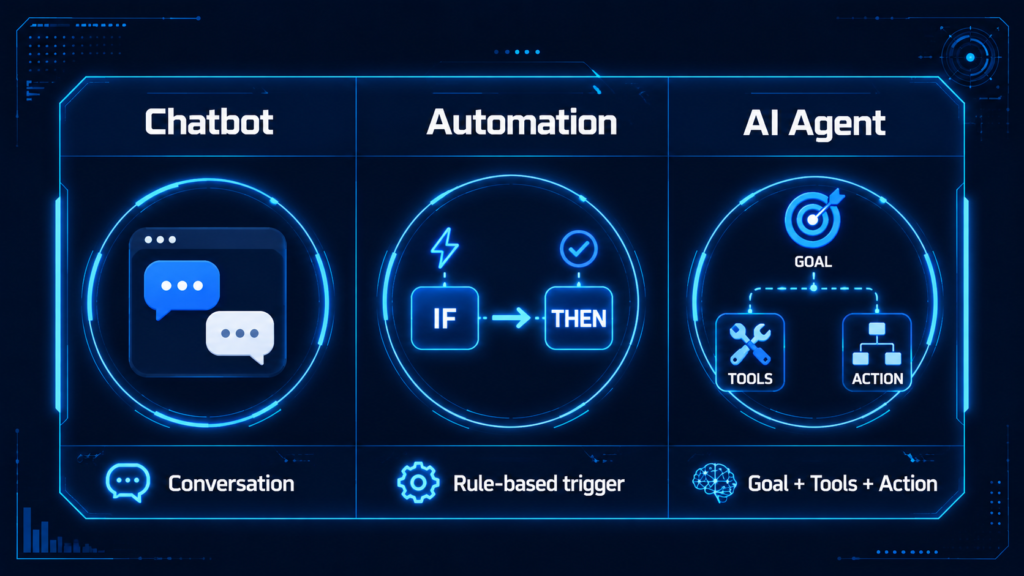
This is where most beginners get confused. People use “AI agent,” “AI assistant,” “chatbot,” “automation,” and “workflow” like they mean the same thing. They do not.
| Type | Plain-English Meaning | Best For | Beginner Example |
|---|---|---|---|
| Chatbot | AI you talk to | Answers, drafts, brainstorming, summaries | Asking ChatGPT to write a blog outline |
| Automation | A rule-based workflow | Repeating predictable steps | When a form is submitted, add the lead to a spreadsheet |
| AI Agent | AI that works toward a goal using steps and tools | Multi-step tasks with decisions | Research a topic, summarize findings, draft a content plan, and save it somewhere |
| AI Workflow | The full process | Connecting tools, people, and steps | Research → draft → edit → publish → promote |
A chatbot responds.
You type something. It answers. Then a person decides what to do next.
An automation triggers.
This kind of workflow follows a fixed rule, such as “when this happens, do that.”
An AI agent works toward a goal.
Instead of only replying, it can plan steps, interpret information, and use tools inside a workflow.
That does not mean agents are always better. Sometimes a simple automation is safer, cheaper, and easier.
Use automation when the task is predictable. For tasks that need judgment, context, or flexible steps, an agent-style workflow may help.
How AI Agents Work in Simple Steps
You do not need to understand machine learning to understand AI agents. Think of an agent as a system that moves through a task instead of only replying once.
You give the agent a goal
The goal is the job you want done. For example, “fix my email” is vague. A stronger goal is “review new emails, identify customer questions, label urgent messages, and draft replies for review.”
Information gets reviewed
Chatbots answer questions, while automations follow rules. In comparison, agent-style workflows help move tasks forward.
Next, a plan takes shape
An agent-style plan might include reading emails, grouping them by type, identifying urgent messages, drafting replies, flagging uncertain items, and asking before sending.
Tools make the workflow useful
Search, browsers, calendars, spreadsheets, CRMs, databases, task managers, document editors, and automation platforms can all become part of the workflow.
Action stays controlled
The safest beginner setup is simple: AI drafts. Human approves. Automation sends or saves.
Finally, uncertainty gets flagged
Good agent workflows should know when to stop. A useful setup asks for help instead of pretending to be confident.
What AI Agents Are Not
They are not magic employees.
An agent does not automatically understand your business, customers, tone, offers, or priorities. You still need instructions, examples, boundaries, and review.
Full autonomy is not always smart.
Some agents can act without asking every time. For beginners, supervised autonomy is usually safer.
Simple automation may be better.
If you only need to copy a form submission into a spreadsheet, use a normal automation. AI should earn its place in the workflow.
Bad calls can still happen.
Agents can misunderstand instructions, miss context, make confident mistakes, or choose the wrong next step. Start with low-risk tasks.
Hype vs Reality
There are two bad ways to think about AI agents: hype and dismissal.
The hype version
Some people say agents will run your whole business while you sleep. That is not reliable for most beginners.
The dismissive version
Other people say agents are just another buzzword. That is also too simple.
Do Beginners Actually Need AI Agents Yet?
Most beginners do not need a complex AI agent on day one. A better AI-assisted workflow is usually the smarter starting point.
You probably do not need one yet if:
You are still learning ChatGPT And You do not have repeatable tasks Your tools are messy You want AI to figure everything out
You might be ready if:
You repeat the task weekly You can explain the steps You know what good looks like You will review the output
Best First Use Cases for AI Agents
For beginners, the best use cases are low-risk, repetitive, and easy to review. For that reason, do not start with legal decisions, medical advice, financial transfers, payroll, refunds, security, or high-stakes customer promises.
1. Email Sorting
Goal: Identify important emails and draft replies.
Try first: Use AI to summarize and categorize emails before anything sends automatically.
2. Research Assistant
Goal: Research a topic and organize useful information.
Try first: Use AI for first-pass research. Then verify claims before publishing.
3. Content Workflow Assistant
Goal: Turn one idea into a content plan.
Try first: Create one repeatable content workflow before automating every platform.
4. Lead Follow-Up
Goal: Respond to new leads faster.
Try first: Keep AI in draft mode until you trust the workflow.
5. Scheduling Support
Goal: Prepare for meetings and follow-ups.
Try first: Use AI for summaries and prep. Keep calendar changes under human control.
6. Task Routing
Goal: Categorize and prioritize incoming tasks.
Try first: Let AI recommend categories. Then you approve the final routing.
Easiest AI Agent-Style Workflows to Try
Use ChatGPT or Claude as a planning agent
Start by asking AI to turn messy work into a checklist. This is not fully autonomous, but it teaches you agent-style thinking.
Build a dedicated custom assistant
Create one helper for one repeatable job, such as a blog outline assistant, email reply drafter, SEO checklist assistant, or client onboarding helper.
Add AI to a simple automation
Use automation for predictable steps. Meanwhile, AI can help with summarizing, drafting, categorizing, or interpreting language.
Move to visual workflow tools later
Visual workflow tools are powerful, but they work best after you already understand the task and the decision points.
Start where your work already lives
The best AI workflow is usually close to the work you already do. That might be documents, forms, email, task managers, notes, or content tools.
Beginner-Friendly AI Agent Examples
Blogger Research Agent
Workflow: topic → beginner questions → article sections → internal links → draft outline.
You still do: add experience, verify facts, edit, and publish with judgment.
Creator Repurposing Agent
Workflow: transcript → key points → blog outline → short captions → Pinterest titles → email draft.
But You still do: check tone, fix context, and choose what gets posted.
Small Business Lead Agent
Workflow: inquiry → service type → urgency → reply draft → next step → follow-up reminder.
And You still do: approve replies, handle pricing, and make customer decisions.
Weekly Business Review Agent
Workflow: tasks + notes + content plan → completed items → blocked tasks → next priorities.
You still do: choose priorities and make business decisions.
The Best First AI Agent Workflow for Most Beginners
The TechnofluxAI recommendation is simple: start with a research-to-action workflow.
This workflow is useful, low-risk, and easy to review. As a result, it works well as a first step.
Copy This Beginner Prompt
“Act like a beginner-friendly AI workflow assistant. I want to learn about [topic]. Research the main ideas, explain them simply, then create a practical checklist of what I should do next. Separate facts from suggestions. Ask before assuming anything important.”
You can use this for blog topics, tool research, business ideas, content planning, customer questions, automation planning, and productivity systems.
What Should I Actually Do?
Pick one repetitive task
Choose something you do every week, such as writing outlines, sorting emails, planning content, summarizing notes, following up with leads, or organizing research.
Write the manual version first
Before using AI, write the steps. If you cannot describe the workflow, AI cannot reliably help with it.
Use AI for one step
Do not automate the entire workflow immediately. Start with one step: summarize research, draft the outline, sort emails, suggest titles, or create follow-up drafts.
Add a human review checkpoint
Use this rule: AI can prepare. You approve. That one checkpoint prevents most beginner problems.
Connect tools later
Once the workflow works manually, connect tools like Google Docs, Notion, Gmail, forms, spreadsheets, or task managers.
Common Mistakes Beginners Make With AI Agents
Beginners usually run into problems when they give AI too much control too fast. Instead, start with small workflows that are easy to review.
Starting too big
Do not start with “run my business.” A safer first test is “draft replies to these five customer emails.”
Giving vague instructions
“Handle my leads” is too broad. Instead, tell AI what to read, what to identify, what to draft, and where to stop.
Skipping review
New workflows should not send important messages, update records, or make decisions without review. Because of that, approval steps matter.
Automating a broken process
When the manual process is messy, AI may make the mess faster. Fix the workflow first, then add AI.
Using too many tools
Twelve dashboards are not required. Most beginners need one workflow that saves time and stays easy to control.
Trusting the output too soon
Trust should be earned. Therefore, start with low-risk tasks and check the work before expanding the workflow.
TechnofluxAI Take
AI agents are not the end of work. They are the next layer of workflow software.
For beginners, the biggest opportunity is not building a sci-fi autonomous system. Instead, it is learning how to turn repeatable work into simple AI-assisted workflows.
For creators
Start with idea → outline → draft → social posts. Then review the output before publishing anywhere.
For bloggers
A useful path is keyword → search intent → article brief → internal links. After that, edit for accuracy and experience.
For solopreneurs
Try lead → summary → reply draft → follow-up reminder. However, keep pricing and customer decisions under human control.
That is practical and useful. Most importantly, that is where beginners should start.
Keep Learning Inside This Guide
Use these quick paths to jump to the most useful parts of this article. Each one helps you move from understanding AI agents to choosing a safe first workflow.
FAQ: AI Agents Explained for Beginners
These quick answers cover the most common beginner questions about AI agents, chatbots, automation, safety, and first workflows.
AI Agent Basics
What are AI agents?
AI agents are AI systems that can work toward a goal, make a plan, use tools, and complete tasks with some level of independence. For beginners, the easiest way to understand one is this: AI with a job, a goal, and access to tools.
Are AI agents the same as chatbots?
No. A chatbot mainly responds to your messages. An agent is designed to complete a task or workflow. For example, a chatbot might write an email, while an agent-style workflow might review messages, draft responses, and organize follow-up tasks.
What is the difference between AI agents and automation?
Automation follows fixed rules, such as “when this happens, do that.” By contrast, agents are more flexible because they can interpret information, make decisions, and choose steps based on a goal.
Beginner Use Cases
Do beginners need AI agents?
Most beginners do not need complex agents right away. Instead, they should start with simple AI-assisted workflows, such as summarizing research, drafting content outlines, organizing tasks, or preparing email replies.
What are examples of AI agents?
Beginner-friendly examples include email sorting assistants, research assistants, content workflow assistants, lead follow-up assistants, scheduling helpers, task routing systems, and weekly planning assistants.
What is the easiest AI agent workflow to try first?
The easiest workflow is a research-to-action assistant. Ask AI to research a topic, summarize the key points, and create a checklist of what to do next. As a result, you get a useful output without giving AI risky control.
Safety, Tools, and Limits
Can AI agents make mistakes?
Yes. They can misunderstand instructions, use incomplete information, make wrong assumptions, or take the wrong action. Because of that, use human review checkpoints before sending messages, publishing content, changing customer records, or making business decisions.
Are AI agents safe for small businesses?
They can be useful when used carefully. Start with low-risk tasks like summaries, drafts, internal organization, and follow-up reminders. However, avoid giving agents unsupervised control over payments, legal decisions, refunds, sensitive data, or high-stakes communications.
What tools can beginners use to try agent-style workflows?
Beginners can start with general AI chat tools, custom assistants, project workspaces, automation tools, task managers, and productivity apps that include AI features. The best tool depends on the task and where your work already happens.
Will AI agents replace human workers?
They may reduce repetitive work and change some workflows. However, they are not a simple replacement for human judgment, trust, creativity, customer relationships, or business strategy.
Conclusion: AI Agents Are Useful When You Start Small
AI agents sound complicated because the internet made them complicated.
At the beginner level, the idea is simple: an AI agent is AI that can help move a task forward.
Unlike a basic chatbot, it does more than answer a prompt. It can also help organize the next step in a workflow.
The practical version is better: move the work forward one safe step at a time.
Suggested Sources to Add in WordPress
Use these as supporting sources in your source or citation area if your theme has one. They are listed as text only here so this HTML has no broken outbound links.
- Google Cloud — What are AI agents?
- IBM — What are AI agents?
- OpenAI — Practical guide to building agents
- OpenAI — Introducing ChatGPT agent
? Creator AI Tools Update
AI creator tools are evolving quickly in 2026. Content creators now use AI systems for video editing, voice generation, thumbnails, workflow automation, scripting, image generation, social media planning, and AI-assisted publishing across multiple platforms.
Modern creators are combining AI tools with workflow systems to publish content faster, stay more consistent, improve engagement, and scale content production without large teams.
- AI video tools speed up content creation workflows
- Workflow automation helps creators stay consistent
- Short-form video content continues dominating social traffic
- AI image systems improve thumbnails and visual branding
- Cross-platform publishing workflows are becoming essential