

Estimated reading time: 15 minutes
Best AI Tools for Local Businesses in 2026
Local business owners do not need another giant list of AI tools. What they need is a simple way to answer customers faster, create better content, follow up with leads, organize work, and stop losing time to repetitive admin tasks.
This guide breaks down the best AI tools for local businesses by real use case, not hype. These tools should not replace your team. Instead, they should help a small team move faster without making the business feel robotic.
Quick Answer: What Are the Best AI Tools for Local Businesses?
The best AI tools for local businesses in 2026 are the ones that remove daily bottlenecks. A practical starting stack is ChatGPT or Gemini for writing and planning, Canva for local marketing visuals, Mailchimp or HubSpot for customer follow-up, Zapier for automation, and a review or customer-support workflow that helps you respond faster.
First move
Pick one painful workflow, improve it with one AI tool, and measure the result for 30 days before adding more software.
Smart use cases
Try AI for content, customer replies, review responses, lead follow-up, internal checklists, automation, and website FAQs.
Rule to remember
AI should support local judgment. Real service details, photos, offers, policies, and human review still matter.
Jump to the Section You Need
What Are AI Tools for Local Businesses?
AI tools for local businesses are apps that use artificial intelligence to help with everyday business tasks. Common examples include writing social posts, drafting emails, summarizing customer reviews, answering website questions, organizing leads, creating images, building automations, and analyzing customer data.
In practical terms, local AI tools usually fit into six categories:
- Writing assistants for planning, research, and everyday business copy.
- Design tools for flyers, menus, ads, and social posts.
- Email and CRM tools for customer follow-up.
- Automation tools that connect apps together.
- Customer support tools for website chat and FAQs.
- Review and reputation tools for local SEO improvement.
A restaurant might create weekly social posts, update menu descriptions, write email promotions, and respond to reviews with AI support. An HVAC company could organize service-area pages, draft follow-up emails, summarize customer calls, and generate seasonal maintenance reminders.
Why AI Tools Matter for Local Businesses in 2026
Local businesses need faster communication because customers expect clear answers before they call. A potential customer may compare your business with several competitors, check your Google Business Profile, scan reviews, visit your website, look at photos, and read your service pages.
Thin, outdated, or slow information can cost you trust before the first conversation happens. AI tools can help close those gaps by supporting writing, planning, review replies, emails, follow-up, and customer-service content.
In 2026, the biggest shift is that AI is becoming less of a separate app and more of a built-in layer inside tools local businesses already use, including email platforms, design apps, CRM systems, automation tools, website chat tools, and workspace software.

Best AI Tools for Local Businesses in 2026
The right AI tool depends on the bottleneck. Some local businesses need faster customer replies, while others need better social posts, cleaner lead follow-up, stronger review workflows, or simple automation between tools. Start with the problem first, then choose the tool.
1. ChatGPT: Best for Everyday Business Writing and Planning
ChatGPT is one of the most flexible AI tools for local businesses because it can help with many small tasks throughout the day. A local owner or manager can use it to draft social posts, rewrite service pages, summarize customer feedback, create FAQ answers, plan offers, write email templates, and turn rough ideas into usable copy.
- Google Business Profile post drafts.
- Service page outlines.
- Customer email replies.
- Review response templates.
- Staff training checklists.
- Local ad copy ideas.
- Blog post outlines.
- FAQ sections.
Avoid publishing generic AI copy. Add your real service areas, offers, policies, photos, and local voice before anything goes live.
2. Google Gemini for Workspace: Best for Businesses Already Using Google
Google Gemini is a strong option for local businesses that already run on Gmail, Google Docs, Google Sheets, Google Drive, and Google Meet. Instead of moving work into a separate tool, Gemini can support writing, summarizing, organizing, and analyzing inside the Google Workspace environment.
- Summarizing long email threads.
- Drafting customer replies in Gmail.
- Turning notes into Google Docs.
- Organizing ideas in Sheets.
- Finding information inside Drive.
- Creating internal SOP drafts.
Local businesses that already live inside Gmail, Drive, Docs, and Sheets can get AI help where the work already happens.
3. Canva AI: Best for Local Marketing Graphics
Canva AI is one of the easiest tools for local business visuals. A business can create social graphics, flyers, coupons, menus, event promos, hiring posts, simple ads, and website images without needing a full design team.
- Facebook and Instagram posts.
- Local event flyers.
- Seasonal promotions.
- Menu updates.
- Before-and-after graphics.
- Hiring announcements.
- Simple ad creatives.
Restaurants, salons, gyms, real estate offices, shops, med spas, and service providers often need consistent visuals across local channels.
4. Mailchimp: Best for Email Marketing and Customer Follow-Up
Mailchimp is useful for local businesses that want to turn one-time customers into repeat customers. The platform can support newsletters, promotions, appointment reminders, seasonal campaigns, abandoned-cart emails, and customer segments.
- Monthly newsletters.
- Birthday or anniversary offers.
- Seasonal reminders.
- New service announcements.
- Win-back campaigns.
- Event promotions.
- Customer education sequences.
Create simple segments for new customers, repeat customers, inactive customers, and high-value customers.
5. HubSpot: Best for CRM, Leads, and Sales Follow-Up
HubSpot is a strong option for local businesses that need a more organized way to manage leads, contacts, sales conversations, and customer follow-up. Service businesses can use it when they receive form submissions, quote requests, consultation bookings, or sales calls.
- Lead tracking.
- Contact management.
- Sales pipelines.
- Follow-up email templates.
- Customer service notes.
- Website forms.
- Quote request workflows.
Businesses where leads are slipping through the cracks, including roofers, med spas, consultants, repair services, and B2B local providers.
6. Zapier: Best for Connecting Local Business Apps
Zapier is useful when your business uses several apps that do not naturally talk to each other. The tool can connect forms, email, spreadsheets, calendars, CRMs, payment tools, and messaging apps.
- Website leads to a CRM.
- Form submissions to a spreadsheet.
- New customer inquiries to tasks.
- Appointment notifications to your team.
- Email list updates.
- Follow-up reminders.
A quote request can create a CRM contact, send a team alert, add a follow-up task, and trigger a confirmation email.
7. AI Website Chatbot: Best for Answering Repetitive Questions
An AI website chatbot can help local businesses answer common questions when staff are busy or the business is closed. Common uses include service areas, hours, pricing ranges, booking instructions, cancellation policies, FAQs, and lead capture.
- Do you serve my area?
- How do I book?
- What are your hours?
- Do you offer emergency service?
- Can I request a quote?
- Where are you located?
The chatbot should not guess. Medical, legal, financial, repair, and pricing-related answers need approved responses and human review.
8. AI Review Management Tools: Best for Reputation and Local SEO
Reviews are one of the most important trust signals for local businesses. With AI support, teams can summarize customer sentiment, draft review replies, identify recurring complaints, and spot service issues.
- Draft review replies.
- Summarize review themes.
- Find repeated complaints.
- Identify training opportunities.
- Create FAQ updates from real concerns.
- Spot positive phrases for marketing.
Avoid using the same review response over and over. Customers can tell when replies feel copied.
9. Notion AI or Similar Workspace Tools: Best for Internal Knowledge
Many local businesses lose time because information is scattered. Policies live in someone’s head, training notes sit in old emails, and service steps often hide inside spreadsheets. Workspace tools with AI can turn messy notes into SOPs, checklists, onboarding documents, and internal FAQs.
- Staff onboarding.
- Opening and closing checklists.
- Phone scripts.
- Service checklists.
- Inventory procedures.
- Marketing calendars.
- Team meeting notes.
Build your first internal page around the 10 questions your team answers most often.
10. AI Scheduling and Booking Assistants: Best for Appointment-Based Businesses
Local businesses that rely on appointments can use AI-supported scheduling tools to reduce back-and-forth messages. Salons, clinics, tutors, consultants, home service providers, fitness studios, and repair shops can all benefit from a cleaner booking process.
- Appointment reminders.
- Booking links.
- Reschedule workflows.
- Follow-up messages.
- No-show reduction.
- Intake questions.
- Calendar organization.
The booking process should feel easier than calling. AI should reduce friction, not add extra steps.
How to Choose the Best AI Tools for Your Local Business
Avoid choosing AI tools by popularity alone. The better move is to choose by bottleneck, because the right tool should fix a repeatable problem in your customer journey or internal workflow.
1. What repeats every week?
AI works best for repeat tasks like review replies, email drafts, social posts, lead follow-ups, quote requests, and appointment reminders.
2. Where do customers drop off?
Review your form, phone follow-up, email list, reviews, booking page, service pages, and Google Business Profile.
3. What already fits?
Teams already using Google, Canva, Mailchimp, or HubSpot should test those built-in AI features before adding a new platform.
4. Can a human review it?
AI should speed up reviewable work, not make unchecked decisions about pricing, policies, disputes, or sensitive issues.
Recommended Next Click Path
After choosing your first bottleneck, send readers deeper into related TechnofluxAI content. These links should point to your internal guides once published.
? Creator AI Tools Update
AI creator tools are evolving quickly in 2026. Content creators now use AI systems for video editing, voice generation, thumbnails, workflow automation, scripting, image generation, social media planning, and AI-assisted publishing across multiple platforms.
Modern creators are combining AI tools with workflow systems to publish content faster, stay more consistent, improve engagement, and scale content production without large teams.
- AI video tools speed up content creation workflows
- Workflow automation helps creators stay consistent
- Short-form video content continues dominating social traffic
- AI image systems improve thumbnails and visual branding
- Cross-platform publishing workflows are becoming essential
A Simple AI Workflow for Local Businesses
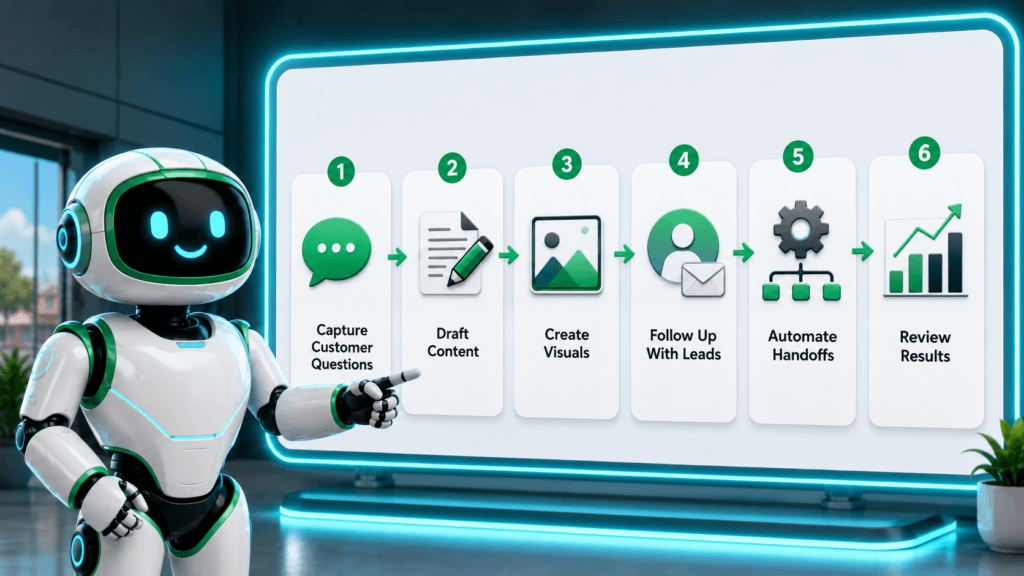
A good AI setup should help with five things: getting found, answering customers, creating content, following up with leads, and saving admin time. The workflow below gives most local businesses a practical starting point.
Capture the customer question
Gather real customer questions from calls, emails, reviews, Google Business Profile messages, website forms, and social comments. These questions show what customers actually need before they buy.
Turn questions into content
Turn those questions into website FAQs, Google Business Profile posts, email tips, and social captions with ChatGPT or Gemini. Keep every answer clear, local, and accurate.
Create visuals in Canva
Create simple graphics for the strongest topics in Canva AI, such as seasonal reminders, service tips, local promotions, event posts, or customer education graphics.
Add follow-up in Mailchimp or HubSpot
Build a simple follow-up sequence for new leads or recent customers. For example: day one thank-you message, day three helpful guide, day ten booking reminder, and day thirty review request.
Automate the hand-off with Zapier
Connect your website form to your CRM, spreadsheet, email list, and internal notification system. This hand-off helps prevent missed leads and makes follow-up easier.
Review results monthly
Review leads received, missed inquiries, email clicks, review volume, response time, bookings, quote requests, and time saved by staff. AI becomes useful when it improves a measurable business system.
Practical Examples by Business Type
The best AI tools for local businesses change depending on the business model. Restaurants, salons, home service companies, clinics, shops, and realtors all need different workflows.
Restaurant
Restaurants can use ChatGPT for weekly specials, Canva for menu graphics, Mailchimp for event emails, and AI review summaries to find common complaints or popular dishes.
Salon or Med Spa
Salons and med spas can rely on AI for appointment reminders, post-treatment instructions, Instagram captions, review replies, and seasonal promotion emails.
Home Service Business
Home service companies can draft service-area pages, create maintenance reminders, summarize quote requests, write follow-up emails, and build FAQ content from real customer calls.
Local Retail Shop
Local retail shops can use Canva for product promos, Mailchimp for campaigns, ChatGPT for product descriptions, and Zapier to connect forms or purchases to follow-up workflows.
Dentist or Clinic
Clinics should use AI carefully for administrative content, appointment reminders, FAQs, and patient education drafts. Avoid personalized medical advice without professional review.
Realtor
Realtors can use AI for listing descriptions, neighborhood guides, buyer email sequences, social posts, and lead follow-up templates. Always verify property facts, market data, and compliance rules.
Mistakes to Avoid With AI Tools for Local Businesses
Using too many tools at once
A messy AI stack creates more work. Begin with one workflow and one tool.
Publishing generic AI content
Local businesses need local trust. Add real photos, service details, city names, team knowledge, and actual customer concerns.
Trusting old pricing or features
AI tool pricing and features change often. Check the official website before making software decisions or publishing comparisons.
Automating before fixing the process
Automation makes good systems faster and bad systems messier. Clean up the workflow first.
Ignoring customer privacy
Keep sensitive customer details out of AI tools unless your account, policies, and permissions support that use. Remove private information when possible.
Letting AI handle sensitive decisions
AI can draft, summarize, and organize. Final decisions about refunds, legal issues, medical questions, financial advice, hiring, firing, or complex complaints still need human judgment.
TechnofluxAI Take
The best AI tools for local businesses in 2026 are not the flashiest tools. A stronger stack makes the customer journey smoother.
A local business should not start with the question, “What AI tool should I buy?” The better question is, “Where are we losing time, leads, trust, or repeat customers?”
For content problems, start with ChatGPT, Gemini, or Canva. When follow-up is the bottleneck, look at Mailchimp or HubSpot. Disconnected apps point toward Zapier. Repetitive questions may need a better FAQ or chatbot workflow. Reputation problems are a good reason to use AI for review insights and faster responses.
What Should I Actually Do?
Run a 30-day AI test. Pick one workflow, choose one tool, and track one result. That result could be hours saved, faster replies, more reviews, more email clicks, fewer missed leads, or more booked appointments.
Content workflow
Draft weekly social posts, service FAQs, and Google Business Profile updates with ChatGPT or Gemini.
Design workflow
Turn promotions, events, service tips, or local offers into simple branded graphics with Canva.
Follow-up workflow
Reduce missed leads and make customer communication more consistent with Mailchimp, HubSpot, or Zapier.
FAQ: AI Tools for Local Businesses
What is the best AI tool for local businesses?
The best AI tool for most local businesses is the one that solves the most repetitive problem first. ChatGPT and Gemini are good general starting points, Canva is best for visuals, Mailchimp is strong for email, HubSpot helps with leads, and Zapier helps connect apps.
Can AI help my local business get more customers?
Yes, these tools can help you create better content, respond faster, follow up with leads, improve email marketing, and learn from customer reviews. The best results usually come from pairing AI with a clear offer, strong local reputation, and accurate business information.
Should local businesses use AI for Google Business Profile posts?
Drafting Google Business Profile posts is a good AI use case, but every post should be edited before publishing. Add real offers, real photos, service details, local context, and accurate dates.
Can AI respond to customer reviews?
Review responses can be drafted with AI, and review trends can be summarized faster. A human should still approve the reply before posting, especially for negative reviews or sensitive customer situations.
What AI tools should a small service business start with?
A small service business can start with ChatGPT or Gemini for writing, Canva for simple graphics, HubSpot or a basic CRM for leads, and Zapier for automating form submissions and follow-up tasks.
Is AI safe for local businesses?
Local businesses can use AI safely when they avoid entering sensitive customer information unless their tools and policies allow it. Always review AI output before publishing or sending it to customers.
How many AI tools does a local business need?
Most local businesses only need two or three AI-supported tools at first. A simple stack might include one writing assistant, one design tool, and one follow-up or automation tool.
What is the biggest mistake local businesses make with AI?
The biggest mistake is using AI randomly instead of tying it to a workflow. A useful AI setup should help with a measurable business problem, such as missed leads, slow replies, weak content, or inconsistent follow-up.
Build the AI Stack Around the Bottleneck
The best AI tools for local businesses are the ones that help you serve customers faster, communicate more clearly, and stay consistent without overwhelming your team. You do not need a complicated AI system to start. Choose one bottleneck, pick one tool, build one simple workflow, and review the results after 30 days.
That is how local businesses should use AI: not as a gimmick, but as a practical assistant for the work that already matters.