
Estimated reading time: 7 minutes
Key Takeaways
- The ASUS Ascent GX10 is a compact AI workstation designed for local AI development and experimentation.
- It features NVIDIA’s GB10 Grace Blackwell Superchip and supports models up to 200 billion parameters.
- With 128GB of unified memory, the GX10 allows users to run larger AI models than typical consumer systems.
- This device is expensive, ranging from $3,500 to $4,000, and targets AI developers and researchers rather than casual users.
- Overall, the ASUS Ascent GX10 represents a shift from cloud-only AI systems to local processing capabilities.
Learn what an AI mini supercompute
For years, most AI tools have lived in the cloud.
You open ChatGPT,open Claude, open Gemini.
Everything happens on someone else’s servers.
But what if you could run powerful AI models directly on your desk?
That is exactly what a new generation of AI mini computers is trying to make possible.
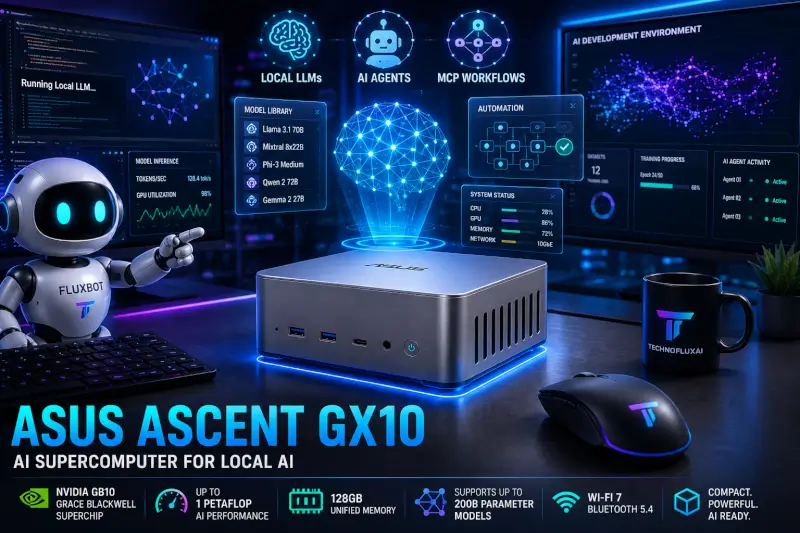
Today we’re looking at a compact AI workstation designed for local AI development, experimentation, and AI-assisted workflows.
Quick Answer
If you want to run AI models locally, experiment with automation, or learn about the future of AI hardware, a dedicated AI mini PC can be an interesting investment.
For most beginners, cloud AI tools are still the easier option.
For power users, local AI opens new possibilities.
ASUS Ascent GX10 AI Supercomputer Review: Can You Really Run AI Locally?
Quick Verdict
The ASUS Ascent GX10 is one of the most interesting AI computers available today.
Powered by NVIDIA’s GB10 Grace Blackwell Superchip, it brings AI development, local LLM experimentation, and AI agent workflows to a desktop-sized device that is smaller than many mini PCs.
This is not a gaming PC.
This is not a general office computer.
It is a specialized AI workstation designed for developers, researchers, AI enthusiasts, and businesses exploring local AI deployment.
Rating: 4.5/5
ASUS Ascent GX10 Specifications
| Specification | Details |
|---|---|
| Processor | NVIDIA GB10 Grace Blackwell Superchip |
| CPU | 20-Core Arm CPU (10 Cortex-X925 + 10 Cortex-A725) |
| GPU | NVIDIA Blackwell GPU |
| AI Performance | Up to 1 PetaFLOP FP4 |
| Memory | 128GB LPDDR5x Unified Memory |
| Storage | 1TB PCIe Gen4 NVMe SSD |
| Networking | Wi-Fi 7, Bluetooth 5.4, 10Gb Ethernet |
| AI Networking | NVIDIA ConnectX-7 |
| Operating System | NVIDIA DGX OS (Ubuntu Linux) |
| AI Model Support | Up to 200B parameter models |
| Dimensions | 150 x 150 x 51 mm |
| Weight | 1.48 kg |
| Displays | Up to five 4K displays |
| Cooling | Three fans with dual vapor chamber design |
Sources: ASUS, NVIDIA, independent reviews.
What Makes the GX10 Different?
Most AI enthusiasts run models in the cloud.
You use ChatGPT, Claude, Gemini.
The heavy lifting happens on someone else’s hardware.
The ASUS Ascent GX10 changes that.
Instead of renting AI compute from cloud providers, this system is designed to bring AI development directly to your desk using NVIDIA’s latest Grace Blackwell architecture. ASUS claims the system can support fine-tuning and experimentation with models up to 200 billion parameters thanks to its 128GB unified memory architecture.
What I Like
Massive 128GB Unified Memory
This is arguably the biggest selling point.
Many local AI projects hit a wall because of memory limitations.
The GX10 uses 128GB of unified LPDDR5x memory, allowing much larger models to run than would be practical on many consumer systems.
Tiny Footprint
The system measures only about 5.9 inches square.
It can sit on almost any desk without looking like a server.
Built Specifically for AI
Unlike gaming PCs that happen to run AI software, the GX10 was built for AI workloads first.
Local LLMs.
Agentic workflows.
Model experimentation.
AI development.
That focus shows throughout the design.
Enterprise-Class Networking
The inclusion of NVIDIA ConnectX-7 and 10Gb networking makes it possible to scale beyond a single machine and build more advanced AI environments.
What I Don’t Like
Expensive
With pricing around $3,500-$4,000 depending on configuration, this is not an impulse purchase.
Linux Focused
The GX10 runs NVIDIA DGX OS, which is based on Ubuntu Linux.
Developers will love this.
Beginners may find the learning curve steep.
Not a Gaming Machine
Some people see a powerful NVIDIA system and assume gaming.
That is not what this device was built for.
Independent testing has shown that gaming performance is far less impressive than its AI capabilities.
Potential Thermal Concerns
Some early users and reviewers have reported thermal throttling concerns under sustained AI workloads. While this may not affect everyone, it is worth noting for buyers expecting maximum performance at all times.
Who Should Buy the ASUS Ascent GX10?
Great For
- AI developers
- Machine learning engineers
- AI researchers
- Local LLM enthusiasts
- Businesses experimenting with AI agents
- Advanced automation builders
Probably Not For
- Casual ChatGPT users
- Gamers
- Students learning basic AI concepts
- Users looking for a general-purpose desktop
Local AI vs Cloud AI
The GX10 represents a larger trend.
AI is slowly moving from cloud-only systems toward hybrid and local deployments.
Benefits include:
- Better privacy
- Reduced dependence on subscriptions
- Faster local inference
- Greater experimentation flexibility
For creators and developers, learning local AI today may provide an advantage as AI agents and automation systems continue to evolve.
My Final Verdict
The ASUS Ascent GX10 is one of the first truly consumer-accessible AI supercomputers.
It is expensive, specialized.
It is not for everyone.
But if your goal is running local AI models, building AI agents, experimenting with MCP-powered workflows, or learning the future of AI computing, few systems currently offer this level of capability in such a compact package.
For the average creator, cloud AI tools remain the easier choice.
For serious AI enthusiasts and developers, the GX10 is one of the most exciting AI hardware products available today.
What Is an AI Mini Supercomputer?
An AI mini supercomputer is a compact desktop computer designed specifically for AI workloads.
Unlike traditional office PCs, these systems are built to handle:
- AI inference
- Local LLMs
- Machine learning workloads
- AI development
- Automation projects
- Edge AI applications
The goal is simple:
Bring AI processing closer to the user instead of relying entirely on cloud services.
Why People Are Interested in Local AI
Several trends are driving interest in local AI systems.
Privacy
When AI runs locally, your data stays on your machine.
Speed
Certain tasks can be completed without waiting for cloud processing.
Learning
Developers and AI enthusiasts can better understand how AI systems work.
Independence
You are less dependent on subscriptions and cloud services.
Best Uses
AI Experimentation
Perfect for learning how local AI models work.
AI Development
Developers can build and test AI workflows locally.
Automation Projects
Run automation systems without relying entirely on external services.
Creator Workflows
Creators can experiment with local AI tools for content generation, research, and productivity.
Who Should Buy This?
Good Fit
- AI enthusiasts
- Developers
- Automation builders
- Local AI hobbyists
- Tech creators
Probably Not Necessary
- Casual ChatGPT users
- People who only use cloud AI
- Beginners with no interest in local AI
Pros
- Compact form factor
- Designed for AI workloads
- Local processing capabilities
- Great conversation starter for AI enthusiasts
- Future-focused technology
Cons
- Higher cost than standard PCs
- Learning curve involved
- Not necessary for most casual AI users
- Cloud AI tools are still easier for many tasks
My Take
The most interesting thing about products like this is not necessarily what they can do today.
It is what they represent.
AI is moving from cloud-only experiences toward local and hybrid systems.
Over the next few years we will likely see more AI processing happen directly on personal devices.
For creators, developers, and AI enthusiasts, learning about local AI today could provide an advantage tomorrow.
Should You Buy One?
If your goal is simply using ChatGPT, probably not.
If your goal is learning how AI works, experimenting with local models, and exploring the future of AI computing, an AI mini workstation becomes much more interesting.
? Check Current Price on Amazon
FAQ
What is a local AI computer?
A local AI computer runs AI models directly on the device rather than relying entirely on cloud servers.
Can I run AI without the cloud?
Yes. Many AI models can run locally if your hardware is powerful enough.
Are AI mini PCs worth it?
For developers, AI enthusiasts, and local AI experimentation, they can be valuable. Casual users usually benefit more from cloud AI tools.
What is the advantage of local AI?
Privacy, control, reduced reliance on subscriptions, and hands-on learning.
TechnofluxAI cornerstone guides
Start here to build your AI toolkit
Explore our main guides for choosing AI tools, improving workflows, growing with AI, and putting useful technology into practice.
More from Jon
Want something a little different? First, visit MistakenlyAI.com for AI-assisted recipes and easy cooking ideas. Then, for shopping ideas, product finds, and affiliate content, take a look at TimewasterAI.com .
Founder Insight: I’ve been working with computers, software, and creative technology since the early days of personal computing and personally test many of the AI tools featured on TechnofluxAI before recommending them.