Estimated reading time: 8 minutes
AI Search Internal Linking Strategy for Bloggers
An AI search internal linking strategy helps bloggers connect related posts so search engines, AI answer tools, and readers can understand what each page is about. The goal is not to add random links everywhere. The goal is to build clear paths between your pillar pages, supporting articles, definitions, comparisons, tutorials, and money pages.
An AI search internal linking strategy helps bloggers connect related posts so search engines, AI answer tools, and readers can understand what each page is about.
The goal is not to add random links everywhere. The goal is to build clear paths between your pillar pages, supporting articles, definitions, comparisons, tutorials, and money pages.
For bloggers, the best strategy is to organize posts into topic clusters, use descriptive anchor text, link from new posts to older useful posts, link from older posts to newer stronger resources, and make sure your most important articles are easy to reach.
Good internal linking helps your site feel less like a pile of posts and more like a trusted knowledge base.
Recommended TechnofluxAI click path
Use this block near the top or after the intro to move readers deeper into the AI search cluster.
Why Internal Linking Matters More in AI Search
AI search is changing how people find blog content.
Instead of only clicking traditional search results, users may now get summarized answers from AI Overviews, ChatGPT Search, Bing Copilot, Perplexity-style tools, and other answer engines.
That means your content needs to be easy to understand at the page level and at the site level.
A single strong blog post helps. A connected library of strong blog posts is better.
Internal links help show how your content fits together. They can help search systems discover important pages, understand relationships between topics, and identify which page is the main resource for a subject.
For a blogger, this matters because most blogs grow messy over time. You publish tutorials, reviews, updates, opinion posts, listicles, and resource guides. Without internal links, those posts often sit alone.
AI search rewards clarity. Internal linking creates clarity.
What Is an AI Search Internal Linking Strategy?
An AI search internal linking strategy is a plan for connecting your blog posts in a way that helps answer engines understand your expertise, topic coverage, and best source pages.
Traditional internal linking often focuses on SEO rankings and PageRank flow. That still matters. However, AI search adds another layer.
You are also trying to help AI systems answer questions like:
- Which page gives the clearest answer?
- Which article is the main guide?
- Which post defines the term?
- Which page supports the claim?
- Which content is outdated?
- Which post should be cited for this topic?
Your internal links should make those answers obvious.
A good AI search internal linking strategy helps readers find the next useful page, helps search engines crawl and understand your site, and helps AI tools connect your content into a topic map.
The Best Internal Linking Structure for Bloggers
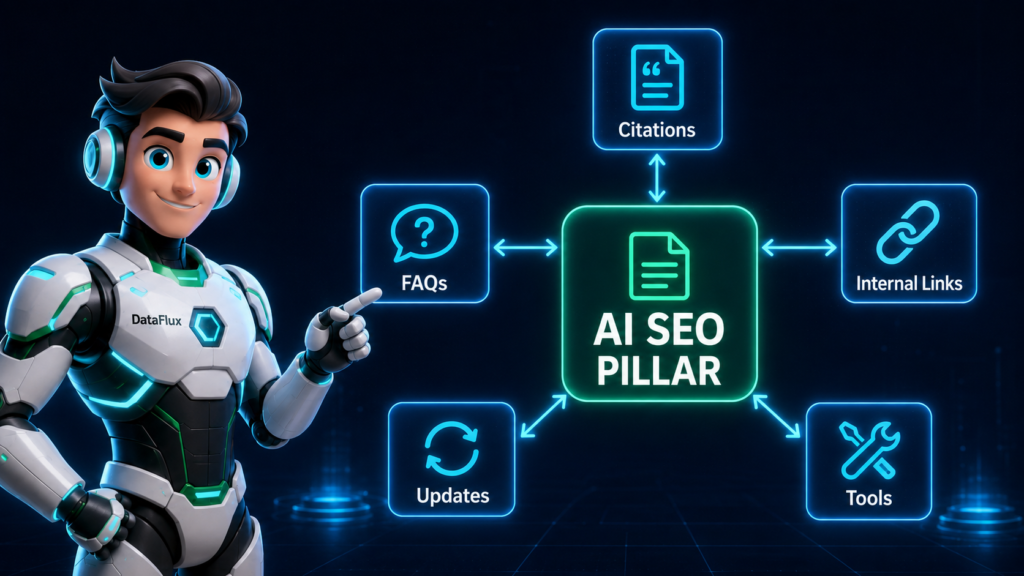
The strongest structure for most bloggers is a topic cluster.
A topic cluster has one main pillar page and several supporting posts.
The pillar page covers the broad topic. Supporting posts answer narrower questions. Each supporting post links back to the pillar page, and the pillar page links out to the most important supporting posts.
Example:
- Pillar page: AI SEO for Beginners
- Supporting post: AI Search Optimization for Beginners
- Supporting post: AI Search Internal Linking Strategy for Bloggers
- Supporting post: Best GEO Tools
- Supporting post: What Is Generative Engine Optimization?
- Supporting post: GEO vs SEO: What Changed in AI Search?
This structure helps people and search systems understand that your site has depth around a topic.
Instead of publishing one isolated post about AI search, you are building a connected content library.
Start With Your Pillar Pages
Before adding links, identify your pillar pages.
A pillar page is the main article you want readers and search systems to associate with a broad topic.
For a blogger in the AI content space, pillar pages might include:
- AI SEO
- AI blogging
- GEO
- AI tools for creators
- Content automation
- Prompt engineering
- Blog monetization
- Pinterest SEO
- Email marketing with AI
Your pillar pages should be comprehensive, current, and internally linked from many relevant posts.
A mistake many bloggers make is linking only to the newest article. Instead, decide which page deserves to be the central source for each topic.
That page becomes the hub.
Build Supporting Posts Around Each Pillar
After choosing the pillar page, list the supporting posts that belong under it.
Supporting posts should answer smaller, more specific questions.
For the pillar page “AI SEO,” supporting posts could include:
- How to optimize for AI search
- How to write AI-friendly headings
- How to optimize old blog posts for AI search
- How to use FAQ sections for AI visibility
- How to write source-backed content
- How to create topic clusters for GEO
Each supporting post should link back to the pillar page. The pillar page should also link to the strongest supporting posts.
This creates a two-way relationship.
The reader can start broad and go deeper. Or they can land on a specific post and move up to the main guide.
Use Descriptive Anchor Text
Anchor text is the clickable text in a link.
For AI search and traditional SEO, descriptive anchor text is better than vague anchor text.
Weak anchor text:
- Click here
- Read more
- This post
- Learn more
- Our guide
Stronger anchor text:
- AI search optimization
- Internal linking strategy for bloggers
- How to structure blog posts for AI visibility
- GEO for bloggers
- AI blogging workflow
Descriptive anchor text gives context. It tells the reader what they will get after clicking. It also helps search systems understand the relationship between the current page and the linked page.
Do not force exact-match keywords into every link. Use natural language.
A good rule: the anchor text should make sense even if you read it without the surrounding sentence.
Link From New Posts to Old Posts
Every time you publish a new blog post, link to older relevant content.
This keeps your existing articles alive.
For example, if you publish this article about AI search internal linking, you should link to older posts about AI SEO, GEO, blog structure, content clusters, and AI visibility.
New posts are a chance to strengthen your older content.
Do not treat internal linking as something you only do after publishing. Build it into your writing process.
Before publishing, ask:
- Which pillar page should this post support?
- Which older article explains a key concept?
- Which post should readers read next?
- Which related article adds proof, examples, or context?
If a new post does not link to anything else on your site, it is probably not connected enough.
Link From Old Posts to New Posts
This is the step most bloggers forget.
When you publish a strong new article, go back to older relevant posts and add links to it.
Older posts may already have traffic, backlinks, or authority. They can help your new article get discovered faster.
For example, after publishing this article, you might update older posts such as:
Add the new link only where it makes sense. Do not drop it into unrelated sections.
A useful internal link should feel like a helpful next step, not a forced SEO move.
Create Definition Links
AI search tools often need clean definitions.
If your blog uses terms like GEO, AI search, AI Overviews, answer engine optimization, semantic SEO, prompt engineering, or internal linking, create clear definition pages or sections.
Then link to them consistently.
Example:
- If you mention “GEO,” link to your main GEO guide the first time it appears in an article.
This helps readers who are new to the topic. It also helps your site build stronger topical clarity.
Definition links are especially useful for bloggers covering technical, niche, or fast-changing topics.
Create Comparison Links
Comparison posts are powerful for AI search because users often ask comparison-style questions.
Examples:
- GEO vs SEO
- ChatGPT Search vs Google Search
- AI Overviews vs Featured Snippets
- Topic Clusters vs Content Silos
- Internal Links vs Backlinks
When you mention one side of a comparison in another article, link to the comparison post.
For example, in an article about AI SEO, you could link to a GEO vs SEO comparison when explaining how generative search changes content strategy.
Comparison links help readers understand differences quickly. They also help AI search tools connect related concepts across your site.
Create Next-Step Links
A next-step link tells the reader what to do after finishing the current article.
This is different from a random related post widget.
A next-step link should match the reader’s journey.
Example:
If the reader just learned how to structure blog posts for AI visibility, the next logical step might be learning how to internally link those posts into a topic cluster.
Good next-step links often use language like:
- Next, build your AI search internal linking strategy.
- After that, update your old posts for AI search visibility.
- Once your pillar page is ready, create supporting articles around it.
These links feel helpful because they match the reader’s intent.
Create Evidence Links
An evidence link points to a post that supports a claim, explains a method, or gives an example.
For example, if you say “FAQ sections can help answer specific search questions,” you could link to a future article about writing FAQ sections for AI search.
Evidence links are useful because they turn your site into a source network.
Instead of making one article carry the entire explanation, you can use internal links to support deeper learning.
This is especially helpful for AI-focused content because readers may want proof, definitions, workflows, and examples before trusting a recommendation.
Avoid Orphan Posts
An orphan post is a page with no internal links pointing to it.
That makes it harder for people and search systems to find.
Every important blog post should have at least a few internal links from relevant pages.
To fix orphan posts:
- Find posts with no internal links.
- Choose the most relevant pillar page or cluster.
- Add links from older related articles.
- Add the post to a hub page if it fits.
- Link from the post back to its parent topic.
Orphan posts are common on older blogs because content gets published and forgotten.
A simple internal linking audit can uncover useful articles that are buried.
Build a Link Map Before You Publish
For important topics, create a simple link map.
You do not need fancy software. A spreadsheet or notes document is enough.
Use columns like:
- Post title
- URL
- Primary topic
- Pillar page
- Supporting posts to link to
- Posts that should link back
- Anchor text ideas
- Update date
This gives you a repeatable system.
Instead of guessing which links to add, you can see the full topic cluster at a glance.
A link map also helps when you update older posts because you already know which pages belong together.
How Many Internal Links Should a Blog Post Have?
There is no perfect number.
A short post may only need three to five internal links. A long guide may naturally include ten or more.
The better question is: does every internal link help the reader?
If yes, keep it. If no, remove it.
Avoid adding links just to hit a number. Too many links can make a page feel cluttered and unfocused.
For most blog posts, prioritize:
- One link to the main pillar page
- Two to five links to closely related supporting posts
- One next-step link near the end
- One or two definition links when needed
The exact number depends on the article length and topic depth.
Where to Place Internal Links
Internal links work best when they appear naturally inside the article.
Good places to add links include:
- The introduction, when referencing the broader topic
- A definition section, when explaining a key term
- A step-by-step section, when pointing to a deeper tutorial
- An example section, when showing a related use case
- The conclusion, when suggesting the next action
- An FAQ answer, when the linked article expands the answer
Avoid stuffing all links at the bottom. Related post blocks can help, but contextual links inside the article are usually more useful.
A contextual link tells the reader why the next page matters.
Internal Linking Example for This Article
Here is how this article could fit into a TechnofluxAI AI search topic cluster.
The pillar should link to the definition, tutorial, comparison, and tools page. Each supporting post should link back to the pillar and to the most relevant next step.
Add Next-Step Links Inside the Article
Internal links work best when they match reader intent.
Do not only add links at the end of the article. Add them where the reader naturally needs another resource.
Good places for internal links include:
- After a definition
- After a process step
- After mentioning a tool or strategy
- Inside comparison sections
- At the end of a beginner explanation
- Before a checklist
- At the conclusion
The goal is to give readers a useful next click before they leave.
If a reader finishes a section and thinks, “What should I read next?” your internal link should answer that question.
Use Related Posts Carefully
Related post blocks can help, but they are often too broad.
A random related posts plugin may show posts that share a tag but do not match the reader’s actual need.
For AI search strategy, hand-picked links are usually stronger.
Instead of a generic related posts block, use a focused next-step block.
This is better than a random carousel because each link has a clear reason to exist.
Fix Orphan Posts
An orphan post is a page with no internal links pointing to it.
Orphan posts are harder for readers and search engines to find.
To fix orphan posts, look for useful older articles that are not linked from your main guides, category hubs, or recent posts.
Then add links to them from relevant pages.
Good places to link to orphan posts:
- Pillar pages
- Category hubs
- Resource pages
- High-traffic posts
- FAQ sections
- Glossary or definition pages
Do not revive every old post. Some posts may need to be updated, merged, redirected, or removed.
Only strengthen posts that still serve a clear reader need.
Use Internal Links to Support Money Pages
If your blog earns from affiliates, digital products, email signups, services, or tools, internal links should support those goals without becoming spammy.
For example, a blogger might have a money page like:
- Best GEO Tools
- Best AI Tools for Content Creators
- AI content workflow templates
- Blog audit services
- Email list growth toolkits
Supporting informational posts can link to these pages when they naturally help the reader choose a tool, template, or next step.
Do not force a money page link into every post.
Trust comes first. Monetization comes after usefulness.
Make Your Navigation Support Your Clusters
Internal linking is not only inside articles.
Your menus, homepage sections, category pages, sidebar blocks, footer links, and hub pages all shape how readers move through your site.
For AI search, your navigation should make your main topics obvious.
For example, a site about AI for bloggers might have top-level paths like:
- AI SEO
- GEO
- AI Tools
- Blogging Workflows
- Creator Tools
- Prompt Guides
These paths tell readers what your site is about quickly.
They also help search engines and AI tools understand your topical focus.
Common Internal Linking Mistakes Bloggers Make
Internal linking is simple, but it is easy to do poorly.
Watch for these mistakes:
- Adding links only at the end of posts
- Using vague anchor text like “click here”
- Linking to unrelated posts because they need traffic
- Forgetting to link from old posts to new posts
- Creating too many posts on the same topic without choosing a main page
- Letting orphan posts sit outside the content library
- Sending every internal link to money pages
- Using plugin-generated related posts with no manual strategy
- Ignoring mobile readability in card blocks and link sections
Most internal linking problems come from treating links as SEO decoration instead of reader paths.
AI search internal linking is really knowledge base design.
You are not just connecting URLs. You are organizing ideas.
For bloggers, this is a major opportunity. Most sites have useful posts, but the posts are scattered. AI search tools need clarity, and readers need direction.
The strongest bloggers will not simply publish more content. They will connect their content better.
A good internal linking strategy tells AI search tools: this is my main guide, these are the supporting resources, this is the definition, this is the comparison, this is the next step, and this is the page worth citing.
What Should I Actually Do?
Start with one topic cluster.
Choose one pillar page that matters to your blog. Then find five to ten supporting posts that should connect to it.
Update each supporting post with a link back to the pillar page. Then update the pillar page with links to the strongest supporting posts.
Next, add links between related supporting posts where they naturally help the reader.
Use descriptive anchor text. Remove irrelevant links. Fix orphan posts. Add next-step links near the end of articles.
Do not try to fix your entire site in one day.
Start with one cluster and make it clean.
AI Search Internal Linking Checklist
Use this checklist before publishing or refreshing a blog post.
FAQ
What is internal linking for AI search?
Internal linking for AI search means connecting related pages on your site so AI tools, search engines, and readers can understand how your content fits together. It helps show which pages are main guides, which posts support them, and which articles answer specific questions.
Do internal links help AI tools cite my blog?
Internal links can help AI tools discover and understand your content, but they do not guarantee citations. They improve your site structure, which can make your strongest pages easier to find and interpret.
What is the best internal linking strategy for bloggers?
The best internal linking strategy for bloggers is to build topic clusters. Create one pillar page for a broad topic, publish supporting posts around related questions, and link them together with clear anchor text.
How many internal links should I add to a blog post?
There is no exact number. Add as many internal links as are genuinely useful. Most standard blog posts can include a link to the main pillar page, a few links to related articles, and one next-step link near the end.
What anchor text should I use for internal links?
Use descriptive anchor text that explains what the linked page is about. Avoid vague phrases like “click here” or “read more” when a clearer phrase would help the reader.
Should I update old blog posts with new internal links?
Yes. Updating old posts with links to newer relevant content is one of the easiest ways to strengthen your internal linking strategy. It helps readers find updated resources and helps search systems discover newer pages.
What is an orphan post?
An orphan post is a page that has no internal links pointing to it. Important orphan posts should be connected to relevant pillar pages, category hubs, or related articles so they are easier to find.
Are related post plugins enough?
Usually not. Related post plugins can help, but hand-picked links are often better because they match the reader’s intent more clearly.
Should I link from old posts to new posts?
Yes. Updating older relevant posts with links to newer content is one of the best ways to connect your content library and help new posts get discovered.
Where should this post link next?
This post should naturally point readers toward AI SEO for Beginners, What Is GEO?, AI Search Optimization for Beginners, and GEO vs SEO.
Conclusion
AI search internal linking is not about stuffing links into every paragraph.
It is about building a clear content network.
Start with pillar pages. Add supporting posts. Use descriptive anchor text. Link from new posts to old posts and from old posts to new posts. Fix orphan content. Create next-step paths for readers.
When your blog is connected well, it becomes easier for people to navigate, easier for search engines to understand, and easier for AI tools to recognize as a useful source.