

Estimated reading time: 16 minutes
Key Takeaways
- AI workflow examples demonstrate how AI integrates into real work through repeatable steps.
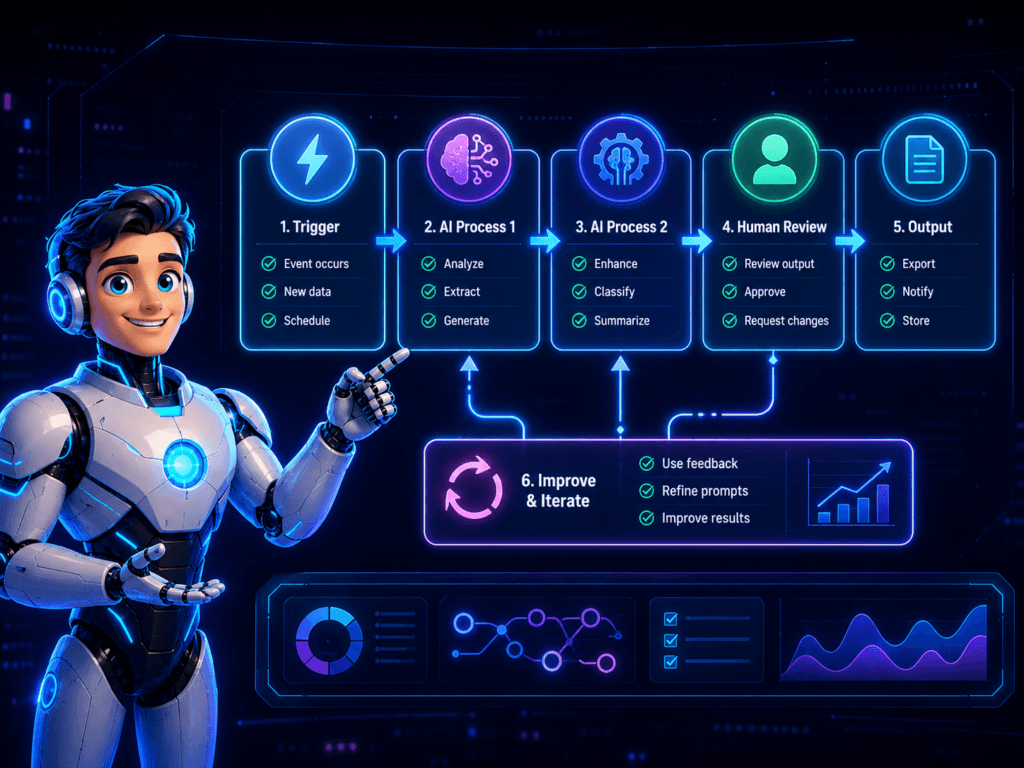
- An effective AI workflow includes a trigger, AI steps, a human review, and a final output.
- In 2026, AI workflows evolve beyond simple tasks, playing significant roles in customer interactions and business processes.
- Practical examples include lead generation, SEO content creation, and customer support automation.
- Beginners can build AI workflows by starting small, defining tasks, and ensuring human oversight.
AI workflow examples are useful because they show how AI fits into real work.
Not magic,robot employees. Not “set it and forget it.”
An AI workflow is a set of repeatable steps where AI handles part of a task, then a human reviews the important parts.
That is the key.
AI can sort, summarize, draft, answer, route, and suggest. But the best workflows still include human judgment before anything important goes live.
Quick Answer: What Is an AI Workflow?
Table of contents
- Quick Answer: What Is an AI Workflow?
- Why AI Workflows Matter in 2026
- 1. Customer Message to Lead Follow-Up Workflow
- 2. Blog Idea to SEO Outline Workflow
- 3. News Story to Evergreen Article Workflow
- 4. YouTube Short to Blog Post Workflow
- 5. AI Tool Review Workflow
- 6. Customer Support FAQ Workflow
- 7. Content Repurposing Workflow
- How to Build Your First AI Workflow
- Common AI Workflow Mistakes
- Best AI Workflow Tools to Consider
- Founder’s Insight: Boring Workflows Win
- FAQ: AI Workflow Examples
An AI workflow is a repeatable process where AI helps complete one or more steps, such as answering questions, sorting information, drafting content, summarizing data, or sending a task to the next tool.
The best AI workflows include:
- A clear trigger
- One or more AI steps
- A human review step
- A final output
For example, a customer asks about pricing. AI answers the basic question, asks for more details, checks if the person is a good lead, then sends the conversation to a human or booking tool.
That is an AI workflow.
Why AI Workflows Matter in 2026
AI is moving from “chat with a bot” to “build a process.”
A strong example is Meta’s new AI Business Agent. Reuters reported that Meta launched an AI agent for business messaging across WhatsApp, Messenger, and Instagram. The agent is designed to help businesses answer customer questions, qualify leads, book appointments, close sales, and send complex issues to human staff when needed.
That matters because it shows where AI workflow automation is going.
AI is not only writing captions anymore. It is becoming part of customer messages, sales follow-up, support, scheduling, and daily business operations.
But you do not need Meta’s exact tool to use the same pattern.
You can build simple AI workflow examples with tools like ChatGPT, Zapier, Make, n8n, Notion, ClickUp, Taskade, or your website forms.
The goal is simple:
Use AI to reduce repetitive drag, then keep a human in control of the important decisions.
1. Customer Message to Lead Follow-Up Workflow
This is the first real-world example because it mirrors the Meta AI Business Agent idea.
A customer sends a message. AI answers the easy part. Then it gathers the right details and routes the lead to the next step.
Trigger:
A customer sends a DM asking “pricing?” or “availability?”
AI step 1:
Answer common questions and collect basic details.
Example:
- What service are you interested in?
- What city are you in?
- When do you need help?
- What is your budget range?
AI step 2:
Qualify the lead by asking about budget, timeline, product, service, or location.
For example, a local service business might ask:
- What type of project is this?
- Is this urgent?
- Are you comparing options?
- Do you want a quote or a call?
AI step 3:
Book a meeting, create a ticket, or recommend the next step.
That might mean:
- Sending a calendar link
- Creating a CRM record
- Adding the lead to a spreadsheet
- Sending the question to a human
- Creating a support ticket
Human step:
Handle edge cases, review important details, and close the sale.
A human should review:
- High-value leads
- Refund issues
- Angry customers
- Custom quotes
- Legal or financial questions
- Anything that could damage trust
Output:
A logged conversation, a qualified lead, and a clear next action.
How to use this without Meta’s exact tool
You can build this same AI lead generation workflow with basic tools.
A creator can use it for sponsorship requests.
An affiliate site can use it for product recommendation forms.
A coach can use it for discovery calls.
A local service provider can use it for quote requests.
An ecommerce seller can use it for product questions.
Start simple. Write your top 10 customer questions. Create approved answers. Then use AI to suggest replies, collect details, and route the conversation.
Do not let AI close important sales alone at first. Let it prepare the conversation so you can close faster.
2. Blog Idea to SEO Outline Workflow
This is one of the most useful AI workflow examples for bloggers, affiliate sites, and niche publishers.
The goal is to turn a rough idea into a clean SEO content plan.
Trigger:
You think of a blog topic or find a keyword.
Example:
“AI workflow examples”
AI step 1:
Research the search intent.
Ask AI:
“What does someone searching this keyword actually want to do?”
For this topic, the intent is practical. The reader wants examples, not theory.
AI step 2:
Group the article into useful sections.
Ask for:
- Main problem
- Quick answer
- Step-by-step examples
- Mistakes to avoid
- FAQ questions
- Tools to mention
- Internal link ideas
AI step 3:
Build the SEO outline.
Include:
- H1
- H2 sections
- Related keywords
- FAQ section
- Conclusion
- Meta description
- Schema ideas
AI step 4:
Add internal links.
For TechnofluxAI, this post should link to:
- AI Productivity hub
- AI Tools Directory
- GEO vs SEO article
- AI Overviews Survival Checklist
- Existing AI workflow or AI blogging content
Internal links help readers take the next step and help AI systems understand your topic clusters. TechnofluxAI’s internal linking guide recommends connecting each article to a pillar page, related cluster articles, and a monetization page.
Human step:
Check the outline before writing.
Ask:
- Does this answer the actual keyword?
- Is this useful for beginners?
- Are the examples specific?
- Does each section tell the reader what to do?
Output:
A complete SEO outline that is ready to draft.
This is an AI content workflow. It saves time because you are not starting from a blank page.
3. News Story to Evergreen Article Workflow
This workflow helps you use fresh news without becoming a news site.
The goal is to turn a current event into a practical guide.
Trigger:
A news story appears in your niche.
Example:
Meta launches an AI Business Agent for customer messages.
AI step 1:
Summarize what happened in your own words.
Do not copy the article.
Write a short summary:
“Meta introduced an AI business messaging tool that can answer questions, qualify leads, book appointments, and route complex issues to humans.”
AI step 2:
Explain why it matters.
Ask:
- What trend does this show?
- Who should care?
- What can a small business learn from it?
- What workflow does this inspire?
AI step 3:
Turn the news into a useful framework.
For example:
- Customer message workflow
- Lead qualification workflow
- Human escalation workflow
- Appointment booking workflow
Human step:
Add judgment.
Do not just repeat the news. Explain what the reader should do with it.
Output:
An evergreen article that uses fresh news as a hook.
This is great for GEO because AI systems often look for clear, timely explanations tied to practical steps. TechnofluxAI’s GEO playbook recommends using quick answers, real examples, workflows, mistakes, FAQs, and next steps to improve AI citation potential.
4. YouTube Short to Blog Post Workflow
This workflow is useful for creators who want more value from one idea.
You start with one short video. Then you turn it into multiple assets.
Trigger:
You create one YouTube Short idea.
Example:
“3 AI workflow mistakes beginners make.”
AI step 1:
Turn the idea into a short script.
Use this format:
- Hook
- Problem
- 3 quick points
- Call to action
AI step 2:
Create the caption.
Ask AI for:
- A short caption
- 3 hashtags
- A question to drive comments
AI step 3:
Turn the script into a blog summary.
Ask AI to expand the video into a 500–800 word post.
Include:
- What the mistake is
- Why it matters
- How to fix it
- A next step
AI step 4:
Create Pinterest and social assets.
Turn the same idea into:
- Pinterest pin title
- Pinterest description
- TikTok caption
- Instagram Reel caption
- Email tip
- Internal link suggestion
Human step:
Edit the tone and make sure the advice is real.
Output:
One video idea becomes a script, caption, blog summary, Pinterest pin, and internal link.
This matches the TechnofluxAI creator growth system: one article can feed Pinterest, TikTok, YouTube Shorts, Facebook posts, and email content.
This is one of the best AI workflows for creators because it turns one idea into a small content engine.
5. AI Tool Review Workflow
AI tool reviews can make affiliate revenue, but only when they feel tested and useful.
Do not publish generic tool reviews.
Build a workflow that proves the tool was used.
Trigger:
You choose one AI tool to review.
Example tools:
- Jasper
- ClickUp AI
- Taskade
- Notion AI
- Zapier AI
- Make
- n8n
- ChatGPT workflow templates
AI step 1:
Create a test plan.
Pick one real task.
Examples:
- Write a blog outline
- Build a task board
- Create a customer FAQ
- Summarize meeting notes
- Generate social captions
- Build a simple automation
AI step 2:
Capture the results.
Track:
- What worked
- What failed
- How long it took
- What needed editing
- Who should use it
- Who should avoid it
AI step 3:
Draft the review structure.
Use sections like:
- What the tool does
- Best use case
- My test
- Pros
- Cons
- Pricing notes
- Best alternatives
- Final recommendation
Human step:
Add screenshots, real opinion, and affiliate disclosure.
Your review should say what you actually tested.
Output:
A review that helps the reader decide.
This is better than “Top 10 AI Tools” content because it shows a real workflow.
Monetization angle:
Add affiliate links where they help the reader.
Good fits for this topic:
- Zapier for simple automation
- Make for visual workflow automation
- n8n for advanced or self-hosted workflows
- ClickUp for task management
- Taskade for creator workflows
- Notion for knowledge bases
- Jasper for AI writing workflows
- ChatGPT-related workflow templates
- AI prompt vault or downloadable checklist
Keep it useful. Do not overload the article with affiliate links.
6. Customer Support FAQ Workflow
This is one of the easiest AI workflow examples for business.
If customers ask the same questions every week, turn those questions into a support system.
Trigger:
You notice repeated customer questions.
Examples:
- What are your prices?
- Where is my order?
- How do I cancel?
- Do you offer refunds?
- What is included?
- How fast is delivery?
- Can I speak to someone?
AI step 1:
Group questions by topic.
Categories might include:
- Pricing
- Shipping
- Refunds
- Booking
- Product details
- Troubleshooting
- Account help
AI step 2:
Draft FAQ answers.
Keep answers short.
Use your real policies. Do not let AI invent rules.
AI step 3:
Turn FAQs into reusable replies.
Create:
- Chatbot replies
- Email templates
- Help center answers
- DM response snippets
- Support macros
AI step 4:
Create a human escalation rule.
Escalate when:
- The customer is angry
- Payment is involved
- A refund is requested
- Personal data is involved
- The answer is not certain
- The issue affects safety, legal, or trust
Human step:
Approve every support answer before using it.
Output:
An AI customer support workflow with approved replies and clear escalation rules.
This saves time without making your business feel cold.
7. Content Repurposing Workflow
This AI productivity workflow helps you publish more without starting over every time.
The idea is simple:
One blog post becomes many smaller content assets.
Trigger:
You publish a blog post.
Example:
“AI Workflow Examples: 7 Practical Ways to Use AI in 2026”
AI step 1:
Extract the core ideas.
Ask AI to find:
- 5 key lessons
- 5 short tips
- 5 common mistakes
- 5 hooks
- 5 audience questions
AI step 2:
Turn the ideas into platform content.
Create:
- TikTok hooks
- YouTube Shorts scripts
- Pinterest pin titles
- Email newsletter tips
- LinkedIn post ideas
- Instagram carousel points
- Facebook captions
AI step 3:
Add internal links.
Each repurposed asset should send people back to the main article or related cluster post.
Human step:
Edit for platform style.
A TikTok hook should not sound like a blog intro.
A Pinterest title should be clear and clickable.
An email tip should feel personal.
Output:
One article becomes a full content distribution pack.
This is where AI workflow automation gets powerful. You are not asking AI to “make content.” You are asking it to turn one approved idea into useful formats.
How to Build Your First AI Workflow
Start small.
Do not try to automate your whole business on day one.
Use this process.
1. Pick one repeatable task.
Choose something you do every week.
Good examples:
- Answering the same customer question
- Creating blog outlines
- Summarizing calls
- Writing social captions
- Sorting leads
- Repurposing content
- Creating FAQs
2. Define the trigger.
A trigger starts the workflow.
Examples:
- A form is submitted
- A customer sends a DM
- A blog post is published
- A new keyword is found
- A support email arrives
- A YouTube Short is uploaded
3. List the AI steps.
Write what AI should do.
Example:
- Summarize the message
- Classify the request
- Draft a reply
- Suggest next action
- Send to the right folder
4. Add a human review step.
Decide what needs approval.
For beginners, review everything before it is sent.
Later, you can loosen this for low-risk tasks.
5. Decide the final output.
The output should be clear.
Examples:
- Draft email
- Published post
- Support ticket
- Qualified lead
- Content brief
- Social captions
- Updated spreadsheet
6. Test the workflow manually before automating it.
Do the workflow by hand first.
Use ChatGPT, a document, and a checklist.
Only automate after the steps make sense.
7. Improve it after 5–10 real uses.
Track what breaks.
Ask:
- Did AI misunderstand anything?
- Did the output save time?
- Did the human review catch issues?
- Did the workflow create a useful result?
- Is the process too complex?
Then improve the prompt, tool, or review step.
Common AI Workflow Mistakes
AI workflows fail when people try to move too fast.
Here are the big mistakes to avoid.
Trying to automate too much at once
Start with one task.
Do not automate sales, support, posting, email, and reporting in the same week.
Skipping human review
AI can sound confident when it is wrong.
Review anything public, sensitive, financial, legal, or customer-facing.
Using too many tools
More tools do not always mean a better workflow.
Start with one AI tool and one place to save the output.
Not saving prompts
If a prompt works, save it.
Create a prompt vault for:
- Blog outlines
- FAQ replies
- Lead qualification
- Social captions
- Tool reviews
- Content repurposing
Not tracking results
Track simple numbers.
Examples:
- Time saved
- Leads captured
- Replies drafted
- Posts created
- Support tickets reduced
- Content assets repurposed
Letting AI send important messages without approval
Do not let AI send high-stakes messages alone.
Use approval steps for:
- Sales quotes
- Refunds
- Complaints
- Legal topics
- Health or finance claims
- Account access issues
Best AI Workflow Tools to Consider

You do not need every AI workflow tool.
Pick tools based on the job.
ChatGPT
Best for prompts, drafts, summaries, outlines, and planning.
Use it when you want flexible thinking and reusable templates.
Zapier
Best for simple app-to-app automation.
Use it when you want one tool to trigger another.
Make
Best for visual workflow automation.
Use it when you want to see the steps in a flow.
n8n
Best for advanced AI automation workflow setups.
Use it when you want more control or self-hosting options.
ClickUp
Best for task workflows, teams, and project tracking.
Use it when your output becomes assigned work.
Taskade
Best for creator planning, task lists, and lightweight AI workflows.
Use it when you want simple planning and execution in one place.
Notion
Best for knowledge bases, prompt vaults, content calendars, and internal documentation.
Use it when your workflow needs organized notes.
Jasper
Best for marketing content workflows.
Use it when you need repeatable brand-focused writing support.
Founder’s Insight: Boring Workflows Win
At TechnofluxAI, we think the best AI workflows are boring on purpose.
That sounds strange, but it is true.
A good workflow does not need to feel impressive. It needs to work the same way every time.
The goal is not to replace the creator.
The goal is to remove the repetitive drag.
AI should help with the parts that slow you down:
- Sorting ideas
- Drafting first versions
- Summarizing information
- Reusing content
- Answering common questions
- Preparing tasks for review
The creator still brings the judgment.
The creator decides what is useful, what sounds right, what fits the audience, what should be tested, and what should be published.
That is where taste lives.
AI workflow examples matter because they show the real pattern:
Let AI handle the repeatable steps. Let humans handle trust, judgment, taste, testing, and publishing.
That is the workflow.
FAQ: AI Workflow Examples
What is an AI workflow?
An AI workflow is a repeatable process where AI helps complete one or more steps in a task. It usually includes a trigger, AI steps, human review, and a final output.
What is an example of an AI workflow?
A simple example is a customer support workflow. A customer asks a question, AI drafts a reply, the business owner reviews it, and the final answer is sent or saved as an FAQ.
Can beginners build AI workflows?
Yes. Beginners should start manually with one task, one prompt, and one review step. After the process works, they can use AI workflow automation tools like Zapier, Make, or n8n.
Do AI workflows replace human workers?
AI workflows should not replace human judgment. They work best when AI handles repetitive steps and humans review important decisions, sensitive messages, and final outputs.
What tools can create AI workflows?
Common AI workflow tools include ChatGPT, Zapier, Make, n8n, ClickUp, Taskade, Notion, and Jasper. The best tool depends on whether you need writing, automation, task management, or content planning.
What is the difference between an AI workflow and an AI agent?
An AI workflow follows a defined process. An AI agent can make more decisions inside that process. For most beginners, it is safer to start with a workflow because the steps are easier to review and control.
Meta AI Business Agent and Business Tools
- Reuters: Meta launches enterprise-focused AI Business Agent
https://www.reuters.com/business/meta-launches-enterprise-focused-ai-business-agent-automate-daily-operations-2026-06-03/ - Meta official business AI page
https://www.facebook.com/business/ai - Meta Business Suite tools page
https://www.facebook.com/business/tools/meta-business-suite
AI Agents and Workflow Automation Examples
- Microsoft Copilot Studio agents documentation
https://learn.microsoft.com/en-us/microsoft-copilot-studio/fundamentals-what-is-copilot-studio - Microsoft 365 Copilot agents documentation
https://learn.microsoft.com/en-us/microsoft-365-copilot/extensibility/overview-agent-builder
AI Workflow Automation Tools
- Zapier AI automation guide
https://zapier.com/ai - Zapier workflow automation basics
https://zapier.com/blog/what-is-workflow-automation/ - Make automation education page
https://www.make.com/en/academy - Make apps and integrations page
https://www.make.com/en/integrations

About the Author
Jon Hicks
Founder of TechnofluxAI.
I’m the creator behind TechnofluxAI, focused on breaking down powerful AI tools, emerging trends, and practical strategies to help creators and entrepreneurs stay ahead in a rapidly evolving digital world.
Follow TechnofluxAI for the latest AI tools & strategies