

27 Best Zapier Automations for Small Businesses
The best Zapier automations for small businesses are workflows that remove repetitive admin work from lead capture, email follow-up, CRM updates, scheduling, invoicing, support, project management, and social media publishing.
A good Zapier automation usually starts with one trigger, such as a form submission, booked appointment, new payment, or new email. Then Zapier sends that information to another app and performs one or more actions automatically.
Quick Answer
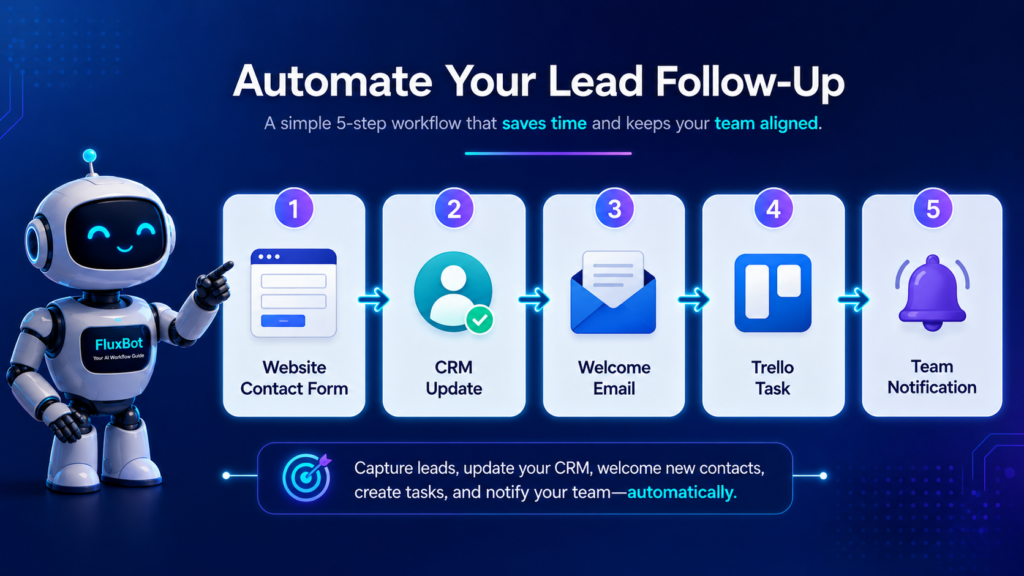
The best place to start is a lead capture workflow: contact form → CRM or spreadsheet → welcome email → task card → team notification. This protects new opportunities from getting buried in your inbox and gives every lead a clear next step.
If Trello is part of that workflow, these six practical Trello automations show how to handle recurring tasks, reminders, assignments, and connected app workflows.
What Is a Zapier Automation?
A Zapier automation is a workflow that connects two or more apps. In Zapier, these workflows are often called Zaps.
The basic structure is simple:
- Trigger: something happens in one app.
- Action: Zapier automatically does something in another app.
For example, when a new lead fills out a Typeform, Zapier can add the lead to HubSpot, send a Gmail follow-up, and create a Trello task.
Why Small Businesses Should Use Zapier Automations
Small business owners usually do not lose time on one huge task. They lose time on dozens of tiny tasks that repeat every day.
Stop losing form submissions
Send every important inquiry into your CRM, spreadsheet, task board, or inbox automatically.
Reply faster
Send welcome emails, appointment reminders, invoice notices, and support alerts without manual copy-paste.
Keep tools updated
Move customer data between apps so your team does not rely on scattered tabs and forgotten notes.
Beginner Path
Use this page based on what you want to fix first:
27 Best Zapier Automations for Small Business Examples
Use these examples as starting points. You do not need all 27. Pick the one that removes the most repeated manual work from your week.
Lead Capture and Sales Automations
Website Contact Form to CRM
Apps: WordPress Forms, Typeform, Gravity Forms, HubSpot, Airtable
When someone fills out your contact form, Zapier creates a new CRM contact automatically.
Why it helps: every lead is saved before it gets buried in an inbox.
Contact Form to Welcome Email
Apps: Typeform, WPForms, Gmail, Outlook, MailerLite, ConvertKit
Send a short confirmation or next-step email as soon as someone requests information.
Why it helps: faster replies build trust before a competitor responds.
New Lead to Google Sheets
Apps: Facebook Lead Ads, Typeform, Google Sheets, Zapier Tables
Log every lead in a simple spreadsheet or table for easy review.
Why it helps: you get a lightweight lead database without building a full CRM.
New Lead to Trello Card
Apps: Typeform, Google Forms, Trello
Create a Trello card whenever a new inquiry arrives.
Why it helps: leads become visible tasks instead of passive emails.
New Appointment to Calendar Reminder
Apps: Calendly, Google Calendar, Outlook Calendar, Gmail
Create reminders and prep tasks after someone books an appointment.
Why it helps: fewer missed calls, forgotten prep notes, and late responses.
Calendly Booking to CRM Update
Apps: Calendly, HubSpot, Pipedrive, Salesforce
Update a contact or deal stage when a sales call is booked.
Why it helps: your CRM reflects real customer intent.
Payments, Invoicing, and Admin Automations
New Payment to Thank-You Email
Apps: Stripe, PayPal, Square, Gmail, MailerLite
Send a thank-you message after a payment is received.
Why it helps: customers get instant confirmation and reassurance.
New Payment to Accounting Spreadsheet
Apps: Stripe, PayPal, Square, Google Sheets, QuickBooks
Record payments in a spreadsheet or accounting workflow.
Why it helps: income tracking becomes easier at tax time.
Invoice Created to Client Notification
Apps: QuickBooks, FreshBooks, Xero, Gmail
Notify a client when a new invoice is created.
Why it helps: invoice communication becomes consistent.
Overdue Invoice to Reminder Task
Apps: QuickBooks, Trello, Asana, ClickUp
Create a follow-up task when an invoice becomes overdue.
Why it helps: collections do not depend on memory.
Gmail Label to Task Manager
Apps: Gmail, Trello, Asana, ClickUp, Todoist
Turn labeled emails into actionable tasks.
Why it helps: important emails become part of your workflow.
Customer Support Email to Help Desk Ticket
Apps: Gmail, Zendesk, Freshdesk, Help Scout
Create support tickets from incoming customer emails.
Why it helps: support requests get tracked instead of scattered.
Support, Marketing, Content, and Operations Automations
New Support Ticket to Slack Alert
Notify your team when a new customer issue arrives.
Positive Review to Testimonial Database
Save positive customer feedback into Airtable, Notion, or Google Sheets.
New Blog Post to Social Media Draft
Turn each new WordPress post into a draft social update.
YouTube Video Published to Newsletter Draft
Create an email draft when a new video goes live.
New Newsletter Subscriber to Welcome Sequence
Add subscribers to a beginner-friendly welcome sequence.
Lead Magnet Download to CRM Tag
Tag subscribers based on the resource they downloaded.
New Client to Onboarding Checklist
Create a client onboarding checklist after payment or contract approval.
New Client to Google Drive Folder
Create a client folder automatically so files stay organized from day one.
Form Submission to Proposal Draft
Use form details to start a proposal draft faster.
New Order to Fulfillment Task
Create a fulfillment task when a new Shopify or WooCommerce order arrives.
Failed Payment to Follow-Up Email
Send a helpful follow-up when a subscription payment fails.
New Survey Response to Feedback Board
Collect customer feedback in Airtable, Notion, or a product board.
Meeting Recording to Notes Database
Save meeting recordings or summaries into a searchable notes database.
New Task Completed to Client Update
Send a client update when a project task is marked complete.
Weekly Automation Report to Inbox
Send a weekly summary of leads, tasks, payments, or support activity.
DataFlux Take: Start With This One Workflow
Start with the workflow that protects your most valuable opportunity: a new lead.
When a customer fills out your website contact form, Zapier should automatically:
- Add the lead to Google Sheets or your CRM.
- Send a short welcome email.
- Create a task in Trello, Asana, or ClickUp.
- Notify you or your team in Slack or email.
This one automation gives you better speed, better tracking, and fewer missed opportunities.
Best Zapier Automations by Business Type
Start here
Contact form to CRM, new client to onboarding checklist, invoice notification, overdue invoice reminder, and completed task to client update.
Start here
Website form to welcome email, appointment reminder, new lead to Google Sheets, payment thank-you email, and review to testimonial database.
Start here
New blog post to social draft, YouTube video to newsletter draft, lead magnet tag, welcome sequence, and weekly content report.
? Creator AI Tools Update
AI creator tools are evolving quickly in 2026. Content creators now use AI systems for video editing, voice generation, thumbnails, workflow automation, scripting, image generation, social media planning, and AI-assisted publishing across multiple platforms.
Modern creators are combining AI tools with workflow systems to publish content faster, stay more consistent, improve engagement, and scale content production without large teams.
- AI video tools speed up content creation workflows
- Workflow automation helps creators stay consistent
- Short-form video content continues dominating social traffic
- AI image systems improve thumbnails and visual branding
- Cross-platform publishing workflows are becoming essential
How to Choose Your First Zapier Automation
Use this simple filter before building anything:
Find the repeated task
Look for something you copy, paste, send, save, or check every week.
Find the trigger
Ask: what starts this task? A form, payment, email, booking, order, or new file?
Pick one useful action
Start with one result: add a row, send an email, create a task, update a contact, or send an alert.
Mistakes to Avoid With Zapier Automations
- Building too many automations at once: start with one workflow that saves time every week.
- Automating a messy process: clean the process first, then automate it.
- Forgetting to test with real examples: test with actual form submissions, payments, or emails.
- Ignoring failed Zap alerts: check errors so important steps do not silently break.
- Making every automation too complex: simple workflows are easier to trust and maintain.
Recommended Tool Stack for Beginners
Disclosure: some tool links on TechnofluxAI may be affiliate links. The goal is to recommend useful tools only when they fit the workflow.
Zapier
Best for connecting forms, CRMs, email tools, task managers, spreadsheets, and support apps.
HubSpot or Airtable
Best for tracking leads before they become paying customers.
Trello, Asana, or ClickUp
Best for turning leads, support requests, and client work into visible next steps.
Downloadable Checklist Idea
Create a content upgrade called 50 Small Business Automation Ideas Checklist.
Use sections for lead capture, email marketing, sales, invoicing, support, project management, content promotion, and reporting. Add the download box near the top of this article and again after the FAQ.
FAQ
What is the best Zapier automation for a small business?
The best first automation is usually a lead capture workflow. Send contact form submissions to a CRM or spreadsheet, send a welcome email, create a task, and notify your team.
Is Zapier good for beginners?
Yes. Zapier is beginner-friendly because many workflows can be built without code. Start with simple two-step automations before building multi-step workflows.
What should I automate first?
Automate the task that is repeated often, easy to define, and connected to revenue or customer experience. Lead capture, appointment reminders, invoice follow-ups, and customer support alerts are strong starting points.
Can Zapier replace a CRM?
No. Zapier connects tools and moves data between them. A CRM stores and organizes customer relationships. Many small businesses use Zapier to send leads into a CRM.
How many Zapier automations does a small business need?
Most small businesses should start with one to five reliable automations. A few useful workflows are better than dozens of confusing ones that nobody checks.
Build One Automation This Week
Do not start with a complicated system. Start with one workflow that saves time, protects a lead, or prevents a missed follow-up.