

Claude Code Leak: What It Means for AI Coding Tools
The Claude Code leak reportedly exposed source code from Anthropic’s coding-agent tool through a public npm package mistake. The important detail is that this was not the same thing as leaking Claude’s model weights, customer conversations, or the full Claude chatbot system.
For creators, developers, website owners, and small teams, the bigger lesson is practical: AI coding tools are now part of the software supply chain. They can save time, explain code, and speed up projects, but they still need human review, limited permissions, testing, and rollback plans.
Quick Answer
Anthropic reportedly exposed Claude Code’s source code through a public npm package file, revealing parts of how the company’s coding-agent tool works under the hood.
The Claude Code leak does not mean Claude’s model weights, customer data, or the full Claude chatbot “brain” were released. Reports say the exposed material came from a source map included with the @anthropic-ai/claude-code npm package, not from the underlying Claude model itself.
The simple takeaway: AI coding agents are powerful developer tools, but they should be used with the same security discipline as any tool that can read files, edit code, run commands, or touch production workflows.
Beginner Path
Use this article based on what you want to understand first:
What Reportedly Happened in the Claude Code Leak
Reports say Anthropic accidentally shipped a source map file with version 2.1.88 of the public @anthropic-ai/claude-code npm package. That source map reportedly exposed TypeScript and JavaScript source behind Claude Code’s CLI application.
InfoQ reported that security researcher Chaofan Shou found the issue on March 31, 2026, and that the exposed npm package contained Claude Code’s TypeScript source. Zscaler’s ThreatLabz described the exposed material as roughly 513,000 lines of unobfuscated TypeScript across 1,906 files.
That sounds dramatic, but it needs context. This was reportedly a packaging and release mistake, not a leak of Claude’s model weights. The exposed material was tied to Claude Code, Anthropic’s terminal-based coding agent, not the core Claude model itself.
What Did Not Leak?
The most important part of the Claude Code leak story is what did not leak.
Claude’s model was not released
Public reporting frames this as a source-code exposure involving Claude Code, not a release of Claude’s underlying model weights.
Customer conversations were not the story
The reported issue involved a public package source map, not a dump of customer chats or assistant history.
Credentials were reportedly not exposed
Coverage of the incident says Anthropic stated no sensitive customer data or credentials were exposed.
That distinction matters because people often use “Claude” to mean several different things:
| Term | What It Means | Was This the Reported Leak? |
|---|---|---|
| Claude model | The AI system that generates responses. | No. Public reports do not describe this as a model-weight leak. |
| Claude chatbot | The user-facing assistant experience. | No. The reported issue was not a release of the full chatbot system. |
| Claude Code | The agentic coding tool that works in your terminal and project files. | Yes. The reported leak involved Claude Code’s application source. |
June 2026 Update: Claude Code Trouble This Week Was Malware Bait, Not a New Source-Code Leak
A newer Claude Code-related security story surfaced in June 2026, but it appears to be different from the earlier Claude Code source-code leak.
The earlier incident involved Anthropic reportedly exposing Claude Code’s source through a public npm package source map file. The June 2026 trouble, however, centers on attackers abusing trusted platforms, including Google Ads and Claude shared chat links, to trick developers into running fake Claude Code installation commands.
According to Trend Micro, cybercriminals used searches for popular AI developer tools to send victims toward malicious pages and instructions. TechRadar also reported that attackers abused Claude’s “Shared Claude Chats” feature by creating fake conversations that looked like legitimate Claude Code setup help, then pushed users toward terminal commands that installed infostealer malware.
That means this week’s story is not best described as “Claude Code leaked again.” A more accurate description is:
Scammers are using Claude Code’s popularity to spread malware through fake install guides, sponsored search results, and trusted-looking shared Claude links.
Why This Matters
This is important because Claude Code is a developer tool. Developers often have access to source code, API keys, local environment files, Git repositories, package managers, and internal systems. If an attacker convinces a developer to paste a malicious terminal command, the damage can be much bigger than a normal consumer malware infection.
What Creators and Developers Should Do
- Do not install Claude Code from sponsored search results.
- Do not paste terminal commands from shared AI chats unless you verify them first.
- Use Anthropic’s official documentation or verified package pages only.
- Read install commands before running them, especially commands using
curl,bash,sudo, or remote scripts. - Keep API keys, tokens, and production secrets out of local project folders whenever possible.
- Use a test machine or sandbox when trying new AI coding tools.
The bigger lesson is the same as the earlier Claude Code source-map leak: AI coding tools are now part of the software supply chain. The risk is not only what the AI model says. The risk is also where you download the tool, what permissions it gets, and what commands you allow it to run.
? Creator AI Tools Update
AI creator tools are evolving quickly in 2026. Content creators now use AI systems for video editing, voice generation, thumbnails, workflow automation, scripting, image generation, social media planning, and AI-assisted publishing across multiple platforms.
Modern creators are combining AI tools with workflow systems to publish content faster, stay more consistent, improve engagement, and scale content production without large teams.
- AI video tools speed up content creation workflows
- Workflow automation helps creators stay consistent
- Short-form video content continues dominating social traffic
- AI image systems improve thumbnails and visual branding
- Cross-platform publishing workflows are becoming essential
Why Source Maps Matter
A source map is a file that connects transformed, bundled, or minified code back to its original source. Developers use source maps because they make debugging easier.
In development, that is helpful. In production, it can become risky if the source map exposes internal source code, private architecture, comments, file names, unreleased features, or implementation details that were not meant to be public.
That appears to be the core mistake in the Claude Code leak. Claude Code’s published package reportedly included a source map that revealed far more of the original source than intended.
This is not an “AI magic” failure. It is a classic software-release hygiene failure.
DataFlux Note
The wrong takeaway is: “Claude Code leaked, so AI coding tools are unsafe.”
The smarter takeaway is: “AI coding tools are now real software infrastructure, and they need the same security discipline as every other developer tool.”
Most real-world failures are not cinematic hacks. They are small process gaps that slip through release workflows.
Why the Claude Code Leak Matters for AI Coding Agents
Claude Code is not just a text editor plugin. Anthropic describes Claude Code as an agentic coding tool that lives in the terminal, understands a codebase, executes routine tasks, explains complex code, and handles git workflows through natural language commands.
That makes coding agents different from normal chatbots.
Suggests code
A normal AI chatbot can explain code, draft snippets, or suggest a fix that you copy into your editor.
Touches the project
A coding agent can often read files, edit files, run commands, inspect errors, and interact with a real codebase.
Needs guardrails
When a tool can change your project, it deserves the same scrutiny as any other development dependency.
When an AI coding agent is connected to your local environment, it may have access to:
- Project files
- Environment variables
- Shell commands
- Package managers
- Git history
- Internal documentation
- Build scripts
- Deployment workflows
The Claude Code leak is not mainly interesting because people got to inspect source code. It is interesting because it reminds everyone that coding agents are now part of the software supply chain.
If a tool can touch your codebase, it deserves the same scrutiny as any dependency, plugin, package, or deployment tool.
Claude Code vs Codex: The Trust Lesson
The Claude Code leak also creates a useful comparison point between Claude Code and OpenAI Codex.
OpenAI describes Codex CLI as a coding agent that runs locally from the terminal and can read, change, and run code on your machine in the selected directory. OpenAI also describes Codex CLI as open source and built in Rust.
That does not automatically make one tool safer than another. Open source does not remove risk, and closed source does not automatically mean unsafe.
| Tool | Basic Idea | Trust Question |
|---|---|---|
| Claude Code | Anthropic’s terminal-based coding agent for working with codebases through natural language commands. | What can it read, edit, run, or access inside your project? |
| Codex CLI | OpenAI’s local terminal coding agent that can read, change, and run code in a selected directory. | How are permissions, review, sandboxing, and rollback handled? |
| Cursor, Gemini CLI, and other agents | AI-assisted coding tools with varying levels of file, command, and workflow access. | Can the tool make changes you do not fully understand? |
The real trust lesson is this: creators should judge AI coding tools by their permissions, release practices, transparency, sandboxing options, and recovery workflow — not just by the model brand.
Whether you use Claude Code, Codex, Cursor, Gemini CLI, or another agent, the same question matters: Can this tool make changes you do not fully understand?
If the answer is yes, you need guardrails.
What Creators and Small Teams Should Do Before Using AI Coding Tools
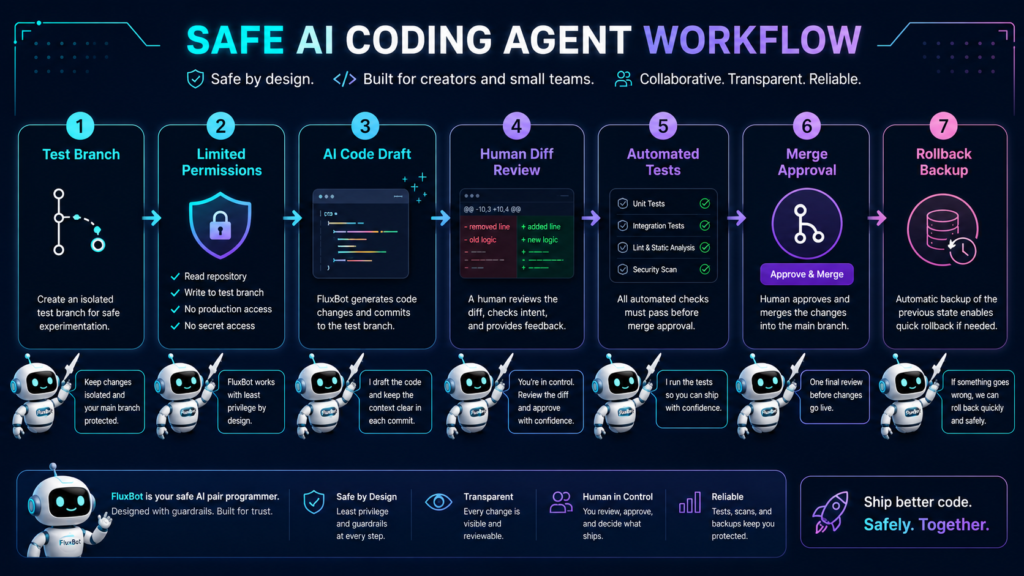
Start in a test branch
Never let an AI coding agent make major changes directly on your main branch. Use a separate branch so every change can be reviewed before merging.
Limit project access
Point the tool only at the folder it needs. Avoid giving broad access to unrelated projects, private documents, or sensitive credentials.
Review every diff
Treat AI-generated code like a junior developer’s pull request. It may be helpful, but it still needs review.
Keep secrets out of the project folder
Do not leave API keys, passwords, private tokens, or production credentials sitting in files the agent can read.
Use environment-specific permissions
A coding agent should not have production database access unless there is a very specific, controlled reason.
Require confirmation before destructive actions
Any command that deletes files, resets databases, changes infrastructure, or deploys code should require human approval.
Run tests before accepting changes
Ask the agent to write tests, but do not rely only on the agent’s confidence. Run the tests yourself.
Keep backups
Before using an AI coding agent on an important project, make sure the repository is pushed, the database is backed up, and rollback steps are clear.
The Beginner-Friendly Rule
Use this rule before letting an AI coding tool touch your project:
If you would not let a new freelancer do it without review, do not let an AI agent do it without review.
That one sentence solves most of the problem.
Where AI Coding Tools Are Most Useful
AI coding tools can be extremely helpful when the task is clear, reviewable, and easy to test.
Explaining unfamiliar code
Use an agent to summarize files, explain functions, map dependencies, and help you understand a project faster.
Drafting simple functions
Small functions, helper utilities, simple components, and repeatable logic are easier to review and test.
Refactoring repetitive files
AI agents can help rename patterns, update repeated code, clean formatting, and make repetitive edits across files.
Writing tests
Ask the agent to draft test cases, then run them yourself and inspect whether they actually protect the behavior you care about.
Creating documentation
Agents are useful for README drafts, setup instructions, API notes, changelogs, and internal documentation.
Finding likely bug locations
Use the agent to inspect logs, trace related files, and suggest where the problem might be before changing anything.
Where AI Coding Tools Need Extra Caution
The more permanent the change, the more human review it needs.
Database migrations
A bad migration can damage real data. Always review, back up, and test in a non-production environment first.
Authentication changes
Login, password reset, roles, permissions, and session logic need careful review because mistakes can lock users out or expose accounts.
Payment logic
Checkout, refunds, invoices, subscriptions, tax handling, and webhook logic should never be accepted without testing and review.
Security rules
Access controls, API permissions, secrets handling, and file upload rules can create serious risk if changed blindly.
Production deployments
An AI agent should not be able to deploy directly to production without human confirmation and a rollback plan.
Dependency upgrades
Package upgrades can introduce breaking changes. Review release notes, run tests, and check for security advisories before merging.
TechnofluxAI Take
This story should not be treated as AI gossip. It should be treated as a workflow warning.
Claude Code is powerful because it can work close to your codebase. Codex is powerful for the same reason. Cursor, Gemini CLI, and other agentic tools are moving in the same direction.
That means the future of AI coding is not just about which model writes better code. It is about which workflow keeps humans in control.
The best setup is not “AI writes everything.”
The best setup is: AI drafts, humans review, tests verify, and permissions limit damage.
Practical AI Coding Agent Safety Checklist
Before using Claude Code, Codex, Cursor, Gemini CLI, or another coding agent, check these items:
- The project is backed up.
- You are working on a separate branch.
- The agent does not have unnecessary folder access.
- Secrets are not stored in readable project files.
- Destructive commands require approval.
- You can inspect every diff.
- Tests run before merge.
- Production credentials are not available locally.
- Deployment is not fully automatic.
- Rollback steps are documented.
This checklist matters more than the tool name.
FAQ About the Claude Code Leak
Did Anthropic leak Claude’s AI model?
No. Public reports say the leak involved Claude Code’s source code, not Claude’s model weights or the full Claude chatbot system.
What is Claude Code?
Claude Code is Anthropic’s agentic coding tool for developers. Anthropic describes it as a terminal-based tool that can understand a codebase, execute routine tasks, explain code, and handle git workflows through natural language commands.
What is a source map?
A source map is a file that links transformed, bundled, or minified code back to its original source code. It helps developers debug, but it can expose source code if accidentally shipped publicly.
Does the Claude Code leak mean AI coding tools are dangerous?
Not automatically. It means AI coding tools should be treated like powerful developer tools with real access to files, commands, dependencies, and workflows. They need permissions, review, testing, and rollback plans.
Is Codex safer than Claude Code?
Not by default. Codex CLI and Claude Code are both coding-agent tools that can interact with local code. OpenAI describes Codex CLI as able to read, change, and run code in the selected directory, so users still need guardrails.
Should beginners use AI coding tools?
Yes, but carefully. Beginners should use AI coding tools for explanations, small changes, documentation, and tests before trusting them with databases, authentication, deployments, or payment systems.
What is the safest way to use an AI coding agent?
The safest workflow is to work in a separate branch, limit folder access, keep secrets out of readable files, review every diff, run tests, require approval for destructive actions, and keep rollback steps ready.
Final Takeaway
Anthropic’s Claude Code leak does not mean Claude’s AI model was released. It means the source code for a coding-agent tool was reportedly exposed through a public package mistake.
That distinction matters.
But the bigger lesson is even more important: AI coding tools are becoming part of the developer supply chain. They can save time, explain code, and speed up projects, but they also need human oversight.
The safest workflow is simple:
AI suggests. Humans review. Tests verify. Permissions limit the blast radius.
That is how creators and small teams should use AI coding tools now.
Use AI Coding Tools Without Giving Up Control
Start with small, reviewable tasks. Keep humans in the loop. Let AI speed up the work, but do not let it silently control the workflow.