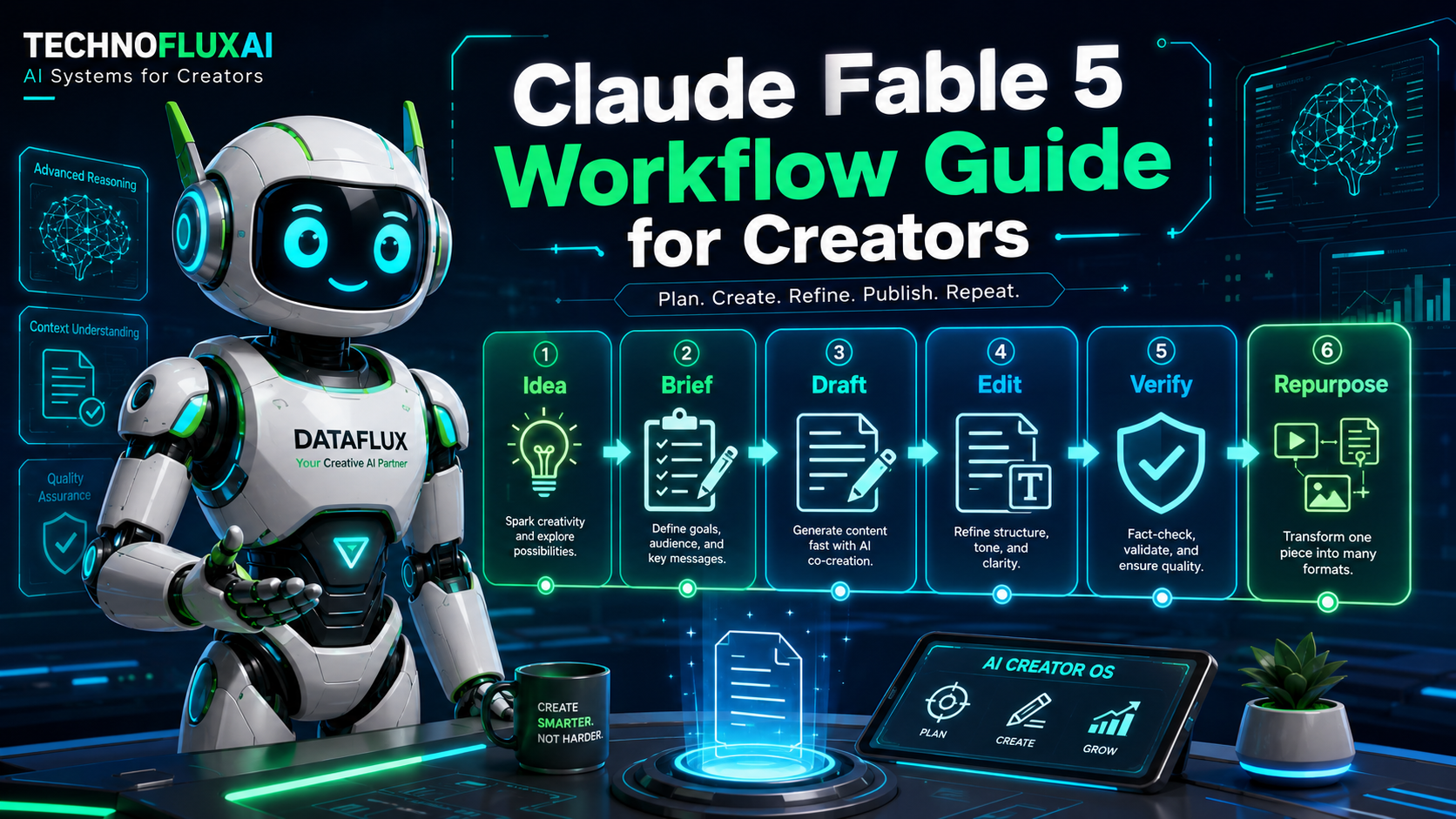
Estimated reading time: 14 minutes
Key Takeaways
- Claude AI is a conversational assistant designed for creators, bloggers, and small business owners, enhancing content creation workflows.
- Best practices involve outlining, drafting sections individually, and adding personal examples to ensure authenticity.
- Claude AI helps with tasks like document summaries, email writing, brainstorming content ideas, and repurposing posts for social media.
- By integrating Claude into structured workflows, users can improve output quality and content consistency.
- Creators should verify Claude’s output for accuracy and tailor it to their unique voice before publishing.
Claude AI for Creators: Practical Workflows for Bloggers and Small Business Owners
Quick Answer
Claude AI is a conversational AI assistant made by Anthropic. Creators, bloggers, marketers, and small business owners can use it to plan content, draft article sections, write emails, summarize research, organize ideas, and repurpose finished work into social posts.
The best way to use Claude AI is not to ask it for a finished article in one prompt. Use it as part of a workflow: define the goal, give it context, build an outline, draft one section at a time, add your own examples, and fact-check anything important before publishing.
Claude can save time, but it does not replace your judgment. It gives you a faster starting point. You still bring the voice, strategy, experience, and final decision-making.
Introduction: Why Creators Are Paying Attention to Claude AI
Most creators do not need another random AI tool.
They need a better way to move from idea to finished content without getting stuck halfway through the process.
That is where Claude AI can be useful.
Maybe you have already tried AI writing tools and felt disappointed. The draft looked polished, but it sounded generic. The structure was fine, but the article had no real opinion. The ideas were usable, but they did not sound like you.
That does not always mean the tool failed.
A lot of the time, the workflow failed.
Claude AI works best when you give it a clear job. Instead of asking it to “write a blog post about marketing,” you can ask it to help you outline a beginner-friendly post, organize your notes, rewrite a weak section, or turn one finished article into five social posts.
That is the real value.
Claude is not magic. It is a writing and thinking assistant that becomes more useful when you treat it like part of your creative system.
What Is Claude AI?
Claude AI is a conversational AI assistant created by Anthropic. You can ask it questions, give it writing tasks, paste in long text, request summaries, brainstorm ideas, and refine content through a back-and-forth conversation.
For creators, Claude can help with tasks like:
- Blog outlines
- Article drafts
- Email writing
- Research summaries
- Content repurposing
- FAQ sections
- Business documents
- Prompt improvement
- Social media content ideas
One of Claude’s strongest use cases is working with longer context. That can make it useful when you are editing a long article, summarizing a document, organizing research notes, or reviewing a detailed content brief.
Claude is available through Anthropic’s Claude products, and Anthropic also offers API access for developers. Pricing, model names, usage limits, and plan details can change, so always check Anthropic’s official pages before publishing specific product claims.
What Can Creators Use Claude AI For?
Claude AI is not just a writing tool. It is more useful when you plug it into repeatable workflows.
Here are practical ways creators can use it.
Blog Outlines
Claude can help you turn a rough topic into a structured article outline.
Instead of starting with a blank page, give Claude your topic, audience, search intent, and preferred angle. Ask for an outline before asking for a draft.
For example, if you run a food blog and want to write about weeknight meal prep, you could ask Claude for a beginner-friendly outline aimed at busy parents who want simple meals with minimal prep.
Now you have a structure to edit instead of a blank page to stare at.
Content Drafts
Claude can draft sections once your outline is clear.
The key is to work in pieces. Do not ask for the entire article at once unless it is short. Ask for one section, review it, improve it, then move to the next.
This gives you more control over the final article and helps prevent generic AI writing.
Email Writing
Claude can help with newsletters, customer emails, follow-ups, outreach messages, and support replies.
Give it the situation, the reader, the goal, and the tone.
Example prompt:
Write a polite follow-up email to a potential client who requested pricing last week but has not replied. Keep it friendly, short, and not pushy.
That gives Claude enough direction to create something useful.
Summarizing Documents
Claude can help turn long notes, articles, PDFs, or reports into clearer summaries.
This is helpful during research, planning, and editing. You can ask for key points, missing ideas, action items, or a simplified explanation.
Just remember: Claude can summarize what you provide, but you still need to verify facts before publishing.
Brainstorming Content Ideas
Claude is useful when you need more angles around a topic.
Instead of asking for “blog ideas,” give it your niche, audience, and goal.
Better prompt:
Give me 20 blog post ideas for beginner affiliate marketers who want to use AI tools without creating generic content. Group the ideas by search intent.
That will usually produce stronger ideas than a vague brainstorming request.
Social Media Posts
Claude can turn one finished article into multiple social posts.
You can ask it to create:
- LinkedIn posts
- TikTok hooks
- YouTube Shorts ideas
- Pinterest pin titles
- X post ideas
- Instagram captions
- Facebook discussion posts
This is one of the best ways to get more mileage from every article you publish.
Repurposing Content
One strong blog post can become a newsletter, short video script, carousel outline, Pinterest pin, and several social captions.
Claude can help you build that repurposing system.
The workflow is simple:
Publish the article first. Then use Claude to break it into smaller platform-specific pieces.
This keeps your content consistent while saving time.
Research Organization
Claude is useful for organizing messy research.
You can paste in notes, bullet points, interview snippets, or copied research excerpts and ask Claude to group them into themes.
It should not replace source checking. But it can help you turn scattered information into a cleaner structure.
Prompt Testing
Claude can also help you improve your prompts.
If you keep getting weak AI output, paste your prompt into Claude and ask:
Why is this prompt producing generic results? Rewrite it so the output is more practical, specific, and beginner-friendly.
That one habit can improve your entire AI workflow.
Business Planning
Small business owners can use Claude for rough drafts of service pages, FAQ pages, SOPs, onboarding documents, customer email templates, and content calendars.
Again, the output is a starting point.
You still need to review it for accuracy, tone, legal risk, and brand fit.
Claude AI Workflow for Creators
Here is a simple workflow you can use to write better content with Claude.
Step 1: Start With One Clear Goal
Before opening Claude, decide what you are making.
Are you writing a how-to article?
A beginner guide?
A comparison post?
A newsletter?
A service page?
Claude performs better when the task is specific.
Weak goal:
Write about blogging.
Better goal:
Help me create a beginner-friendly blog post that teaches new bloggers how to use Claude AI to outline, draft, and repurpose articles.
That gives Claude a clear direction.
Step 2: Give Claude Context
Do not make Claude guess who the content is for.
Tell it:
- Who the audience is
- What they already know
- What problem they have
- What tone you want
- What the final content should do
Example prompt:
My audience is beginner bloggers who feel overwhelmed by AI tools. They want practical workflows, not hype. Write in a conversational, direct tone with simple examples.
That context changes the quality of the output.
Step 3: Ask for an Outline First
This is one of the most important steps.
Do not start with a full draft. Start with the structure.
Example prompt:
Create a detailed outline for a blog post about Claude AI for beginner bloggers. Include an introduction, main sections, workflow steps, mistakes to avoid, FAQ ideas, and a conclusion. Do not write the full article yet.
This lets you fix the direction before Claude writes hundreds of words.
Step 4: Draft One Section at a Time
Once the outline looks good, ask Claude to draft one section.
Review it before moving on.
This keeps the article focused and makes editing easier. It also helps you avoid the “AI wrote the whole thing and now I have to fix everything” problem.
Step 5: Add Human Examples
Claude can create examples, but your own examples are stronger.
Add:
- What you have tested
- What your audience asks
- Mistakes you have seen
- Your opinion
- Your process
- Screenshots or real workflow notes when useful
This is what turns AI-assisted content into content people trust.
Step 6: Fact-Check Anything Current
Claude can be wrong.
Always verify:
- Pricing
- Model names
- Tool features
- Usage limits
- Company claims
- Statistics
- Legal or financial claims
- Current product comparisons
Use official sources first. Do not publish fast-changing information without checking it.
Step 7: Repurpose the Finished Content
After the article is edited and verified, use Claude again.
Ask it to turn the article into:
- 5 TikTok hooks
- 3 LinkedIn posts
- 10 Pinterest pin titles
- A newsletter intro
- A YouTube Shorts script
- A Facebook post
This is where Claude can save creators a lot of time.
Copy-and-Paste Claude AI Prompt for Bloggers
Use this prompt as a starting point:
I am writing a blog post for [describe your audience].
The topic is [your topic].
The goal of the article is to help the reader [specific outcome].
My tone should be conversational, practical, and clear. Avoid hype, jargon, and generic AI language.
Please create a detailed blog post outline with 5–7 main sections. Include suggested H2s, H3s, a quick answer section, practical examples, mistakes to avoid, and FAQ ideas.
Do not write the full article yet. Only create the outline.
After Claude gives you the outline, edit the structure first. Then ask it to draft one section at a time.
Claude AI for Bloggers
Fable 5 can be especially helpful for bloggers because blogging has so many repeatable steps.
You are not just writing one article. You are planning topics, matching search intent, building outlines, drafting sections, editing, adding FAQs, creating meta descriptions, and repurposing the final post.
Claude can help with each part.
For bloggers, useful Claude workflows include:
- Creating SEO-focused outlines
- Writing quick answer sections
- Drafting FAQ sections
- Improving old blog posts
- Summarizing research notes
- Rewriting weak introductions
- Turning posts into newsletters
- Repurposing articles into social content
The main rule is simple:
Do not let Claude replace your voice.
Use it to speed up structure, drafting, and organization. Then add your own examples, judgment, and experience.
That is what makes the article worth publishing.
Claude AI for Small Business Owners
Small business owners often know what they want to say, but they do not always have time to write it clearly.
Claude can help turn rough thoughts into usable drafts.
Here are practical uses.
Customer Emails
Use Claude to write replies, follow-ups, appointment reminders, onboarding emails, and support responses.
Give it the context and tone. Then edit before sending.
Service Page Copy
Describe your service, who it helps, and what makes it different. Ask Claude to create a rough service page structure.
Do not publish it as-is. Use it as a starting draft.
SOPs and Process Docs
Claude can help turn a messy process into a standard operating procedure.
For example, you can describe how you onboard a client and ask Claude to format it into clear steps.
FAQ Pages
Give Claude a list of common customer questions and ask it to write simple answers.
Then review for accuracy and adjust the language so it sounds like your business.
Local Content Ideas
If you run a local business, Claude can help brainstorm blog ideas based on your city, service area, customer problems, and seasonal topics.
This can be useful for local SEO planning.
Sales Follow-Up Templates
Claude can help you create polite follow-up emails for leads, customers, and past clients.
Save the best versions as reusable templates.
Claude AI vs ChatGPT: Which One Should Creators Use?
Claude AI and ChatGPT are both useful AI assistants. The better choice depends on your workflow.
Claude is often a good fit for long-form writing, summarizing documents, organizing ideas, and creating nuanced drafts.
ChatGPT is also strong for writing, brainstorming, planning, coding help, image-related workflows, custom GPTs, and broader tool integrations.
The practical answer is not “use only one.”
Creators who use AI seriously often test both tools with the same task:
- Blog outline
- Email draft
- Long document summary
- Social post repurposing
- FAQ section
- Content refresh plan
Then compare which output is easier to edit.
Do not choose based on hype. Choose based on the work you actually do.
Mistakes to Avoid When Using Claude AI
Asking Vague Prompts
A vague prompt gives you vague output.
Instead of:
Write a blog post about AI.
Use:
Create a beginner-friendly outline for a blog post about how small business owners can use Claude AI to write customer emails, FAQs, and service page drafts.
Specific prompts create better drafts.
Asking for the Whole Article Too Early
This is one of the fastest ways to get generic content.
Start with the outline. Then draft one section at a time.
Publishing Without Fact-Checking
AI models can produce confident-sounding claims that still need checking.
For tool articles, verify pricing, model details, availability, integrations, and feature claims before publishing.
Removing Your Own Voice
Claude can make writing smoother, but it cannot replace your experience.
Add your own examples, opinions, screenshots, lessons, and workflow notes.
Creating Tool Lists Instead of Workflows
Readers do not only need a list of AI tools.
They need to know what to do with them.
A better article shows the reader how to move from idea to finished result.
TechnofluxAI Take
The mistake most creators make with Claude is asking it to finish the job too early.
Claude is better when it helps you shape the work before you write the final version. Use it to organize the messy middle: the outline, notes, examples, drafts, edits, and repurposing steps.
Then bring your own judgment into the final draft.
That is the difference between AI-assisted content and generic AI content.
What Should I Actually Do?
Start with one workflow.
Do not rebuild your whole content system today.
Pick one article idea. Ask Claude for an outline. Edit the structure. Draft one section. Add your own example. Verify the facts. Then repurpose the final post into three short social posts.
That is enough to see whether Claude fits your process.
Once that workflow works, save your prompt and repeat it.
FAQ
Is Claude AI good for bloggers?
Yes. Claude AI can help bloggers plan outlines, draft sections, summarize notes, create FAQs, improve introductions, and repurpose finished articles. It works best when used as part of a structured workflow instead of a one-prompt article generator.
Can Claude AI write a full blog post?
Claude can draft a full blog post, but that is not always the best workflow. For better results, start with an outline, draft one section at a time, add your own examples, and fact-check important claims before publishing.
Is Claude AI better than ChatGPT?
It depends on the task. Claude is often useful for long-form writing, summaries, and document-heavy work. ChatGPT is also strong for writing, planning, coding, custom GPTs, and tool-based workflows. Test both with your real tasks instead of choosing based on hype.
Can small business owners use Claude AI?
Yes. Small business owners can use Claude for customer emails, follow-ups, FAQ drafts, service page outlines, SOPs, onboarding documents, and local content ideas. The output should always be reviewed before publishing or sending.
Should I publish Claude AI content without editing it?
No. Claude output should be edited for accuracy, tone, originality, and usefulness. Add human examples, check current claims, and make sure the final article sounds like your brand.
Can Claude AI help with SEO?
Yes. Claude can help with SEO outlines, title ideas, meta descriptions, FAQ sections, internal link planning, and content refreshes. You still need to verify search intent, check sources, and avoid keyword stuffing.
Verification Notes
Before publishing this article, verify current Claude product details through Anthropic’s official pages. Model names, pricing, availability, plan limits, app features, API access, and integrations can change. Anthropic’s official pricing page and model documentation should be treated as primary sources for current product claims.
If you mention Claude Fable 5 specifically, make that a dedicated section or separate article. Anthropic’s newsroom lists Claude Fable 5 and Claude Mythos 5 as June 2026 announcements, so model-specific claims should be checked close to publication.
Conclusion
Claude AI can help creators plan, write, summarize, and repurpose content, but it works best when used inside a repeatable workflow.
Do not start by asking for a finished article.
Start with the goal. Define the reader. Build the outline. Draft in sections. Add your own examples. Verify important claims. Then repurpose the finished piece into smaller content assets.
That is how Claude becomes more than another AI tool.
It becomes part of your creative system.
Related AI Search & GEO Guides
Explore more AI search optimization, GEO strategy, workflow automation, and AI visibility guides from TechnofluxAI.
Learn how Generative Engine Optimization works. Optimize for ChatGPT
Improve AI visibility and conversational rankings. How ChatGPT Chooses Sources
Understand AI content evaluation systems. Best AI Workflow Tools
Explore workflow systems for creators and teams. AI Productivity Tools
Compare AI productivity and automation platforms.
Trusted External Resources

About the Author
Jon Hicks
Founder of TechnofluxAI.
I’m the creator behind TechnofluxAI, focused on breaking down powerful AI tools, emerging trends, and practical strategies to help creators and entrepreneurs stay ahead in a rapidly evolving digital world.
Follow TechnofluxAI for the latest AI tools & strategies