
Estimated reading time: 7 minutes
How to Create an AI Workflow SOP for a Small Team
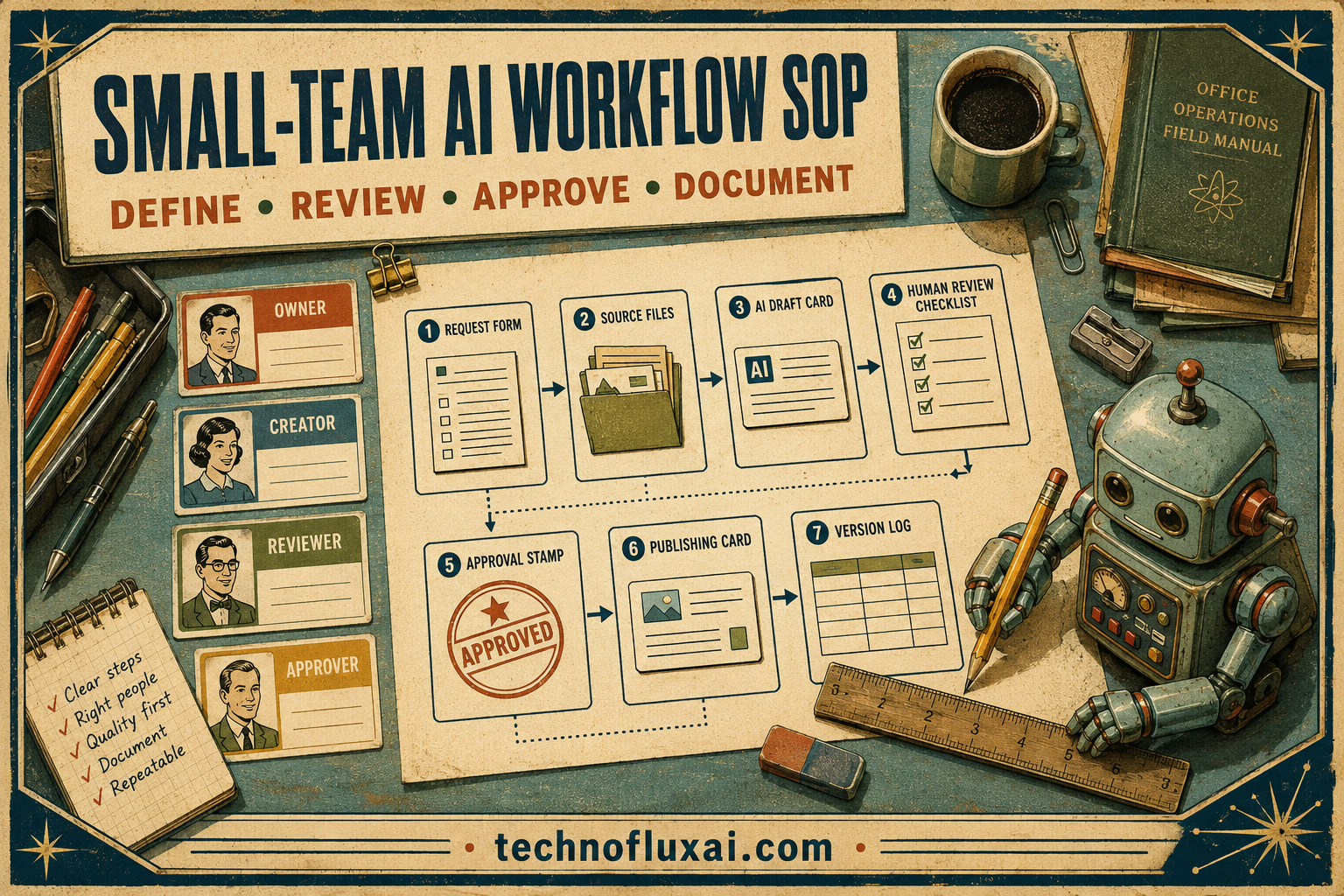
AI tools can save a small team hours every week, but only when everyone uses them the same way. Without a clear process, one person gets great results, another gets messy output, and the team never builds a repeatable system.
Quick Answer
An AI workflow SOP is a simple operating document that explains when your team should use AI, which tools to use, what prompts or inputs are required, how outputs should be reviewed, and who approves the final work before it goes live.
The Pain Point
Small teams often adopt AI casually. Someone uses it for emails, another uses it for content, and someone else avoids it because there is no clear standard.
Why an SOP Helps
A written SOP turns AI from a random tool into a team process. It protects quality, reduces rework, and helps new team members understand how work should move from idea to finished output.
What You Will Build
This guide shows how to define use cases, map your workflow, write AI instructions, create review checkpoints, and keep the SOP useful as your team grows.
Start small: document one AI-assisted task your team already repeats every week, then turn that task into a clear step-by-step workflow.

What an AI Workflow SOP Actually Includes
An AI workflow SOP should not be a long policy document nobody reads. The best version is practical, direct, and easy for the team to follow while doing real work.
Use Case
Define the task AI is helping with, such as writing product descriptions, summarizing meetings, drafting support replies, or creating blog outlines.
Inputs
List what the team must provide before using AI. This can include customer notes, brand voice rules, examples, product details, files, or source material.
AI Instructions
Include the prompt, role, format, tone, limits, and output requirements so the team does not have to recreate the process every time.
Review Rules
Explain who checks the AI output, what must be verified, and when the work needs human approval before being sent, published, or delivered.
Step 1: Choose One Workflow to Document First
Do not try to write an AI SOP for every task in the business at once. Choose one repeatable workflow that already takes time, causes delays, or creates inconsistent results.
Good First SOP Candidates
- Turning meeting notes into action items
- Drafting customer support replies
- Creating blog outlines or article briefs
- Writing social media captions from long-form content
- Summarizing sales calls or client conversations
- Generating product descriptions from approved details
- Preparing weekly reports from raw notes or metrics
Step 2: Map the Workflow Before Adding AI
AI works better when the workflow is already clear. Map the current process first, then decide where AI can assist without creating confusion.
Before AI
What information is collected, who owns the task, which files are used, and what result is expected?
During AI
Which prompt is used, what context is provided, what tool is allowed, and what output format should the AI return?
After AI
Who reviews the output, what gets edited, where the finished work goes, and what gets saved for future use?
Step 3: Write the SOP in a Simple Format
A small team SOP should be easy to scan while someone is doing the task. Short sections, clear labels, and plain instructions are more useful than a formal manual.
AI Workflow SOP Template
- Workflow name: Give the process a clear title.
- Purpose: Explain what this workflow helps the team produce.
- Owner: Name the person or role responsible for maintaining the SOP.
- When to use it: Define the trigger for starting the workflow.
- Required inputs: List the information, files, examples, or notes needed before AI is used.
- Approved tool: Identify which AI tool or workspace the team should use.
- Prompt or instruction set: Add the exact starting prompt and required output format.
- Review checklist: List what must be checked before the output is used.
- Approval step: Explain who signs off when the work is customer-facing, public, or sensitive.
- Update date: Record when the SOP was last reviewed.
Step 4: Add a Reusable Prompt Block
A reusable prompt keeps the team from inventing instructions from scratch. It also improves consistency because everyone starts with the same structure.
Example Prompt Block
You are helping our team complete the workflow below. Use only the source material provided. Follow our brand voice, keep the output clear, and flag any missing information instead of guessing.
Task: [describe the task]. Source material: [paste notes, details, or links]. Output format: [define sections, bullets, table, email, checklist, or draft]. Review risks: [list facts, claims, numbers, policies, or customer details that need human checking].
Step 5: Create a Human Review Checklist
Warning Card: AI Output Is Not Approval
AI can draft, organize, summarize, and speed up work, but it should not be treated as the final decision-maker. Customer-facing, legal, financial, medical, hiring, or brand-sensitive work needs human review.
Review Checklist for Small Teams
- Check facts, dates, numbers, names, and product details.
- Remove anything the AI guessed or could not verify.
- Make sure the tone matches your business.
- Confirm the output follows the correct format.
- Review customer privacy and sensitive information.
- Save useful examples so the SOP improves over time.
Advanced Tips for Keeping Your AI SOP Useful
A strong AI SOP should evolve as your team learns. The first version does not need to be perfect, but it does need to be clear enough that people can use it without asking the same questions again.
Create SOP Owners
Assign one person to maintain each workflow. Ownership prevents outdated prompts, broken processes, and unclear approval steps from sticking around.
Save Winning Outputs
Keep examples of strong AI-assisted work. These samples help new team members understand the expected quality faster.
Review Monthly
Check the SOP after the team has used it in real work. Remove steps that slow people down and improve anything that causes repeated confusion.
Common Mistakes to Avoid
Mistake 1: Making the SOP Too Long
A 12-page SOP may look complete, but small teams need instructions they can use quickly. Keep the workflow clear, short, and action-focused.
Mistake 2: Letting Everyone Use Different Prompts
Random prompts create random output. Shared prompt blocks help the team build repeatable quality instead of starting over every time.
Mistake 3: Skipping Review Rules
AI can sound confident even when it is wrong. Review rules protect your team from publishing errors, making bad promises, or sharing sensitive information.
Mistake 4: Never Updating the Process
Workflows change as tools, team roles, offers, and customer needs change. Add a review date so the SOP does not become outdated.
FAQ
How long should an AI workflow SOP be?
For a small team, one to three pages is usually enough. The SOP should explain the workflow clearly without becoming a document nobody wants to open.

About the Author
Jon Hicks
Founder of TechnofluxAI.
I’m the creator behind TechnofluxAI, focused on breaking down powerful AI tools, emerging trends, and practical strategies to help creators and entrepreneurs stay ahead in a rapidly evolving digital world.
Follow TechnofluxAI for the latest AI tools & strategies
Want more TechnofluxAI in Google?
Add TechnofluxAI as a Preferred Source to help Google show you more of our AI guides, tests, workflows, and research.