

Estimated reading time: 7 minutes
How Small Businesses Can Build an AI Customer-Support Knowledge Base
Customer questions can pile up fast, especially when you are running a small business with limited time. An AI customer-support knowledge base gives your team, chatbot, website, and customers one clear place to find reliable answers.
Quick Answer
A small business can build an AI customer-support knowledge base by collecting common customer questions, turning them into clear answers, organizing them by topic, adding business rules, and connecting the content to a chatbot, help center, or internal support workflow.
The Pain Point
Most small businesses answer the same questions again and again. Shipping, pricing, refunds, appointment rules, service details, onboarding steps, and troubleshooting requests can eat up hours every week.
Why AI Helps
AI can only give useful support when it has useful source material. A strong knowledge base gives AI the answers, policies, examples, and boundaries it needs to respond with confidence.
What You Will Build
This guide walks through a simple system for creating support articles, organizing customer questions, avoiding bad AI answers, and keeping your knowledge base accurate over time.
Start with your most repeated customer question. That one answer can become the first building block of your AI support system.
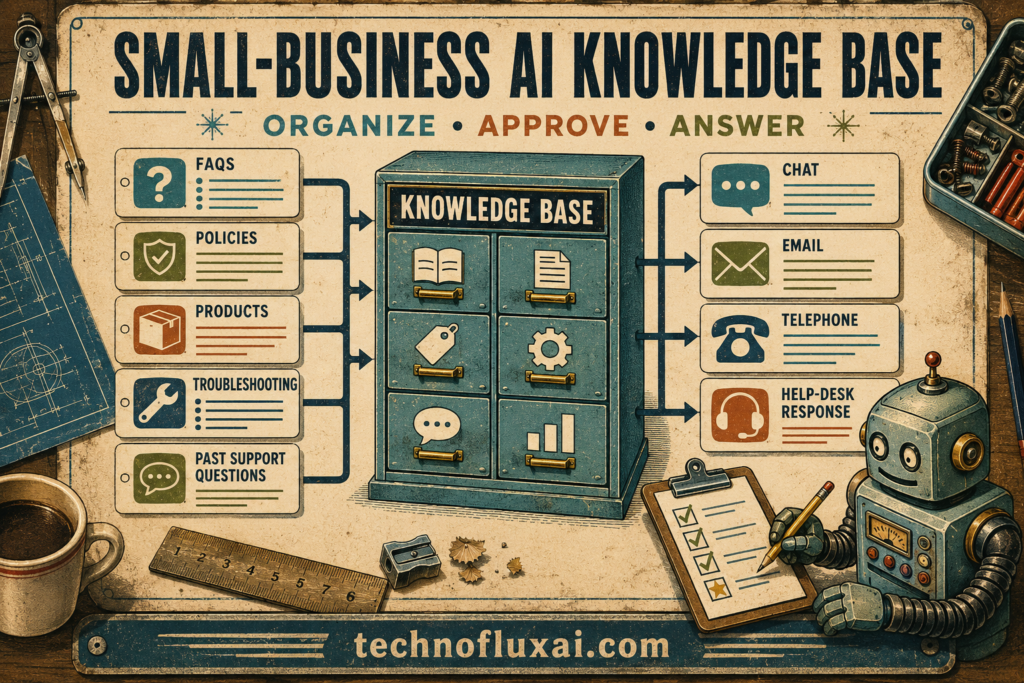
What an AI Customer-Support Knowledge Base Actually Is
An AI customer-support knowledge base is a structured collection of answers, policies, instructions, examples, and business rules that an AI tool can use to help customers. Think of it as the source of truth behind your chatbot, help center, email support, and internal team replies.
Customer Questions
These are the real questions customers ask before buying, after buying, or while trying to use your product or service.
Approved Answers
Approved answers explain what your business actually wants customers to know, without guessing or making promises you cannot keep.
Policies and Boundaries
Refunds, shipping rules, appointment windows, guarantees, support hours, and escalation rules help AI avoid risky answers.
Examples
Sample replies, customer scenarios, and troubleshooting steps teach the AI how your business should sound in real conversations.
Step 1: Collect the Questions Customers Already Ask
Do not start by guessing what should be in your knowledge base. Start with real support history, because your customers have already shown you what they need help with.
Places to Pull Questions From
- Customer emails
- Live chat messages
- Contact form submissions
- Social media comments and direct messages
- Sales calls and consultation notes
- Reviews, complaints, and refund requests
- Questions your team answers from memory every week
Step 2: Sort Questions Into Support Categories
A messy document full of random answers is hard for people to use and even harder for AI to understand. Clear categories make your support knowledge easier to search, update, and connect to automation tools.
Before Purchase
Pricing, product fit, service details, booking rules, availability, features, comparisons, and common objections.
After Purchase
Order status, delivery timing, onboarding, account access, invoices, receipts, and next steps.
Troubleshooting
Login issues, setup problems, product usage, damaged items, missed appointments, and service confusion.
Policies
Refunds, returns, cancellations, guarantees, privacy, response times, support limits, and escalation rules.
Step 3: Turn Each Question Into a Clean Support Article
Each article should answer one main question clearly. Long, unfocused pages make AI support weaker because the tool has to dig through extra wording to find the useful answer.
Simple Support Article Template
- Question: Write the exact customer question in plain language.
- Short answer: Give the direct answer in one or two sentences.
- Details: Explain the rule, process, or next step clearly.
- Example: Show what this looks like in a real customer situation.
- When to escalate: Tell the AI or team when a human should step in.
- Last updated: Add a review date so old policies do not stay active forever.
Step 4: Add Rules So AI Does Not Guess
Warning Card: AI Should Not Invent Policies
If your knowledge base does not explain refunds, delivery timelines, warranty rules, or escalation steps, an AI tool may respond too broadly. Clear rules protect your customers and your business.
Use Exact Limits
Replace vague wording with specific rules, such as response windows, refund deadlines, booking cutoffs, and support hours.
Define Escalation
Tell the AI when to send the customer to a person, especially for billing problems, angry customers, legal questions, or unusual requests.
Add Approved Language
Include sample replies that match your brand voice, so automated answers sound helpful instead of robotic.
Step 5: Connect the Knowledge Base to Your Support Workflow
Once your knowledge base is organized, connect it to the places customers already ask for help. For a small business, that might mean a website chatbot, an internal support document, saved email replies, or a help center.
Beginner-Friendly Workflow
Start manually before you automate everything. Build 20 strong answers, test them with real customer questions, clean up anything unclear, then connect the content to an AI tool once the source material is reliable.
Advanced Tips for Making Your AI Support Knowledge Base Reliable
A good knowledge base is not just a folder of answers. It is a living support system that needs ownership, review dates, clear rules, and regular updates as your business changes.
Create an Owner
Assign one person to maintain the knowledge base. Without an owner, old policies and outdated answers can stay active too long.
Review High-Risk Topics Often
Refunds, pricing, shipping timelines, health claims, legal language, and billing rules need closer review than general questions.
Use Customer Language
Write answers using the words customers actually use. AI tools perform better when your support content matches real questions.
Common Mistakes to Avoid
Mistake 1: Starting With the Tool
Many businesses pick a chatbot before building the answers. Better source material matters more than a shiny support widget.
Mistake 2: Using Vague Policies
Phrases like “usually,” “soon,” or “case by case” can confuse customers and AI systems. Specific rules make support safer.
Mistake 3: Never Reviewing Old Answers
A support answer that was correct six months ago may be wrong today. Add review dates to your most important articles.
Mistake 4: Letting AI Handle Everything
Some customer issues need a human. Escalation rules protect customer trust and prevent small problems from becoming bigger ones.
FAQ
Do I need a chatbot to build an AI support knowledge base?
No. You can start with a structured document or help center. Once your answers are clear, connecting them to a chatbot becomes much easier.
How many articles should I create first?
Start with 15 to 25 answers based on your most repeated customer questions. That is usually enough to reduce basic support friction.
Can AI write the knowledge base for me?
AI can help draft and organize articles, but a human should approve facts, policies, pricing, guarantees, and any sensitive customer-facing language.
What should never be left only to AI?
Billing disputes, legal questions, medical concerns, angry customers, refund exceptions, and unusual account issues should have human review.
Final Takeaway
Small businesses do not need a huge support department to use AI well. They need a clear knowledge base, real customer questions, approved answers, strong escalation rules, and a habit of keeping support content updated.
Next Step
Choose your 20 most repeated customer questions and turn each one into a clean answer. After that, organize them by topic and decide which questions AI can answer safely.