

Estimated reading time: 9 minutes
How to Test Custom GPT Knowledge Updates Before Publishing
Updating a Custom GPT’s knowledge files sounds simple: upload the new document, save the GPT, and move on. But if you publish too fast, your GPT can answer from old information, miss important details, ignore your preferred formatting, or confuse users with incomplete responses.
Quick Answer
Before publishing a Custom GPT knowledge update, test it with old questions, new questions, edge cases, source-specific questions, formatting checks, and user-style prompts. Do not only ask, “Does this work?” Ask whether the GPT uses the updated knowledge correctly.
Why Testing Matters
OpenAI describes GPT knowledge as uploaded files the GPT can use as reference material during conversations, while instructions define how the GPT should behave. That means your testing needs to check both the source material and the behavior around it.
The Reader Pain Point
Many GPT builders update their knowledge files and assume the GPT will automatically behave perfectly. Then users ask real questions and the GPT gives vague answers, misses the new policy, forgets a product detail, or responds in the wrong style.
The problem is not always the uploaded file. Sometimes the issue is unclear instructions, conflicting knowledge, weak file organization, missing examples, or prompts that do not force the GPT to prove it is using the latest information.
What This Guide Helps You Do
This guide gives you a practical testing workflow for Custom GPT knowledge updates so you can catch problems before users do. You will learn how to create a testing set, compare old and new responses, check file usage, test edge cases, and decide when your GPT is ready to publish.
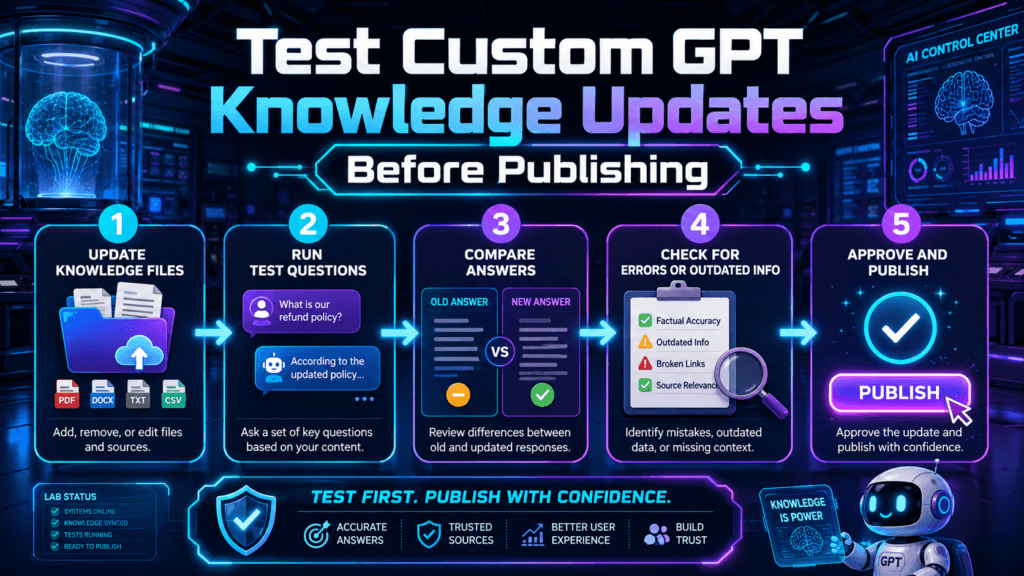
The Custom GPT Knowledge Testing Workflow
The best way to test a Custom GPT knowledge update is to treat it like a mini product release. You are not just checking whether the GPT can answer one question. You are checking whether it can handle real users, messy prompts, old assumptions, and new source material without drifting.
Step 1: Create a Before-and-After Test Set
Before you upload or replace knowledge files, collect a small group of test prompts. These should include the types of questions users already ask, the questions your new knowledge update should improve, and the questions that previously caused weak answers.
Old Questions
Ask questions your GPT already handled well. This checks whether the update accidentally broke existing behavior.
New Questions
Ask questions that should now be answered better because of the new knowledge file.
Edge Cases
Ask unclear, partial, or messy questions to see whether the GPT asks for clarification or guesses too much.
Source Checks
Ask questions that require details from a specific updated file, policy, product page, guide, or internal document.
Step 2: Test Whether the GPT Uses the Updated Knowledge
A common mistake is asking broad questions like, “What does this GPT know?” That does not prove the update worked. Instead, ask targeted questions that only the new file can answer.
Weak Test Prompt
“Tell me about our services.”
Better Test Prompt
“Based on the updated service guide, what are the three new packages we now offer, and which customer is each package best for?”
The better prompt forces the GPT to retrieve specific updated information. If the GPT gives an answer that sounds generic, incomplete, or based on old wording, your update needs more testing.
Step 3: Run a Knowledge Conflict Test
Knowledge updates often fail because the GPT has conflicting information. For example, an old pricing document says one thing, a new product sheet says another, and the instructions do not tell the GPT which source wins.
Use this conflict test:
- Ask about a detail that changed in the new knowledge file.
- Ask the same question in three different ways.
- Check whether the GPT consistently gives the updated answer.
- Ask what it should do when older and newer documents disagree.
- Update the GPT instructions if it needs a clear source priority rule.
Step 4: Test Formatting and Brand Voice
Knowledge accuracy is only half the job. A good Custom GPT also needs to respond in the right format, tone, and structure. If your GPT is supposed to create short social posts, long-form articles, client replies, product recommendations, or research summaries, test those output types directly.
Formatting Test Checklist
- Does the GPT follow the required article, email, report, or post structure?
- Does it use the correct brand voice?
- Does it avoid banned phrases or unwanted formatting?
- Does it include required sections every time?
- Does it stay beginner-friendly when the user asks a beginner question?
- Does it give practical examples instead of generic filler?
Step 5: Test User-Style Prompts, Not Perfect Prompts
Real users rarely write perfect prompts. They misspell words, ask short questions, skip context, and assume the GPT knows what they mean. Your testing should include messy prompts because that is where weak knowledge updates usually show up.
Step 6: Use the GPT Preview Like a Real User
The GPT editor includes a preview/testing flow, so use it seriously before saving and publishing changes. Test the GPT from the user’s perspective, not the builder’s perspective. OpenAI’s help documentation describes testing in preview and saving changes as part of configuring GPTs.
Run at least five to ten realistic prompts before publishing. If the GPT fails the same category twice, fix the knowledge file, instructions, or source priority before you publish.
Advanced Tips Before You Publish the GPT Update
CTAOnce the basic tests pass, run a final publishing check. This is where you confirm the GPT is not only accurate, but also reliable, clear, safe, and useful for the audience it was built to serve.
Advanced Implementation Guidance
- Name your knowledge files clearly. Use names like “Product-Pricing-August-2026.pdf” instead of “final-new-v3.pdf.”
- Add a version note inside the file. Put the update date, purpose, and source priority near the top of important documents.
- Remove outdated files when possible. Do not make the GPT choose between five old versions of the same policy.
- Use instructions to define source priority. Tell the GPT which document should win if two sources conflict.
- Test the most important user journey first. For a sales GPT, test pricing and objections. For a support GPT, test troubleshooting and escalation. For a content GPT, test format and voice.
- Keep a small testing log. Save the prompt, expected answer, actual answer, and pass/fail result.
Common Mistakes to Avoid
Mistake 1: Testing only one prompt
One good answer does not prove the update works. Test different user angles, formats, and difficulty levels.
Mistake 2: Keeping outdated files
Old files can create confusion. If an old file is still needed, label it clearly and explain how the GPT should treat it.
Mistake 3: Ignoring tone and formatting
A GPT can be factually correct and still fail if it gives answers in the wrong format for your audience.
Mistake 4: Publishing without edge-case testing
Users will ask unclear, incomplete, or oddly worded questions. A strong GPT handles uncertainty instead of guessing confidently.
Pre-Publishing Test Scorecard
- Accuracy: Does the GPT answer from the updated knowledge?
- Consistency: Does it give the same updated answer across similar prompts?
- Source priority: Does it know which file wins when documents conflict?
- Format: Does it follow the required output structure?
- Voice: Does it sound like the intended brand or assistant?
- Clarification: Does it ask questions instead of guessing when information is missing?
- Old behavior: Did the update avoid breaking what already worked?
FAQ: Testing Custom GPT Knowledge Updates
How many prompts should I test before publishing?
For a small update, test at least five to ten realistic prompts. For a major knowledge update, test old questions, new questions, edge cases, and source-specific questions.
What should I do if the GPT ignores the new knowledge file?
Check whether the file is clear, current, and not contradicted by older files. Then update your instructions to tell the GPT when and how to use that knowledge.
Should I delete old knowledge files?
Delete outdated files when they are no longer needed. If you must keep older files, label them clearly and add instructions that explain which source is authoritative.
Can a GPT still make mistakes after testing?
Yes. Testing reduces risk, but it does not guarantee perfect answers. That is why important GPTs need regular reviews, clear instructions, updated files, and feedback from real users.
What is the biggest sign my GPT is not ready to publish?
If it gives different answers to the same updated fact, guesses when information is missing, or keeps using outdated details, it is not ready yet.
Final Takeaway
A Custom GPT knowledge update should be tested like a real release, not treated like a quick file upload. The goal is to confirm that the GPT understands the new material, follows the right instructions, avoids old assumptions, and responds in the format your users expect.
The best GPT builders do not publish because the update was uploaded. They publish because the update was tested.
CTA Block
Building a Custom GPT for your brand, business, course, or content workflow? Create a repeatable testing checklist before every knowledge update so your GPT stays accurate, useful, and ready for real users.
TechnofluxAI
Practical AI for creators and website owners
Learn how to use AI, improve AI search visibility, build smarter workflows, and test what actually works.
Explore our other sites
TimewasterAI
— product reviews, buying guides, and useful finds.
Tina Trends
— fashion, beauty, pets, lifestyle, and fun discoveries.
Mistakenly Delicious
— simple recipes and practical cooking ideas.
Want more TechnofluxAI in Google?
Add TechnofluxAI as a Preferred Source to help Google show you more of our AI guides, tests, workflows, and research.