
Estimated reading time: 10 minutes
TechnofluxAI GPT Builder Guide
Custom GPT Instructions Checklist for Better Outputs
This Custom GPT instructions checklist gives creators a quality-control guide for writing clear, specific, and testable rules. As a result, an AI assistant can produce more reliable outputs with less cleanup.
Quick Answer
Stronger Custom GPT outputs come from instructions that define the GPT’s role, audience, task boundaries, output format, tone, examples, refusal rules, review steps, and testing process.
If the GPT is already producing weak or inconsistent results, use the Custom GPT troubleshooting workflow to diagnose the symptom before rewriting everything.
The Main Problem
Custom GPTs often fail when their instructions are too broad, too vague, or internally conflicting. Without a clearly defined workflow, the model has to guess what success should look like.
What This Guide Helps You Do
With this checklist, you can improve your GPT setup, reduce cleanup time, standardize responses, and make your assistant easier to test before sharing it with users.
Soft internal link suggestion: Additionally, connect this article to related TechnofluxAI guides such as “How to Build an Article Package Generator With AI,” “Prompt Engineering Checklist for Beginners,” or “AI Workflow Systems for Creators.”
Main Teaching Content
What Good Custom GPT Instructions Should Include
Strong Custom GPT instructions act like an operating manual. In practice, these rules tell the assistant who it serves, what it should do, how it should respond, where it should be careful, and what a successful answer looks like.
Role
First, define what the GPT is, who it helps, and the kind of work it should specialize in.
Rules
Next, set clear boundaries for tone, format, citations, safety, follow-up questions, and output quality.
Examples
After that, show the GPT what good output looks like so it can match the structure more consistently.
Testing
Finally, run the GPT through realistic prompts and revise the instructions when the output misses the goal.
Start With a Clear GPT Mission
Every custom GPT needs a specific job. Instead of saying “help users with marketing,” define the exact outcome, audience, and type of support the assistant should provide.
Mission Statement Template
“You are a [type of assistant] that helps [target user] achieve [specific outcome] by producing [main output types] in a [tone/style] format.”
Example
For example, a useful mission could be: “You are a WordPress SEO assistant that helps beginner bloggers create publish-ready article packages with SEO metadata, structured HTML sections, FAQs, image ideas, and social media suggestions.”
Define the Output Format Next
Output format is where many GPTs become inconsistent. Therefore, give the assistant a required structure so every response follows the same order.
Weak Instruction
“Write a helpful article for my site.”
Better Instruction
“Return the answer in this order: SEO package, three HTML sections, image suggestions, social copy, FAQ, CTA, and final checklist.”
Add Tone, Style, and Audience Rules
Tone rules help the GPT sound like your brand. Meanwhile, audience rules guide the level of detail, examples, vocabulary, and explanation style.
Tone Checklist
- Pick the voice: beginner-friendly, expert, casual, direct, or premium.
- Also, list any phrases the GPT should avoid.
- Then, choose the preferred format: short paragraphs, cards, tables, checklists, or examples.
- Next, decide whether the audience needs simple explanations or advanced implementation details.
- Finally, set a rule for missing information: ask questions or make a best-effort draft.
Remove Conflicts and Vague Rules
Conflicting instructions create unstable outputs. For instance, one rule might ask for short answers, while another asks for detailed long-form content. In that situation, the GPT may try to satisfy both and produce something awkward.
Test the GPT With Real Prompts Before Release
Testing shows whether the instructions work outside your imagination. To make the check useful, use messy, short, incomplete, and realistic prompts that reveal how the GPT behaves when users do not provide perfect context.
Pass Criteria
- Follows the required format
- Uses the correct tone
- Avoids forbidden phrases
- Handles missing context well
- Produces useful, specific answers
- Stays within its assigned role
Fail Criteria
- Ignores the structure
- Gives generic filler
- Asks unnecessary questions
- Misses key fields
- Invents facts
- Uses the wrong audience level
Simple Testing Prompt
“Review this Custom GPT’s output against its instructions. Then, identify where it followed the rules, where it failed, and which instruction should be rewritten to improve the next answer.”
Advanced Checklist
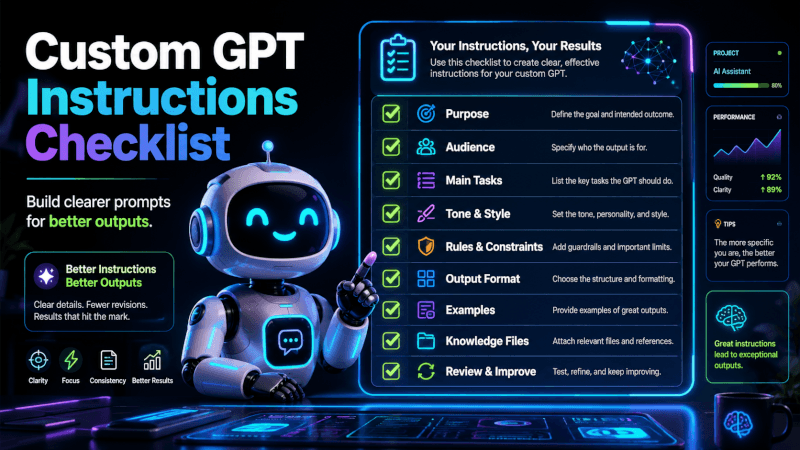
The Custom GPT Instructions Checklist
Use this checklist before publishing or sharing a Custom GPT. As a result, every item helps the assistant respond with clearer structure, fewer mistakes, and better alignment with the job it was built to do.
Core Instructions Checklist
Mission
Your GPT has one clear purpose, audience, and primary outcome.
Output Format
Each response follows a defined order, layout, and structure.
Tone
For better consistency, the assistant uses the right voice for the audience and brand.
Boundaries
Clear limits explain what the GPT should not do, claim, assume, or invent.
Examples
For reference, sample outputs show the model what success looks like.
Testing
Before release, realistic prompts should be used to check the GPT.
Common Mistakes to Avoid
Writing Instructions Like a Prompt
A one-time prompt is not the same as permanent behavior rules. Therefore, GPT instructions need repeatable operating logic.
Adding Too Many Jobs
One assistant should not try to be a strategist, coder, designer, lawyer, and copywriter unless the workflow clearly separates those modes.
Skipping Negative Rules
To reduce bad outputs, tell the GPT what to avoid, especially banned phrases, unsupported claims, unwanted formats, or risky assumptions.
Never Updating Instructions
Treat GPT instructions like software. Then, test, revise, and improve them when real users expose weak spots.
FAQ: Custom GPT Instructions Checklist
What are Custom GPT instructions?
In simple terms, Custom GPT instructions are the behavior rules that tell a custom assistant how to respond, what role to follow, which outputs to create, and which limits to respect.
Why do Custom GPT instructions matter?
Because clear instructions reduce guesswork, a GPT can produce more consistent answers. They also reduce vague outputs, missing fields, wrong formatting, tone drift, and unnecessary follow-up questions.
How long should Custom GPT instructions be?
Good instructions should be long enough to define the role, rules, format, examples, and boundaries, but short enough to avoid conflicts. In most cases, clear and specific beats long and messy.
Should I include examples in GPT instructions?
Yes. For better pattern matching, strong examples give the GPT a structure to follow. Use them for output structure, tone, formatting, and common edge cases.
How do I improve a GPT that ignores instructions?
Review the instructions for conflicts, broad wording, missing format rules, weak examples, and unclear task boundaries. After that, test the GPT with real prompts and revise the weakest rules first.
Final Takeaway
Better Custom GPT outputs start with better instructions. For more consistent results, define the assistant’s mission, structure, tone, boundaries, examples, and review process before publishing.
CTA
Before publishing your next Custom GPT, run its instructions through this checklist and test it with at least five real user prompts.
Image Suggestions
Featured Image Idea
Visual concept: Show a neon AI dashboard with a Custom GPT instruction checklist covering mission, rules, format, tone, examples, and testing cards.
Suggested alt text: Custom GPT instructions checklist displayed on a futuristic AI dashboard.
AI image prompt: Futuristic neon AI dashboard showing a Custom GPT instructions checklist, clean modular cards for mission rules format tone examples testing, dark background, cyan blue purple glow, practical creator workspace, no fake logos, no unreadable text.
In-Article Image Idea 1
Workspace concept: Picture a creator editing Custom GPT instructions on a laptop with glowing checklist panels beside the screen.
Suggested alt text: Creator editing Custom GPT instructions with checklist panels on a laptop.
AI image prompt: Clean futuristic blogger workspace, creator editing AI assistant instructions on laptop, floating checklist panels, neon cyan purple blue accents, dark modern desk setup, soft glow, no logos, no readable text.
In-Article Image Idea 2
Workflow concept: Create a before-and-after visual comparing vague GPT instructions with clear, structured GPT instructions.
Suggested alt text: Before-and-after comparison of vague and clear Custom GPT instructions.
AI image prompt: Neon split-screen AI interface comparing vague instructions and structured Custom GPT instructions, clean checklist layout, dark background, cyan blue purple glow, modern UI, no fake logos, minimal crisp labels only.
Optional Infographic Idea
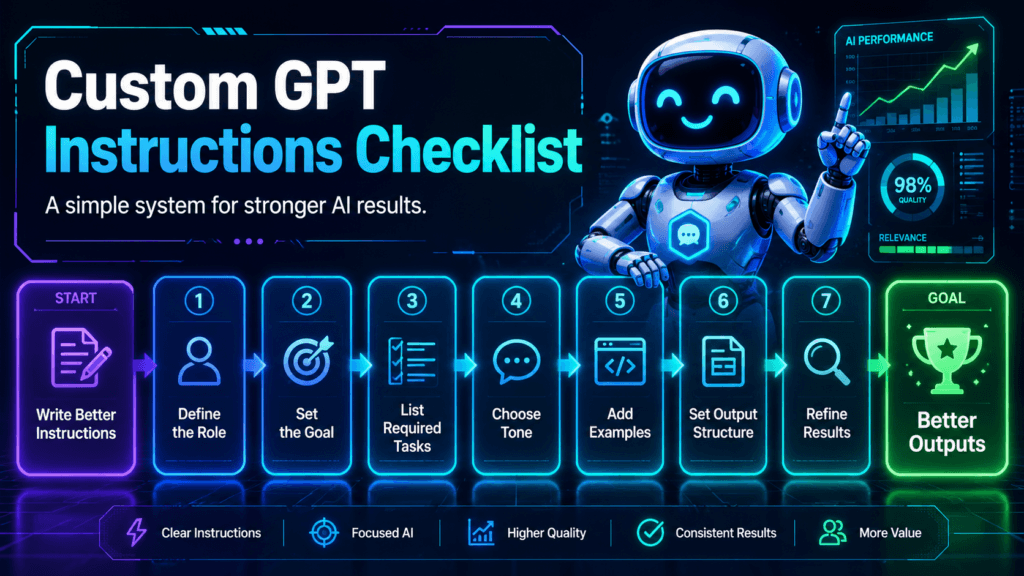
Infographic concept: Build a six-step checklist: Mission → Format → Tone → Boundaries → Examples → Testing.
Suggested alt text: Six-step Custom GPT instructions checklist for better AI outputs.
AI image prompt: Six-step vertical infographic for Custom GPT instructions checklist, mission format tone boundaries examples testing, neon AI dashboard style, black background, cyan blue purple accents, clean cards, mobile-friendly design, no fake logos.
Social Media Suggestions
Short-Form Video Copy
YouTube Shorts hook: Your Custom GPT is not broken. Instead, its instructions might just be too vague.
TikTok caption: Stronger GPT outputs start with better rules. Use this checklist before publishing your custom assistant.
Social Post Copy
LinkedIn post: Your Custom GPT is only as strong as its instructions. Before blaming the model, check the mission, output format, tone rules, boundaries, examples, and test prompts. Then, use those findings to turn a random assistant into a repeatable workflow.
Facebook post: Building a Custom GPT? Do not stop after writing a short role prompt. Instead, give it a checklist: mission, format, tone, boundaries, examples, and testing rules.
Pinterest Copy
Pinterest title: Custom GPT Instructions Checklist for Better Outputs
Pinterest description: Learn how to write better Custom GPT instructions with a simple checklist for mission, format, tone, boundaries, examples, and testing.
Hashtags and Newsletter Teaser
Hashtags: #CustomGPT #ChatGPT #AIWorkflow #PromptEngineering #GPTBuilder #AIProductivity #AIAssistant #CreatorTools #AIContent #TechnofluxAI
Newsletter teaser: Before you publish a Custom GPT, check the instructions that control how it thinks, formats, and responds.

About the Author
Jon Hicks
Founder of TechnofluxAI.
I’m the creator behind TechnofluxAI, focused on breaking down powerful AI tools, emerging trends, and practical strategies to help creators and entrepreneurs stay ahead in a rapidly evolving digital world.
Follow TechnofluxAI for the latest AI tools & strategies