

WordPress Abilities API Explained for Site Owners and AI Builders
WordPress is moving toward a future where websites are not only edited by people clicking buttons, but also by AI assistants, automation tools, and connected apps that need to understand what a site can safely do.
Quick Answer
The WordPress Abilities API is a system that lets WordPress core, plugins, and themes register structured “abilities” that describe what a site can do. These abilities can be discovered and executed by WordPress, developer tools, automation systems, and AI agents when the proper permissions are in place.
Why It Matters
For site owners, it helps turn WordPress capabilities into clearer, more controlled actions. For AI builders, it creates a cleaner way for agents and tools to discover what WordPress can do without guessing through random plugin code.
The Pain Point: WordPress Can Do a Lot, But AI Needs Structure
A normal WordPress site can publish posts, edit pages, manage users, process forms, update products, moderate comments, change settings, and connect to dozens of plugins. Humans can understand those options visually inside the dashboard. AI systems need a structured way to know what actions exist, what inputs are required, what permissions are needed, and what the result should look like.
That is where the Abilities API becomes important. WordPress describes the API as a unified, discoverable, and secure way for core, plugins, and themes to define and expose capabilities, or “abilities.” The API was added in WordPress 6.9, according to the official WordPress developer documentation.
What This Article Helps You Understand
This guide explains what the WordPress Abilities API is, why site owners should care, how AI builders can use it, what kinds of abilities might be exposed, and what security questions matter before letting automated systems interact with a live website.
What the WordPress Abilities API Actually Does
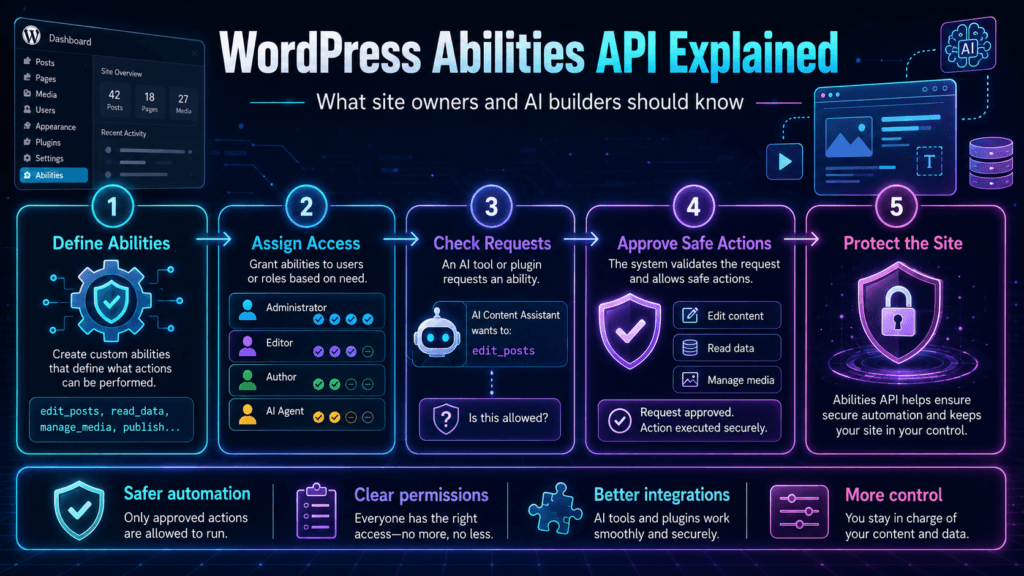
Think of an ability as a clearly described action or function that WordPress can expose in a controlled way. Instead of an AI agent trying to guess how a plugin works, the plugin can register an ability with a name, description, input requirements, output structure, permissions, and execution logic.
For Site Owners
The Abilities API matters because it can make WordPress automation more understandable. Instead of “AI has access to my site” being a vague and scary idea, abilities can define specific actions such as reading content, drafting a post, searching products, or running a plugin task.
For AI Builders
The API gives builders a standardized way to expose WordPress functionality to AI systems. This matters because AI tools work better when available actions are structured, documented, permission-aware, and machine-readable.
For Plugin Developers
Plugin developers can register their own abilities so other systems can discover and use plugin features in a predictable way. That could help reduce one-off integrations and make plugins more useful in AI-assisted workflows.
For Agencies
Agencies can think of abilities as building blocks for safer client automation. A client site might expose only approved actions instead of giving an AI tool broad dashboard access.
A Simple Example
Imagine a WordPress site has a custom events plugin. Without a structured ability, an AI assistant may not know how to find event data, what fields matter, or how to create a new event safely.
With the Abilities API, the plugin could expose abilities like:
- Read upcoming events: Returns event titles, dates, locations, and registration links.
- Create draft event: Creates a draft event but does not publish it automatically.
- Update event details: Changes approved fields only after permission checks.
- Search event registrations: Returns structured registration data for authorized users.
That is the practical promise of the Abilities API: it turns site functions into clearer, structured abilities that can be discovered, validated, and controlled.
How Abilities Connect to AI Agents
Step 1
A plugin, theme, or WordPress feature registers an ability.
Step 2
The ability describes what it does, what inputs it accepts, and what permissions are required.
Step 3
An AI tool or automation layer discovers the ability through supported interfaces.
Step 4
The system executes the ability only if the user, tool, and site permissions allow it.
WordPress’s developer blog explains that once an ability is registered, it can be discoverable and executable from PHP, JavaScript, and the REST API. The WordPress MCP Adapter can then adapt registered abilities into Model Context Protocol tools and resources so AI agents can discover and execute site functionality in a more standardized way.
Abilities API vs REST API vs Regular Plugin Features
What Site Owners Should Watch
Site Owner Checklist
- Know what abilities are exposed: A site owner should understand which actions a plugin or tool makes available.
- Check permissions: Reading a post is different from publishing, deleting, editing users, or changing settings.
- Prefer draft-first workflows: AI should often create drafts for review instead of publishing instantly.
- Review plugin quality: Badly designed abilities can create confusion or security risk.
- Keep logs where possible: Important AI-assisted actions should be reviewable later.
- Start small: Expose low-risk abilities before allowing high-impact actions.
TechnofluxAI
Practical AI for creators and website owners
Learn how to use AI, improve AI search visibility, build smarter workflows, and test what actually works.
Explore our other sites
TimewasterAI
— product reviews, buying guides, and useful finds.
Tina Trends
— fashion, beauty, pets, lifestyle, and fun discoveries.
Mistakenly Delicious
— simple recipes and practical cooking ideas.
Advanced Guidance for AI Builders and WordPress Teams
The Abilities API is not just another developer feature. It is part of a bigger shift: WordPress sites are becoming more machine-readable, more automation-ready, and more compatible with AI workflows. That creates opportunities, but it also raises serious questions about permissions, trust, and control.
Best Practices for AI Builders
- Design abilities around real user tasks. Do not expose random technical functions just because you can. Create abilities that map to useful outcomes.
- Use clear names and descriptions. An AI tool should understand what an ability does without needing hidden context.
- Validate inputs carefully. If an ability updates content, pricing, users, products, or settings, weak validation can become a serious problem.
- Separate read abilities from write abilities. Reading site data is usually lower risk than changing site data.
- Make destructive actions harder to trigger. Delete, publish, change settings, and modify users should require stricter permission checks.
- Return useful structured output. AI systems need clear responses, not vague success messages.
- Build for review. For content workflows, draft-first is usually safer than publish-first.
Common Mistakes to Avoid
Mistake 1: Exposing too much too soon
A site does not need every possible action exposed to AI. Start with safe, useful, low-risk abilities before allowing more powerful actions.
Mistake 2: Treating AI as an administrator
An AI tool should not automatically receive broad admin-level control. It should operate through specific, permission-aware abilities.
Mistake 3: Skipping human review
For content, design, ecommerce, user management, and settings changes, a human review step can prevent mistakes before they go live.
Mistake 4: Using vague ability descriptions
If an ability description is unclear, AI tools may call it in the wrong situation. Clear descriptions reduce confusion and improve reliability.
Beginner-Friendly Security Reality Check
The Abilities API does not mean every AI tool should control every WordPress site. It means WordPress can describe site capabilities in a more structured way. Security still depends on authentication, authorization, user roles, capability checks, plugin quality, and smart workflow design.
A safe AI workflow should answer three questions before running an action: Who is asking? Are they allowed to do this? What exactly will change?
FAQ: WordPress Abilities API
Is the Abilities API only for AI?
No. AI is one major use case, but the API can also help developers, automation tools, plugins, themes, JavaScript apps, PHP code, REST integrations, and command-line workflows understand and use WordPress capabilities more consistently.
Does the Abilities API let AI automatically control my site?
Not by itself. The API helps define and expose abilities, but actual access still depends on how the site, plugin, permissions, authentication, and connected tools are configured.
What is an example of a safe ability?
A safe starting ability might read published post information, summarize site content, search products, or create a draft post for review. These are usually lower risk than deleting content or changing site settings.
What is an example of a risky ability?
Publishing content, deleting posts, changing prices, editing users, modifying roles, updating payment settings, or changing site-wide configuration should be treated as higher-risk actions.
Why should site owners care if they are not developers?
Because AI-connected websites need clear boundaries. Site owners should know which tools can read data, which tools can change data, and whether human approval is required before important changes go live.
Will every plugin support the Abilities API?
Not automatically. Plugin developers need to register abilities intentionally. Over time, more plugins may expose structured abilities if AI-assisted WordPress workflows become more common.
Final Takeaway
The WordPress Abilities API is important because it gives WordPress a clearer language for describing what a site can do. That matters for AI builders, automation tools, plugin developers, agencies, and site owners who want smarter workflows without giving away uncontrolled access.
The simple way to think about it: abilities turn WordPress actions into structured, discoverable, permission-aware building blocks. Used well, they can make AI-assisted WordPress sites more useful. Used carelessly, they can create new risks. The winning approach is clear abilities, careful permissions, and human review where it matters.
CTA Block
If you build WordPress sites, plugins, automations, or AI tools, start thinking in abilities instead of vague access. Define what the system should read, what it should change, what requires approval, and what should never be automated.
Want more TechnofluxAI in Google?
Add TechnofluxAI as a Preferred Source to help Google show you more of our AI guides, tests, workflows, and research.