

Estimated reading time: 9 minutes
TechnofluxAI Creator Workflow Guide
Custom GPT vs Claude Project: Which Should Creators Use?
Custom GPTs and Claude Projects both help creators turn AI into a repeatable workflow instead of starting from a blank chat every time. The real question is not which one is “better.” The better question is which one fits the way you create, organize, reuse, and publish your work.
Quick Answer
Use a Custom GPT when you want a reusable AI assistant with a specific role, repeatable instructions, custom knowledge, and a shareable task-based experience. Use a Claude Project when you want a focused workspace for a larger body of work, ongoing context, uploaded materials, and long-form creative development.
The Creator Problem
Most creators do not struggle because they lack AI tools. They struggle because their prompts, brand notes, content ideas, files, examples, and workflows are scattered across too many chats.
What This Guide Helps You Decide
You’ll learn when to build a Custom GPT, when to use a Claude Project, how each one fits creator work, and how to choose the right setup for blogging, YouTube, coaching, affiliate content, products, and client work.
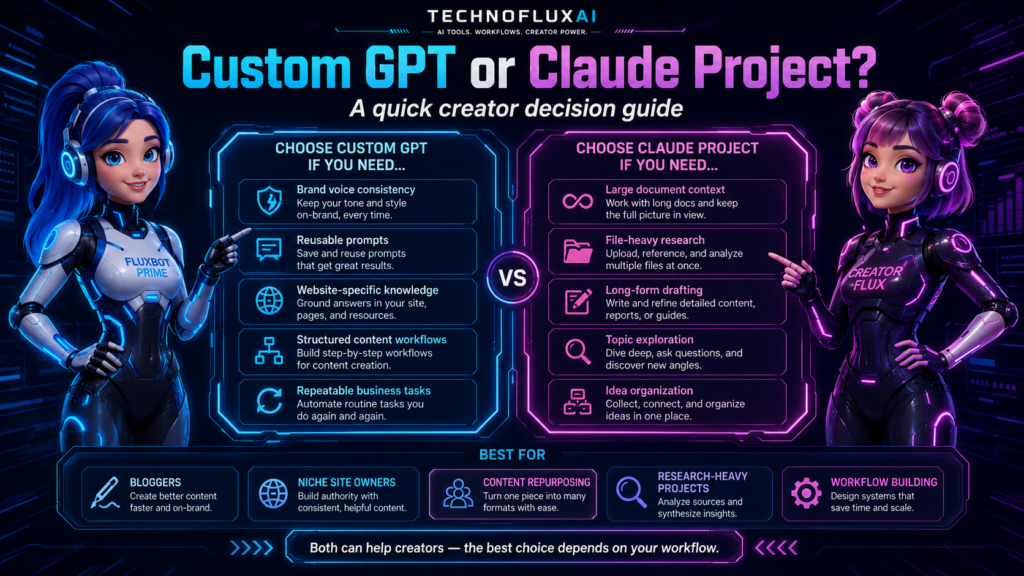
The Simple Difference Between a Custom GPT and a Claude Project
A Custom GPT feels more like building a specialized assistant. You give it a role, instructions, knowledge, and capabilities so it can perform a repeatable job. A Claude Project feels more like setting up a dedicated workspace where chats, files, project knowledge, and instructions stay centered around one ongoing body of work.
Custom GPT
Best for repeatable assistants, branded workflows, task-specific tools, client-facing helpers, and internal systems you want to reuse often.
- Reusable assistant behavior
- Custom instructions and knowledge
- Good for repeat tasks
- Useful for templates and systems
- Can be shared depending on settings and plan
Claude Project
Best for focused creative workspaces, long-form projects, research collections, brand libraries, course development, and content operations that need persistent context.
- Project-based workspace
- Dedicated project knowledge
- Separate chat history by project
- Strong for long-form creation
- Helpful for documents, drafts, and artifacts
Use a Custom GPT When You Need a Repeatable Creator Assistant
A Custom GPT is a strong choice when the workflow is predictable. For example, you may want an assistant that always writes in your brand voice, creates blog outlines, scores affiliate content, reviews YouTube scripts, rewrites product descriptions, or checks posts before publishing.
Creator-Friendly Custom GPT Examples
- Blog SEO GPT: Turns rough article ideas into SEO packages, outlines, FAQs, and internal link suggestions.
- Brand Voice GPT: Rewrites captions, emails, and posts so they sound consistent across platforms.
- Affiliate Review GPT: Checks product reviews for missing pros, cons, use cases, comparisons, and buyer intent.
- YouTube Script GPT: Builds hooks, talking points, retention beats, and short-form repurposing ideas.
- Client Intake GPT: Helps collect project details, summarize needs, and generate first-draft deliverables.
Use a Claude Project When You Need a Focused Workspace
Claude Projects make more sense when the work has a lot of moving pieces. Instead of creating one assistant for one task, you create a dedicated workspace for a larger project. That could be a course, book, brand refresh, content cluster, client campaign, research library, or product launch.
Creator-Friendly Claude Project Examples
- Course project: Store lesson notes, module outlines, student pain points, worksheets, and launch copy in one workspace.
- Blog cluster project: Keep keyword research, article briefs, pillar content, and supporting posts together.
- Client project: Organize strategy notes, meeting summaries, brand documents, draft copy, and campaign ideas.
- Digital product project: Develop a guide, template pack, landing page, email sequence, and support content in one place.
Side-by-Side Creator Comparison
The easiest way to choose is to look at the job you need the AI system to perform. A Custom GPT is usually better when the job repeats. A Claude Project is usually better when the work grows over time.
Best for Reusable Tasks
Custom GPT wins. It is easier to think of it as a specialized assistant you return to whenever you need the same type of output.
Best for Long Projects
Claude Project wins. It works well when you need a dedicated space for files, context, drafts, and ongoing creative decisions.
Best for Brand Systems
Custom GPT is usually cleaner. Build one assistant around your voice, content rules, offers, formatting, and publishing standards.
Best for Deep Drafting
Claude Project is often smoother. It shines when you are shaping long drafts, strategy docs, scripts, guides, or structured creative assets.
A Practical Decision Rule for Creators
Choose based on the shape of your work. If you are building a repeatable machine, use a Custom GPT. If you are building a living workspace, use a Claude Project. Many creators will eventually use both, but they should not use both for the same job.
The One-Minute Choice Test
- Do you want the AI to behave the same way every time? Build a Custom GPT.
- Do you want one place to develop a big project over time? Use a Claude Project.
- Do you want to share a reusable assistant with others? Start with a Custom GPT.
- Do you want to organize documents, drafts, and research around one goal? Start with a Claude Project.
- Do you want both a system and a workspace? Use a Custom GPT for repeat tasks and a Claude Project for active project development.
Example Setup: A Blogger Who Uses Both
Imagine a creator running a blog about AI tools. A Custom GPT could handle the repeatable article package: SEO title, slug, meta description, intro structure, comparison sections, CTA, and publishing checklist. A Claude Project could hold the larger content cluster: research notes, competitor angles, old drafts, brand positioning, pillar topics, and long-term strategy.
Simple Hybrid Workflow
- Create a Claude Project for the full blog category or campaign.
- Upload brand notes, topic lists, audience pain points, and existing content ideas.
- Use the project to plan article angles, clusters, and long-form strategy.
- Send individual article tasks to a Custom GPT built for your publishing format.
- Bring the finished draft back into your editorial workflow for human review, screenshots, links, and final polish.
Advanced Tips for Choosing the Right AI Workspace
The wrong setup creates more friction than it removes. Before you build a Custom GPT or start a Claude Project, decide whether you need repeatability, context, collaboration, content depth, or a cleaner publishing workflow.
Build Around Real Work
Do not create an AI workspace because it sounds impressive. Build it around a job you already repeat, such as drafting posts, reviewing scripts, building lead magnets, or planning campaigns.
Keep Instructions Short
Long instruction files can become messy. Use clear rules, examples, formatting preferences, and decision criteria. Skip generic advice the model already understands.
Review Outputs Like an Editor
Neither option removes the need for judgment. Check accuracy, brand fit, source quality, tone, structure, and whether the output actually helps your audience.
Common Mistakes to Avoid
- Building too many Custom GPTs: Ten half-used assistants are worse than one strong workflow.
- Using Claude Projects like random folders: A project should have a clear goal, not just a pile of unrelated files.
- Skipping examples: AI systems improve when they can see what “good” looks like for your brand.
- Trusting old tool information: AI product features, limits, pricing, and interfaces can change quickly.
- Overloading the workspace: Too many documents or instructions can make your setup harder to control.
- Expecting one tool to do everything: Creators often get better results by using different AI spaces for different jobs.
FAQ: Custom GPT vs Claude Project
Is a Custom GPT the same as a Claude Project?
No. A Custom GPT is better understood as a reusable assistant with a specific role and behavior. A Claude Project is better understood as a focused workspace with its own context, files, instructions, and project conversations.
Which is better for bloggers?
For repeatable blog formatting and SEO workflows, a Custom GPT is usually better. For planning a content cluster, organizing research, or developing a long-term editorial project, Claude Projects can be more useful.
Which is better for YouTube creators?
Use a Custom GPT for repeatable script structures, hooks, titles, descriptions, and Shorts repurposing. Use a Claude Project for a full channel strategy, series planning, audience research, and larger creative direction.
Which is better for client work?
Claude Projects are helpful for keeping client context, strategy notes, and drafts together. Custom GPTs are helpful when you want one reusable assistant for repeated deliverables like audits, briefs, reports, or content packages.
Should creators use both?
Many creators should use both, but not randomly. Use Custom GPTs for repeatable tasks and Claude Projects for larger creative workspaces. That split keeps your AI system organized instead of turning it into another messy folder.
Final Takeaway
Custom GPTs are best when creators need a repeatable assistant. Claude Projects are best when creators need a dedicated workspace for a larger body of work. Pick the system based on your workflow, not the hype. The smartest creator setup is often simple: one workspace for context, one assistant for repeatable output, and a human editor making the final call.
CTA
Want to build a cleaner AI workflow for your content business? Start by choosing one repeatable task, then turn it into a system you can use every week.
Explore AI Tool GuidesWant more TechnofluxAI in Google?
Add TechnofluxAI as a Preferred Source to help Google show you more of our AI guides, tests, workflows, and research.