

Estimated reading time: 10 minutes
TechnofluxAI Guide
How to Make WordPress Content Easier for AI Agents to Use
AI agents do not read your WordPress site the same way a human visitor does. They scan for structure, context, clear answers, entities, relationships, and reusable information. If your content is messy, vague, or buried inside weak formatting, AI tools may misunderstand it or skip over the best parts.
Quick Answer
To make WordPress content easier for AI agents to use, write clear answers near the top, use descriptive headings, organize ideas into logical sections, add helpful schema markup, explain entities clearly, avoid thin filler, and make each page useful enough to stand alone.
The Real Problem
Many WordPress posts are written only for traditional search engines. They may have keywords, but they do not always have clean explanations, direct answers, strong structure, or enough context for AI assistants to confidently understand what the page is about.
Why This Matters Now
Search is changing from a list of blue links into a system of answers, summaries, recommendations, and task-based agents. A person may not visit your site first. An AI assistant may summarize your content, compare it with competitors, pull steps from it, recommend it, or ignore it entirely.
That means your WordPress content needs to be written for people and structured clearly enough for machines. This is not about tricking AI. It is about making your expertise easier to identify, quote, summarize, and trust.
What You Will Learn
This guide will show you how to make WordPress content easier for AI agents to use by improving structure, clarity, formatting, internal context, schema, examples, and page usefulness.
You will also learn how to avoid the common formatting habits that make a page harder for AI systems to understand, even when the actual information is valuable.
Start with one important post on your site. Open it as if you were an AI assistant trying to answer a user’s question. If the main answer is buried, unclear, or scattered, that page needs a stronger structure.
Main Framework
Build WordPress Pages That AI Agents Can Understand, Trust, and Reuse
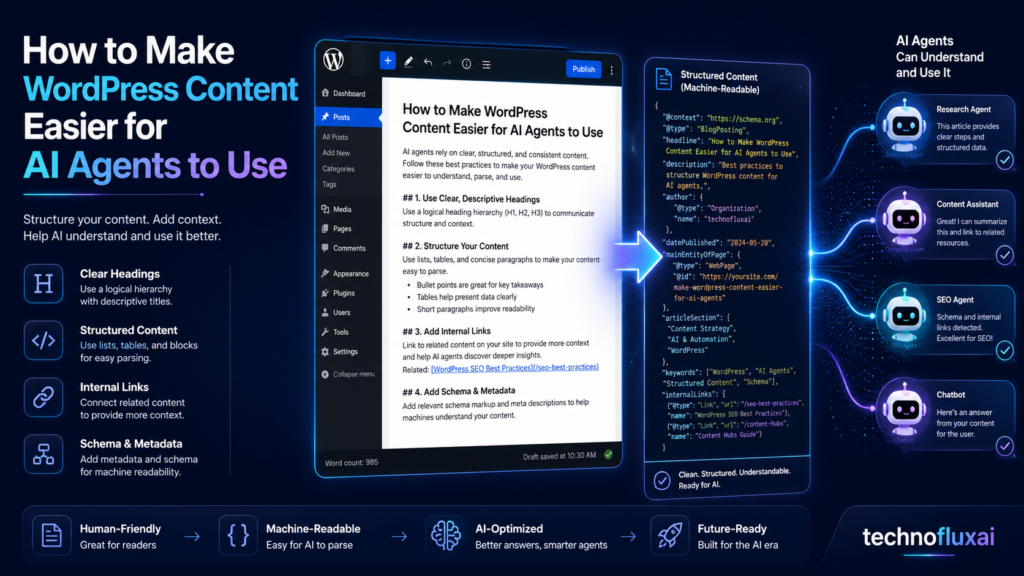
AI-friendly content is not robotic content. The best version is clear, specific, well-organized, and genuinely helpful. The goal is to make every important idea easy to find and easy to connect with the rest of the page.
1. Put the Main Answer Near the Top
AI agents often look for a clear answer before they evaluate the rest of the page. If your article takes too long to explain what it is about, the agent has to guess. That increases the chance of weak summaries or missed context.
A strong WordPress article should answer the main question early. You can still tell a story, build context, and explain details later, but the page should not hide the core answer behind a long introduction.
Weak Opening
“The internet has changed a lot over the years, and businesses need to adapt to new technology.”
Better Opening
“To make a WordPress article easier for AI agents to use, start with a direct answer, use descriptive headings, add clear examples, and connect related ideas with internal links.”
2. Use Headings That Explain the Page Structure
Headings are not just design elements. They are navigation signals. A human reader uses headings to scan. AI agents use them to understand how ideas are grouped.
Avoid vague headings like “Overview,” “More Info,” or “Final Thoughts” when a more specific heading would help. A heading should tell the reader and the AI system what the next section actually covers.
Better Heading Examples
- How AI Agents Read WordPress Content
- Where to Place the Quick Answer in a Blog Post
- How Schema Helps AI Understand Page Purpose
- Common WordPress Formatting Mistakes That Confuse AI Tools
- How to Update Old Posts for AI Search
3. Make Each Section Useful on Its Own
AI agents may extract one section of your page instead of reading the entire article from top to bottom. That means each important section should have enough context to make sense by itself.
For example, a section titled “Use Schema” is less helpful than a section titled “Use Schema Markup to Clarify What the Page Is About.” The second version gives the AI agent more meaning before it even reads the paragraph.
Clear Topic
Each section should focus on one main idea instead of mixing several unrelated points.
Direct Explanation
Explain what the concept means before giving advanced advice.
Practical Example
Show how the idea applies to a real WordPress page, product review, tutorial, or service page.
4. Add Context Around Important Entities
An entity is a specific thing your content talks about. It can be a brand, tool, product, person, place, process, platform, topic, or concept. AI agents use entities to understand relationships.
If you mention WordPress, explain whether you mean WordPress.org, WordPress.com, the WordPress editor, a WordPress plugin, or a WordPress website. If you mention AI agents, explain whether you mean AI search assistants, automated browsing agents, content extraction tools, or workflow agents.
Practical Example
Instead of writing, “Use Rank Math for better AI results,” write, “Use an SEO plugin such as Rank Math or Yoast SEO to add structured metadata, page titles, meta descriptions, and schema markup that helps search systems understand the purpose of your WordPress page.”
The improved version explains the tool category, the task, and the reason it matters.
5. Use Lists, Tables, and Cards for Scannable Information
AI agents can use structured information more easily when it is organized clearly. Long walls of text make it harder to identify steps, comparisons, warnings, and definitions.
Use formatting that matches the job of the content. Steps should be numbered. Comparisons should be grouped. Warnings should be separated. Definitions should be easy to spot.
6. Add Schema Markup Where It Fits
Schema markup gives search systems extra clues about what a page contains. It does not replace good writing, but it can support your content structure.
For WordPress sites, common schema types include Article, BlogPosting, FAQPage, HowTo, Product, Review, LocalBusiness, Organization, and BreadcrumbList. The right schema depends on the page type.
Simple Rule
Use schema to describe what is already visible on the page. Do not add FAQ schema for questions that are not actually answered. Do not add review schema if the page does not contain a real review. Schema should clarify, not fake authority.
7. Create an AI-Friendly WordPress Workflow
Use this workflow when writing or updating a WordPress post:
- Choose one main question the page should answer.
- Write a direct answer in the first screen of the article.
- Use descriptive H2 and H3 headings.
- Define important terms before using them heavily.
- Add examples, steps, tables, or checklists where they make the content clearer.
- Link to related internal pages with descriptive anchor text.
- Add relevant schema markup that matches the visible content.
- Review the post by asking whether an AI assistant could summarize it correctly in five sentences.
This workflow helps your content serve readers first while also making it easier for AI systems to understand the purpose, structure, and value of the page.
Advanced Optimization
How to Upgrade Existing WordPress Posts for AI Agents
You do not need to rebuild your whole website at once. Start with your most important posts, then improve the structure, clarity, and usefulness one page at a time.
Advanced Tip 1: Add a Clear Summary Block
A summary block gives AI agents a clean overview of the page. This is especially useful for long tutorials, product comparisons, service pages, and resource guides.
What to Include
- The main answer
- Who the page is for
- The problem it solves
- The steps or criteria covered
- The most important takeaway
Advanced Tip 2: Strengthen Internal Links
Internal links help AI agents understand how your content connects. A post about WordPress content for AI agents could link to related articles about schema markup, AI SEO, content briefs, WordPress plugins, and generative engine optimization.
The anchor text matters. “Click here” is weak because it gives no context. “Learn how to add FAQ schema in WordPress” is stronger because it explains the destination.
Weak Anchor Text
Read more
Better Anchor Text
Read our guide to AI SEO for WordPress beginners
Advanced Tip 3: Refresh Old Posts With Better Intent Matching
Older WordPress posts often rank for keywords but fail to answer the modern version of the search intent. AI agents are especially sensitive to this because they are trying to solve a task, not just match a phrase.
When updating a post, check whether the page answers the question someone is actually asking now. A post titled “Best WordPress SEO Tips” may need sections about AI summaries, entity clarity, structured data, content freshness, and answer-first formatting.
Common Mistakes to Avoid
Burying the Answer
Do not make readers or AI agents dig through five paragraphs before the page says anything useful.
Using Vague Headings
Headings should explain the section, not act as decoration.
Adding Schema Without Substance
Structured data cannot rescue a thin or unclear page.
Writing for Bots Only
AI-friendly content still needs to help real people. Clarity beats keyword stuffing.
FAQ
What does it mean to make WordPress content easier for AI agents to use?
It means structuring your content so AI tools can understand the topic, extract the main answer, follow the logic, identify important entities, and summarize the page accurately.
Is AI-friendly content the same as SEO content?
They overlap, but they are not exactly the same. SEO content often focuses on ranking in search results. AI-friendly content also focuses on being easy for AI assistants, answer engines, and task-based agents to understand and reuse.
Do I need schema markup for every WordPress post?
Not every post needs advanced schema, but every important page should have basic metadata and a clear page type. Use schema when it accurately describes what is already visible on the page.
Can AI agents read content inside tabs, accordions, or page builders?
Sometimes, but important content should not be hidden or difficult to access. Place your most valuable answers, definitions, and steps in clear visible sections whenever possible.
What is the fastest way to improve an old WordPress post for AI search?
Add a direct answer near the top, rewrite vague headings, include practical examples, improve internal links, and add relevant schema markup if it matches the content.
Final Takeaway
The best WordPress content for AI agents is not stuffed with keywords or overloaded with technical tricks. It is clear, structured, specific, and genuinely useful.
If your page answers the question early, explains important terms, uses logical headings, adds examples, and connects related ideas, both humans and AI systems will have an easier time understanding its value.
Build Smarter WordPress Content
Start by updating one high-value post this week. Improve the answer, structure the headings, add useful examples, and make the page easier for both readers and AI agents to understand.
Explore more TechnofluxAI guides on AI SEO, WordPress content systems, and creator-friendly automation.