

Estimated reading time: 10 minutes
TechnofluxAI Workflow Guide
WordPress AI Content Workflow: Draft, Review, Optimize, Publish
A WordPress AI content workflow is a repeatable process for turning an idea into a useful, search-ready blog post by using AI for drafting, humans for review, SEO tools for optimization, and WordPress for final publishing.
Quick Answer
The best AI workflow for WordPress is: research the reader’s problem, generate a structured draft, fact-check and human-edit the content, optimize the post for SEO and AI search, then publish with strong formatting, images, internal links, and a final quality checklist.
Reader Pain Point
AI makes it easy to create words fast, but fast content is not automatically good content. Many WordPress posts fail because they are published before they are checked for accuracy, usefulness, formatting, search intent, and originality.
What You’ll Learn
You’ll learn how to build a simple WordPress AI content system that protects quality, reduces editing time, improves SEO structure, and makes each post easier for readers and AI search engines to understand.
Soft internal link suggestion: Link this article to a related TechnofluxAI guide such as “How to Write AI-Friendly Blog Posts” or “Beginner SEO Checklist for WordPress Bloggers.”
Main Workflow
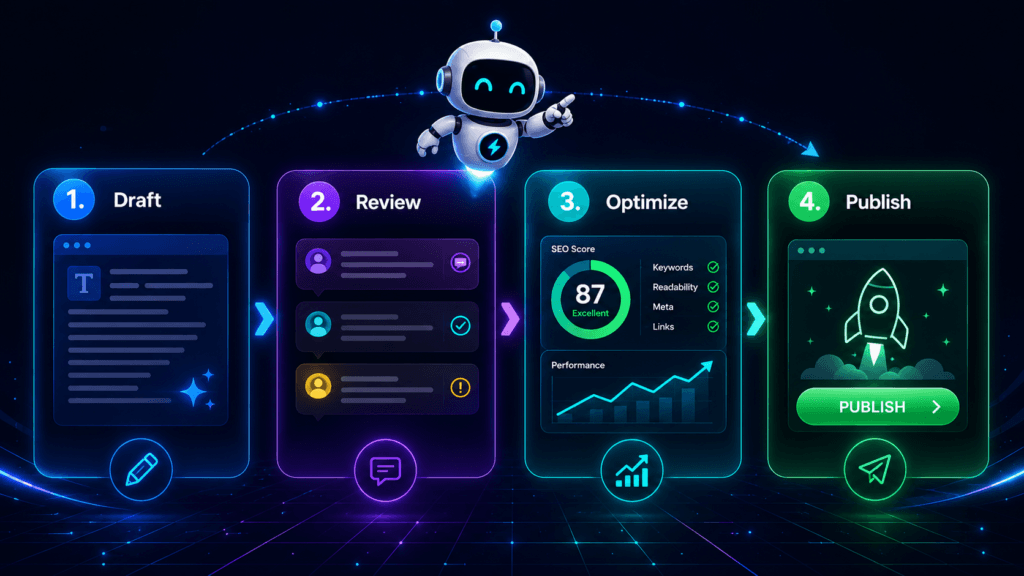
The 4-Part WordPress AI Content Workflow
A strong AI content process has four stages: draft, review, optimize, and publish. AI can help with speed and structure, but the best results come when a human adds judgment, examples, experience, accuracy checks, and brand voice.
1. Draft
Turn the topic into a clear outline, article structure, intro, examples, and first-pass body content.
2. Review
Check facts, remove filler, improve clarity, add real examples, and make sure the article helps a real person.
3. Optimize
Improve headings, metadata, internal links, alt text, schema opportunities, snippets, and AI-search extractability.
4. Publish
Format in WordPress, preview on mobile, set the featured image, choose categories and tags, then publish or schedule.
Step 1: Draft the Post With Search Intent First
Before asking AI to write, define the job of the article. A WordPress post should not begin with “write me 1,500 words.” It should begin with the reader’s problem, the search intent, and the answer the post must deliver.
AI Draft Prompt Example
“Create a WordPress blog outline for beginners about [topic]. Start with a direct answer, explain the problem, include step-by-step guidance, practical examples, common mistakes, and FAQ questions. Write for a reader who wants a clear process, not hype.”
Drafting Checklist
- Define the target reader before drafting.
- Write the main answer in the first 100 words.
- Use H2 headings that match real questions or workflow stages.
- Ask AI for examples, but replace weak examples with your own.
- Include a clear takeaway for every major section.
Step 2: Review the AI Draft Like an Editor, Not a Spellchecker
The review stage is where AI content becomes useful content. Do not only fix grammar. Look for shallow claims, repeated ideas, missing context, weak transitions, unsupported advice, and anything that sounds like a generic AI answer.
Remove
Generic filler, repeated points, fake certainty, bloated intros, unsupported claims, and phrases that do not help the reader act.
Add
First-hand experience, screenshots, examples, product context, internal links, definitions, comparison tables, and clear next steps.
Warning Card: AI Can Sound Right and Still Be Wrong
Always verify technical steps, tool names, plugin settings, prices, laws, statistics, and current platform features before publishing. A confident sentence is not the same as an accurate sentence.
Step 3: Optimize for SEO, AI Search, and Human Skimming
Optimization is not keyword stuffing. It is the process of making the article easier to understand, easier to crawl, easier to summarize, and easier to trust.
Step 4: Publish in WordPress With a Final Quality Gate
Publishing is not just pressing the blue button. A strong WordPress publishing process includes formatting, previewing, metadata, image checks, mobile review, category selection, and final proofing.
WordPress Publishing Checklist
- Paste the article into the WordPress block editor and clean up spacing.
- Confirm H1, H2, and H3 hierarchy.
- Add a featured image with descriptive alt text.
- Write or confirm the excerpt.
- Select one primary category and a small set of relevant tags.
- Add internal links to related posts.
- Preview desktop and mobile layouts.
- Check links, buttons, image loading, and CTA placement.
- Publish immediately or schedule for the best editorial timing.
Advanced Publishing Guidance
How to Make AI-Assisted WordPress Content Worth Referencing
AI search engines are more likely to reference content that gives a clear answer, demonstrates topical authority, avoids vague claims, and explains the process in a way that is easy to quote, summarize, and verify.
Use Definition Blocks
Add short, direct definitions near the top of the article. Example: “A WordPress AI content workflow is a repeatable process for drafting, reviewing, optimizing, and publishing posts with AI assistance and human oversight.”
Add Process Lists
AI systems and readers both understand step-by-step content quickly. Use ordered workflows, checklists, and comparison cards instead of long walls of text.
Show Human Judgment
Add your own examples, warnings, screenshots, opinions, and experience. Content that only repeats common advice is easier to ignore and harder to trust.
Common Mistakes to Avoid
Publishing the First AI Draft
The first draft is raw material. It still needs editing, fact-checking, examples, formatting, and brand voice.
Optimizing Only for Keywords
A keyword can help define the topic, but the article must satisfy the reader’s actual problem.
Skipping the Excerpt
A strong excerpt gives WordPress themes, archive pages, and readers a clean summary of the post.
Forgetting Internal Links
Internal links help readers move through your site and help search engines understand related content.
FAQ: WordPress AI Content Workflow
What is a WordPress AI content workflow?
A WordPress AI content workflow is a repeatable process for using AI to help draft content, then using human review, SEO optimization, and WordPress publishing checks to create a finished blog post.
Can AI write WordPress blog posts by itself?
AI can create a first draft, outline, headline ideas, summaries, and metadata. However, a human should review the post for accuracy, usefulness, originality, examples, tone, and reader value before publishing.
How do I make AI content better for SEO?
Start with search intent, answer the main question early, use clear headings, add useful examples, include internal links, write a strong meta description, add relevant images, and remove generic filler.
What should I check before publishing an AI-written WordPress post?
Check facts, links, headings, formatting, image alt text, category, tags, excerpt, mobile layout, CTA placement, internal links, and whether the post gives the reader a complete answer.
Is AI content bad for Google Search?
AI-assisted content is not automatically bad. The problem is low-value content created at scale without original insight, accuracy, or usefulness. Use AI as an assistant, not as a replacement for quality control.
Final Takeaway
The best WordPress AI content workflow is not about publishing faster at any cost. It is about using AI to speed up the rough work while using human review to protect accuracy, trust, usefulness, and brand voice.
CTA
Want to build a smarter blog system? Use this workflow as your publishing checklist for every AI-assisted WordPress post before it goes live.
Image Suggestions
Featured Image Idea
Idea: A futuristic WordPress content dashboard showing four glowing stages: Draft, Review, Optimize, Publish.
Alt text: Neon AI dashboard showing a WordPress content workflow from draft to publish.
AI image prompt: Futuristic neon AI dashboard for a WordPress blog workflow, four clean cards labeled conceptually as draft review optimize publish, blue cyan purple black color palette, creator workspace, soft glow, modern UI, no logos, no unreadable text.
In-Article Image Idea 1
Idea: A creator reviewing an AI-generated blog draft on a laptop with checklist cards floating beside the screen.
Alt text: Creator reviewing an AI-generated WordPress blog draft with an editing checklist.
AI image prompt: Clean futuristic blogger workspace, person reviewing AI content on laptop, floating checklist UI cards, neon cyan and purple accents, dark background, practical modern AI workspace, no fake logos, no readable text.
In-Article Image Idea 2
Idea: WordPress publishing checklist visual with metadata, images, links, excerpt, and mobile preview represented as clean icons.
Alt text: WordPress publishing checklist with SEO, images, links, excerpt, and mobile preview steps.
AI image prompt: Neon AI publishing checklist interface, clean icons for SEO metadata images internal links excerpt mobile preview, dark UI dashboard, cyan blue purple glow, modern blog production theme, no logos, no unreadable text.
Optional Infographic Idea
Idea: A four-step vertical workflow: Draft → Review → Optimize → Publish.
Alt text: Four-step WordPress AI content workflow infographic showing draft, review, optimize, and publish.
AI image prompt: Vertical infographic layout showing four-stage AI content workflow for WordPress, clean neon cards, dark background, blue cyan purple accents, simple arrows, modern dashboard style, no fake logos, minimal readable text only if crisp.
Social Media Suggestions
YouTube Shorts hook: Stop publishing raw AI blog drafts. Use this 4-step WordPress workflow instead.
TikTok caption: AI can draft your blog post, but your workflow decides whether it ranks, helps, or gets ignored.
LinkedIn post: AI content does not fail because AI was involved. It fails when there is no editorial system. A better WordPress workflow is simple: draft with intent, review like an editor, optimize for clarity, then publish with a checklist. The human layer is what turns AI output into useful content.
Facebook post: Using AI for WordPress blog posts? Do not publish the first draft. Use a repeatable workflow: draft, review, optimize, and publish with a final checklist.
Pinterest title: WordPress AI Content Workflow for Better Blog Posts
Pinterest description: Learn a simple WordPress AI workflow for drafting, reviewing, optimizing, and publishing blog posts that are useful, readable, and SEO-ready.
Hashtags: #WordPress #AIContent #BloggingTips #SEOContent #ContentWorkflow #AIWriting #WordPressSEO #CreatorTools #BlogStrategy #GenerativeAI #DigitalPublishing #TechnofluxAI
Newsletter teaser: Before you publish another AI-written blog post, run it through this 4-step WordPress workflow.