

Estimated reading time: 11 minutes
TechnofluxAI Guide
How to Create a Small-Business AI Use Policy
AI can help a small business write faster, answer customer questions, summarize notes, improve marketing, and automate repetitive work. But without a clear AI use policy, your team may accidentally expose private data, publish unchecked AI content, rely on inaccurate answers, or use tools in ways that create legal, security, or brand risk.
Quick Answer
A small-business AI use policy should explain which AI tools are allowed, what employees can and cannot enter into those tools, when human review is required, how customer data should be protected, who approves new tools, and how AI-generated work should be checked before it is used.
Why Small Businesses Need One
AI tools are easy to start using, which is exactly why they need simple rules. A policy helps your team move faster without guessing what is safe, private, accurate, or approved.
The Real Pain Point
Most small businesses do not have a legal department, compliance team, or full-time security officer. That means AI decisions often happen casually: someone pastes a customer email into a chatbot, asks AI to write an ad claim, uploads a spreadsheet, or uses an AI-generated answer in a client message without checking it.
The problem is not that your team wants to use AI. The problem is that everyone may be using it differently. A small-business AI use policy turns random AI usage into a clear, repeatable system.
What This Article Will Help You Build
This guide will help you create a practical AI policy that works for a real small business. Not a 40-page corporate document. Not vague rules nobody reads. A usable policy that tells your team how to use AI responsibly in daily work.
You will learn what to include, how to set boundaries, how to protect customer data, how to require human review, and how to roll the policy out without slowing your team down.
A good AI use policy should make AI easier to use, not harder. The goal is to give your team safe lanes, not scare them away from useful tools.
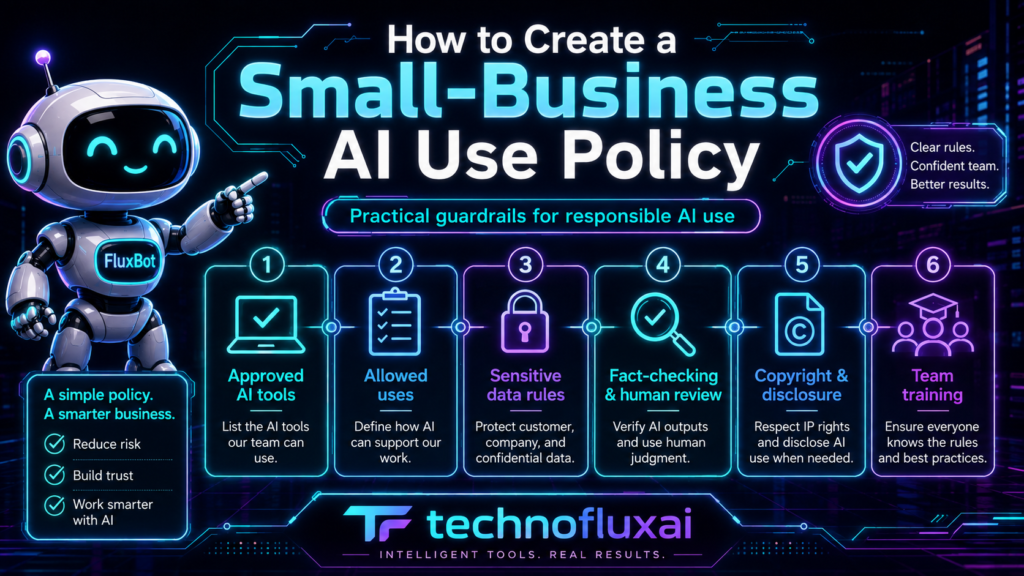
Policy Framework
The Core Parts of a Small-Business AI Use Policy
Your policy does not need to be complicated. It needs to answer the questions employees, contractors, and managers will actually have when they use AI tools.
1. Define the Purpose of AI in Your Business
Start by explaining why your business uses AI. This sets the tone for the whole policy. AI should support better work, faster operations, clearer communication, and smarter decision-making. It should not replace judgment, hide mistakes, or create fake expertise.
Example Policy Language
“Our business uses AI tools to help with drafting, research support, organization, brainstorming, customer service preparation, marketing assistance, and internal productivity. AI may support work, but employees are responsible for reviewing, correcting, and approving final outputs before use.”
2. List Approved and Prohibited AI Uses
Your team should know which AI uses are encouraged, which require approval, and which are not allowed. This avoids confusion and keeps everyone from inventing their own rules.
Usually Safe Uses
- Brainstorming blog ideas
- Drafting first versions of internal documents
- Summarizing non-sensitive meeting notes
- Creating outlines for marketing content
- Rewriting public information in a clearer style
Needs Approval
- Uploading business files
- Using AI with customer records
- Automating customer replies
- Creating financial analysis
- Using new AI software for team workflows
Should Be Prohibited
- Entering passwords or API keys
- Uploading private customer data without approval
- Using AI output as legal, medical, tax, or financial advice without expert review
- Publishing AI claims without fact-checking
- Impersonating customers, employees, or competitors
3. Create Data Privacy Rules
Data privacy is one of the most important parts of an AI policy. Employees need to know what information can be used with AI tools and what information must stay out.
A simple rule works best: do not enter sensitive, confidential, private, regulated, or customer-identifying information into AI tools unless the tool is approved for that purpose and the business owner or manager has authorized it.
Information Employees Should Protect
- Customer names, emails, phone numbers, addresses, and account details
- Payment information, invoices, tax records, and payroll data
- Passwords, login credentials, API keys, and security codes
- Private contracts, proposals, quotes, and business plans
- Employee records, performance notes, medical details, and HR documents
- Trade secrets, unpublished product ideas, and confidential client work
4. Require Human Review Before Final Use
AI can sound confident even when it is wrong. Your policy should make it clear that AI-generated work must be reviewed before it is sent, published, sold, submitted, or used to make an important decision.
Human Review Checklist
- Is the information accurate?
- Does it match our brand voice?
- Could it mislead a customer?
- Does it include unsupported claims?
- Does it reveal private or confidential information?
- Does it need expert review before use?
- Would we be comfortable standing behind this as our business?
5. Set Rules for Marketing, Sales, and Customer Communication
AI is useful for marketing, but it can also create risk if it invents claims, exaggerates results, writes fake testimonials, or makes promises your business cannot prove.
Your policy should require fact-checking for anything customer-facing. This includes ads, website copy, product descriptions, sales emails, chatbot replies, proposals, and social media posts.
6. Decide Who Can Approve New AI Tools
Small businesses often adopt tools quickly. That can be useful, but it can also create tool sprawl. One employee may use one AI app for documents, another may use a browser extension, and another may connect an AI tool to customer records without realizing the risk.
Your AI use policy should name who approves new AI tools. This could be the owner, operations manager, IT lead, marketing manager, or a small internal review group.
Tool Approval Questions
- What business task does this tool solve?
- What data will employees enter or upload?
- Does the tool store prompts, files, or outputs?
- Can the business control user access?
- Does the tool offer security, privacy, or admin settings?
- Who will be responsible for checking outputs?
- What happens if the tool gives a wrong answer?
7. Write the Policy in Plain Language
The best small-business AI policy is one your team can actually understand. Avoid legal-heavy language unless your industry requires it. Use direct rules, examples, and short sections.
Too Vague
“Employees should use artificial intelligence responsibly and in accordance with company expectations.”
Much Better
“Do not paste customer names, payment details, passwords, private contracts, employee records, or confidential client information into any AI tool unless that tool has been approved for that exact use.”
Implementation Guide
How to Roll Out Your AI Use Policy Without Overcomplicating It
A policy is only useful if your team knows it exists, understands it, and can follow it during normal work. Keep the first version simple, then improve it as your AI usage grows.
Step 1: Audit How Your Team Already Uses AI
Before you write rules, find out what is already happening. Ask employees and contractors which tools they use, what tasks they use them for, what data they enter, and whether AI outputs are reviewed before use.
Simple AI Use Audit
- Which AI tools are currently being used?
- Who uses each tool?
- What business task does each tool support?
- Is customer, employee, or confidential data being entered?
- Are outputs reviewed before they are used?
- Are any tools connected to business accounts or databases?
Step 2: Start With a One-Page Policy
A one-page policy is often enough for a small business starting out. You can expand it later if you work in a regulated industry, handle sensitive data, use AI in hiring, automate customer support, or connect AI tools to business systems.
One-Page Policy Structure
- Purpose of AI use
- Approved AI tools
- Allowed uses
- Prohibited uses
- Data privacy rules
- Human review requirements
- Tool approval process
- Who to ask when unsure
Step 3: Train the Team With Real Examples
Do not just send the policy as a document and hope people understand it. Walk through practical examples from your business. Show what is allowed, what needs approval, and what is off limits.
Allowed Example
Asking AI to rewrite a public service description in a friendlier tone, then reviewing it before publishing.
Approval Example
Uploading a customer support export to an AI tool to identify common complaints.
Not Allowed Example
Pasting a customer’s private payment issue, full name, phone number, and account notes into an unapproved public AI tool.
Common Mistakes to Avoid
Making the Policy Too Long
A small team is more likely to follow a clear one-page policy than a complicated document nobody reads.
Ignoring Contractors
Freelancers, virtual assistants, agencies, and consultants may also use AI with your business information.
Approving Tools Without Checking Data Use
Do not approve an AI tool until you understand what data it collects, stores, shares, or uses for training.
Skipping Human Review
AI-generated work can be useful, but it still needs a person responsible for accuracy and judgment.
FAQ
Does a small business really need an AI use policy?
Yes, if anyone in the business uses AI tools for writing, customer communication, marketing, data analysis, operations, or decision support. A simple policy helps prevent mistakes before they become expensive problems.
How long should a small-business AI policy be?
For many small businesses, one to three pages is enough. The policy should be short enough to read and specific enough to answer real workplace questions.
Should employees be allowed to use free AI tools?
Free tools may be useful for low-risk tasks, but employees should not enter private, confidential, customer, employee, financial, or regulated information into unapproved tools. Your policy should clearly explain what is allowed.
Who should approve AI tools in a small business?
The owner, manager, IT lead, operations lead, or another trusted decision-maker should approve AI tools before they are used with sensitive data or connected to business systems.
Is an AI use policy the same as a privacy policy?
No. A privacy policy usually explains how a business collects and handles personal information. An AI use policy tells employees and contractors how they may use AI tools during work.
Final Takeaway
A small-business AI use policy does not need to be intimidating. It needs to be clear, practical, and connected to how your team actually works.
Start with approved tools, allowed uses, prohibited data, human review rules, and a simple approval process. That gives your business the freedom to use AI while reducing the risk of careless mistakes.
Make AI Safer and Easier for Your Team
Pick one AI tool your business already uses. Write down who uses it, what they use it for, what data they enter, and who reviews the output. That single audit can become the foundation of your first AI use policy.
Explore more TechnofluxAI guides on AI workflows, small-business automation, and responsible AI systems.

About the Author
Jon Hicks
Founder of TechnofluxAI.
I’m the creator behind TechnofluxAI, focused on breaking down powerful AI tools, emerging trends, and practical strategies to help creators and entrepreneurs stay ahead in a rapidly evolving digital world.
Follow TechnofluxAI for the latest AI tools & strategies