

Estimated reading time: 8 minutes
AI Automation Safety Guide
How to Build a Human Review Step Into AI Automation
AI automation is powerful, but not every task should run without supervision. A human review step gives you control before an AI-generated email, post, report, invoice, or customer response goes live.
Quick Answer
To build a human review step into AI automation, pause the workflow after the AI creates its output, send that output to a review location, let a person approve or edit it, then continue the automation only after approval.
Why It Matters
AI can misunderstand context, use the wrong tone, miss details, or produce content that looks polished but still needs judgment. Human review catches mistakes before they reach customers or the public.
The Pain Point
Many beginners either over-automate everything or avoid automation completely. The smarter middle ground is simple: automate the repetitive work, then add human review where risk, trust, money, or brand reputation is involved.
What This Guide Will Help You Build:
You will learn where to place human approval, which tasks need review, how to design approval buttons, and how to keep your AI automation from becoming slow or messy.
Soft CTA:
Before you publish or send AI-generated work automatically, create a simple approval checkpoint for anything that affects customers, sales, public content, or sensitive decisions.
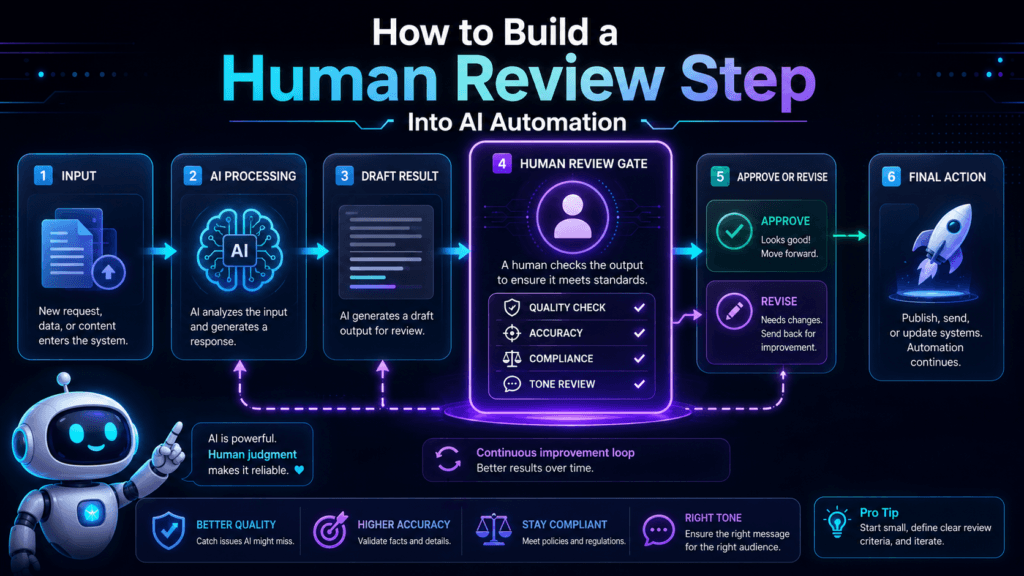
Human-in-the-Loop Workflow
The Best AI Automations Do Not Remove Humans Everywhere
A good AI workflow removes repetitive steps. It should not remove judgment from moments that need context, taste, ethics, or business awareness. That is where human review becomes useful.
Review Before Sending
Use this for customer emails, sales replies, proposals, support messages, and anything that represents your business directly.
Review Before Publishing
Use this for blog posts, social captions, newsletters, ads, landing pages, videos, and public-facing content.
Review Before Updating
Use this before AI changes CRM records, project statuses, invoices, task owners, customer notes, or important spreadsheet fields.
A Simple 6-Step Human Review Workflow
Step 1: Trigger the Automation
The workflow starts when something happens. That could be a form submission, new email, spreadsheet update, CRM stage change, uploaded file, or scheduled content task.
Step 2: Let AI Create the First Draft
The AI completes the repetitive thinking step. It can draft a reply, summarize a ticket, classify a lead, write a caption, create a report outline, or suggest a next action.
Step 3: Send the Output to a Review Location
Place the draft where a person can review it. Good review locations include an email draft folder, project management task, Airtable record, Notion database, Google Sheet row, Slack message, or CRM note.
Step 4: Add Approval Choices
Give the reviewer clear options. Use choices like approve, edit needed, reject, escalate, schedule, or send. Do not make the reviewer guess what happens next.
Step 5: Continue Only After Approval
The automation should wait for a human signal before it sends, publishes, updates, or moves the task forward. Approval is the gate.
Step 6: Log the Decision
Save who reviewed the output, what they decided, what changed, and when the final action happened. A simple log helps you improve prompts and troubleshoot future mistakes.
Where to Place the Human Review Step
The review step usually belongs between the AI output and the final action. That placement lets AI do the heavy lifting while keeping a human in control of the result.
Good Placement
Trigger → AI draft → Human review → Approved action
Risky Placement
Trigger → AI draft → Automatic send → Human notices later
Example: AI Email Reply
A customer fills out a support form. AI drafts a reply based on the question, order details, and support policy.
Instead of sending the reply automatically, the workflow creates a draft and marks it for review. A team member approves it, edits it, or escalates it.
Example: AI Social Post
AI turns a blog post into three social captions. The automation sends them to a content review board.
The reviewer checks tone, accuracy, hashtags, and timing. Only approved posts move to the scheduler.
Human Review Checklist
- Is the AI output factually correct?
- Does the tone fit the brand?
- Is any sensitive information included?
- Does the output match the customer or audience?
- Are required fields complete?
- Is the next action safe to automate?
- Should the item be approved, edited, rejected, or escalated?
- Was the final decision logged?
TechnofluxAI
Practical AI for creators and website owners
Learn how to use AI, improve AI search visibility, build smarter workflows, and test what actually works.
Explore our other sites
TimewasterAI
— product reviews, buying guides, and useful finds.
Tina Trends
— fashion, beauty, pets, lifestyle, and fun discoveries.
Mistakenly Delicious
— simple recipes and practical cooking ideas.
Advanced Implementation
Make Human Review Fast, Clear, and Easy to Repeat
A human review step should not feel like a traffic jam. The goal is to create a clean approval checkpoint that protects quality without slowing down every small task.
Use Risk Levels
Not every AI task needs review. Low-risk tasks can continue automatically. High-risk tasks should pause for approval before the final action happens.
Create Review Queues
Group AI outputs by status. Use labels like needs review, approved, edit needed, rejected, scheduled, sent, or escalated.
Add Time Limits
Review steps need ownership. Assign a reviewer and set a deadline so drafts do not sit untouched for days.
A Simple Approval Logic You Can Copy
If approved
Send the email, publish the post, update the CRM, schedule the asset, or move the task to the next stage.
If edits are needed
Send the item back to the reviewer, writer, or AI revision step with clear notes about what needs to change.
If rejected
Stop the automation path, log the issue, and prevent the item from being sent or published.
If escalated
Notify the right person. Escalation works best for refunds, complaints, legal topics, sensitive customers, or unusual requests.
Common Mistakes to Avoid
Mistake 1: Reviewing Everything
If every tiny AI task needs approval, the automation loses its value. Review the risky steps, not every harmless internal update.
Mistake 2: Having No Clear Owner
A review step without an owner becomes a waiting room. Assign one person or one team to each approval queue.
Mistake 3: Using Vague Approval Choices
Buttons like okay or done can create confusion. Use clear decisions such as approve, edit needed, reject, schedule, or escalate.
Mistake 4: Skipping the Decision Log
Without a log, you cannot see what was approved, who changed it, or why the automation behaved a certain way.
FAQ: Human Review Steps in AI Automation
What is a human review step in AI automation?
A human review step is a checkpoint where a person reviews AI-generated output before the workflow sends, publishes, updates, or approves the final result.
When should AI automation require approval?
Use approval for customer-facing messages, public content, financial tasks, legal language, sensitive data, important records, and anything that could damage trust if wrong.
Does human review make automation slower?
It can, but only if it is designed poorly. A clear approval queue, assigned owner, simple buttons, and deadline can keep the process moving.
Can low-risk AI tasks run without review?
Yes. Internal tagging, draft creation, note summaries, and low-impact organization tasks can often run automatically if the consequences are small.
What tools can handle human approval steps?
Review steps can be built with email drafts, project management boards, spreadsheets, databases, forms, chat notifications, CRM tasks, or automation platforms that support approval paths.
Final Takeaway
A human review step turns AI automation from a risky shortcut into a controlled workflow. Let AI create, sort, summarize, and prepare. Let humans approve the moments that affect trust, money, customers, and your brand.
Build Safer AI Automation
Start with one workflow. Add AI where it saves time. Add human approval where the final action matters. That balance gives you speed without giving up control.

About the Author
Jon Hicks
Founder of TechnofluxAI.
I’m the creator behind TechnofluxAI, focused on breaking down powerful AI tools, emerging trends, and practical strategies to help creators and entrepreneurs stay ahead in a rapidly evolving digital world.
Follow TechnofluxAI for the latest AI tools & strategies