

Estimated reading time: 8 minutes
AI Inbox Cleanup Comparison
SaneBox vs Gmail Gemini: Which Is Better for Inbox Cleanup?
SaneBox and Gmail Gemini both help with email overload, but they solve different problems. SaneBox is better for automatic inbox sorting. Gmail Gemini is better for summarizing, searching, and writing inside Gmail.
Quick Answer
Choose SaneBox if your inbox is crowded because too many low-value emails keep reaching your main inbox. Choose Gmail Gemini if your biggest problem is reading long threads, finding details, writing replies, or catching up faster inside Gmail.
Best Overall Pick
For pure inbox cleanup, SaneBox wins. For AI assistance inside Gmail, Gemini wins. Many busy Gmail users may get the best result by using SaneBox for sorting and Gemini for reading and replies.
The Real Problem
Most people do not need more email features. They need less noise. A cleaner inbox makes it easier to spot real customers, team messages, invoices, deadlines, and opportunities before they disappear under newsletters and automated updates.
Soft CTA:
Before adding another email tool, write down your top inbox problem: too much junk, too many long threads, poor search, slow replies, missed follow-ups, or no daily review system.
Main Comparison
SaneBox Cleans the Inbox. Gmail Gemini Helps You Work Inside It.
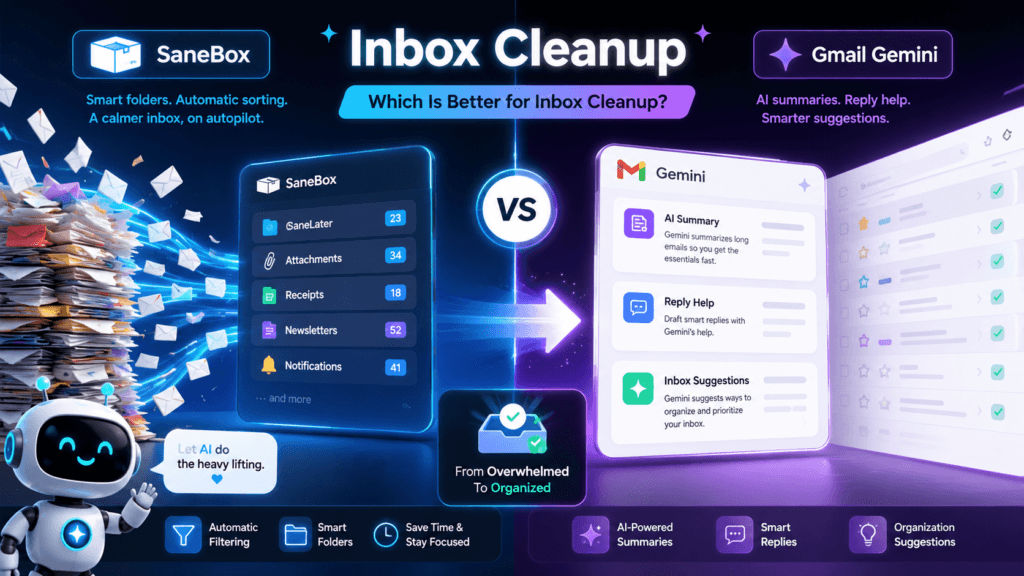
The biggest mistake is treating these tools like direct copies. They are not. SaneBox acts like an automatic email organizer. Gemini acts like an AI assistant inside Gmail. That difference matters when you are choosing the right tool.
What SaneBox Does Best
SaneBox studies email patterns and moves less important messages out of your main inbox. The result is a calmer inbox where important emails are easier to notice.
- Automatically filters lower-priority email.
- Creates smart folders for inbox organization.
- Summarizes filtered email in a digest.
- Works beyond Gmail, including other email providers.
- Helps reduce the number of emails you manually sort.
What Gmail Gemini Does Best
Gmail Gemini helps you understand and respond to email faster. It is especially useful when your inbox contains long threads, scattered details, and messages that need polished replies.
- Summarizes long email threads.
- Drafts new emails and replies.
- Finds information from previous emails.
- Can help locate details from connected Google files.
- Improves writing, tone, and response speed.
SaneBox vs Gmail Gemini: Feature-by-Feature Breakdown
Inbox Cleanup
SaneBox is stronger for inbox cleanup because it automatically moves less important emails away from your main inbox. Gemini can help you find and summarize information, but it is not mainly a folder-based cleanup system.
Email Summaries
Gemini is better for summarizing long conversations. SaneBox offers digest-style summaries for filtered messages, but Gemini is more useful when you need to understand the meaning, action items, or context of a thread.
Writing Replies
Gmail Gemini wins for writing. It can help draft replies, polish messages, adjust tone, and turn rough notes into emails. SaneBox is focused more on organizing email than creating responses.
Cross-Platform Use
SaneBox is better if you use more than Gmail. It can work with different email services and devices. Gmail Gemini makes the most sense when Gmail and Google Workspace are already the center of your workflow.
Setup Simplicity
Gemini is easier if it is already included in your Gmail plan. SaneBox takes more setup because you need to connect your email account and train the system, but the payoff can be stronger long-term sorting.
Daily Workflow Fit
SaneBox works quietly in the background. Gemini works when you ask it to help. That makes SaneBox better for passive cleanup and Gemini better for active email work.
Choose SaneBox If…
- Your inbox fills with newsletters, promos, receipts, and low-priority updates.
- You want fewer messages in your main inbox.
- You use more than one email provider.
- You prefer automatic sorting over AI chat features.
- You want an email cleanup system that works in the background.
Choose Gmail Gemini If…
- You already live inside Gmail or Google Workspace.
- You need help summarizing long email threads.
- You write many replies each day.
- You want AI help finding details in past emails.
- You care more about response speed than folder cleanup.
Practical Example: The Busy Creator Inbox
Imagine a creator who gets sponsorship pitches, customer questions, newsletter replies, social media alerts, software receipts, and collaboration updates in the same inbox.
SaneBox can move lower-priority messages away from the main inbox so the creator sees the important conversations first. Gmail Gemini can then summarize a long sponsor thread, find a deadline, and help draft a professional reply.
That is why the best answer is not always one tool or the other. SaneBox handles inbox pressure. Gemini handles email understanding and response speed.
Warning: Do Not Buy Based on AI Hype Alone
A smarter inbox is not the same thing as a cleaner inbox. If your main problem is email volume, choose a sorting system. If your main problem is understanding and replying, choose an assistant.
Final Decision Guide
The Best Inbox Cleanup Tool Depends on Your Email Problem
SaneBox and Gmail Gemini are both useful, but they are not built for the same job. Start with the problem, then pick the tool. That approach saves money, time, and frustration.
Best for Inbox Cleanup
SaneBox is the better choice when your main inbox is too crowded. It reduces clutter by moving less important email into separate folders.
Best for AI Email Work
Gmail Gemini is the better choice when you need to summarize, search, draft, rewrite, and respond faster inside Gmail.
Best Combo Setup
Use SaneBox to keep the inbox clean. Use Gemini to process the important messages that remain. This setup fits heavy Gmail users who want both automation and AI assistance.
Simple Decision Checklist
Pick SaneBox when email volume is the issue.
Too many unimportant messages are landing in your inbox. You want fewer distractions before you even start reading.
Pick Gmail Gemini when email effort is the issue.
The inbox may not be huge, but the messages take too long to read, understand, search, and answer.
Use both when email is central to your business.
Client communication, sales replies, support questions, and partnerships deserve a cleaner inbox and faster AI-assisted replies.
Common Mistakes to Avoid
Mistake 1: Expecting Gemini to organize everything automatically
Gemini can help you understand and act on messages, but it is not a full replacement for a dedicated inbox sorting system.
Mistake 2: Using SaneBox when writing is the real bottleneck
SaneBox can reduce clutter, but it will not write your replies. If drafting messages drains your day, Gemini may help more.
Mistake 3: Cleaning email without changing habits
No tool can fix a messy inbox forever if you keep subscribing to everything, ignoring folders, and never reviewing old rules.
Mistake 4: Ignoring privacy and access settings
Email tools need access to your inbox. Review permissions, plan details, admin settings, and privacy terms before using any email assistant.
FAQ: SaneBox vs Gmail Gemini
Is SaneBox better than Gmail Gemini?
SaneBox is better for automatic inbox cleanup. Gmail Gemini is better for summarizing, searching, drafting, and replying inside Gmail.
Can Gmail Gemini clean my inbox?
Gemini can help you find information, summarize threads, and work through messages faster. For automatic sorting and background cleanup, SaneBox is usually the more direct fit.
Does SaneBox work with Gmail?
Yes. SaneBox can work with Gmail and other major email services. It adds smart folders and filters messages based on importance.
Do I need Gmail Gemini if I already use SaneBox?
Maybe. If SaneBox already keeps your inbox clean but you still spend too much time reading and replying, Gemini can add value.
Which tool is better for small business owners?
SaneBox is better for reducing inbox noise. Gmail Gemini is better for writing, summarizing, and finding details. Small business owners who depend on email may benefit from both.
Final Takeaway
SaneBox is the stronger choice for inbox cleanup. Gmail Gemini is the stronger choice for AI-powered email work. If your inbox is noisy, start with SaneBox. If your inbox is hard to process, start with Gemini.
Build a Cleaner AI Email Workflow
The best inbox system has two parts: fewer distractions and faster decisions. Use automation to remove noise. Use AI to understand and answer what matters.
TechnofluxAI
Practical AI for creators and website owners
Learn how to use AI, improve AI search visibility, build smarter workflows, and test what actually works.
Explore our other sites
TimewasterAI
— product reviews, buying guides, and useful finds.
Tina Trends
— fashion, beauty, pets, lifestyle, and fun discoveries.
Mistakenly Delicious
— simple recipes and practical cooking ideas.