

Estimated reading time: 8 minutes
How to Refresh Old AI Tool Reviews for 2026
A practical workflow for updating outdated AI tool reviews so they stay accurate, useful, search-friendly, and trustworthy for readers who are comparing tools in 2026.
Quick Answer
To refresh old AI tool reviews for 2026, check whether the tool still exists, update pricing and features, retest the product, replace old screenshots, improve comparison sections, add current use cases, refresh FAQs, strengthen affiliate disclosures, and republish with a clear update note.
The Creator Problem
AI tools change fast. A review that felt fresh six months ago can become misleading if the pricing, interface, free plan, model quality, integrations, or best alternatives have changed.
What This Helps You Do
This workflow helps you turn stale AI tool reviews into stronger 2026 content assets that are clearer for readers, safer for affiliate trust, and easier for search engines and AI answer engines to understand.
Why Old AI Tool Reviews Need Special Attention
AI software reviews age faster than many other blog posts because the products themselves keep changing. A tool may add new models, remove a free tier, change its workflow, launch team features, improve output quality, or fall behind newer competitors.
A basic date change is not enough. A real refresh should make the review more accurate, more helpful, more visual, and more decision-ready for someone choosing a tool now.
Soft CTA: Before publishing another new AI tool article, refresh one older review that already has traffic, backlinks, impressions, or affiliate potential.
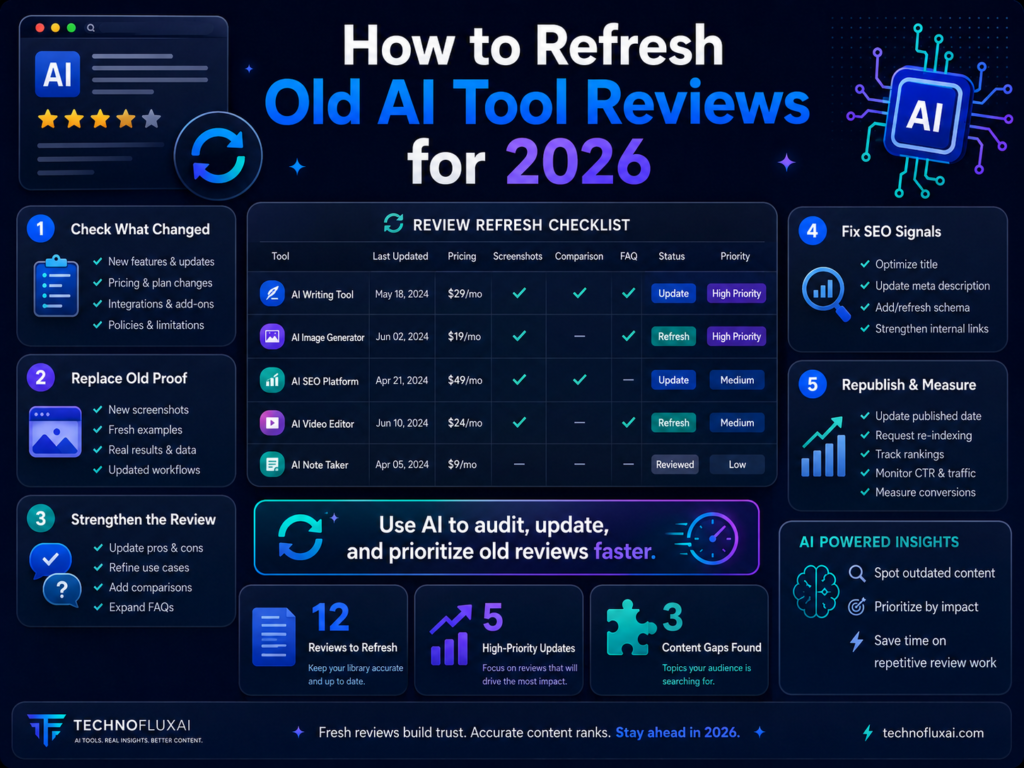
The 2026 AI Tool Review Refresh Workflow
The best way to refresh an old AI tool review is to treat it like a mini re-review. You are not just editing paragraphs. You are checking whether the tool still deserves the same recommendation.
Step 1: Check Tool Status
Confirm the tool is still active, accessible, relevant, and positioned the same way. Some AI products pivot, merge, get acquired, shut down, or become less competitive.
Step 2: Retest the Product
Open the tool and test the current workflow. Check output quality, speed, onboarding, templates, limits, exports, integrations, and whether the user experience has changed.
Step 3: Update Buyer Details
Refresh pricing, free plan limits, trial details, platform support, target users, refund terms, affiliate links, and important disclaimers.
Step 4: Improve the Decision Value
Add clearer pros and cons, best-for sections, comparisons, screenshots, real examples, use cases, alternatives, and a final recommendation that reflects 2026.
Start With a Review Refresh Audit
Before rewriting anything, audit the page. Your goal is to identify what is outdated, what is missing, and what should be strengthened. This prevents you from doing a shallow refresh that only changes the year in the title.
AI Tool Review Refresh Checklist
- Is the tool still available?
- Has the pricing changed?
- Has the free plan changed?
- Are the screenshots still accurate?
- Does the review mention old features that no longer exist?
- Are there better alternatives now?
- Does the review include firsthand testing?
- Are the pros and cons specific enough?
- Is the affiliate disclosure clear?
- Are internal links updated?
- Are FAQs current for 2026 search intent?
- Does the final verdict still make sense?
AI Prompt to Audit an Old AI Tool Review
Use AI to create an update plan before rewriting the review. Paste the old article, your testing notes, and any verified product details.
Audit this old AI tool review for a 2026 refresh.

Goal: Improve accuracy, usefulness, SEO, reader trust, and conversion quality.

Review the article and identify:
1. Outdated claims
2. Missing 2026 features or use cases
3. Pricing or plan details that need verification
4. Weak sections that need more firsthand testing
5. Missing screenshots or examples
6. Internal link opportunities
7. FAQ questions to add or update
8. Better comparison angles
9. Affiliate disclosure improvements
10. Final recommendation changes

Important rules:
- Do not invent facts about the tool.
- Mark anything that needs manual verification.
- Separate quick edits from deeper rewrite tasks.
- Prioritize changes that help readers make a better decision.

Old review:
[Paste article here]

Current testing notes:
[Paste notes here]

Verified product details:
[Paste pricing, features, screenshots, and plan details here]
What to Update in Every 2026 AI Tool Review
Pricing and Plans
Update monthly pricing, annual pricing, free plan limits, credit systems, usage caps, team plans, trials, and upgrade restrictions.
Feature Changes
Check new features, removed features, model upgrades, export options, integrations, automation features, templates, and workflow changes.
Firsthand Testing
Add real testing notes, example outputs, screenshots, limitations, learning curve notes, and specific situations where the tool performs well or poorly.
Alternatives
Refresh competing tools and explain when a reader should choose this product instead of another popular option.
Before-and-After Review Refresh Example
Weak Old Review Section
“This is one of the best AI writing tools. It has many features and is great for bloggers, marketers, and businesses.”
Stronger 2026 Review Section
“After retesting the tool in 2026, its strongest use case is still fast first-draft content creation. The biggest improvement is its cleaner workflow for content briefs, but users who need deep factual research should still verify outputs manually before publishing.”
Refresh the Review Structure, Not Just the Facts
Many older AI reviews are built like basic list posts: intro, features, pros, cons, conclusion. For 2026, readers need faster decision support. Give them a structure that answers the real buying question: “Is this still worth using?”
Recommended 2026 AI Tool Review Structure
- Updated verdict: Say whether the tool is still recommended.
- Best for: Explain who should use it.
- Not ideal for: Explain who should skip it.
- What changed: Summarize major 2026 updates.
- Hands-on testing: Show how you tested the tool.
- Pricing notes: Explain plan differences clearly.
- Pros and cons: Use specific, evidence-based points.
- Alternatives: Compare against realistic competitors.
- FAQ: Answer current reader objections.
- Final recommendation: Give a clear next step.
Advanced Tips for Refreshing AI Tool Reviews in 2026
A strong refresh should make the article feel newly useful, not lightly edited. The goal is to improve trust, accuracy, comparison value, and conversion quality at the same time.
Add an Update Note Near the Top
Tell readers when the review was last updated and what was checked. This builds trust and makes the page feel maintained instead of recycled.
Use Real Screenshots
Replace old dashboard images with current screenshots. Readers want to see what the tool actually looks like before they sign up.
Add a “Who Should Skip It” Section
Honest limitations make reviews stronger. A review that explains who should not buy the tool often feels more trustworthy than one that recommends it to everyone.
Use AI to Create a Refresh Brief
Once your audit is complete, use AI to turn your notes into a clear editing plan. This keeps the update focused and prevents random rewriting.
Create a refresh brief for this AI tool review.

Include:
1. New article angle for 2026
2. Sections to rewrite
3. Sections to add
4. Claims that need verification
5. Screenshots needed
6. Comparison updates
7. Internal links to add
8. FAQ questions to include
9. CTA improvements
10. Final verdict recommendation

Use this format:
- Priority
- Section
- Problem
- Recommended fix
- Notes for editor

Old review notes:
[Paste notes]

Current product testing notes:
[Paste notes]

Business goal:
[Affiliate clicks, email signups, authority content, comparison ranking, etc.]
Common Mistakes to Avoid
Warning Card
- Only changing the year: Readers can tell when a review says 2026 but still talks like an old article.
- Trusting AI without verification: AI can help organize the refresh, but pricing, features, and tool availability need manual checking.
- Keeping outdated screenshots: Old visuals make the entire review feel neglected.
- Ignoring better alternatives: If the market changed, your recommendation may need to change too.
- Hiding affiliate relationships: Disclosures should be clear, visible, and easy for readers to understand.
- Making every review positive: A useful review should explain limitations, tradeoffs, and who the tool is not right for.
AI Tool Review Refresh FAQ
How often should I refresh AI tool reviews?
For important AI tool reviews, review them at least every quarter. For high-traffic or affiliate-heavy pages, check pricing, features, and competitors more often.
Should I change the publish date after updating a review?
Only update the date if the article was meaningfully refreshed. A real update should include verified changes, improved examples, current screenshots, stronger recommendations, or new comparison details.
Can AI rewrite the whole review for me?
AI can help rewrite sections, organize findings, and create a stronger structure. However, you should provide real testing notes and manually verify product details before publishing.
What is the most important part of a refreshed AI review?
The most important part is the updated verdict. Readers want to know whether the tool is still worth using, who it is best for, and what tradeoffs they should understand before signing up.
Should I remove reviews for AI tools I no longer recommend?
Not always. Sometimes the better move is to update the article with a clear explanation, recommend alternatives, and redirect readers to a better option. Remove or redirect only when the page no longer serves readers or your site strategy.
Final Takeaway
Refreshing old AI tool reviews for 2026 is not busywork. It is one of the fastest ways to protect reader trust, improve affiliate performance, strengthen topical authority, and make your existing content library work harder.
CTA: Refresh One Review Before Writing a New One
Choose one older AI tool review, retest the product, update the facts, improve the verdict, and add a stronger comparison section. One strong refresh can be more valuable than another thin new post.
Next internal link suggestion: Link this article to guides about AI content audits, WordPress content inventory, affiliate SEO, and AI tool comparison articles.
TechnofluxAI
Practical AI for creators and website owners
Learn how to use AI, improve AI search visibility, build smarter workflows, and test what actually works.
Explore our other sites
TimewasterAI
— product reviews, buying guides, and useful finds.
Tina Trends
— fashion, beauty, pets, lifestyle, and fun discoveries.
Mistakenly Delicious
— simple recipes and practical cooking ideas.
Want more TechnofluxAI in Google?
Add TechnofluxAI as a Preferred Source to help Google show you more of our AI guides, tests, workflows, and research.