

Estimated reading time: 8 minutes
How to Build a WordPress Content Inventory With AI
A practical workflow for organizing your WordPress posts, finding outdated content, spotting SEO gaps, and using AI to turn your website into a clearer content system.
Quick Answer
To build a WordPress content inventory with AI, export your post list, organize it in a spreadsheet, add key SEO and content fields, then use AI to classify topics, identify weak pages, suggest updates, and group articles into content clusters.
The Real Problem
Most WordPress sites grow messy over time. You publish posts, update a few, forget older ones, and eventually lose track of what is ranking, what is outdated, and what should be improved.
What This Helps You Do
This workflow helps you create a simple content command center so you can update old posts, plan new articles, improve internal links, and make better SEO decisions without guessing.
Why a Content Inventory Matters
A content inventory is a structured list of the pages and posts on your website. For WordPress users, it becomes the foundation for smarter content updates, stronger internal linking, cleaner categories, and better editorial planning.
Without an inventory, you are managing your website from memory. With one, you can see your content clearly and make decisions based on what already exists.
Creator mindset: Your WordPress content is not just a pile of posts. It is an asset library. AI helps you map that library faster.
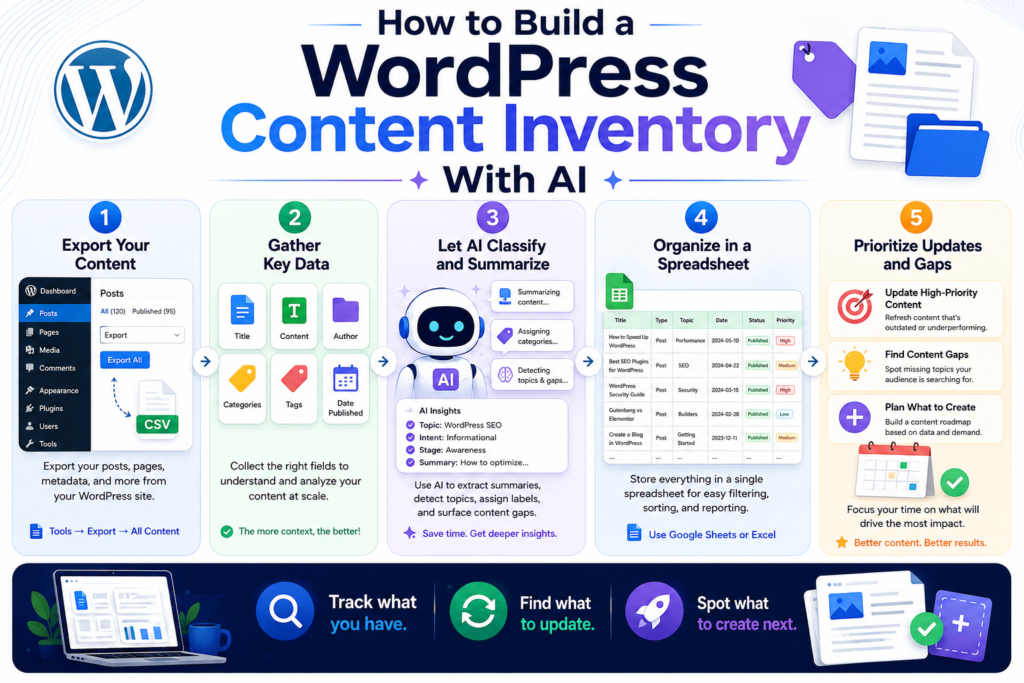
The AI-Powered WordPress Content Inventory Workflow
A strong content inventory does not need to be complicated. Start with the basics, then use AI to help you organize, classify, and prioritize your content. The goal is clarity, not spreadsheet perfection.
Step 1: Export Your Content List
Start by collecting your WordPress post titles, URLs, categories, publish dates, authors, and status. You can export this manually, use a plugin, or copy from your WordPress dashboard.
Step 2: Add SEO Fields
Add columns for focus keyword, meta description, search intent, target reader, internal links, update status, traffic notes, and content quality score.
Step 3: Use AI to Classify Content
Feed your post titles and summaries into AI and ask it to group them by topic, funnel stage, reader problem, content type, and update priority.
Step 4: Turn the Inventory Into Action
Use the finished inventory to decide which posts to refresh, merge, expand, delete, redirect, internally link, or turn into new content clusters.
What to Include in Your Content Inventory
Your inventory should give you enough information to make decisions quickly. Do not overload it with columns you will never use. Start with the fields that help you understand what each post is, who it serves, and what should happen next.
Core Content Inventory Columns
- Post title
- URL
- Content type
- Category
- Publish date
- Last updated date
- Target keyword
- Search intent
- Target reader
- Current CTA
- Internal links included
- Suggested internal links
- Content status
- Update priority
- Next action
Simple AI Prompt for Classifying WordPress Content
Once you have a list of titles and URLs, AI can help you make sense of them. Use a prompt like this with batches of posts.
Analyze this WordPress content list.

For each post, classify:
1. Main topic
2. Search intent
3. Target reader
4. Funnel stage
5. Content type
6. Suggested content cluster
7. Update priority: High, Medium, or Low
8. Recommended next action

Use clear, practical labels. Do not invent performance data. If you are unsure, mark it as "Needs review."

Content list:
[Paste post titles, URLs, categories, and summaries here]
How AI Helps You Find Content Gaps
A content gap is a missing article, missing section, weak explanation, or unanswered reader question. AI can scan your inventory and help you see where your site is thin.
Topic Gaps
AI can identify topics you mention often but have not fully covered with dedicated articles.
Intent Gaps
You may have many informational posts but not enough comparison, tutorial, review, or buying-intent content.
Internal Link Gaps
AI can suggest which posts should link to each other based on topic similarity and reader journey.
Update Gaps
Older posts may need fresher examples, better formatting, stronger FAQs, updated CTAs, or clearer summaries.
Recommended Content Status Labels
Status labels make your inventory easier to act on. Instead of staring at a giant list of posts, you can filter by what needs attention first.
Keep
The post is useful, accurate, and still fits your site strategy.
Refresh
The post is worth keeping but needs updated examples, sections, links, or SEO improvements.
Expand
The post has potential but is too thin, too narrow, or missing important reader questions.
Merge
The post overlaps with another article and may perform better as part of a stronger combined page.
Remove or Redirect
The post is outdated, irrelevant, duplicated, or no longer supports your content strategy.
Example WordPress Content Inventory Row
| Title | Intent | Status | Priority | Next Action |
|---|---|---|---|---|
| Best AI Tools for Bloggers | Comparison | Refresh | High | Update tools, add FAQs, improve internal links |
Advanced Ways to Use Your WordPress Content Inventory
Once your inventory is built, it becomes more than a list. It becomes a planning system. You can use it to guide updates, build topic authority, organize internal links, and avoid publishing random articles that do not connect to the rest of your site.
Build Content Clusters
Group related posts around larger pillar topics. For example, a site about AI blogging might have clusters for keyword research, content writing, WordPress publishing, and SEO updates.
Prioritize High-Value Updates
Not every old article deserves your time. Use AI to help flag pages with strong strategic value, outdated examples, missing sections, weak CTAs, or poor internal link coverage.
Create a Smarter Editorial Calendar
Your inventory can show which topics are already covered and which ones need support articles. This helps you plan future posts with purpose instead of chasing random ideas.
AI Prompt for Finding Internal Link Opportunities
Internal links are one of the easiest improvements to miss. Use AI to compare related article titles and suggest natural linking opportunities.
Review this WordPress content inventory and suggest internal link opportunities.

For each recommendation, include:
1. Source article
2. Destination article
3. Suggested anchor text
4. Why the link makes sense
5. Priority: High, Medium, or Low

Rules:
- Only suggest links that are contextually relevant.
- Do not suggest the same destination repeatedly.
- Use natural anchor text.
- Mark uncertain recommendations as "Needs manual review."

Content inventory:
[Paste titles, URLs, topics, and summaries here]
Common Mistakes to Avoid
Warning Card
- Tracking too many fields: A giant spreadsheet is useless if you never open it.
- Letting AI invent performance data: AI can classify content, but it should not guess traffic, rankings, or conversions.
- Ignoring old posts: Some of your best opportunities may be articles you published months or years ago.
- Only looking at keywords: Search intent, reader need, content quality, and internal links matter too.
- Never turning the inventory into action: The inventory is only valuable if it leads to updates, links, new posts, or cleanup decisions.
WordPress Content Inventory FAQ
What is a WordPress content inventory?
A WordPress content inventory is a structured list of your site’s posts and pages. It usually includes titles, URLs, categories, keywords, publish dates, update status, internal links, and recommended next actions.
Can AI create a content inventory for me?
AI can help organize, classify, summarize, and prioritize your content, but you still need to provide accurate post data from WordPress and review the recommendations before making changes.
How often should I update my content inventory?
A practical rhythm is to update it after every publishing batch and review it monthly or quarterly. Larger sites may need a more frequent review schedule.
What is the biggest benefit of using AI for this?
The biggest benefit is speed. AI can help you sort large amounts of content into useful groups, identify patterns, and suggest next actions faster than doing everything manually.
Final Takeaway
Building a WordPress content inventory with AI gives you control over your website. Instead of guessing what to update or publish next, you can see your content system clearly and make smarter decisions.
CTA: Turn Your WordPress Site Into a Content System
Start with a simple spreadsheet, add your most important content fields, and let AI help you classify, prioritize, and improve what you already have.
Best next step: Choose ten existing posts and run them through the inventory workflow before auditing your entire site.
TechnofluxAI
Practical AI for creators and website owners
Learn how to use AI, improve AI search visibility, build smarter workflows, and test what actually works.
Explore our other sites
TimewasterAI
— product reviews, buying guides, and useful finds.
Tina Trends
— fashion, beauty, pets, lifestyle, and fun discoveries.
Mistakenly Delicious
— simple recipes and practical cooking ideas.

About the Author
Jon Hicks
Founder of TechnofluxAI.
I’m the creator behind TechnofluxAI, focused on breaking down powerful AI tools, emerging trends, and practical strategies to help creators and entrepreneurs stay ahead in a rapidly evolving digital world.
Follow TechnofluxAI for the latest AI tools & strategies