

Estimated reading time: 7 minutes
AI YouTube Description Generator Workflow for Creators
A practical, beginner-friendly workflow for turning messy video notes into polished YouTube descriptions, searchable summaries, chapters, CTAs, links, and hashtags using AI.
Quick Answer
The best AI YouTube description generator workflow starts with a clean video brief, then uses AI to create a structured description with a hook, summary, links, timestamps, keywords, hashtags, and a clear viewer action.
Creator Pain Point
Most creators spend too much time writing descriptions after the video is already finished. That is when energy is low, deadlines are tight, and important SEO details get skipped.
What You’ll Learn
You’ll learn how to build a repeatable AI-powered workflow that turns every video into a stronger publishing asset instead of a last-minute text box.
Why YouTube Descriptions Still Matter
Your YouTube description is not just a place to dump links. It helps viewers understand the video, gives YouTube more context, supports search discovery, and creates space for calls to action.
A weak description usually says, “Watch this video.” A strong description tells the viewer why the video matters, what they will learn, where to go next, and how to stay connected with your brand.
Soft CTA: After reading this, create a reusable “YouTube Publishing System” page on your site and internally link it to your best AI tools, creator workflow, and YouTube SEO articles.
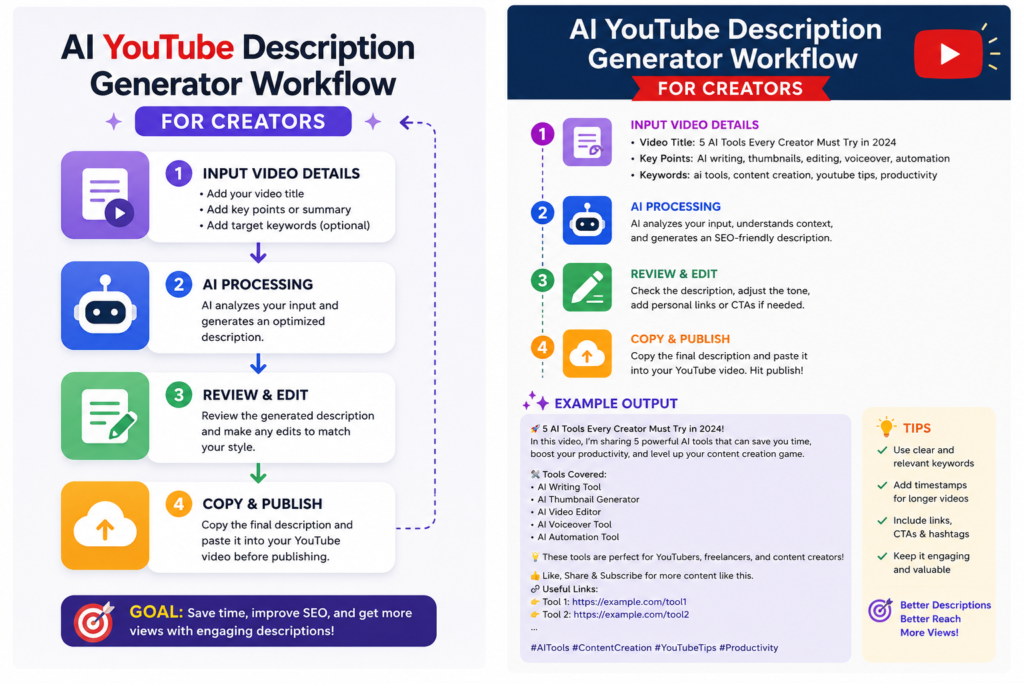
The Creator-Friendly AI YouTube Description Workflow
The goal is not to let AI write random description filler. The goal is to give AI the right inputs so it can produce a useful, searchable, human-sounding description that matches your video and your audience.
Step 1: Capture the Video Brief
Before using AI, write down the video title, topic, target viewer, main promise, key points, offer, links, and any required disclaimers.
Step 2: Generate the First Draft
Use AI to turn your rough notes into a structured description with a strong opening, short summary, bullets, links, and CTA.
Step 3: Optimize for Search
Add your main keyword naturally in the first few lines, include related phrases, and make the description readable instead of stuffed.
Step 4: Add Publishing Assets
Ask AI to create timestamps, pinned comment ideas, hashtags, Shorts captions, and newsletter teaser copy from the same video brief.
What to Give the AI Before It Writes
AI works better when you stop treating it like a magic button and start treating it like a production assistant. The better your input, the better your description.
Video Brief Checklist
- Working video title
- Main topic or question answered
- Target viewer
- Three to seven key points from the video
- Primary call to action
- Important links, products, tools, or resources mentioned
- Brand voice notes, such as friendly, direct, beginner-friendly, or expert
- Any compliance notes, affiliate disclosure, sponsorship note, or disclaimer
Reusable AI Prompt for YouTube Descriptions
Use this prompt as your starting point. Replace the bracketed fields with your video details.
Create a YouTube description for this video.

Video title: [Insert title]
Target viewer: [Insert viewer]
Main promise: [What the viewer will learn or achieve]
Key points covered:
- [Point 1]
- [Point 2]
- [Point 3]
Links to include:
- [Link 1]
- [Link 2]
Primary CTA: [Subscribe, download, book a call, read article, join list, etc.]
Brand voice: Friendly, clear, practical, beginner-friendly.

Write:
1. A strong first two-line hook
2. A short summary paragraph
3. Bullet points showing what the viewer will learn
4. A clear CTA section
5. Resource links section
6. Suggested timestamps based on the key points
7. Three relevant hashtags
8. A pinned comment idea

Avoid hype, keyword stuffing, and robotic wording.
Example: Before and After AI Workflow
Weak Description
“In this video I talk about how to use AI for YouTube. Like and subscribe.”
Stronger AI-Assisted Description
“Want to publish YouTube videos faster without writing descriptions from scratch every time? In this video, you’ll learn a simple AI workflow for turning your video notes into descriptions, timestamps, CTAs, and hashtags.”
A Simple Workflow Creators Can Repeat
- Record the video: Keep a few rough notes while filming or editing.
- Paste your notes into AI: Include title, viewer, topic, links, and CTA.
- Generate the description: Ask for structure, not just a paragraph.
- Edit the opening lines: Make sure the first two lines are clear and clickable.
- Add links and disclosures: Include affiliate or sponsor notes where needed.
- Create bonus assets: Generate a pinned comment, Shorts caption, and newsletter teaser.
- Save the final version: Add it to your content tracker or publishing checklist.
Description Structure That Works Well
Opening Hook
One or two lines that clearly explain why the viewer should care.
Video Summary
A short paragraph that explains the video topic in natural language.
Viewer Benefits
Bullets showing what the viewer will learn, solve, or understand.
CTA and Links
A clean action step with relevant resources, not a cluttered link dump.
Advanced Tips for Better AI-Generated YouTube Descriptions
Once you have the basic workflow, the next step is consistency. The creators who benefit most from AI are not just using it once. They are building a repeatable system around every upload.
Create a Brand Description Template
Save a reusable format for your videos. Include your normal greeting style, CTA order, link sections, disclosure wording, and social links.
Generate Multiple Versions
Ask AI for three versions: search-focused, beginner-friendly, and conversion-focused. Then combine the best parts instead of accepting the first draft.
Repurpose From One Brief
Use the same video brief to create your YouTube description, pinned comment, blog intro, newsletter teaser, and social captions.
Common Mistakes to Avoid
Warning Card
- Letting AI invent details: Always provide accurate video notes and links.
- Stuffing keywords: Use natural phrases instead of repeating the same phrase.
- Forgetting disclosures: Add affiliate, sponsorship, or product relationship notes when needed.
- Using the same CTA everywhere: Match the CTA to the video’s purpose.
- Publishing without editing: AI gives you a draft. You still need to make it sound like you.
AI YouTube Description Generator FAQ
What is an AI YouTube description generator?
An AI YouTube description generator is a tool or prompt workflow that helps creators turn video notes into structured descriptions with summaries, keywords, CTAs, timestamps, links, and hashtags.
Can AI write YouTube descriptions automatically?
Yes, but creators should still review the output. AI can speed up the first draft, but you should check accuracy, links, tone, disclosures, and the final call to action.
What should every YouTube description include?
A strong YouTube description should include a clear opening, short video summary, viewer benefits, important links, timestamps when useful, a CTA, and a few relevant hashtags.
Is this workflow only for big YouTube channels?
No. Smaller creators often benefit the most because AI reduces repetitive publishing work and helps them stay consistent without hiring a content assistant.
Final Takeaway
A good AI YouTube description generator workflow is not about replacing your voice. It is about removing the blank page, organizing your ideas, and making every upload easier to publish, search, and repurpose.
CTA: Build Your Creator Publishing System
Save this workflow as a repeatable template for every video. The more consistent your input process becomes, the faster your publishing system gets.
TechnofluxAI
Practical AI for creators and website owners
Learn how to use AI, improve AI search visibility, build smarter workflows, and test what actually works.
Explore our other sites
TimewasterAI
— product reviews, buying guides, and useful finds.
Tina Trends
— fashion, beauty, pets, lifestyle, and fun discoveries.
Mistakenly Delicious
— simple recipes and practical cooking ideas.

About the Author
Jon Hicks
Founder of TechnofluxAI.
I’m the creator behind TechnofluxAI, focused on breaking down powerful AI tools, emerging trends, and practical strategies to help creators and entrepreneurs stay ahead in a rapidly evolving digital world.
Follow TechnofluxAI for the latest AI tools & strategies
Want more TechnofluxAI in Google?
Add TechnofluxAI as a Preferred Source to help Google show you more of our AI guides, tests, workflows, and research.