

Estimated reading time: 9 minutes
Beginner AI CRM Workflow for Small Businesses
A small business does not need a complicated sales system to benefit from AI. The best beginner AI CRM workflow helps you capture leads, organize customer details, follow up faster, and avoid losing opportunities in emails, sticky notes, spreadsheets, or memory.
Quick Answer
A beginner AI CRM workflow starts with one clear place for contacts, a simple lead status system, AI-assisted notes, automated reminders, follow-up templates, and weekly pipeline review. The goal is not to automate everything. The goal is to make sure no lead or customer gets forgotten.
The Small Business Problem
Most small businesses do not lose sales because they lack effort. They lose sales because lead details are scattered, follow-ups are late, customer notes are incomplete, and nobody has a simple system for what happens next.
What This Workflow Helps You Do
This beginner-friendly workflow is designed for small teams that need a practical customer management system without enterprise complexity. You can use it with a CRM platform, a spreadsheet-based CRM, or a simple database tool.
- Capture new leads from forms, calls, emails, social media, and referrals.
- Use AI to summarize conversations and clean up messy customer notes.
- Set clear follow-up reminders so prospects do not go cold.
- Organize your pipeline into simple stages that your team can understand.
- Review opportunities weekly and decide what needs action next.
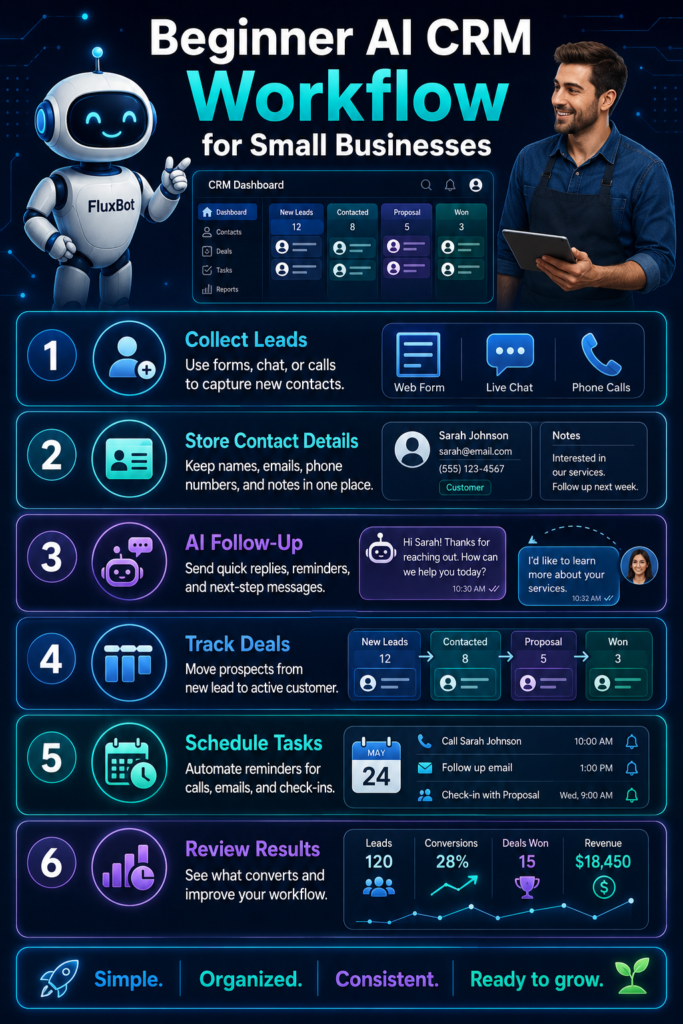
The Simple AI CRM Workflow Every Small Business Can Start With
A CRM is only useful when people actually use it. For beginners, the workflow should be simple enough to follow every day. Do not start with complex dashboards, ten pipeline stages, or advanced automations. Start with the customer journey your business already has.
Beginner AI CRM Workflow Overview
- Capture every lead in one place.
- Tag the lead source and customer need.
- Use AI to summarize notes and conversations.
- Move the lead through simple pipeline stages.
- Send or draft follow-ups based on the stage.
- Set reminders for the next action.
- Review the pipeline once a week.
- Improve the workflow based on what slows your team down.
1. Capture Every Lead in One Place
The first job of your CRM is simple: stop losing customer information. Every new lead should enter one system, whether that lead comes from your website, phone calls, referrals, social media messages, events, ads, or email.
Good Beginner Setup
Every new inquiry becomes a contact record with name, email, phone, source, need, status, and next action.
Messy Setup
Some leads are in email, some are in text messages, some are in a notebook, and some only exist in someone’s memory.
2. Use Simple Lead Statuses
A beginner CRM does not need a complicated pipeline. Start with clear stages that describe what is happening with each prospect. The fewer stages you use at the beginning, the easier the system is to maintain.
Beginner Pipeline Stages
- New Lead: The person has reached out or entered your system.
- Contacted: You have replied, called, or sent a first response.
- Qualified: The lead appears to be a real fit for your product or service.
- Proposal or Quote Sent: You have sent pricing, a package, or next-step details.
- Won: The customer purchased, booked, subscribed, or signed.
- Lost or Not Now: The lead did not move forward, or the timing is not right.
3. Let AI Clean Up Customer Notes
Small business notes are often messy because they are captured quickly after calls, emails, meetings, or walk-ins. AI can help turn raw notes into clean summaries, but a person should still review them before saving anything important.
AI Note Cleanup Prompt
Copy your messy call notes into your AI assistant and use this prompt:
Clean these CRM notes into a short customer summary. Include: customer need, urgency, budget clues, objections, promised follow-up, and next action. Do not invent missing details.4. Create Follow-Up Templates for Each Stage
Follow-up is where many small businesses lose money. AI can help draft replies faster, but your workflow should still sound personal. The goal is not to blast generic messages. The goal is to respond faster with more context.
New Lead Follow-Up
Thank the person, confirm what they asked about, and explain the next step clearly.
Quote Follow-Up
Reference the quote, answer common objections, and ask whether they want help choosing the right option.
Not Now Follow-Up
Respect their timing, offer a useful resource, and set a future reminder if they want to reconnect later.
AI Follow-Up Prompt
Write a friendly follow-up email for this lead. Keep it short, helpful, and not pushy. Mention their need, the last conversation, the next step, and one simple question. Use a small business owner tone.5. Set a Next Action for Every Contact
A CRM without next actions becomes a storage box. Every active lead should have a next step attached to it. That next step can be a call, email, quote, demo, appointment, reminder, payment request, or check-in.
Next Action Rule
If a lead is not marked Won, Lost, or Not Now, it should have a clear next action and a follow-up date. This one rule prevents most beginner CRM systems from becoming abandoned contact lists.
6. Use AI to Prioritize Leads
Small businesses often treat every lead the same, but not every lead needs the same attention. AI can help organize leads by urgency, fit, value, and missing information. This is useful when your inbox is busy and your team is small.
Simple Lead Priority Checklist
- High priority: Ready to buy, urgent need, clear fit, requested pricing, or asked to book.
- Medium priority: Interested but comparing options, needs more information, or has timing questions.
- Low priority: Poor fit, unclear need, no budget, no timeline, or only browsing.
7. Review Your Pipeline Every Week
The weekly review is what turns your CRM from a database into a business workflow. Once a week, check every open lead and decide what needs to happen next.
Review New Leads
Make sure every new lead has been contacted and assigned a next action.
Review Stale Leads
Look for leads that have not moved in several days or weeks and decide whether to follow up or close them out.
Review Won Customers
Add onboarding notes, service reminders, upsell opportunities, or future check-in dates.
8. Keep the Workflow Human
AI should support your customer relationships, not replace them. Customers can tell when a message feels careless or overly automated. Use AI to draft, summarize, organize, and remind, but keep final judgment human.
Human Review Checklist
- Does the message sound like your business?
- Did the AI invent anything that was not in the notes?
- Is the next step clear?
- Is the tone helpful instead of pushy?
- Does the message respect the customer’s timing and situation?
Advanced Tips for Making an AI CRM Workflow Actually Useful
A beginner AI CRM workflow should start simple, but it should also improve over time. Once your basic system is working, use AI to reduce repetitive work, spot missed opportunities, and help your team make better follow-up decisions.
Create Saved AI Prompts
Save prompts for call summaries, follow-up emails, proposal reminders, customer onboarding, and win-loss notes. This keeps your workflow consistent.
Track Lead Sources
Add a source field for every lead. Over time, you will see whether referrals, search, ads, social media, email, or local networking bring better customers.
Review Lost Deals
Use AI to summarize why deals were lost. Look for patterns like price objections, slow response times, unclear offers, or poor-fit leads.
Common AI CRM Mistakes Small Businesses Should Avoid
- Automating before organizing: If your contacts, stages, and notes are messy, automation will only move the mess faster.
- Using too many pipeline stages: Complicated workflows are harder for small teams to maintain.
- Letting AI send messages without review: AI can draft quickly, but customer communication still needs human judgment.
- Not setting next actions: A lead with no next step is easy to forget.
- Ignoring stale leads: Old opportunities should be followed up, closed out, or moved to a future reminder.
- Tracking everything except outcomes: A CRM should help you see what leads turned into customers and why.
- Choosing software before defining the workflow: The tool matters less than the customer process you build around it.
FAQ: Beginner AI CRM Workflow for Small Businesses
What is an AI CRM workflow?
An AI CRM workflow is a customer management process that uses AI to help organize contacts, summarize conversations, draft follow-ups, prioritize leads, and remind your team what to do next.
Do small businesses need AI in their CRM?
Not every small business needs advanced AI, but many can benefit from simple AI tasks like cleaning up notes, drafting follow-ups, summarizing customer history, and spotting leads that need attention.
Can I start an AI CRM workflow without expensive software?
Yes. A beginner workflow can start with a simple CRM, spreadsheet, or database tool. The most important pieces are consistent lead capture, clear statuses, next actions, follow-up reminders, and clean notes.
What should AI not do in a CRM workflow?
AI should not invent customer details, make promises your business cannot keep, send sensitive messages without review, or replace human judgment in important customer relationships.
What is the first CRM automation a beginner should create?
Start with a simple follow-up reminder. When a lead moves to Contacted, Qualified, or Quote Sent, the CRM should remind you to follow up after a set number of days.
Final Takeaway
The best beginner AI CRM workflow for a small business is not the most advanced one. It is the one your team will actually use. Start with clean lead capture, simple stages, AI-assisted notes, clear next actions, and weekly review. Once that foundation works, add smarter automation one step at a time.
CTA: Build a CRM Workflow Before Buying More Tools
Before adding another app to your business, map your customer workflow first. Decide how leads enter, how they move through the pipeline, who follows up, and where AI can save time without making customer communication feel robotic.
TechnofluxAI
Practical AI for creators and website owners
Learn how to use AI, improve AI search visibility, build smarter workflows, and test what actually works.
Explore our other sites
TimewasterAI
— product reviews, buying guides, and useful finds.
Tina Trends
— fashion, beauty, pets, lifestyle, and fun discoveries.
Mistakenly Delicious
— simple recipes and practical cooking ideas.
Want more TechnofluxAI in Google?
Add TechnofluxAI as a Preferred Source to help Google show you more of our AI guides, tests, workflows, and research.