

Estimated reading time: 9 minutes
How to Document AI-Assisted Work for Clients
AI can speed up client work, but speed alone does not build trust. Clients want to know what was created, what was reviewed, what was changed, and where your professional judgment shaped the final result.
Quick Answer
Document AI-assisted work by recording the task goal, tools used, human review steps, source material, edits made, quality checks, and final client-facing decisions. The point is not to overwhelm the client with every prompt. The point is to show responsible process, clear ownership, and professional accountability.
Why This Matters
AI use can make clients nervous when it feels hidden, careless, or unreviewed. A simple documentation process shows that AI helped the workflow, but you still controlled the strategy, accuracy, creative direction, and final delivery.
The Real Client Pain Point
Most clients are not angry that AI exists. They are worried about paying expert rates for copy-pasted machine output, receiving inaccurate work, losing originality, or being exposed to legal, brand, privacy, or quality risks. Good documentation calms those fears because it explains the human process behind the finished work.
This article will help you create a practical documentation system for AI-assisted client work, including what to track, what to share, what to keep internal, and how to explain AI use without sounding defensive.
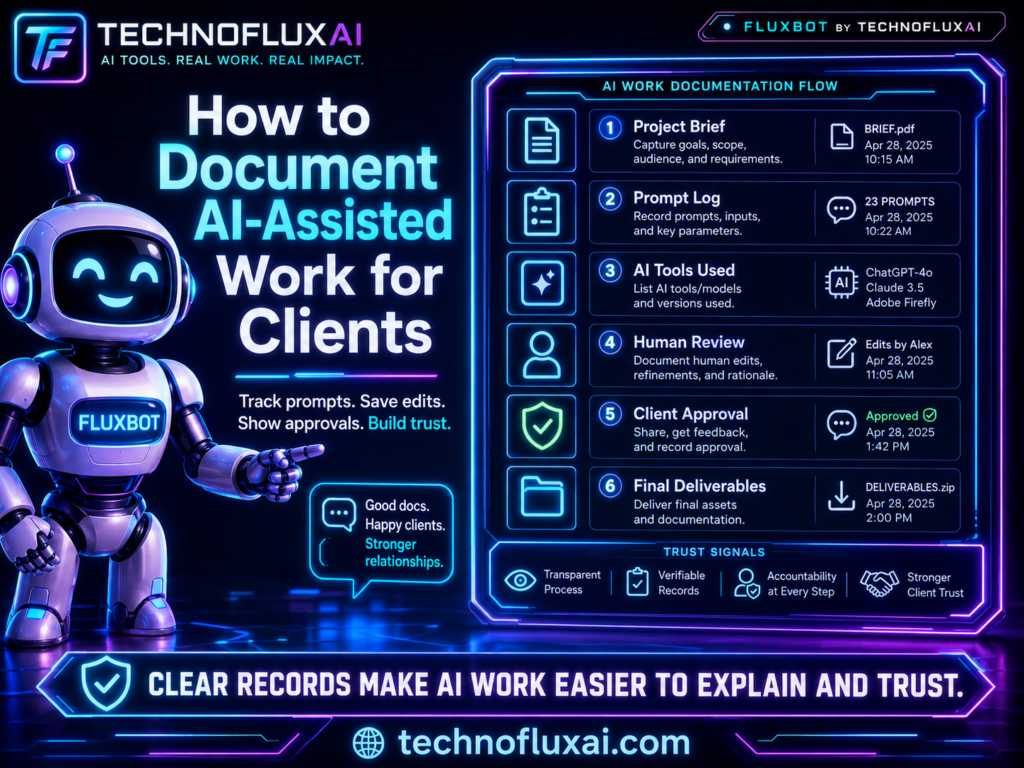
What AI-Assisted Work Documentation Should Prove
Documentation is not about confessing that you used AI. It is about proving that the work was handled responsibly. Clients need to see that AI was used as an assistant, not as an unchecked replacement for expertise.
Process
What steps were used to move from client input to finished deliverable?
Judgment
Where did a human make decisions, correct errors, refine strategy, or improve quality?
Accountability
Who reviewed the output, checked the claims, and approved the final version?
1. Start With the Client Goal
Every documentation note should begin with the outcome the client asked for. This keeps the record focused on business value instead of tool usage. A client usually does not need a long technical explanation of prompts, model settings, or every draft. They need to know the work matched the assignment.
Simple Client Goal Format
- Project: Blog article, website copy, strategy memo, design concept, code review, research brief, or campaign plan.
- Client objective: What the work needed to accomplish.
- Audience: Who the work was created for.
- Final deliverable: What was sent to the client.
- Review owner: The person responsible for final approval.
2. Separate AI Assistance From Human Decisions
The cleanest way to document AI-assisted work is to separate what AI helped with from what you decided. This matters because clients are not just buying output. They are buying taste, experience, judgment, and responsibility.
AI Assisted With
Brainstorming, outlining, summarizing notes, creating first-pass variations, organizing research, drafting repetitive sections, or checking for gaps.
Human Decided
Strategy, claims, positioning, examples, final wording, brand fit, source quality, risk tolerance, creative direction, and client-ready edits.
3. Keep an Internal AI Work Log
Not every note belongs in the client deliverable. A private AI work log gives you a record of what happened without cluttering the client experience. This is useful when a client asks how something was created, when a team member needs to review the process, or when you want to improve your workflow later.
Internal AI Work Log Template
Project:
Client:
Date:
Deliverable:
AI tool used:
Purpose of AI assistance:
Client-provided inputs used:
Sensitive information included? Yes / No
Drafts generated:
Human edits made:
Facts or claims checked:
Sources reviewed:
Final reviewer:
Client-facing disclosure needed? Yes / No
Notes for future improvement:
4. Use a Client-Facing AI Note When Appropriate
Some clients want full transparency. Others only need to know that your work was reviewed and quality controlled. The best client-facing note is simple, calm, and specific. It should not sound like an apology. It should sound like a professional workflow explanation.
Client-Facing Note Example
“AI tools were used to support early-stage outlining and draft organization. Final strategy, editing, fact review, examples, brand alignment, and approval were completed by a human reviewer before delivery.”
5. Match the Documentation Level to the Risk Level
A quick social caption does not need the same documentation as a legal-adjacent research memo, medical content brief, financial article, enterprise strategy deck, or client data analysis. The higher the risk, the more documentation you should keep.
Low Risk
Brainstorming, captions, outlines, headline options, rough content ideas, formatting help.
Medium Risk
Blog posts, email campaigns, sales pages, research summaries, customer-facing brand content.
High Risk
Legal, financial, medical, compliance, hiring, security, private client data, or regulated industry content.
6. Document Source Material and Inputs
One of the biggest risks in AI-assisted work is unclear source material. If an AI tool helped summarize, organize, or transform information, document what it was given. This is especially important when the client provides notes, transcripts, analytics exports, brand guidelines, product details, or private documents.
Input Documentation Checklist
- Client brief or project instructions
- Brand voice guide
- Research documents
- Analytics exports
- Interview transcripts
- Product or service details
- Competitor examples
- Source links or citations
- Internal notes or meeting summaries
7. Create a Final Quality Review Record
This is the part clients care about most. They want to know that someone checked the work before it reached them. A final quality review record can be short, but it should show that the deliverable was not blindly copied from an AI response.
Final Review Template
Final review completed by:
Reviewed for:
- Client objective
- Brand voice
- Accuracy
- Source support
- Originality
- Formatting
- Confidential information
- Risky claims
- Missing context
- Client instructions

Approved for delivery: Yes / No
Final notes:
Important Warning
Do not document AI-assisted work in a way that makes the client feel like they are paying for a raw AI output. The language should emphasize your process, review, judgment, and accountability. AI is the assistant. You are the professional responsible for the result.
Advanced Tips for Better AI Work Documentation
Once you have a basic documentation system, the next step is consistency. You do not need a complicated compliance department to document AI-assisted work well. You need repeatable language, clear review habits, and a simple way to prove that the final deliverable was shaped by human judgment.
Create Three Documentation Levels
The easiest system is a three-level approach. This keeps small projects lightweight while giving larger or riskier projects the extra detail they deserve.
Level 1: Light Note
Use for low-risk creative work. Record the tool, task, and final human review.
Level 2: Standard Log
Use for normal client deliverables. Track inputs, AI role, human edits, and quality checks.
Level 3: Risk Review
Use for sensitive, regulated, technical, or high-stakes work. Add source review, approval notes, and risk flags.
Use Plain-Language AI Disclosure
Clients do not need vague disclosure language like “AI was leveraged to optimize efficiencies.” That sounds evasive. Use plain words. Say what AI helped with and what the human reviewer controlled.
Stronger Disclosure Formula
“AI assisted with [specific task]. Human review covered [specific review areas]. The final deliverable was edited, checked, and approved by [person or team].”
Common Mistakes
Mistake 1: Hiding AI Completely
When clients discover hidden AI use later, the trust problem becomes bigger than the AI use itself.
Mistake 2: Oversharing Raw Prompts
Most clients do not need every prompt. They need the process summary, review record, and final accountability.
Mistake 3: Skipping Fact Review
AI can sound confident even when it is wrong. Any factual, strategic, or client-specific claim needs human review.
Mistake 4: Treating Documentation as Legal Protection Only
Documentation is also a sales, trust, quality, and operations tool. It helps clients understand why your work is worth paying for.
FAQ
Should I tell every client when I use AI?
You should follow your contract, industry requirements, and the client’s expectations. In general, it is safer to be clear about AI-assisted workflows than to hide them, especially when AI affects research, content, strategy, data, or final deliverables.
Do clients need to see my prompts?
Usually, no. Most clients need a process summary, quality review record, and clear explanation of how AI was used. Raw prompts are usually internal workflow material unless the contract says otherwise.
What should I never put into an AI tool?
Avoid entering confidential client information, private customer data, financial records, legal materials, unpublished intellectual property, or sensitive business details unless the tool, contract, and privacy terms clearly allow it.
How detailed should my AI documentation be?
Match the detail to the risk. Low-risk creative drafts may only need a short note. High-stakes client work should include inputs, sources, AI role, human review, corrections, and approval details.
Can AI-assisted work still be original?
Yes, but originality depends on your inputs, direction, editing, examples, structure, and final judgment. Raw AI output is rarely the strongest final product. Human refinement is what turns assistance into client-ready work.
Final Takeaway
Documenting AI-assisted work is not about making AI the star of the project. It is about showing that you used modern tools responsibly, protected the client’s interests, reviewed the work carefully, and remained accountable for the final result.
Client Trust Action Step
Create one reusable AI work log template and attach it to every client project where AI supports research, drafting, strategy, analysis, or creative production.
Build Your AI Client Workflow
About the Author
Jon Hicks
Founder of TechnofluxAI.
I’m the creator behind TechnofluxAI, focused on breaking down powerful AI tools, emerging trends, and practical strategies to help creators and entrepreneurs stay ahead in a rapidly evolving digital world.
Follow TechnofluxAI for the latest AI tools & strategies
Want more TechnofluxAI in Google?
Add TechnofluxAI as a Preferred Source to help Google show you more of our AI guides, tests, workflows, and research.