

Estimated reading time: 8 minutes
TechnofluxAI Search Strategy
How to Build Topical Authority for AI Search
AI search is changing how people discover answers. Instead of only matching one keyword to one page, AI-powered search experiences try to understand topics, relationships, sources, examples, and whether your site can be trusted for a subject.
Quick Answer
To build topical authority for AI search, create a complete content ecosystem around one subject. Cover beginner questions, advanced use cases, comparisons, workflows, examples, definitions, mistakes, tools, and next steps. Then connect those pages with clear internal links and keep them updated.
Why It Matters
AI search systems need context. A single article may answer one question, but a strong topic cluster shows that your site understands the wider subject and can support readers at different stages.
The Creator Pain Point
Many creators still publish isolated articles. They write one post about AI tools, one post about prompts, one post about SEO, and one post about automation. Each article may be useful, but the site does not build a clear authority signal around one focused area.
That scattered approach makes it harder for readers, search engines, and AI answer systems to understand what your site should be known for.
What This Article Will Help You Build
This guide will help you create a practical topical authority system for AI search. You will learn how to choose a topic lane, build supporting clusters, create answer-ready pages, strengthen internal links, and update content so your site becomes easier to understand and trust.
Suggested internal link: Connect this article to your AI SEO strategy guide, content cluster checklist, or generative engine optimization workflow.
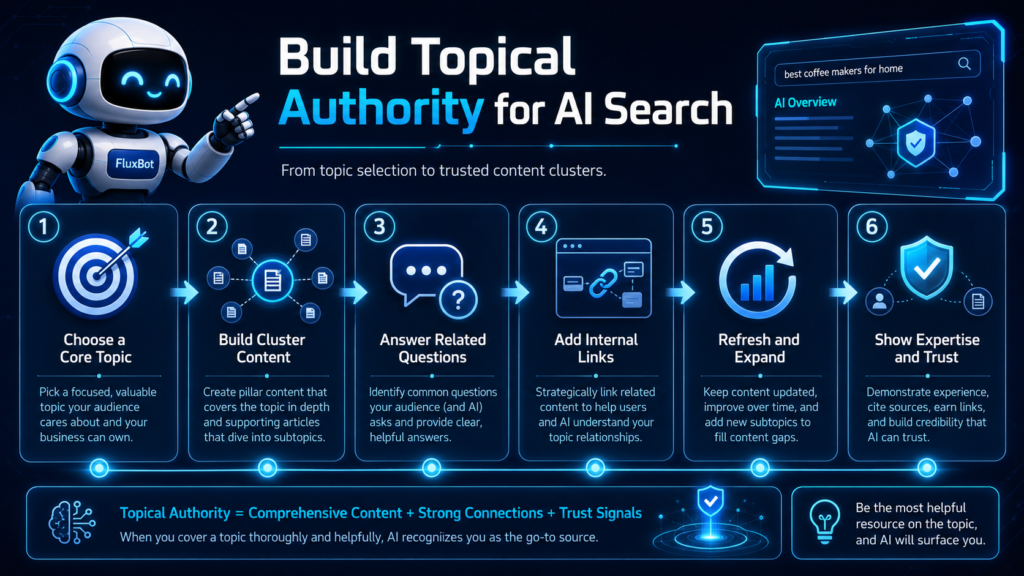
Main Workflow
The Topical Authority System for AI Search
Topical authority is not built by publishing more random articles. It is built by showing complete coverage, clear relationships, useful answers, original perspective, and consistent expertise around a defined subject.
Pick a Topic Lane
Choose one focused area where your site can become genuinely helpful. “AI” is too broad. “AI workflows for freelance service businesses” is much stronger.
Build Content Clusters
Create groups of related articles that answer different parts of the same topic. Each cluster should include beginner, comparison, workflow, troubleshooting, and implementation content.
Connect the Pages
Internal links help readers move through your topic and help search systems understand how your articles relate to each other.
Start With a Clear Authority Map
An authority map is a simple plan that shows what your site should be known for. It prevents you from chasing random keywords and helps every new article support a bigger search strategy.
Core Topic
The main subject your site wants to own, such as AI automation for small businesses.
Subtopics
The supporting areas inside your core topic, such as prompts, workflows, tools, templates, and client use cases.
Reader Problems
The real questions people ask when they are confused, comparing options, or trying to take action.
Proof Assets
Examples, screenshots, templates, tutorials, case studies, original opinions, and step-by-step systems.
Step-by-Step: Build Topical Authority for AI Search
1. Choose One Primary Topic Category
Pick a category that is narrow enough to organize, but large enough to support many articles. For example, instead of targeting “AI tools,” build around “AI tools for content creators” or “AI automation for freelancers.”
2. Create a Pillar Page
Your pillar page should explain the main topic in a broad, useful way. It should define the topic, explain why it matters, introduce major subtopics, and link to deeper supporting articles.
3. Build Supporting Cluster Articles
Each supporting article should answer a specific question. Good cluster formats include tutorials, checklists, comparison posts, templates, troubleshooting guides, glossary pages, and workflow breakdowns.
4. Add Entity-Rich Context
AI search works better when your content clearly names the people, tools, platforms, concepts, use cases, formats, and problems connected to the topic. Do this naturally. Do not stuff lists of terms into the page.
5. Answer Questions Directly
Include short, clear answers near the top of important sections. AI search often favors content that can be understood quickly and quoted cleanly.
6. Link Pages by Reader Journey
Internal links should guide readers from simple explanations to deeper implementation. A beginner guide can link to a checklist. A checklist can link to a template. A template can link to a case study.
7. Refresh and Expand Older Content
AI search topics change quickly. Update older posts with better examples, new workflows, clearer definitions, current tool names, and links to newer supporting content.
Example: Weak vs Strong Topical Authority
Weak Site Structure
A blog has one article about ChatGPT prompts, one article about website builders, one article about email marketing, and one article about productivity. The posts are not connected by a clear topic strategy.
Strong Site Structure
A blog builds a full cluster around AI content workflows for creators. It includes prompt guides, screenshot workflows, fact-checking systems, publishing checklists, content templates, and automation tutorials.
Topical Authority Checklist for AI Search
- Choose one clear topic lane before creating more articles.
- Create a pillar page for the main subject.
- Build supporting articles for beginner, intermediate, and advanced readers.
- Answer common questions directly near the top of each section.
- Use natural entity coverage without keyword stuffing.
- Add examples, workflows, templates, and screenshots where useful.
- Connect articles with helpful internal links.
- Update older posts when tools, platforms, or best practices change.
- Remove thin articles that do not support the topic cluster.
- Track which pages earn impressions, clicks, citations, and engagement.
Advanced Automation Tips
How to Build a Smarter Client Intake System
The best freelancer intake systems do not feel robotic. They make the client experience smoother while helping you protect your time, qualify better leads, and start each project with more clarity.
Use Conditional Questions
Show different questions based on the service selected. A logo client does not need the same intake path as a website client, automation client, or copywriting client.
Create Lead Categories
Sort submissions into simple groups such as ready now, needs clarification, future lead, referral fit, low budget, or not a match.
Protect the Human Touch
Automation should prepare your response, not replace your judgment. Edit AI replies so they sound natural, specific, and aligned with your brand.
Common Mistakes to Avoid
Making the Form Too Long
A long intake form can scare away serious leads. Keep the first form focused on the information needed to decide the next step.
Asking Vague Budget Questions
“What is your budget?” often creates awkward answers. Budget ranges such as under $500, $500 to $1,500, $1,500 to $3,000, and $3,000+ make qualification easier.
Letting AI Send Replies Without Review
AI can misread tone, miss context, or make assumptions. Review every client-facing reply before it reaches a lead.
Ignoring Poor-Fit Signals
Red flags include unclear goals, unrealistic timelines, missing decision makers, very low budgets, and repeated resistance to basic project details.
FAQ: AI Intake Form Automation for Freelancers
What is AI intake form automation?
AI intake form automation is a workflow that uses form responses and AI to summarize client needs, qualify leads, draft replies, and create next-step tasks.
Do freelancers need a CRM for this?
Not always. A spreadsheet, task board, or simple database can work when you are starting. A CRM becomes more useful when lead volume increases.
Can AI decide which clients I should accept?
AI can help organize and score leads, but you should make the final decision. Client fit depends on context, communication, workload, and your business goals.
What should happen after a form is submitted?
The system should save the response, summarize the project, identify missing details, assign a fit category, and prepare the best follow-up action.
How can freelancers keep automation personal?
Use automation for organization and first drafts, then add personal context before sending. Mention the client’s actual goal, project type, and next step.
Final Takeaway
AI intake form automation helps freelancers move from messy inquiries to clear project decisions. Instead of chasing details manually, you can collect better information upfront, summarize each lead, and respond with more confidence.
The goal is not to automate your personality. The goal is to automate the repetitive parts so you can spend more time on better clients and better work.
Next Step
Review your current client inquiry process and write down the questions you ask repeatedly. Those questions are the foundation of your first AI-powered intake form.
TechnofluxAI
Practical AI for creators and website owners
Learn how to use AI, improve AI search visibility, build smarter workflows, and test what actually works.
Explore our other sites
TimewasterAI
— product reviews, buying guides, and useful finds.
Tina Trends
— fashion, beauty, pets, lifestyle, and fun discoveries.
Mistakenly Delicious
— simple recipes and practical cooking ideas.