

Estimated reading time: 8 minutes
TechnofluxAI Freelancer Workflow
AI Intake Form Automation for Freelancers
Freelancers lose hours every month chasing project details, asking the same questions, sorting messy client messages, and trying to figure out whether a new lead is a good fit. AI intake form automation turns that scattered process into a cleaner system.
Quick Answer
AI intake form automation helps freelancers collect client details, summarize project needs, qualify leads, draft follow-up replies, route tasks, and prepare onboarding steps automatically after a form is submitted.
Why Freelancers Need It
A good intake form does more than collect names and emails. It helps you understand the project, spot red flags, estimate scope, prioritize serious leads, and respond faster.
The Freelancer Pain Point
Most freelancers start client conversations with too much manual back-and-forth. A lead says they need a website, logo, article, video, funnel, automation, or marketing help, but the real project details are buried across emails, DMs, calls, screenshots, and vague notes.
Without a structured intake workflow, you may waste time with poor-fit clients, underquote complex projects, miss important requirements, or delay replies because you are still trying to organize the basics.
What This Article Will Help You Build
This guide shows you how to design an AI-powered intake system that collects better client information, summarizes submissions, scores lead quality, creates next-step recommendations, and helps you move from inquiry to proposal with less manual work.
Suggested internal link: Connect this article to your client onboarding checklist, AI workflow automation guide, or freelance proposal template.
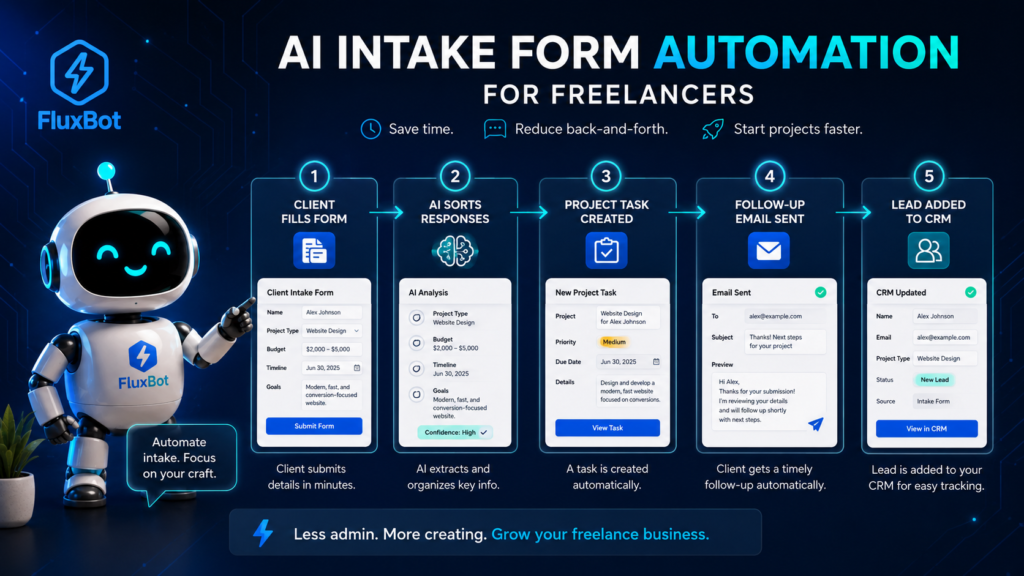
Main Workflow
How AI Intake Form Automation Works
An AI intake workflow starts when a potential client submits a form. From there, automation can organize the response, extract important details, flag missing information, and prepare the next action.
Collect
The form gathers project basics such as client name, business type, service needed, budget range, deadline, goals, files, links, and decision timeline.
Summarize
AI turns the submission into a clean project brief so you do not have to dig through long answers or scattered notes.
Qualify
The system checks whether the lead matches your services, minimum budget, availability, timeline, and project requirements.
Respond
AI can draft a personalized reply, request missing details, suggest a discovery call, or prepare a polite decline for poor-fit inquiries.
What to Include in a Freelancer Intake Form
Your intake form should be short enough to complete, but detailed enough to protect your time. The goal is not to interrogate the client. The goal is to collect the information you need to decide the next step.
Client Basics
Name, email, company, website, industry, preferred contact method, and timezone.
Project Scope
Service needed, deliverables, project goal, audience, examples, assets, and must-have requirements.
Budget and Timeline
Budget range, ideal launch date, urgency, approval process, and whether the deadline is flexible.
Fit Signals
Decision maker status, previous vendor issues, clarity of goals, project readiness, and communication expectations.
Step-by-Step AI Intake Automation Workflow
1. Build the Intake Form Around Decisions
Do not ask questions just because they are common. Ask questions that help you decide whether to accept the lead, request more details, suggest a call, send a proposal, or decline the project.
2. Send New Submissions to a Workspace
Route form responses into a spreadsheet, CRM, task board, database, or inbox label. Keep every inquiry in one place so no lead disappears inside email threads or DMs.
3. Let AI Create a Project Summary
Use AI to turn the form response into a short brief. The summary should include the client goal, requested service, key deliverables, deadline, budget range, missing details, and possible concerns.
4. Score the Lead
Create a simple fit score based on budget, urgency, scope clarity, service match, communication quality, and decision readiness. The score does not need to be perfect. It only needs to help you prioritize.
5. Draft the Next Reply
AI can draft one of four responses: book a call, ask for missing details, send a proposal path, or politely decline. Review every message before sending so it sounds like you.
6. Trigger the Right Follow-Up Task
Add tasks such as prepare discovery questions, review client website, create estimate, send calendar link, request files, or update lead status.
7. Review and Improve the System Monthly
Look at which leads became paid projects and which ones wasted time. Adjust your questions, scoring rules, and follow-up templates based on real client behavior.
Example: Manual Intake vs AI Intake Automation
Manual Intake
A lead sends a vague message. You reply with questions. They answer half of them. You reread the thread later, guess the scope, and delay the proposal.
AI-Automated Intake
A lead completes a structured form. AI summarizes the project, flags missing details, scores fit, drafts the next reply, and creates a follow-up task for your review.
Freelancer Intake Automation Checklist
- Ask only questions that help you make a next-step decision.
- Include budget ranges instead of open-ended budget questions.
- Ask for timeline and deadline flexibility.
- Collect links, files, examples, and brand assets early.
- Use AI to summarize long responses into a project brief.
- Score leads by fit, not just excitement.
- Create reply templates for good-fit, maybe-fit, and poor-fit leads.
- Review AI-generated replies before sending them.
- Store submissions in one searchable workspace.
- Update your intake form after repeated client confusion.
Advanced Automation Tips
How to Build a Smarter Client Intake System
The best freelancer intake systems do not feel robotic. They make the client experience smoother while helping you protect your time, qualify better leads, and start each project with more clarity.
Use Conditional Questions
Show different questions based on the service selected. A logo client does not need the same intake path as a website client, automation client, or copywriting client.
Create Lead Categories
Sort submissions into simple groups such as ready now, needs clarification, future lead, referral fit, low budget, or not a match.
Protect the Human Touch
Automation should prepare your response, not replace your judgment. Edit AI replies so they sound natural, specific, and aligned with your brand.
Common Mistakes to Avoid
Making the Form Too Long
A long intake form can scare away serious leads. Keep the first form focused on the information needed to decide the next step.
Asking Vague Budget Questions
“What is your budget?” often creates awkward answers. Budget ranges such as under $500, $500 to $1,500, $1,500 to $3,000, and $3,000+ make qualification easier.
Letting AI Send Replies Without Review
AI can misread tone, miss context, or make assumptions. Review every client-facing reply before it reaches a lead.
Ignoring Poor-Fit Signals
Red flags include unclear goals, unrealistic timelines, missing decision makers, very low budgets, and repeated resistance to basic project details.
FAQ: AI Intake Form Automation for Freelancers
What is AI intake form automation?
AI intake form automation is a workflow that uses form responses and AI to summarize client needs, qualify leads, draft replies, and create next-step tasks.
Do freelancers need a CRM for this?
Not always. A spreadsheet, task board, or simple database can work when you are starting. A CRM becomes more useful when lead volume increases.
Can AI decide which clients I should accept?
AI can help organize and score leads, but you should make the final decision. Client fit depends on context, communication, workload, and your business goals.
What should happen after a form is submitted?
The system should save the response, summarize the project, identify missing details, assign a fit category, and prepare the best follow-up action.
How can freelancers keep automation personal?
Use automation for organization and first drafts, then add personal context before sending. Mention the client’s actual goal, project type, and next step.
Final Takeaway
AI intake form automation helps freelancers move from messy inquiries to clear project decisions. Instead of chasing details manually, you can collect better information upfront, summarize each lead, and respond with more confidence.
The goal is not to automate your personality. The goal is to automate the repetitive parts so you can spend more time on better clients and better work.
Next Step
Review your current client inquiry process and write down the questions you ask repeatedly. Those questions are the foundation of your first AI-powered intake form.
TechnofluxAI
Practical AI for creators and website owners
Learn how to use AI, improve AI search visibility, build smarter workflows, and test what actually works.
Explore our other sites
TimewasterAI
— product reviews, buying guides, and useful finds.
Tina Trends
— fashion, beauty, pets, lifestyle, and fun discoveries.
Mistakenly Delicious
— simple recipes and practical cooking ideas.