

You don’t necessarily need another platform just to put a few important links in your bio.
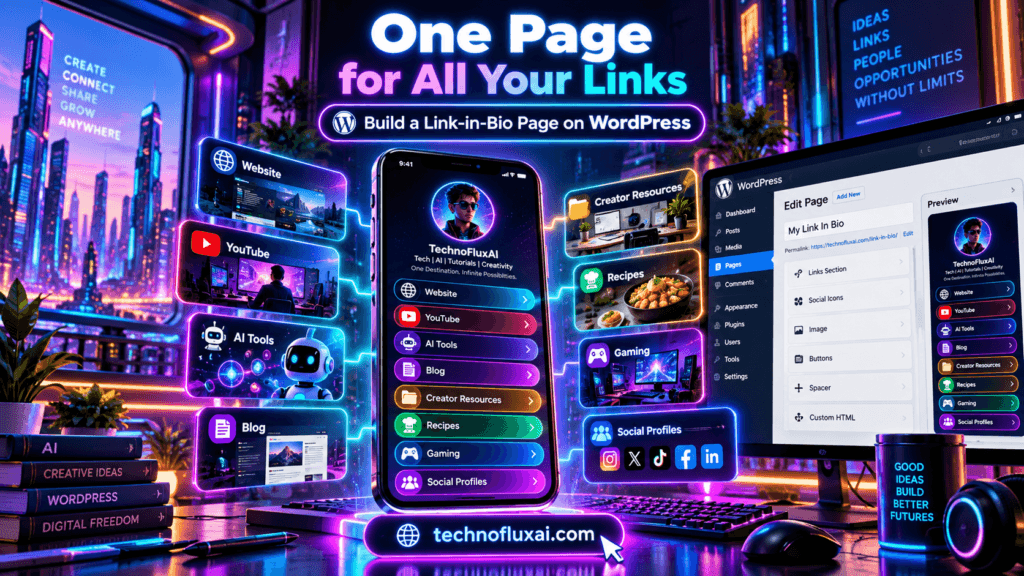
If you already run WordPress, you can build a Linktree-style page directly on your own site and use it as the central destination for your social profiles, projects, products, videos, tools, and whatever else you’re currently trying to keep organized.
That’s what we did with the TechnofluxAI links page.
Quick Answer
To build your own Linktree-style page on WordPress, create a simple mobile-friendly page, add a profile image and short introduction, organize your most important destinations into clear groups, turn each destination into a large tappable button or card, add your social profiles and disclosures, then use that page as the permanent URL in your social bios.
If you already pay for your website and domain, you usually don’t need another subscription just to create the page itself.
This isn’t an argument that Linktree or other link-in-bio services are bad.
They’re convenient. They can be extremely quick to set up. Some also include analytics, commerce features, email capture, automation, and other tools that would take additional work to reproduce yourself.
But once you already have a WordPress site, another option starts making sense:
Why not send people to a page you control?
What Is a Link-in-Bio Page?
A link-in-bio page is a simple landing page that gives people several destinations from one URL.
Instead of changing your Instagram, TikTok, X, YouTube, Facebook, or other profile link every time you publish something new, you keep one permanent address in your bio.
Visitors open that page and choose where they want to go next.
That might include:
- Your main website
- Your latest video or article
- A newsletter
- An online store
- Affiliate recommendations
- Your YouTube or TikTok channel
- A booking page
- A portfolio
- Other projects or websites
The idea is simple. The execution matters more than it first appears.
A page with 37 random buttons isn’t particularly helpful. A good link page gives somebody who knows almost nothing about you a fast answer to one question:
“Where should I go next?”
Why We Built Our Own Linktree-Style Page
Our problem wasn’t a shortage of links.
It was the opposite.
TechnofluxAI had grown into a larger network of sites, creator projects, social profiles, tools, product destinations, and experiments. We had TechnofluxAI itself, TimewasterAI, Tina Trends, recipes through Mistakenly Delicious, gaming content, creator tools, product finds, social accounts, and other destinations.
Sending someone to a different URL every time became messy.
So we built one page:
Now that page can act as the front door to the whole network.
The practical lesson
We weren’t trying to recreate every feature offered by a dedicated link-in-bio company. We needed one stable destination that could explain what we do, organize the projects, and let people choose what interested them.
That turned the page into something more useful than a social-bio workaround.
It became a small navigation hub.
Benefits of Hosting Your Link Page on Your Own Website
1. You control the destination
The URL belongs to your website.
If you redesign the page, change plugins, switch themes, add another business, or reorganize the entire thing next year, the address in your bio can stay the same.
That stability is valuable.
2. Your branding can match the rest of your site
Your fonts, colors, images, copy, buttons, humor, and layout don’t have to fit inside somebody else’s template.
For our page, we wanted it to feel like part of the TechnofluxAI network rather than an unrelated mini-profile living somewhere else.
3. The traffic reaches your domain first
Someone clicking your bio enters your site before continuing to another destination.
That gives you more freedom to point visitors toward related content, introduce your brands, highlight a current project, or keep somebody exploring your own site.
4. You control your analytics setup
You can use the analytics tools already connected to your WordPress site and add campaign parameters when you need more precise attribution.
You aren’t limited to whatever reporting a link-in-bio provider includes in your plan.
5. Affiliate disclosures are easier to control
If the page includes affiliate products or partner links, you can place a clear disclosure exactly where it makes sense instead of squeezing your monetization strategy into a fixed template.
6. It can support internal navigation
A self-hosted page can point visitors deeper into useful sections of your site.
Don’t expect a collection of buttons to become an SEO superweapon. But when the page contains useful context and sensible internal links, it can become part of your overall website structure rather than an isolated profile page.
One Thing I have Learned while building TechnofluxAi is that Ai tools usually sound easier to use than they are in the real world. I like to try things myself, see where I get stuck, and figure out what actually saves time instead of just repeating promisies.That’s the approach I use throughout this site: keep what works, point out what doesn’t, and explain things in a way that makes sense for someone who is still learning. I started out searching for an image creator. That was my first interaction with Ai. I was frustrated by the vast tool list without any real direction on which tool was best. Then I realized how powerful this tool was .and was going to be in the future. Making mistakes has helped me in the choice of articles I write.

Step-by-Step: How to Build Your Own Linktree on WordPress
You don’t need to duplicate our design. Start with the simplest version that solves your problem.
Step 1: Create a new WordPress page
In WordPress, go to Pages → Add New.
Choose a short page name. We used Links, which gives us the clean URL:
/links/
Other reasonable options are:
- /me/
- /start/
- /connect/
- /creator/
A boring URL is perfectly fine here. In fact, boring is useful. You want something short enough to type, remember, say out loud, and fit comfortably inside a social profile.
Step 2: Decide what the page is actually for
Don’t open the editor and immediately start dumping links into it.
Pick the primary job first.
Is this page supposed to help visitors:
- Find your content?
- Shop your recommendations?
- Explore several brands?
- Book or hire you?
- Follow you elsewhere?
- Find the latest thing you’re promoting?
Your answer determines what appears near the top.
Step 3: Add a profile image and a short introduction
Give people enough context to confirm they’ve landed in the right place.
You don’t need your life story.
A profile photo, creator name, brand name, and one or two sentences explaining what people can find here is usually enough.
Step 4: Add large, mobile-friendly links
The standard WordPress block editor already includes a Buttons block, so a beginner can create a functional link page without installing a dedicated Linktree-style plugin.
Use short labels such as:
Read My Latest Guides Watch on YouTube Creator Tools I UsePeople should know what happens before they tap.
“Click here” tells them almost nothing.
Step 5: Group related destinations
If you have more than five or six links, categories become increasingly useful.
For example:
- My Sites
- Latest Content
- Creator Tools
- Shop My Finds
- Work With Me
- Follow Me
This is one of the biggest improvements you can make over the dreaded wall of buttons.
Step 6: Put the most useful choices first
The top of your page is expensive real estate.
Don’t automatically put every social network first just because other link pages do.
If your newsletter matters most, feature it.
If you’re launching a product, move that higher temporarily.
If most visitors are looking for your YouTube channel, make YouTube impossible to miss.
Step 7: Test it on your phone
This page will often be opened from a phone, so your desktop monitor is not the final judge.
Open the live page on your own device and tap every important link.
Check button spacing, text size, image loading, contrast, scrolling, and whether anything awkward happens with a sticky header or cookie banner.
What to Include on the Page
Your exact list depends on what you create, but a useful starting structure is:
- Profile image or logo
- Your name or brand
- One-sentence description
- Your primary destination
- Current or featured content
- Main projects or websites
- Products, services, or useful affiliate resources
- Social profiles
- Contact or work-with-me link
- Required affiliate or sponsorship disclosure
Monetization idea: Don’t turn the entire page into a vending machine. A “Tools I Use” or “Shop My Finds” section can work naturally if those destinations genuinely make sense for your audience.
How We Structured the TechnofluxAI Links Page
Our own page needed to handle more than one creator brand, so we divided it into recognizable destinations instead of treating every URL equally.
The structure currently includes:
- TechnofluxAI
- Mistakenly Delicious
- Tina Trends
- TimewasterAI
- Product and creator shops
- AI and creator tools
- Ways to work with me
- Additional social destinations
- Contact information
- An affiliate disclosure
That organization solves the original problem: somebody can arrive from one social account without already knowing how all the projects connect.
They don’t have to hunt around the internet for the right site.
Design Tips for Mobile Users
A beautiful desktop layout that requires microscopic fingers on a phone is not a successful link page.
Keep tap targets large
Give buttons breathing room and avoid packing tiny links next to each other.
Keep labels short
“See the AI Tools I Use” is better than a paragraph stuffed into a button.
Use strong contrast
Buttons should look clickable. Text should remain readable outdoors, on older screens, and with the brightness turned down.
Don’t make visitors scroll through your biography first
A short introduction is useful. Seven paragraphs before the first useful link are not.
Compress your images
A bio page should feel quick. Don’t make someone download a giant uncompressed portrait just to reach three buttons.
Using a Profile Photo and Personal Branding
One thing we found useful was making the page feel like it belongs to an actual creator, not just a directory generated by a website.
A recognizable profile image helps with that.
It gives people a visual confirmation that the person they saw on one platform is connected to the page they’ve just opened.
If you’re building a personal brand, use a reasonably current photo that matches how people are likely to recognize you elsewhere.
If you’re representing a company instead, a logo may be the better choice.
Don’t forget the social sharing image
Your on-page profile image and your social preview image serve different jobs.
Create a proper Open Graph/social-sharing image for the page so that when somebody posts the URL on Reddit, X, Facebook, messaging apps, or other platforms, it has a recognizable preview instead of whatever image the platform happens to grab.
A useful preview might contain:
- Your photo
- TechnofluxAI branding
- “Jon Hicks | TechnoFlux Network”
- A simple visual hint that the page contains links and projects
Affiliate Link and Disclosure Considerations
A link page is an easy place to accidentally blur the line between normal navigation and monetized recommendations.
If a link can earn you a commission, make that relationship understandable before people make their decision.
Simple example: “Some links on this page are affiliate links. If you purchase through one of them, I may earn a commission at no additional cost to you.”
Don’t assume that writing “affiliate” somewhere in a distant footer automatically explains every recommendation.
For compensated links, also configure the appropriate link relationship in WordPress. Google recommends the rel="sponsored" attribute for advertising and other compensated links.
And don’t add affiliate links merely because the page has room for them.
A useful link page earns trust by removing choices that don’t help.
How to Track Clicks and Traffic
Your analytics plan can be as simple or elaborate as you need.
Start with page traffic
If your existing WordPress site uses an analytics platform, make sure `/links/` is included normally.
That can tell you how many people arrive and where some of that traffic comes from.
Use UTM parameters for different profiles
If you want to know whether visitors came from TikTok, YouTube, X, Instagram, or another campaign, create trackable versions of the URL with UTM parameters.
For example, your TikTok profile could point to a URL tagged for TikTok while your YouTube profile uses one tagged for YouTube.
Track important button clicks when useful
For deeper analysis, configure click events for the links that matter most.
You don’t need a dashboard that looks like mission control on day one.
Start by answering:
- How many people reach this page?
- Where are they coming from?
- Which destinations do they choose?
- Are the links near the top getting most of the attention?
Where to Share Your Link-in-Bio Page
Once it’s live, use the same central destination anywhere a single URL is useful:
- Instagram bio
- TikTok profile
- YouTube channel links or descriptions
- X profile
- Facebook profile or page
- Reddit profile
- Pinterest profile
- Email signature
- Podcast show notes
- Business cards
- QR codes
- Creator media kits
The real advantage comes from consistency.
Instead of changing ten social bios every time your priorities change, you update one WordPress page.
Linktree vs. Your Own WordPress Page
There isn’t one universal winner.
A third-party link-in-bio service optimizes for convenience. A self-hosted page optimizes for control.
| Factor | Third-Party Linktree-Style Service | Self-Hosted WordPress Link Page |
|---|---|---|
| Control | Controlled within the platform’s available settings and features. | You control the page, URL, content, layout, and future direction. |
| Branding | Usually customizable, with additional options sometimes tied to paid tiers. | Can match your website and brand as closely as your theme or design skills allow. |
| Cost | Free options exist; advanced features may require a subscription. | No separate link-page subscription if you already have the WordPress site, although normal domain, hosting, theme, and plugin costs still apply. |
| Analytics | Often built in and easy to access, with depth depending on the service or plan. | Use your existing website analytics and optionally configure custom events or UTMs. |
| SEO Potential | Lives primarily within another platform’s ecosystem. | Lives on your own domain and can participate in your internal site structure, but a thin page of buttons will not magically rank. |
| Affiliate Flexibility | Subject to platform rules, supported features, and account terms. | You control placement and presentation while remaining responsible for legal disclosures and partner-program rules. |
| Customization | Usually fast and template-driven. | Potentially extensive, depending on WordPress, your theme, and your technical comfort. |
| Traffic Ownership | The visitor reaches the provider’s domain or hosted environment first unless a custom-domain option is used. | The visitor arrives directly on your website. |
| Setup Difficulty | Usually very easy. | Slightly more work, particularly if you’re new to WordPress. |
| Maintenance | The provider handles the infrastructure. | You are responsible for your website, updates, security, backups, and broken links. |
Common Mistakes to Avoid
Adding every link you’ve ever created
More isn’t always better.
If your visitor has to study the page like a restaurant menu with 94 entrées, you’ve probably gone too far.
Making every button look equally important
Create some hierarchy. Your newest launch and the Facebook account you haven’t posted on since February shouldn’t necessarily get identical treatment.
Forgetting the page is mostly for mobile visitors
Test it on a real phone.
Then test it again after you add something.
Using vague button labels
Say what the destination is.
“AI Tools for Creators” is more useful than “Explore.”
Hiding affiliate relationships
If you earn from a recommendation, say so clearly.
Putting monetization ahead of usefulness
Your page should help visitors navigate first.
If every other button is an affiliate offer, it stops feeling like your home base and starts looking like a checkout aisle.
Never checking for broken links
Social accounts move. Campaign pages disappear. Product links change.
Review the page periodically and remove dead destinations.
Assuming it needs to rank in Google
This page’s most important job may be conversion and navigation, not organic search traffic.
If it naturally attracts search visibility, great. Don’t turn a useful creator hub into an over-optimized essay solely because you want another indexed URL.
Who Should Build Their Own Page?
A self-hosted WordPress link page makes the most sense when:
- You already own a WordPress site.
- You want your brand URL in your social profiles.
- You manage several projects or websites.
- You use affiliate links and want control over disclosures.
- You want the page to connect with the rest of your site’s navigation.
- You already have analytics configured on your website.
- You care about controlling the design long term.
- You don’t mind maintaining one more WordPress page.
A dedicated third-party service may make more sense when:
- You don’t have a website yet.
- You want something running in a few minutes.
- You don’t want to maintain WordPress.
- You need specialized built-in link-in-bio analytics or integrations.
- You want a managed tool rather than another page to design.
Final Recommendation
If you’re just starting out and don’t have a website, a third-party link-in-bio service is a perfectly reasonable choice.
It’s fast, simple, and designed specifically for the job.
If you already have a WordPress site, though, I think it’s worth asking whether you need another platform between your audience and your website.
For us, building our own links page made sense because we needed one central destination for a growing collection of websites, creator projects, tools, social profiles, shops, and other things we’re building.
We can change what gets featured without changing the URL in every social bio.
We can make it feel personal with a profile image.
We can control how affiliate links and disclosures are presented.
We can create our own social-sharing preview.
And, maybe most importantly, the page has become useful navigation for the larger network instead of only being a workaround for a social-media bio.
My rule of thumb:
Use a hosted link-in-bio tool when convenience matters more than control.
Build your own WordPress link page when you already have the website and want that website to become the permanent home base for your creator identity.
FAQ
Can I build a Linktree-style page for free on WordPress?
If you already have a WordPress website, you can build a basic link-in-bio page using WordPress blocks without purchasing a separate link-in-bio subscription. Your existing domain, hosting, premium theme, or plugin expenses still apply.
Do I need a WordPress plugin to create a link-in-bio page?
No. A basic page can be created with normal WordPress blocks such as headings, images, groups, columns, social icons, and buttons. A plugin may be useful if you need specialized tracking or design features, but it isn’t required for the basic concept.
Is a self-hosted WordPress page better than Linktree?
Not automatically. WordPress gives you more ownership and customization, while a dedicated service can be faster to set up and may include convenient built-in analytics, commerce, audience, or automation features. Choose based on what you actually need.
Can I put affiliate links on my WordPress link page?
Yes, provided the affiliate program allows it and you follow applicable disclosure requirements. Make the commercial relationship clear and use the appropriate sponsored link attributes when required.
Can a WordPress link-in-bio page help SEO?
It can contribute to a sensible internal site structure because it lives on your domain and can link to useful parts of your website. But a thin page containing nothing except buttons should not be expected to generate meaningful search traffic simply because it is self-hosted.
What should I put at the top of my link page?
Start with your name or brand, a recognizable image, a very short explanation, and the one or two destinations most visitors are likely to want. Put lower-priority profiles and secondary resources farther down.
Should I use the same link-in-bio URL everywhere?
Usually, yes. A consistent URL is easier to manage. If you want source-level analytics, you can use campaign parameters to identify which profile sent the visitor while keeping the underlying destination the same.
How often should I update my links page?
Update it whenever your priorities change and review it periodically for outdated offers, old campaigns, dead social links, or destinations that no longer deserve prominent placement.
Next step
If you already have WordPress, create a draft page today with your photo, one-sentence introduction, three important links, and
Want more TechnofluxAI in Google?
Add TechnofluxAI as a Preferred Source to help Google show you more of our AI guides, tests, workflows, and research.