

Estimated reading time: 9 minutes
AI Assistant Strategy
RAG vs Fine-Tuning: Which Does Your AI Assistant Actually Need?
If your AI assistant gives weak answers, the solution is not always “train the model.” In many cases, your assistant does not need fine-tuning. It needs better access to the right information.
Quick Answer
Most AI assistants should start with RAG, not fine-tuning. Use RAG when the assistant needs accurate, current, business-specific information. Use fine-tuning when the assistant needs to consistently behave, write, classify, or respond in a specialized way that prompts alone cannot control.
Best Starting Point
If your assistant needs to answer questions from policies, product docs, FAQs, pricing pages, manuals, client files, or support articles, build a clean RAG system first.
RAG and fine-tuning are often discussed like competing solutions, but they solve different problems. RAG helps your AI assistant find the right information at answer time. Fine-tuning changes how the model tends to respond after being trained on examples.
The mistake many businesses make is trying to fine-tune an assistant because it does not know company facts. That is usually the wrong fix. If the information changes often, lives in documents, or needs to be cited and updated, RAG is usually the better first move.
Simple Decision Rule
Use RAG for knowledge. Use fine-tuning for behavior. Use both only after you know the assistant needs both reliable source retrieval and a more specialized response pattern.
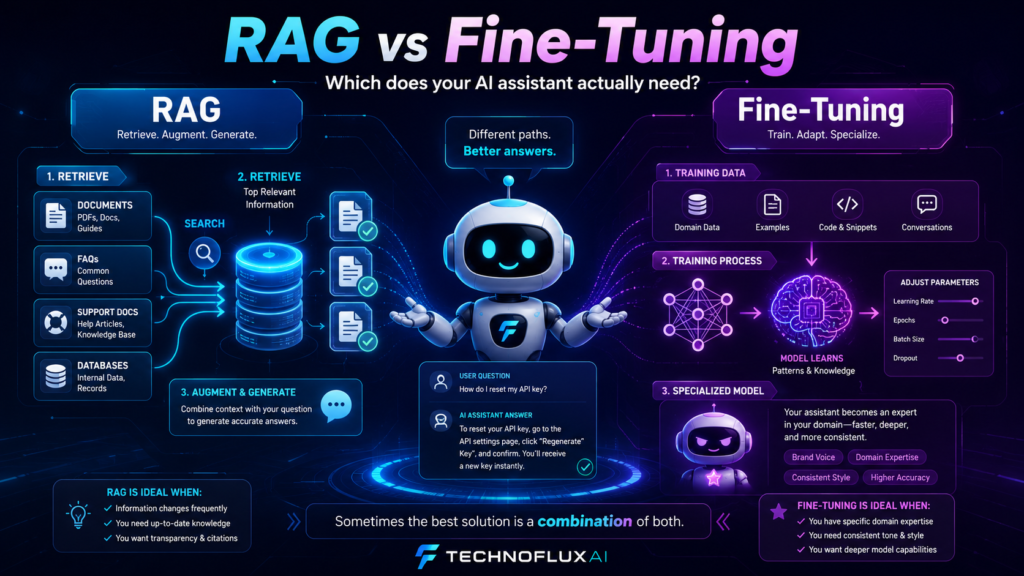
RAG vs Fine-Tuning: The Plain-English Difference
Think of your AI assistant like a smart employee. RAG gives that employee a searchable library. Fine-tuning gives that employee repeated practice on how to perform a task.
RAG
Retrieval-Augmented Generation lets the assistant search approved content before answering. It is best for business facts, documentation, policies, product details, support answers, and information that changes over time.
Fine-Tuning
Fine-tuning trains a model on examples so it becomes better at a specific style, format, classification task, or response pattern. It is best when you need consistent behavior, not just more facts.
The biggest difference is timing. RAG retrieves information when the user asks a question. Fine-tuning changes the model ahead of time. That is why RAG is usually easier to update, while fine-tuning requires a more careful training and evaluation process.
Comparison: Which One Solves Your Problem?
When Your AI Assistant Needs RAG
Your AI assistant probably needs RAG if the main problem is knowledge. This includes customer support bots, internal team assistants, product documentation assistants, onboarding bots, sales enablement assistants, and website chatbots.
Best RAG Use Case
A customer asks, “Can I get a refund if I bought during a promotion?” The assistant should search your refund policy, promotion rules, and support notes before answering. That is a RAG problem.
Use RAG When You Need:
- Answers grounded in specific documents
- Support for changing policies, pricing, or product information
- Source-based answers with less guessing
- Fast updates without retraining a model
- Separate knowledge bases for different clients, teams, or products
- Internal search across manuals, SOPs, notes, PDFs, FAQs, and help docs
When Your AI Assistant Needs Fine-Tuning
Fine-tuning makes more sense when the model already has access to the right information but still does not respond the way you need. This is usually about behavior, format, tone, classification, or repeated task performance.
Best Fine-Tuning Use Case
A company wants an AI assistant to classify thousands of support messages into exact categories using historical examples. The needed skill is not searching documents. The needed skill is repeating a learned decision pattern.
Use Fine-Tuning When You Need:
- Consistent output format across many responses
- A specialized tone or writing style that prompts cannot reliably maintain
- Classification based on many labeled examples
- Repeated decision patterns from historical data
- Lower prompt complexity for a narrow task
- More consistent behavior in a production workflow
The Best AI Assistant Stack Usually Starts With RAG
For most business assistants, the safest build order is simple: start with instructions, add RAG, test the answers, then consider fine-tuning only if the assistant still has a behavior problem.
Recommended Build Order
- Write strong system instructions for the assistant’s role, tone, limits, and escalation rules.
- Build a clean knowledge base with focused articles, FAQs, policies, and examples.
- Add RAG so the assistant can retrieve the right information before answering.
- Test real user questions and collect failed answers.
- Improve the documents, chunking, metadata, and retrieval rules.
- Only consider fine-tuning if the assistant still needs a repeated behavior that prompting and RAG cannot solve.
Can You Use RAG and Fine-Tuning Together?
Yes. A more advanced AI assistant can use both. RAG supplies the current source material, while fine-tuning helps the model respond in a consistent way. This can be useful for mature AI systems that already have clear training examples, repeated workflows, and strong evaluation data.
Important Warning
Do not jump to a hybrid setup just because it sounds advanced. If your documents are messy, outdated, duplicated, or unclear, fine-tuning will not magically fix the knowledge problem. Clean the knowledge base first.
Advanced Decision Framework: Diagnose the Failure First
Before choosing RAG or fine-tuning, look at why the assistant is failing. The failure type tells you what to fix.
Missing Fact
If the assistant does not know the answer, add or improve RAG content. The model needs access to the right source.
Wrong Format
If the assistant knows the answer but keeps formatting it incorrectly, improve prompts first. Consider fine-tuning later if the issue repeats at scale.
Bad Judgment
If the assistant chooses the wrong category, route, label, or response type again and again, fine-tuning may help after you collect strong examples.
Practical Examples
Example 1: Website Support Assistant
A visitor asks about shipping, refunds, product compatibility, and warranty terms. This assistant needs RAG because the answers should come from approved support content and current policies.
Example 2: Ticket Routing Assistant
A support team wants the assistant to classify every incoming message as billing, technical, cancellation, sales, bug report, or refund request. Fine-tuning may help if the team has a large set of accurately labeled past tickets.
Example 3: Internal Operations Assistant
Employees ask about SOPs, HR rules, onboarding steps, tool access, approval paths, and company policies. Start with RAG because the assistant needs to retrieve current internal knowledge.
Example 4: Brand Voice Assistant
A creator wants every response to sound like a specific brand voice across thousands of short replies. Fine-tuning may help if prompt instructions are not consistent enough and there are strong examples to train from.
Common Mistakes to Avoid
Mistake 1: Fine-Tuning to Add Company Knowledge
Fine-tuning is usually not the best way to add changing company facts. For policies, pricing, FAQs, and documentation, RAG is usually easier to update and control.
Mistake 2: Building RAG on Messy Documents
RAG is not magic search dust. If the knowledge base contains duplicates, outdated policies, vague articles, and conflicting answers, the assistant will still struggle.
Mistake 3: Ignoring Evaluation
You need test questions, expected answers, failure tracking, and review cycles. Without evaluation, you are guessing whether RAG or fine-tuning improved the assistant.
Mistake 4: Making the System Too Complex Too Early
Many AI assistants do not need fine-tuning on day one. Start simple, measure failures, improve retrieval, and only add training when the problem is clearly behavioral.
FAQ: RAG vs Fine-Tuning
What is RAG in AI?
RAG stands for Retrieval-Augmented Generation. It lets an AI assistant retrieve relevant information from a knowledge base before generating an answer.
What is fine-tuning?
Fine-tuning is the process of training a model on examples so it becomes better at a specific task, style, format, or response pattern.
Is RAG better than fine-tuning?
RAG is better when the assistant needs current facts from documents. Fine-tuning is better when the assistant needs to learn a repeated behavior or output style. One is not always better than the other.
Should a small business use RAG or fine-tuning?
Most small businesses should start with RAG because they usually need the assistant to answer from policies, FAQs, service details, pricing, and documentation. Fine-tuning can come later if there is a clear behavior problem.
Can RAG and fine-tuning work together?
Yes. RAG can provide the latest source information, while fine-tuning can help the assistant respond in a more consistent way. This is usually an advanced setup, not the first step.
Final Takeaway
Your AI assistant probably does not need fine-tuning just because it gives bad answers. First, check whether it has access to the right information. If the issue is missing, outdated, or hard-to-find knowledge, use RAG. If the issue is repeated behavior, style, classification, or formatting, fine-tuning may be worth exploring.
Build the Right Brain for Your Assistant
Start with clean instructions, a useful knowledge base, and RAG. Then test real questions. Fine-tuning should be a targeted upgrade, not a guess.
Explore More AI Automation Guides