

Estimated reading time: 9 minutes
AI Tool Comparison for Creators
Everneed AI vs Canva AI: Which Is Better for Solo Creators?
Solo creators do not need more tools just for the sake of having more tools. They need an AI workflow that helps them write, design, publish, and promote content without wasting hours switching tabs.
Quick Answer
Canva AI is better for solo creators who need finished visual content, brand assets, presentations, social graphics, and editable designs. Everneed AI is better for creators who mostly need written content, content ideas, SEO copy, scripts, and simple AI generation in one place.
Best Overall Pick
For most solo creators, Canva AI is the stronger everyday tool because it connects AI generation directly to design, editing, brand kits, templates, and publishing-ready visuals.
The real question is not “Which AI tool is more powerful?” The better question is: which tool helps you finish creator work faster? A blogger, YouTuber, coach, Etsy seller, freelancer, and social media creator may all need AI, but they do not need the same workflow.
Everneed AI leans toward AI content generation. Canva AI leans toward AI-powered visual creation. Both can help creators move faster, but they solve different problems. Choosing the wrong one can leave you with a tool that looks exciting but does not fit your daily content process.
Simple Decision Rule
Choose Canva AI if your final output needs to look polished. Choose Everneed AI if your main bottleneck is producing written content, prompts, scripts, article drafts, and marketing copy.
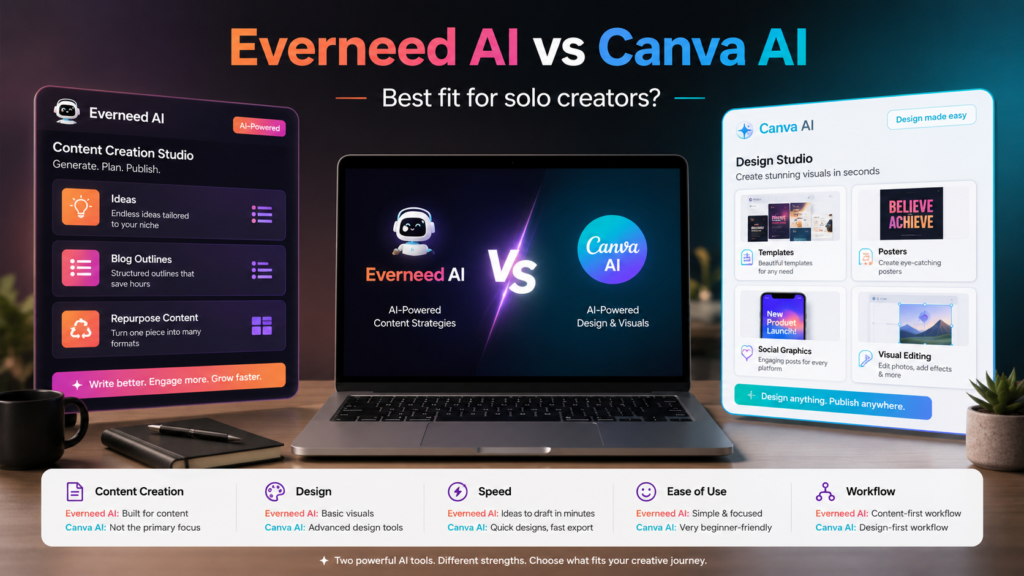
Everneed AI vs Canva AI: The Core Difference
Everneed AI and Canva AI overlap in one big way: both help creators make content faster. But they are not built around the same center of gravity.
Everneed AI
Best understood as an AI content generation platform. It is useful when you want written output, content ideas, SEO drafts, social captions, scripts, chatbot-style responses, and AI-generated images from templates.
Canva AI
Best understood as an AI creative production workspace. It helps you generate, edit, design, format, brand, and publish visual content without needing advanced design skills.
That difference matters. Everneed AI can help you create the words and ideas behind your content. Canva AI can help turn ideas into finished assets people actually see, click, save, watch, or share.
Feature Comparison for Solo Creators
When Everneed AI Makes More Sense
Everneed AI is a stronger fit when your biggest challenge is getting words on the page. If you are creating blog posts, product descriptions, email ideas, ad copy, social captions, YouTube scripts, SEO drafts, or general content ideas, Everneed AI gives you a more writing-focused experience.
Best Everneed AI Use Case
A solo blogger wants to create article ideas, draft SEO-friendly intros, write social captions, generate YouTube descriptions, and test content angles without opening a full design platform.
Everneed AI also makes sense for creators who prefer guided templates. Instead of starting from a blank prompt box every time, you can choose a use case and give the tool specific keywords or instructions. That can be easier for beginners who do not want to build every prompt from scratch.
Choose Everneed AI If You Need:
- Blog post drafts and outlines
- SEO content ideas
- Social media captions
- Video scripts and hooks
- AI-generated copy for products or services
- A simple template-based content workflow
When Canva AI Makes More Sense
Canva AI is better when you need to turn ideas into finished creator assets. That includes Instagram posts, Pinterest pins, YouTube thumbnails, lead magnets, slide decks, product mockups, short-form video graphics, brand kits, and promotional visuals.
Best Canva AI Use Case
A solo creator wants to plan a campaign, generate post ideas, create branded graphics, edit photos, build a presentation, resize content for different platforms, and keep everything visually consistent.
Canva AI has a major advantage because it sits inside the design workflow. You are not just generating an idea and copying it somewhere else. You can create, edit, brand, and export the final asset from the same workspace.
Choose Canva AI If You Need:
- Social media graphics
- YouTube thumbnails
- Brand templates
- Presentations and pitch decks
- AI image generation and image editing
- Visual content that looks ready to publish
Pricing and Value: Which One Feels Better for Solo Creators?
Pricing is not only about the monthly cost. For solo creators, value comes down to how many separate jobs one tool can replace. A cheaper tool is not always cheaper if you still need three other apps to finish the work.
Everneed AI Value
Strong value if you mainly need high-volume written content, image credits, transcription minutes, and template-based AI generation.
Canva AI Value
Strong value if you already use Canva for thumbnails, posts, presentations, PDFs, lead magnets, ads, or creator brand assets.
Best Workflow for Solo Creators
The smartest approach may not be choosing one tool forever. The best creator workflow is choosing the right tool for the job.
Simple Solo Creator Workflow
- Use Everneed AI or another writing tool to brainstorm content angles, hooks, scripts, and article ideas.
- Refine the message so it sounds like your brand instead of generic AI copy.
- Use Canva AI to turn the idea into graphics, thumbnails, carousels, slides, or promotional assets.
- Resize the finished content for each platform.
- Track which content performs best and reuse the winning formats.
Advanced Buying Advice: Do Not Pick Based on Features Alone
Feature lists can be misleading. A solo creator should judge AI tools by how much friction they remove from the daily publishing process. The best tool is the one that helps you move from idea to finished asset with the fewest extra steps.
For Bloggers
Everneed AI may be more useful at the draft and planning stage. Canva AI becomes more useful when creating featured images, Pinterest pins, lead magnets, and social graphics.
For YouTubers
Everneed AI can help with scripts and titles. Canva AI is usually stronger for thumbnails, channel graphics, shorts assets, and visual branding.
For Coaches and Freelancers
Canva AI usually wins if you sell through visual trust: proposals, PDFs, social posts, workshop slides, offers, templates, and simple client-facing assets.
Common Mistakes to Avoid
Mistake 1: Choosing the Tool With the Longest Feature List
More features do not automatically mean a better creator workflow. Pick the tool that helps you finish the content you actually publish every week.
Mistake 2: Using AI Output Without Editing It
Whether you use Everneed AI or Canva AI, the first output should be treated as a draft. Add your opinion, examples, voice, offer, and brand style before publishing.
Mistake 3: Paying for AI You Do Not Use
A solo creator should review usage monthly. If you are only using a tool twice a month, it may not deserve a permanent spot in your stack.
Mistake 4: Forgetting the Final Asset
Written ideas are not enough. Creators need publishable assets. If your work depends on visuals, Canva AI has a clear advantage because it helps complete the final design.
FAQ: Everneed AI vs Canva AI
Is Everneed AI better than Canva AI?
Everneed AI is better for writing-focused creators who need content drafts, SEO ideas, scripts, captions, and template-based AI outputs. Canva AI is better for creators who need visual content, brand assets, presentations, and social graphics.
Is Canva AI enough for solo creators?
For many solo creators, yes. Canva AI can help with content ideas, written copy, image generation, design creation, editing, presentations, and branded visual assets. It is especially useful if Canva is already part of your workflow.
Is Everneed AI good for bloggers?
Yes, Everneed AI can be useful for bloggers who need article ideas, SEO copy, outlines, introductions, social captions, and supporting content. Bloggers will still need to edit the output for accuracy, originality, and personal voice.
Which tool is better for social media creators?
Canva AI is usually better for social media creators because social content is visual. It helps with graphics, templates, resizing, brand consistency, and publish-ready designs.
Should I use both Everneed AI and Canva AI?
Using both can make sense if you publish a lot. Everneed AI can help with writing and planning, while Canva AI can help turn those ideas into graphics, thumbnails, carousels, lead magnets, and presentations.
Final Verdict
Canva AI is the better choice for most solo creators because it supports the full visual content workflow from idea to finished asset. It is especially strong for social media graphics, thumbnails, presentations, lead magnets, and branded creator content.
Everneed AI is still worth considering if your main need is writing, content planning, SEO drafting, scripts, or high-volume text generation. It is more of a content engine, while Canva AI is more of a creator production studio.
Best Pick for Solo Creators
Choose Canva AI if you want one practical tool for creating polished visual content. Choose Everneed AI if your priority is generating written content faster. If your creator business depends on both words and visuals, use Everneed AI for drafting and Canva AI for final production.
Explore More AI Tool Comparisons