

Estimated reading time: 8 minutes
TechnofluxAI Creator Planning Workflow
AI Content Calendar Workflow for Solo Creators
Solo creators do not need a complicated content calendar. They need a simple workflow that turns ideas into planned posts, planned posts into batches, and batches into consistent publishing without burning out.
Quick Answer
An AI content calendar workflow for solo creators should include idea capture, topic sorting, content pillars, weekly planning, batching, repurposing, publishing reminders, and a weekly review. AI helps most when it turns scattered ideas into a realistic calendar you can actually follow.
Why It Matters
Solo creators are usually the strategist, writer, editor, designer, scheduler, and promoter. A clear AI-assisted calendar helps reduce decision fatigue and keeps content moving.
The Problem With Most Content Calendars
Many content calendars look organized at first, but they fail because they are too ambitious. A solo creator may plan five platforms, daily posts, weekly videos, newsletters, blogs, short clips, and promotions all at once. The calendar becomes impressive on paper but impossible in real life.
The better approach is to use AI as a planning assistant. Instead of forcing yourself to invent fresh ideas every day, you can use AI to organize your ideas, group them into themes, create a realistic schedule, and repurpose one strong idea across multiple formats.
What This Article Will Help You Build
This guide will help you build a practical AI content calendar workflow that supports idea capture, weekly planning, content batching, repurposing, and publishing consistency without overwhelming your schedule.
Soft Next Step
After building your content calendar, connect it to your task management workflow so every planned post has a clear next action, deadline, and production step.
TechnofluxAI
Practical AI for creators and website owners
Learn how to use AI, improve AI search visibility, build smarter workflows, and test what actually works.
Explore our other sites
TimewasterAI
— product reviews, buying guides, and useful finds.
Tina Trends
— fashion, beauty, pets, lifestyle, and fun discoveries.
Mistakenly Delicious
— simple recipes and practical cooking ideas.
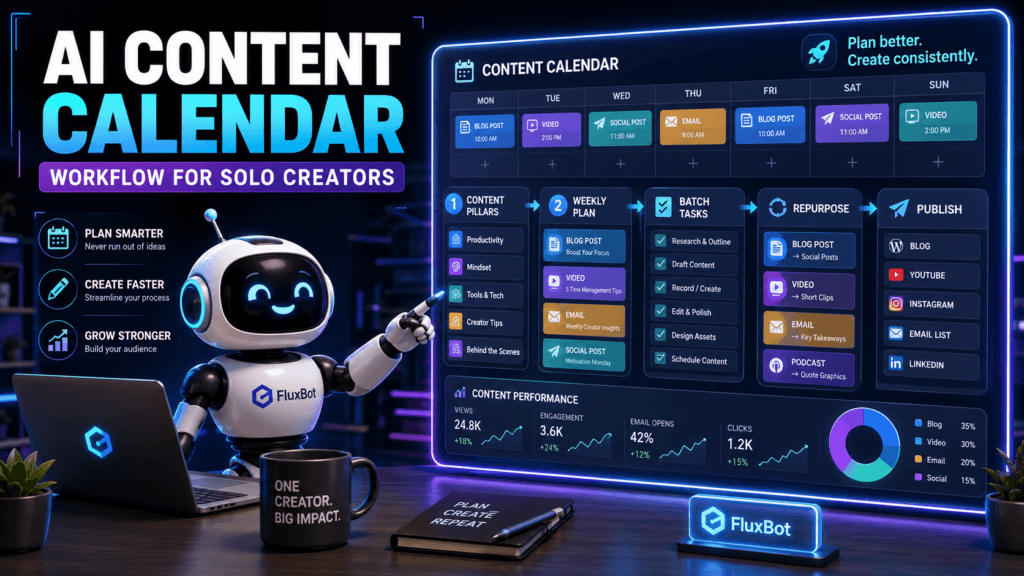
Creator Calendar System
The Simple AI Content Calendar Workflow
A good content calendar should make publishing easier, not heavier. The goal is to create a flexible system that helps you know what to make, when to make it, where to publish it, and how to reuse it.
Capture Ideas
Use AI to collect raw ideas, audience questions, content hooks, product notes, personal stories, recurring themes, and unfinished drafts before they disappear.
Organize Themes
Ask AI to group your ideas into content pillars, audience problems, platform types, funnel stages, or weekly themes so your calendar has structure.
Plan Realistically
Use AI to turn your ideas into a schedule based on your real available time, main platform, production speed, and creative energy.
Step 1: Build a Creator Idea Inbox
Before you build the calendar, create one place where ideas can land. This can include rough notes, questions from your audience, product ideas, content hooks, comments, personal experiences, and half-finished topics.
Audience Questions
Turn comments, DMs, emails, and repeated questions into blog posts, videos, newsletters, and short-form content.
Recurring Topics
Save topics you explain often. These usually become strong evergreen content because they solve repeat problems for your audience.
Personal Lessons
Capture lessons from your own workflow, mistakes, wins, experiments, tools, and behind-the-scenes creator process.
Copyable AI Prompt for Organizing Content Ideas
Use this prompt when your idea list feels messy:
Organize the following content ideas into a simple content calendar for a solo creator. Group the ideas into content pillars, identify which topics are best for long-form content, short-form content, email, and repurposing, then create a realistic weekly schedule. Prioritize ideas that are useful, easy to produce, and connected to my main audience goal. Do not overload the calendar.
Weak Calendar
“Post every day on every platform.”
This sounds productive, but it can quickly lead to rushed content, missed deadlines, and creator burnout.
Strong Calendar
“Create one strong weekly core piece, repurpose it into three shorter posts, and schedule one email or community update.”
This gives the solo creator a repeatable rhythm without requiring a full content team.
Step 2: Choose Your Content Pillars
Content pillars help your calendar stay focused. Instead of creating random posts, you rotate through repeatable themes that support your audience and your creator goals.
Educational Pillar
Teach your audience how to solve a problem, understand a topic, use a tool, or make a better decision.
Behind-the-Scenes Pillar
Show your process, experiments, lessons, mistakes, setup, workflow, or what you are building.
Opinion Pillar
Share your point of view on trends, tools, creator habits, common advice, or industry changes.
Offer Pillar
Create content that naturally supports your product, service, newsletter, community, affiliate offer, or lead magnet.
Step 3: Use a Core Content System
A core content system helps solo creators produce more from less. Instead of treating every platform as a separate job, start with one main piece and repurpose it into smaller assets.
- Core piece: One blog post, video, podcast, newsletter, or tutorial.
- Short-form posts: Three to five smaller ideas pulled from the main piece.
- Email angle: One personal or practical takeaway for your list.
- Social hook: One strong opening line that creates curiosity.
- FAQ post: One simple answer pulled from the topic.
- Behind-the-scenes post: One process note about how or why you made it.
- CTA reminder: One next step connected to your offer, resource, or community.
Advanced Calendar Planning
How to Keep Your AI Content Calendar Realistic
The best content calendar is not the one with the most posts. It is the one you can repeat. AI can help you plan more intelligently by balancing content goals with your actual time, energy, platforms, and production limits.
Plan Around Capacity
Tell AI how many hours you actually have each week. A realistic calendar should fit your life, not pressure you into pretending you have a full production team.
Build Repeatable Themes
Use weekly themes so you are not starting from zero every time. For example, Monday can be education, Wednesday can be behind-the-scenes, and Friday can be opinion or offer content.
Review Before Adding More
Before adding another platform or content type, review what is already working. AI can help you identify which content topics are easiest to repeat and most useful to your audience.
Copyable Weekly AI Content Calendar Prompt
Use this prompt when planning your week:
Create a realistic weekly content calendar for a solo creator. My main audience is [audience]. The main content goal is [goal]. The primary platform is [platform]. I have [number] hours available this week. Use these content pillars: [pillars]. Plan one core content piece, repurposed short-form posts, one email or community update, and a simple publishing schedule. Include production tasks, batching suggestions, and a weekly review step.
Common Mistakes to Avoid
Mistake 1: Planning More Than You Can Produce
A content calendar should respect your real schedule. If the plan requires more time than you have, it is not a strategy. It is a stress machine.
Mistake 2: Treating Every Platform Like a Separate Job
Solo creators need leverage. Start with one strong idea and repurpose it instead of creating completely new content for every platform.
Mistake 3: Skipping the Review Step
If you never review what worked, your calendar will keep filling up with guesses. Use AI to look for patterns in completed content.
Mistake 4: Letting AI Make the Calendar Too Generic
AI needs your audience, goals, platform, available time, and content pillars. Without that context, the calendar may look clean but feel disconnected from your real work.
FAQ: AI Content Calendar Workflow for Solo Creators
Can AI create a content calendar for solo creators?
Yes. AI can help solo creators organize ideas, choose content pillars, plan weekly posts, batch production tasks, repurpose content, and review what worked.
What should a solo creator content calendar include?
A simple content calendar should include topic ideas, content pillars, platform choices, publishing dates, production tasks, repurposing notes, and review reminders.
How often should solo creators plan content?
A weekly planning rhythm works well for many solo creators because it is flexible enough to adjust while still giving the week structure.
How can AI help with content repurposing?
AI can turn one core idea into short-form posts, email angles, captions, hooks, FAQ answers, outline sections, and follow-up content ideas.
Final Takeaway
An AI content calendar workflow for solo creators should help you create with more consistency and less pressure. Start with an idea inbox, organize your topics into pillars, plan one realistic week at a time, and repurpose your strongest ideas. The best calendar is not the fullest calendar. It is the one you can actually use.
Build a Calendar You Can Repeat
Use AI to plan one realistic week first. Capture your ideas, choose your content pillars, create one core piece, repurpose it, and review what worked before adding more.
Better content planning starts with a calendar that respects your capacity.