
Estimated reading time: 10 minutes
AI Workflow Measurement
How to Measure Time Saved by an AI Workflow
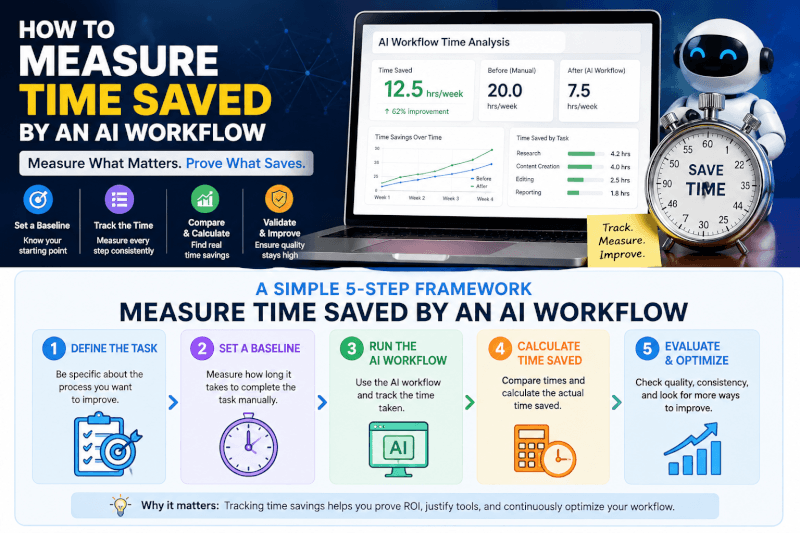
AI tools can feel fast, but feeling faster is not the same as proving time saved. A useful workflow needs a baseline, a test, a review step, and a clear decision rule.
Quick Answer
To measure time saved by an AI workflow, compare one normal manual task against one AI-assisted version. Track time spent, output quality, corrections, review effort, cost, and whether the final result was actually usable.
The Real Problem
Many teams adopt AI before defining the result, evidence, review standard, or fallback plan. That makes the workflow look productive while hiding rework.
What This Guide Helps You Do
You will learn how to test an AI workflow with a small, repeatable process that proves whether automation saves time without lowering accuracy, trust, or quality.
Why Time Saved Is Hard to Measure
AI can make one step faster while adding hidden work somewhere else. A draft may appear in seconds, but someone still has to check facts, revise tone, format the output, confirm sources, and decide whether the result can be used.
The right question is not, “Did AI generate something quickly?” The better question is, “Did the full workflow produce a usable result with less total effort?”
A workflow only deserves to stay when it improves the completed task. Count the whole process, not just the moment when the AI produces an answer.
The Simple Measurement Formula
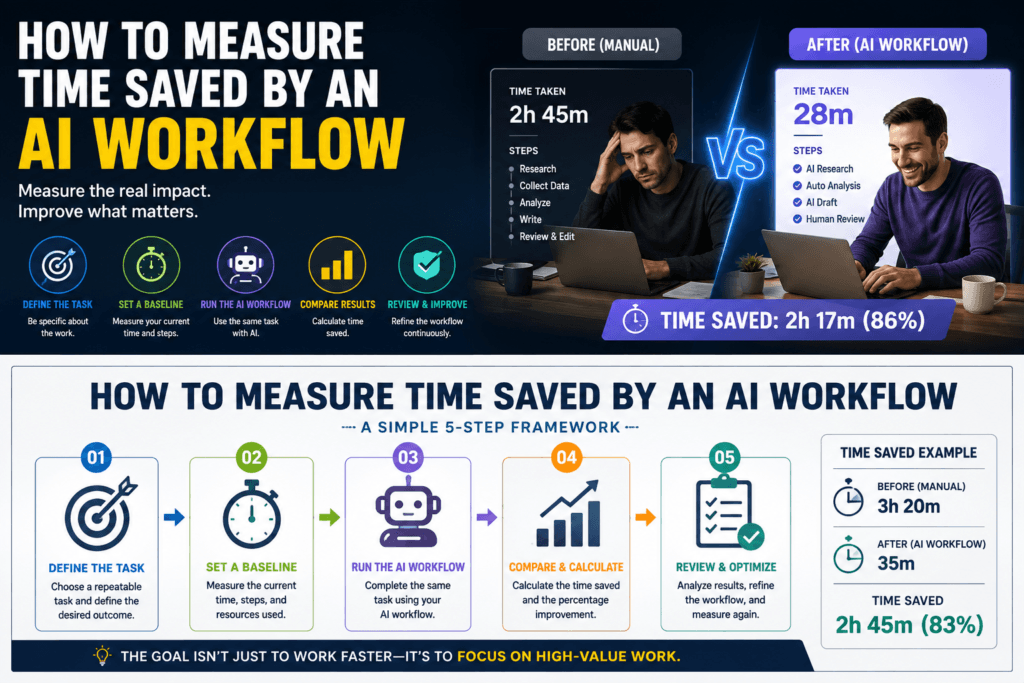
Measure how long the current process takes without AI.
Run one safe AI-assisted test using realistic inputs.
Track corrections, quality issues, manual edits, and approval time.
Keep the workflow only if total effort drops without damaging trust.
Practical Workflow
How to Measure AI Productivity Without Guessing
A useful AI productivity test compares the old process with the new one under realistic conditions. The goal is a working decision, not another list of AI features.
Step 1: Choose One Measurable Outcome
Start with one specific result. Good outcomes include shorter editing time, fewer missed follow-ups, faster source collection, fewer formatting errors, or a repeatable deliverable that takes less effort to finish.
Avoid vague goals like “use more AI” or “automate content.” Those goals make activity look like progress. A stronger target sounds like, “Reduce proposal research time from 45 minutes to 25 minutes while keeping source accuracy intact.”
Step 2: Map the Current Manual Process
Write down every step in the existing workflow before adding AI. Include searching, copying, formatting, waiting, checking, approvals, corrections, and rework.
The slowest part is not always the best automation target. Sometimes the biggest time savings come from reducing handoffs, improving input quality, or creating a better review checklist.
Baseline Notes
- Task name
- Starting input
- Manual steps
- Elapsed time
- Final output
- Approval person
Hidden Work to Count
- Corrections
- Fact-checking
- Formatting
- Source review
- Tool switching
- Final approval
Step 3: Prepare Safe Inputs
Use the smallest amount of context needed for the task. Remove secrets, passwords, payment details, unnecessary personal information, private customer records, and anything you are not authorized to share.
Label the source material clearly. Tell the AI what the task is, who the audience is, what format you want, which constraints matter, and what the final result must include.
Pilot Test Prompt
“Use the source material below to complete this task. Preserve important details, flag anything uncertain, and do not invent missing information. After the output, list what still needs human review before the result can be used.”
Step 4: Run One Small AI Pilot
Test one representative task before changing the full workflow. Keep the original input, prompt, settings, AI output, edited version, time spent, and final decision.
Add one incomplete example and one edge case after the normal test. Those three examples reveal more than a polished demo built around ideal inputs.
Test 1: Normal Task
Use a realistic example that represents the work you do most often.
Test 2: Incomplete Input
Check whether the workflow flags missing details instead of making confident guesses.
Test 3: Edge Case
Try a messy or unusual example to see where the workflow fails.
Step 5: Score the Real Time Saved
Use a small scorecard so the decision does not depend on memory, excitement, or one impressive demo. Measure the complete workflow from start to approved result.
| Metric | Manual Baseline | AI Workflow | Decision Signal |
|---|---|---|---|
| Time per completed task | Record actual minutes | Include review and edits | Lower total time is useful |
| Number of corrections | Count normal rework | Count AI-related fixes | Fewer errors builds trust |
| Completion rate | Track finished tasks | Track usable outputs | More usable output matters |
| Cost per usable outcome | Labor and tools | Plan cost plus review time | Savings must survive total cost |
| Quality of final result | Current accepted standard | Reviewed final version | Quality cannot drop |
Step 6: Keep, Revise, or Remove the Workflow
Write one clear sentence explaining the result. For example: “This process reduced editing time but introduced two source errors,” or “The workflow saved 18 minutes per task after review time was included.”
Keep the workflow when it improves the stated outcome. Revise weak steps when the idea is promising but unstable. Remove automation that adds complexity without producing a better final result.
Advanced Guidance
Make the Workflow Safer Before You Scale It
A workflow is not complete until failure and recovery are understood. Before expanding access, document what remains manual, who approves the result, and how the team returns to the previous process.
How to Keep the Workflow Safe
Limit Inputs
Use redacted or synthetic examples during early testing. Remove secrets, private records, and unnecessary personal information before the workflow touches real data.
Control Access
Give the tool the smallest permission it needs. Store credentials in the approved secret system instead of prompts, notes, documents, or shared folders.
Keep Human Approval
Require explicit approval when the workflow can publish, send, purchase, delete, change records, or affect a customer-facing result.
Preserve the Manual Path
Keep backups and a fallback process until the AI workflow proves dependable across normal examples, incomplete inputs, and edge cases.
Problems That Weaken the Result
Starting With a Tool
Tool-first testing creates weak evidence. Define the problem and result before choosing where AI belongs.
Trusting Fluent Output
Smooth writing does not prove names, dates, links, prices, calculations, or claims are correct.
Skipping the Review Point
A good first demo does not remove the need for approval, rollback steps, and repeat testing.
Measuring Activity
Generated words, automated steps, or impressive screenshots matter less than the final approved outcome.
When This Measurement Approach Is a Good Fit
This approach works best when the task repeats, the result can be checked, and a person can review exceptions. It is especially useful for drafting, formatting, summarizing, research preparation, reporting, intake, and internal admin workflows.
It is less suitable when source information is missing, professional judgment is required, sensitive data lacks proper controls, or workflow failure could cause significant harm.
FAQ: Measuring Time Saved by an AI Workflow
Do I need an expensive AI plan to measure productivity?
Usually not at the beginning. Start with the smallest plan or trial that supports a realistic test. Upgrade only when a documented limit blocks a workflow that already produces value.
What should I avoid uploading during testing?
Avoid passwords, API keys, payment information, private customer records, unpublished contracts, medical or legal records, and any material you are not authorized to share.
How often should I review the workflow?
Review the workflow after product changes, source updates, failures, permission changes, or noticeable quality drops. For a stable recurring process, a monthly or quarterly check is usually enough.
Can I publish or send AI output automatically?
Retain human review by default. Automation may be appropriate only after repeated testing, narrow permissions, clear rollback steps, and explicit approval for the exact publishing or sending behavior.
How do I know whether the AI workflow is helping?
Compare it with the previous process using time, corrections, completion rate, cost, and final output quality. If the workflow cannot beat or meaningfully support the old process, simplify it or remove it.
Final Takeaway
Measuring AI productivity is not about counting how fast a tool generates output. It is about comparing the full old process against the full new process and deciding whether the finished result takes less effort to approve.
Choose one representative task. Record the baseline. Run a small safe test. Count corrections and review time. Keep the workflow only when the total result improves.
Ready to Prove Your AI Workflow Is Actually Saving Time?
Start with one task this week. Measure the baseline, test the AI-assisted version, and keep only the workflow changes that improve the final approved result.
Build a Smarter AI WorkflowImage Suggestions
Featured Image
Neon AI productivity dashboard showing a baseline timer, AI workflow timer, correction log, and final decision score.
Alt text: AI workflow dashboard measuring time saved, corrections, and quality score.
AI image prompt: Futuristic AI productivity dashboard measuring time saved by workflow automation, dark workspace, glowing timer cards, correction checklist, quality score panel, blue cyan purple neon accents, clean practical business style, no fake logos, no unreadable text.
In-Article Image 1
Side-by-side comparison of manual workflow steps and AI-assisted workflow steps with review time included.
Alt text: Manual process compared with AI-assisted workflow for measuring productivity.
AI image prompt: Split-screen workflow comparison, manual process on one side and AI-assisted process on the other, glowing cards for baseline pilot review decision, dark neon AI dashboard look, cyan purple blue accents, clean layout, no logos.
In-Article Image 2
AI workflow scorecard with time, corrections, completion rate, cost, and quality displayed as clean metric cards.
Alt text: AI productivity scorecard for measuring time saved and workflow quality.
AI image prompt: Neon AI productivity scorecard with metric cards for time saved corrections completion rate cost and quality, dark background, modern dashboard interface, blue cyan purple glow, clean business blog visual, no fake logos, no tiny unreadable text.
Optional Infographic
Five-step measurement flow: baseline, safe input, pilot, review, keep or remove.
Alt text: Five-step process for measuring time saved by an AI workflow.
AI image prompt: Clean neon infographic showing five steps to measure AI workflow time savings, baseline safe input pilot review decision, dark AI dashboard theme, cyan blue purple accents, creator-friendly design, no logos, no unreadable microtext.
Social Media Suggestions
YouTube Shorts Hook
AI may feel faster, but is it actually saving time? Here is the simple scorecard I would use before keeping any AI workflow.
TikTok Caption
Do not measure AI by how fast it generates. Measure the full workflow: baseline, edits, review time, and final quality.
LinkedIn Post
The fastest AI workflow is not always the best one. To measure real productivity, compare the manual baseline against the AI-assisted version and include corrections, review time, cost, and quality. If the final approved result does not improve, the automation is not saving time. It is just moving the work somewhere else.
Facebook Post
AI can look productive in a demo, but the real test is whether it saves time after edits, checking, and approval. This guide breaks down a simple way to measure AI workflow time savings without guessing.
Pinterest Title
How to Measure Time Saved by an AI Workflow
Pinterest Description
Use this simple AI productivity scorecard to measure time saved, corrections, cost, review effort, and final output quality.
Hashtags
#AIWorkflow #AIProductivity #AutomationTools #BusinessAutomation #AITips #ProductivitySystems #SmallBusinessAI #WorkflowAutomation #TechnoFluxAI #AIForBusiness
Newsletter Teaser
Before you keep an AI workflow, prove it actually saves time after edits, checking, and approval.