

Estimated reading time: 14 minutes
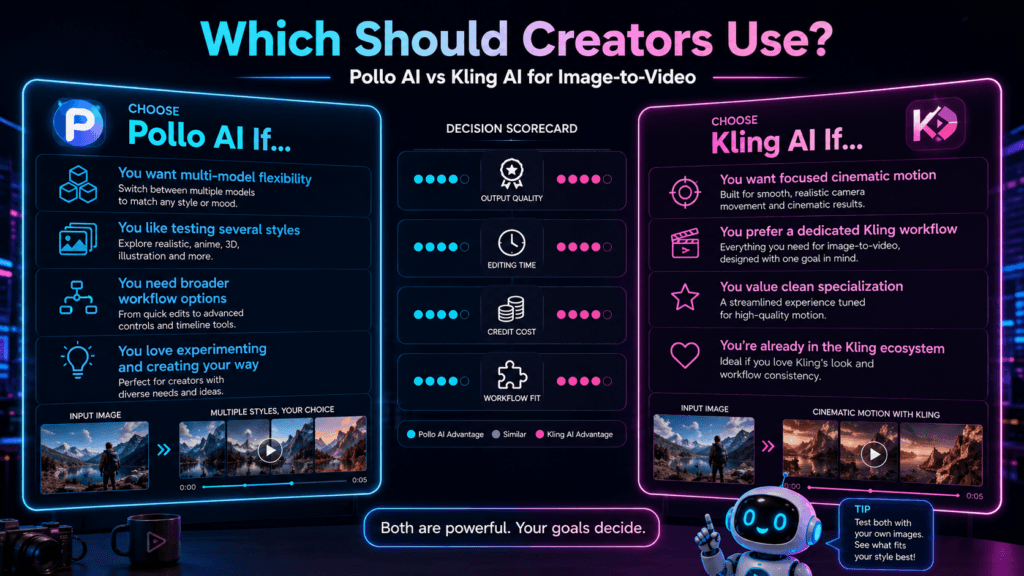
Quick Answer: Choose Pollo AI when you want one workspace where you can compare several image-to-video models, including Pollo 2.5 and Kling. Choose Kling AI directly when you already prefer Kling’s generation system and want to stay closer to its newest model releases and controls. For most creators who are still experimenting, Pollo AI offers more flexibility. For creators committed to Kling, direct access may provide a simpler focused workflow.
Pollo AI vs Kling AI is not a perfectly equal comparison. Pollo AI is an all-in-one creative platform that provides access to its own Pollo video model and several outside models. Kling AI is both a dedicated creative platform and a video-generation model available through services such as Pollo AI.
That distinction matters. A creator can use Kling inside Pollo AI without maintaining a separate Kling workflow. Therefore, the practical decision is often whether to use Pollo as a multi-model workspace or access Kling through its own platform.
This guide focuses specifically on image-to-video creation. It examines workflow flexibility, motion control, character consistency, audio, model access, editing time, credit usage, and creator use cases.
Pollo AI vs Kling AI at a glance
| Category | Pollo AI | Kling AI |
|---|---|---|
| What it is | A multi-model AI image and video platform | A dedicated AI image and video platform and model family |
| Image-to-video options | Pollo models plus Kling, Veo, Sora, Seedance, Runway, Wan, and other supported models | Kling’s own image-to-video models and tools |
| Best advantage | Compare several models without changing platforms | Focused access to the Kling ecosystem |
| Best for | Creators testing different styles, models, and content formats | Creators who already know they want Kling |
| Creative control | Depends on the selected model and generation mode | Includes Kling-specific image-to-video controls where available |
| Workflow complexity | More choices can require additional testing | Fewer model choices can make the workflow more focused |
| Cost comparison | Credits vary by model, duration, resolution, and mode | Credits and plan limits vary by Kling model and subscription |
The most important difference
Pollo AI is useful when you do not want to commit to one video model. Its image-to-video workspace can provide access to Pollo’s flagship model alongside outside options such as Kling.
That flexibility helps when one model performs well with portraits while another handles product motion, landscapes, animation, or cinematic camera movement more reliably.
Kling AI takes a more focused approach. Instead of comparing unrelated model families, you work inside Kling’s own system. This may appeal to creators who have already tested Kling and prefer its motion, prompt response, or visual style.
The choice is not simply about which company has the longest feature list. It depends on whether you need model variety or a dedicated Kling workflow.
Pollo AI for image-to-video
Pollo AI combines image generation, image-to-video creation, editing tools, effects, avatars, and multiple video models inside one workspace. Creators can upload a still image, choose a supported model, enter a motion prompt, adjust available settings, and generate a clip.
Pollo’s current flagship model is Pollo 2.5. Its official product page promotes native audio generation, multi-shot storytelling, consistent characters, advanced prompt understanding, style control, camera movement, and start-and-end-frame control.
However, Pollo AI is broader than the Pollo model itself. The platform also lists access to Kling and other major video models. This allows creators to test the same image with different generation engines without rebuilding the entire project elsewhere.
Pollo AI may be the better fit when you:
- Want to compare several video models from one dashboard.
- Create different types of content for clients or multiple brands.
- Need image generation and image-to-video tools in the same workflow.
- Produce TikToks, Reels, Shorts, advertisements, product clips, or character videos.
- Do not yet know which video model works best for your visual style.
- Want a backup model when one generator produces weak results.
Kling AI for image-to-video
Kling AI focuses on its own image and video generation ecosystem. Current Kling tools support image-to-video creation, while available controls can include start and end frames, camera movement, motion direction, lip-sync features, and other model-specific options.
Kling 3.0 also introduces longer generation options, native audio-visual output, multi-shot creation, and more flexible storyboard control. Availability can depend on the selected plan, model version, region, and generation mode.
Kling AI may be the better fit when you:
- Already prefer Kling’s visual output.
- Want direct access to new Kling releases and features.
- Do not need to compare several unrelated video models.
- Create cinematic clips that require stronger shot planning.
- Use Kling regularly enough to justify a dedicated subscription.
- Want to keep Kling projects inside one focused ecosystem.
Which one produces better image-to-video quality?
There is no reliable universal winner. Output quality changes with the source image, prompt, model version, duration, resolution, aspect ratio, motion settings, and desired visual style.
A model that produces an impressive portrait animation may distort a product. Another may preserve an object accurately but create less exciting motion.
The only useful comparison is one made with your own images and intended content format. Run both tools with the same input before selecting a paid workflow.
How creators should test Pollo AI and Kling AI
A fair comparison requires more than generating one attractive clip. Use a small test set that represents the content you actually plan to publish.
Step 1: Select four realistic images
Choose images that reveal different strengths and weaknesses:
- A close-up portrait with visible facial details.
- A full-body character with hands and clothing visible.
- A product image containing labels, buttons, or important features.
- A detailed environment with foreground and background objects.
A single source image cannot reveal how reliably a model handles different subjects.
Step 2: Define the intended motion
Write down what should move before opening either tool. Avoid vague instructions such as “make this image cinematic.” Describe the subject, action, camera, background, pace, and elements that must remain unchanged.
For example:
The camera slowly moves forward while the subject looks toward the window. Hair and clothing move gently in the breeze. Preserve the person’s face, hands, clothing colors, and background layout. Do not add new objects or change the room.
Step 3: Use matching settings
Keep the duration, aspect ratio, resolution, source image, prompt, and number of outputs as similar as possible. Record the exact model version used inside each platform.
This is especially important when testing Kling through Pollo AI. Changing the model version or generation mode makes the result a different test.
Step 4: Generate more than once
One successful generation can be luck. Create at least three outputs for each important test image. Then record how many results are genuinely usable.
Do not judge a platform only by its best clip. Measure how often it produces acceptable work.
Step 5: Score the results
| Test category | What to examine |
|---|---|
| Image preservation | Does the subject still resemble the original image? |
| Motion quality | Does movement appear smooth, natural, and intentional? |
| Prompt control | Did the generator follow the requested action and camera direction? |
| Character consistency | Did the face, body, hands, clothing, and accessories remain stable? |
| Product accuracy | Did the tool preserve the product’s shape, color, text, and features? |
| Background stability | Did objects remain in place instead of bending or disappearing? |
| Editing time | How much correction, trimming, upscaling, or regeneration was needed? |
| Usable output rate | How many generated clips could actually be published? |
| Credit efficiency | How many credits were spent for each usable clip? |
Pollo AI vs Kling AI for social media creators
Short-form creators often need volume. A single polished clip is useful, but a repeatable workflow matters more.
Pollo AI can be attractive for this use because creators can test several models, effects, and content formats inside one platform. When one model struggles with a particular image, another supported option may work better.
Kling AI may be more efficient for creators who already have a proven Kling prompt style. Staying inside one model family can reduce experimentation and simplify repeated production.
For TikTok, Instagram Reels, and YouTube Shorts, test vertical output before subscribing. Confirm that important faces, products, and text remain inside the safe viewing area.
Pollo AI vs Kling AI for product videos
Product media requires stricter review than entertainment content. A generator must not change a product’s design or invent features that could mislead a buyer.
Watch for altered logos, unreadable labels, additional buttons, changing colors, warped packaging, fake ports, or shifting product dimensions. Even a visually impressive clip should be rejected when it misrepresents the item.
Test simple controlled movements first. Slow camera pushes, gentle rotations, subtle lighting changes, or limited background motion usually create fewer distortions than complex action.
Keep the original product image available during review. Compare the generated video frame by frame before using it in an advertisement, product listing, or affiliate promotion.
Pollo AI vs Kling AI for AI characters
Character creators should concentrate on identity consistency. Faces, hair, clothing, body proportions, hands, and signature accessories must remain recognizable throughout the clip.
Pollo 2.5 promotes consistent character generation and reference-based style control. Kling’s current models also emphasize character performance, motion, and multi-shot storytelling.
Neither claim guarantees a perfect result with every character. Detailed costumes, fast movements, profile views, hands near the face, and scene changes can increase the risk of visual drift.
Begin with a clear front-facing image and restrained motion. Add complexity only after the character remains stable in simpler tests.
Compare real cost instead of subscription price
The cheapest advertised plan is not always the least expensive workflow. Video generation cost depends on how many attempts are required to produce one usable clip.
Record these numbers during your trial:
- Credits used for each generation.
- Credits lost on failed or distorted outputs.
- Maximum duration and available resolution.
- Number of clips needed each month.
- Cost of additional credit packages.
- Time spent regenerating and editing.
- Whether unused subscription credits expire.
- Whether your preferred model requires a higher plan.
Calculate cost per usable video rather than cost per generation. A tool that charges less but requires five attempts may cost more than one that succeeds on the second attempt.
Check privacy and project visibility
Review the current privacy controls before uploading client work, unpublished products, private photos, or copyrighted creative assets.
Confirm whether projects are public by default, whether a private-generation setting is available, how uploaded files are stored, and how deletion works. Some controls may depend on the plan or selected model.
Never upload passwords, API keys, confidential customer records, private contracts, payment information, or material you do not have permission to use.
Which creators should choose Pollo AI?
Pollo AI is the stronger starting point for creators who value flexibility. Its main advantage is not that every Pollo generation will automatically outperform Kling. The advantage is being able to compare Pollo, Kling, and other supported models inside one broader creative workspace.
Consider Pollo AI when you create several content formats, manage different client styles, or frequently test new video models.
Pollo AI is likely the better choice for:
- Creators who are new to AI video generation.
- Social media managers producing varied content.
- Affiliate marketers creating product and promotional clips.
- Agencies working with different brand styles.
- Creators who want image, video, effects, and editing tools together.
- Users who want to test Kling without depending entirely on Kling’s platform.
Which creators should choose Kling AI?
Kling AI is the more focused choice for creators who already know that Kling fits their visual style and production needs.
Direct access may also make sense for creators who want to follow Kling-specific releases, organize work inside its native ecosystem, or avoid paying for a wider platform they will not fully use.
Kling AI is likely the better choice for:
- Creators who already produce reliable results with Kling.
- Filmmakers interested in Kling’s cinematic controls.
- Users who prefer a dedicated model ecosystem.
- Creators building repeatable prompts specifically for Kling.
- Teams that do not need access to many competing video models.
Pollo AI vs Kling AI: final verdict
Pollo AI wins for flexibility. It gives creators a broader workspace and access to several image-to-video models. That makes it useful for experimentation, mixed content needs, client projects, and creators who have not selected a permanent video model.
Kling AI wins for focus. It is better suited to creators who already prefer Kling and want to build their workflow around that ecosystem.
For a beginner, Pollo AI is generally the more practical place to start because it allows broader testing. For an experienced Kling user, moving everything into a multi-model platform may create more choices without improving the final workflow.
The best tool is the one that preserves your source image, follows your motion prompt, produces a high percentage of usable clips, and fits your real monthly production cost.
A practical decision rule
Use Pollo AI when access to multiple models helps you solve different creative problems.
Use Kling AI directly when Kling consistently delivers the result you need and additional models would only complicate your process.
Do not purchase an annual plan based on promotional examples. Test both options using the same images, prompts, aspect ratios, and output requirements first.
Frequently asked questions
Is Pollo AI better than Kling AI?
Pollo AI is better for model variety and an all-in-one workflow. Kling AI may be better for creators who want a dedicated Kling experience. Output quality should be tested with your own images because neither option wins every type of generation.
Can I use Kling AI inside Pollo AI?
Yes. Pollo AI currently lists Kling among the image-to-video models available through its platform. Available Kling versions, settings, credits, and features may change, so confirm the exact model before generating.
Is Pollo AI a video model or a platform?
It is both a creative platform and the provider of its own Pollo video model. The platform also gives users access to supported third-party models.
Which tool is better for TikTok and YouTube Shorts?
Pollo AI may be more flexible for creators testing different visual styles and formats. Kling AI may be more efficient when you already have a reliable Kling workflow. Test vertical videos and review the mobile crop before publishing.
Which tool is better for product videos?
Choose the option that preserves the product most accurately. Reject any generation that changes labels, colors, logos, shapes, ingredients, controls, or other important product details.
Should I pay for both platforms?
Most individual creators should not begin with two subscriptions. Test the free or limited-credit options, determine which workflow produces more usable clips, and pay only for the platform that supports your recurring content.
Can I use the generated videos commercially?
Commercial-use terms can depend on the plan, model, source material, region, and current platform policies. Review the applicable terms before using generated clips in advertisements, sponsored posts, client projects, or paid products.
How often should I repeat the comparison?
Retest after a major model release, pricing change, credit change, or workflow problem. Constantly switching tools can waste time, so avoid replacing a process that continues to produce reliable results.
What should you actually do?
Select two portraits, one product image, and one detailed scene. Generate three clips from each image using matching prompts and settings.
Record the credits spent, usable outputs, editing time, visual problems, and final cost per publishable video. Choose the platform that wins your real test rather than the platform with the most impressive demonstration.
For more help building your video workflow, read AI Tools for Video Creation.
Affiliate disclosure: TechnofluxAI may earn a commission when readers purchase through qualifying affiliate links. This does not increase the price you pay. Recommendations should be based on creator needs, current limitations, and verified workflow results.
Sources and verification
- Pollo AI image-to-video platform
- Pollo 2.5 official model page
- Kling image-to-video options available through Pollo AI
- Kling 3.0 model guide
- Kling AI pricing and plan information
- Pollo AI pricing and credit information
Verification note: Product information was checked on August 5, 2026. Pricing, credits, models, commercial-use terms, privacy settings, resolutions, durations, and available controls can change. Recheck the official pages immediately before publication. This article does not claim hands-on testing unless TechnofluxAI adds documented test results.