

Estimated reading time: 8 minutes
How to Write Beginner-Friendly AI Tutorials
A good AI tutorial does not make beginners feel behind. It gives them a clear starting point, explains each step in plain language, and helps them complete one useful task without getting buried in jargon.
Quick Answer
To write beginner-friendly AI tutorials, start with one clear outcome, explain who the tutorial is for, list what the reader needs, show each step in order, include examples, warn about common mistakes, and end with a simple next action.
The Pain Point
Many AI tutorials move too fast. They assume the reader knows the tool, the terms, the setup process, and the best prompt structure. Beginners get stuck before they reach the useful part.
What This Guide Helps You Do
Use this guide to create AI tutorials that are easier to follow, better for search, more useful for readers, and stronger for affiliate, educational, or product-led content.
Why Beginner-Friendly Tutorials Win
Beginners do not need a lecture about every AI feature. They need a path. When your tutorial helps someone finish a real task, they are more likely to trust your advice, bookmark the page, try your recommended tools, and come back for the next guide.
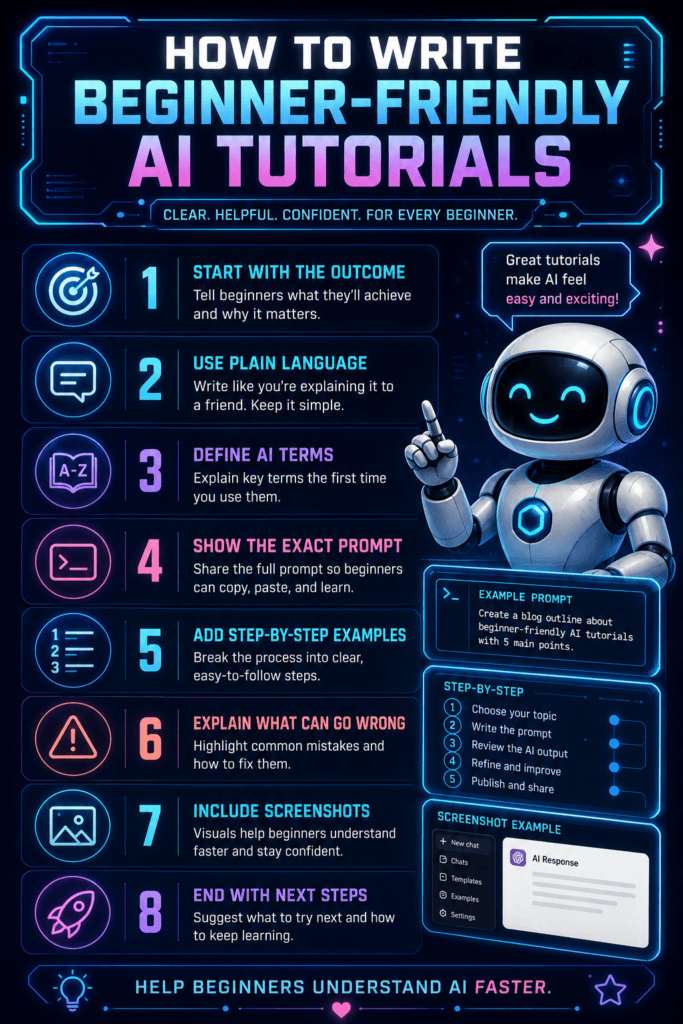
Start With One Clear Outcome
The biggest mistake in AI tutorial writing is trying to teach too much at once. A beginner-friendly tutorial should help the reader complete one specific task, not understand the entire AI landscape in one sitting.
Weak Tutorial Goal
“Learn how to use AI for content creation.”
Stronger Tutorial Goal
“Create a blog post outline with ChatGPT in under 10 minutes.”
1. Define the Beginner Before You Teach
“Beginner” can mean different things. A business owner who has never used AI needs a different explanation than a blogger who already uses prompts every week. Before writing, decide what your reader already understands and what they still need explained.
Beginner Profile Checklist
- What tool are they using?
- Have they used AI before?
- What result are they trying to create?
- Where are they most likely to get confused?
- What words or settings need a plain-English explanation?
2. Open With the Result, Not the History
Avoid starting with a long explanation of artificial intelligence, machine learning, or the entire tool category. Readers came for a tutorial. Show them what they will create, why it matters, and how long the process should take.
Helpful Opening Formula
“In this tutorial, you will learn how to [complete task] using [AI tool]. By the end, you will have [finished result], plus a simple way to improve it.”
3. List What the Reader Needs Before Step One
Beginners get frustrated when a tutorial reveals requirements halfway through. Put the setup details near the top. Mention accounts, free versus paid plans, files, prompts, browser extensions, templates, or screenshots they need before starting.
Before You Start Box
- Tool or platform needed
- Account type required
- Estimated completion time
- Files, examples, or source material
- Skill level required
- Expected final output
4. Break the Process Into Small Steps
A beginner tutorial should feel like a guided path. Each step needs one action, one reason, and one success signal. When a step includes too many actions, split it into smaller pieces.
Action
Tell the reader exactly what to click, type, paste, upload, select, or review.
Reason
Explain why the step matters without turning it into a theory lesson.
Success Signal
Show what the reader should see, receive, or understand before moving on.
5. Use Copyable Prompts and Real Examples
AI tutorials become much more useful when readers can copy, paste, and adapt something immediately. Do not only explain prompt structure. Give them a working prompt, then explain why it works.
Copyable Prompt Example
“Act as a beginner-friendly AI writing coach. Help me create a simple blog post outline about [topic] for [audience]. Use plain language, include 5 main sections, and add one practical example under each section.”
This prompt works because it gives the AI a role, a task, a topic, an audience, a structure, and a quality expectation.
6. Add Screenshots Where the Reader Might Get Lost
Screenshots should not be decoration. Use them when the reader needs visual confirmation, such as account setup, menu locations, prompt boxes, export options, settings, or final output examples.
Screenshot Placement Tips
- Add screenshots after complex setup steps.
- Use captions to explain what the reader is seeing.
- Blur private account details before publishing.
- Replace screenshots when the tool interface changes.
- Use alt text that describes the instructional purpose.
7. Include Mistakes, Fixes, and Troubleshooting
Beginners often learn more from troubleshooting than from perfect examples. Add a short section that explains what can go wrong and how to fix it. This reduces frustration and makes your tutorial more complete.
Common Beginner Problems
- The AI gives a generic answer because the prompt is too broad.
- The output is too long because no format limit was given.
- The result misses the audience because no reader context was included.
- The tutorial fails because the tool interface has changed.
- The reader cannot repeat the result because the example was too vague.
8. End With a Clear Next Step
A tutorial should not leave the reader wondering what to do next. Close with one practical action. That might be saving a prompt, trying a second example, downloading a template, reading a related guide, or comparing tools.
Beginner-Friendly Tutorial Structure
- State the outcome.
- Define who the tutorial is for.
- List what the reader needs.
- Walk through each step in order.
- Show examples and screenshots.
- Add troubleshooting tips.
- End with one useful next action.
Advanced Tips for Stronger AI Tutorials
Once your basic tutorial is clear, the next level is making it easier to trust, easier to scan, and easier to apply. Strong AI tutorials do more than explain steps. They help readers understand what good output looks like.
Show a Finished Result
Give readers a preview of the final output so they know what they are working toward before they begin.
Explain Your Choices
Briefly explain why you used a certain prompt, setting, tool, or workflow so readers can adapt the lesson later.
Add a Practice Task
Give readers one small assignment at the end so they can apply the tutorial instead of only reading it.
Common Mistakes to Avoid
- Starting with a long AI definition instead of the tutorial outcome.
- Using advanced terms without explaining them in plain language.
- Skipping setup details that beginners need before step one.
- Showing a prompt without explaining why it works.
- Adding too many tools, options, or side paths in one tutorial.
- Forgetting to show what a successful result should look like.
- Using screenshots as decoration instead of instruction.
- Ending without a clear next step.
FAQ
What makes an AI tutorial beginner-friendly?
A beginner-friendly AI tutorial has one clear outcome, simple language, ordered steps, setup details, examples, screenshots when needed, and a clear explanation of what the reader should do next.
How long should an AI tutorial be?
It should be as long as needed to help the reader complete the task without confusion. A short tutorial is fine for a simple prompt. A more complex workflow may need screenshots, examples, and troubleshooting notes.
Should I include screenshots in every AI tutorial?
Not always. Use screenshots when they help the reader understand a step, confirm they are in the right place, compare results, or avoid a mistake.
How do I make AI tutorials better for SEO?
Use clear headings, answer the main question early, include related beginner questions, add examples, write descriptive image alt text, and link to related guides that help the reader continue learning.
What should I do when an AI tool changes?
Update the tutorial with fresh screenshots, revised steps, corrected feature names, and a note if the old workflow no longer works. AI tutorial content should be treated as a living resource.
Final Takeaway
Beginner-friendly AI tutorials work because they reduce confusion.
Do not try to impress readers with complexity. Help them finish one useful task. Clear steps, simple language, real examples, and practical troubleshooting will make your tutorial more helpful than a long post full of vague AI advice.
Create Better AI Tutorials
Pick one AI task your audience wants to complete. Write the tutorial around that single result, add the setup details, include a copyable prompt, show what success looks like, and give readers one next step.
Explore More AI Tutorial GuidesWant more TechnofluxAI in Google?
Add TechnofluxAI as a Preferred Source to help Google show you more of our AI guides, tests, workflows, and research.