
Our Second Experiment: A Full HTML Article
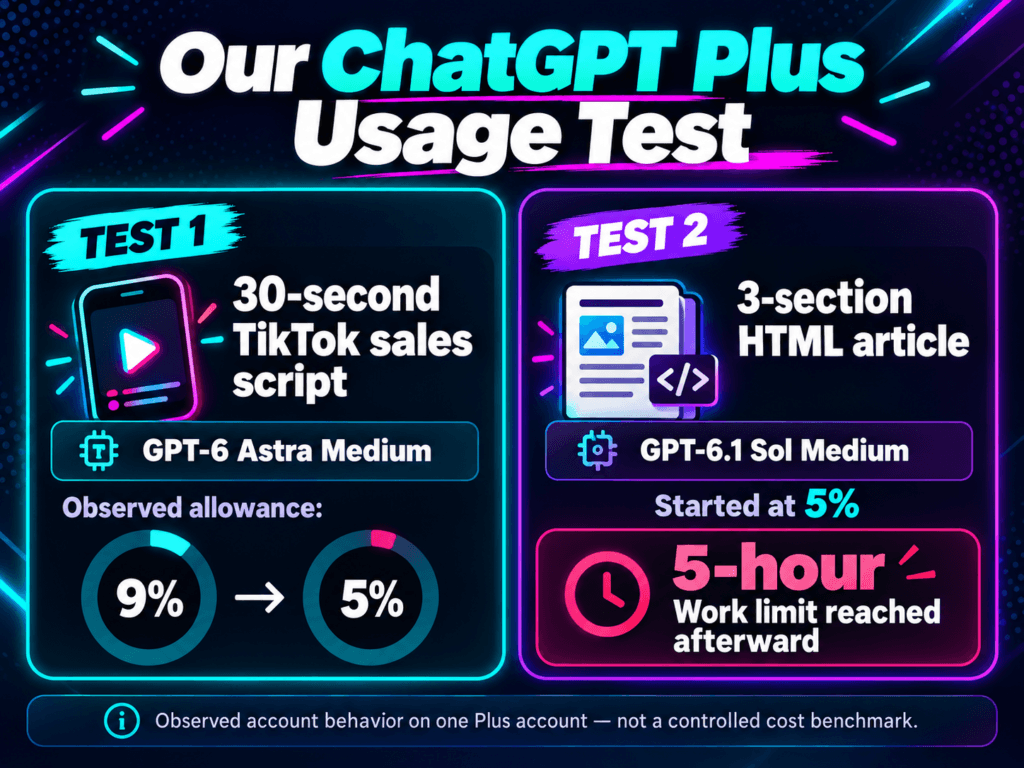
For the next test, we changed both the model and the workload.
We switched to GPT-6.1 Sol Medium, which OpenAI positions as a lower-cost option than Astra for complex professional work.
Then we asked the plugin to complete a task much closer to our normal publishing workflow.
Write a three-section HTML article about the fictional Moonlight Toaster 3000.
Requested length: approximately 1,200–1,500 words
Included: features, comparisons, FAQ, SEO metadata, and responsive HTML
Model: GPT-6.1 Sol Medium
Observed allowance before: 5% remaining
The plugin completed the assignment.
Immediately afterward, ChatGPT told us:
The interface offered several next steps, including upgrading, purchasing additional credits, or waiting for the included allowance to reset.
We chose not to buy additional credits.
The Five-Hour Limit Doesn’t Mean Five Hours of Clock Time
This is one of the easiest parts of ChatGPT’s usage system to misunderstand.
OpenAI explains that Work and Codex allowances are not simply a fixed number of prompts, and a five-hour usage limit can be exhausted before five literal hours have passed.
Consumption varies based on factors such as the model, task, context, reasoning setting, input and output size, and the tools being used.
OpenAI’s own Plus estimates show how wide that variation can be. It currently estimates roughly 5–45 local messages with GPT-6 Astra in a five-hour window, compared with approximately 15–160 using GPT-6.1 Sol.
Those are estimates, not guaranteed prompt counts, and more involved Work tasks can consume more allowance than simple local messages.
That means a creator can’t look at “5% remaining” and reliably translate it into five more prompts, 30 more minutes, or one more article.
What Our Experiment Actually Proves
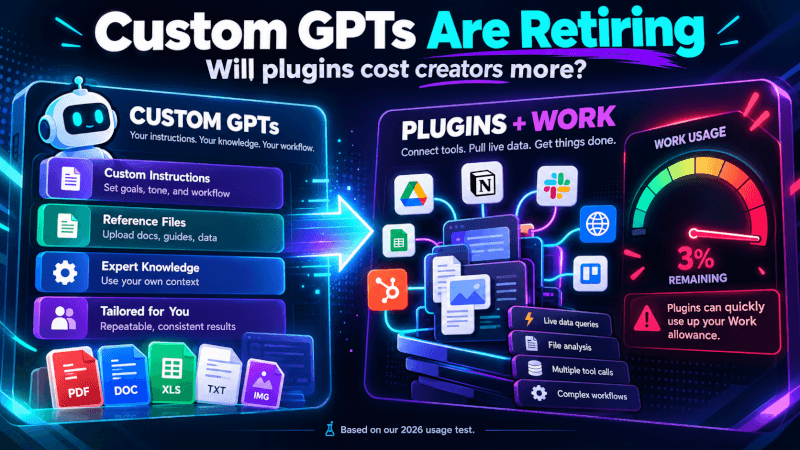
There is a temptation to look at these two tests and conclude that migrated Custom GPTs are going to be dramatically more expensive.
We don’t have enough evidence to make that claim.
Our private plugin operated within a limited Work allowance, and that remaining allowance was exhausted while we were performing two content-production tests.
We did not establish that every plugin costs more, that every plugin request uses Work identically, or that equivalent Custom GPT tasks would have consumed less.
We also can’t claim that our first 30-second script alone caused the entire observed 9% to 5% movement.
A proper cost comparison would require a controlled benchmark: the same source files, the same prompt, comparable models, equivalent reasoning settings, a fresh usage window, and repeated trials.
That’s a test worth doing.
Why Creators Should Care About the Difference Between Chat and Work
OpenAI now distinguishes between ordinary ChatGPT conversations and more agentic Work tasks.
Chat is intended for things like asking questions, brainstorming, searching, and conversational help. Work is designed for larger jobs such as research, analysis, and creating documents, spreadsheets, presentations, reports, and other deliverables.
That’s a meaningful distinction for creators because many Custom GPTs were built precisely to generate substantial deliverables.
A blogger may use one to turn research into a formatted WordPress article. A video creator might use another to create scripts, titles, descriptions, and social posts. A small business might use one to process reference files and create marketing material.
Those aren’t novelty prompts. They’re production systems.
If replacement workflows now operate inside a more constrained shared allowance, creators need to understand that before migrating the systems they depend on.
Our Second Experiment: A Full HTML Article
For the next test, we changed both the model and the workload.
We switched to GPT-6.1 Sol Medium, which OpenAI positions as a lower-cost option than Astra for complex professional work.
Then we asked the plugin to complete a task much closer to our normal publishing workflow.
Write a three-section HTML article about the fictional Moonlight Toaster 3000.
Requested length: approximately 1,200–1,500 words
Included: features, comparisons, FAQ, SEO metadata, and responsive HTML
Model: GPT-6.1 Sol Medium
Observed allowance before: 5% remaining
The plugin completed the assignment.
Immediately afterward, ChatGPT told us:
The interface offered several next steps, including upgrading, purchasing additional credits, or waiting for the included allowance to reset.
We chose not to buy additional credits.
The Five-Hour Limit Doesn’t Mean Five Hours of Clock Time
This is one of the easiest parts of ChatGPT’s usage system to misunderstand.
OpenAI explains that Work and Codex allowances are not simply a fixed number of prompts, and a five-hour usage limit can be exhausted before five literal hours have passed.
Consumption varies based on factors such as the model, task, context, reasoning setting, input and output size, and the tools being used.
OpenAI’s own Plus estimates show how wide that variation can be. It currently estimates roughly 5–45 local messages with GPT-6 Astra in a five-hour window, compared with approximately 15–160 using GPT-6.1 Sol.
Those are estimates, not guaranteed prompt counts, and more involved Work tasks can consume more allowance than simple local messages.
That means a creator can’t look at “5% remaining” and reliably translate it into five more prompts, 30 more minutes, or one more article.
What Our Experiment Actually Proves
There is a temptation to look at these two tests and conclude that migrated Custom GPTs are going to be dramatically more expensive.
We don’t have enough evidence to make that claim.
Our private plugin operated within a limited Work allowance, and that remaining allowance was exhausted while we were performing two content-production tests.
We did not establish that every plugin costs more, that every plugin request uses Work identically, or that equivalent Custom GPT tasks would have consumed less.
We also can’t claim that our first 30-second script alone caused the entire observed 9% to 5% movement.
A proper cost comparison would require a controlled benchmark: the same source files, the same prompt, comparable models, equivalent reasoning settings, a fresh usage window, and repeated trials.
That’s a test worth doing.
Why Creators Should Care About the Difference Between Chat and Work
OpenAI now distinguishes between ordinary ChatGPT conversations and more agentic Work tasks.
Chat is intended for things like asking questions, brainstorming, searching, and conversational help. Work is designed for larger jobs such as research, analysis, and creating documents, spreadsheets, presentations, reports, and other deliverables.
That’s a meaningful distinction for creators because many Custom GPTs were built precisely to generate substantial deliverables.
A blogger may use one to turn research into a formatted WordPress article. A video creator might use another to create scripts, titles, descriptions, and social posts. A small business might use one to process reference files and create marketing material.
Those aren’t novelty prompts. They’re production systems.
If replacement workflows now operate inside a more constrained shared allowance, creators need to understand that before migrating the systems they depend on.
One Important Enterprise Detail
There is another reason creators should be careful when reading statements about plugin pricing.
OpenAI says that in Enterprise workspaces, using a migrated GPT without apps in Instant Chat has no incremental cost. It separately says that creating and editing plugins through a conversation uses Work or Codex, and that actions performed in Work consume credits.
That’s useful information, but it isn’t a blanket promise that every plugin interaction on every plan works the same way.
We’re testing on Plus, not Enterprise.
The difference between a lightweight plugin interaction in Chat and a plugin being used as part of a Work task needs to be easier for ordinary users to understand.
Five Questions We Want OpenAI to Answer
- Can Plus subscribers use migrated Custom GPTs for ordinary text-generation tasks without invoking their Work allowance?
- When the prompt and output are equivalent, will a migrated plugin typically consume more included allowance than the Custom GPT it replaces?
- Can ChatGPT show an estimated usage impact before a creator starts an expensive Work task?
- Can plugin creators configure a workflow to avoid unnecessary Work tools when they only need instructions and reference files?
- Can the interface warn users when one requested task could consume a substantial percentage of their remaining allowance?
These aren’t accusations about OpenAI’s motives.
They’re practical questions from someone actually trying to migrate a production workflow.
What Creators Should Do Before Migrating Their GPTs
OpenAI itself recommends testing migrated plugins against familiar prompts. We’d go a little further.
Keep copies of the important instructions, prompts, examples, and workflow logic your GPT currently uses.
Pick several tasks you know your existing GPT handles well so you can compare behavior after migration.
Check the usage dashboard immediately before and after comparable workloads instead of relying on memory.
The strongest model isn’t automatically the smartest economic choice for every production task.
Move one workflow, test it, document the results, and decide whether the replacement actually makes sense for your business.
What We’re Doing Next
For now, we’re holding off on migrating additional production systems.
That isn’t because we’ve decided plugins are bad.
Plugins may ultimately be much more capable than Custom GPTs. Combining reusable instructions, reference material, apps, and advanced tools could create workflows that weren’t practical before.
But capability and predictability are two different things.
If an independent creator is going to build their publishing system around these tools, they need to know roughly what a routine job will consume and when it may move from included subscription usage into additional credits.
Our two tests don’t settle that question.
They do give us a reason to keep testing it.
The Bottom Line
A migration should not require creators to discover the economics of their replacement workflow by unexpectedly running out of allowance.
Until the usage implications are clearer, preserve your existing GPT instructions, document the workflows you depend on, and test migrated plugins carefully before making them part of daily production.
We’ll continue comparing plugin workloads, models, reasoning settings, and ordinary ChatGPT workflows as the Custom GPT retirement gets closer.
One Thing I have Learned while building TechnofluxAi is that Ai tools usually sound easier to use than they are in the real world. I like to try things myself, see where I get stuck, and figure out what actually saves time instead of just repeating promisies.That’s the approach I use throughout this site: keep what works, point out what doesn’t, and explain things in a way that makes sense for someone who is still learning. I started out searching for an image creator. That was my first interaction with Ai. I was frustrated by the vast tool list without any real direction on which tool was best. Then I realized how powerful this tool was .and was going to be in the future. Making mistakes has helped me in the choice of articles I write.

About the Author
Jon Hicks
Founder of TechnofluxAI.
I’m the creator behind TechnofluxAI, focused on breaking down powerful AI tools, emerging trends, and practical strategies to help creators and entrepreneurs stay ahead in a rapidly evolving digital world.
Follow TechnofluxAI for the latest AI tools & strategies