

Estimated reading time: 8 minutes
AI Meeting Follow-Up Workflow for Small Teams
Small teams do not usually fail because they have too few meetings. Follow-through breaks down when decisions, action items, owners, and deadlines live in scattered notes instead of one clear system.
Quick Answer
An AI meeting follow-up workflow uses AI to turn meeting notes into summaries, decisions, action items, owners, deadlines, and next-step reminders your team can actually use.
The Pain Point
A meeting may feel productive in the moment, but the value disappears when nobody knows what changed, who owns the next step, or when the work is due.
What This Helps You Build
You will build a repeatable process for capturing notes, cleaning them with AI, assigning work, sending recaps, tracking open items, and improving future meetings.
Why Small Teams Need This
Larger companies often have project managers, operations teams, and formal documentation habits. Small teams usually rely on speed, trust, memory, chat messages, and whoever happens to take notes that day.
That works until the team gets busy. An AI follow-up workflow creates structure without adding another heavy process, so the meeting turns into movement instead of another forgotten conversation.
Workflow note: The goal is not to automate people out of the loop. The goal is to make decisions visible, reduce confusion, and give every task a clear owner.
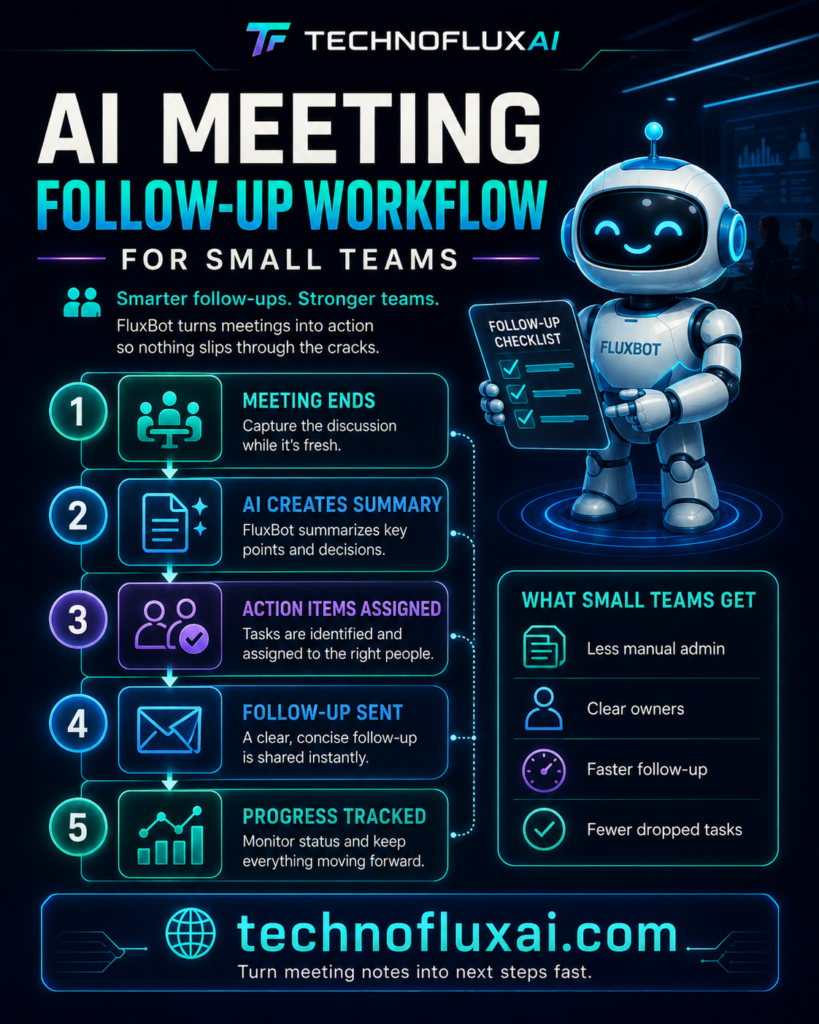
The Simple AI Meeting Follow-Up Workflow
A useful workflow has to be simple enough to repeat after every meeting. Start with one capture method, one AI cleanup prompt, one place for tasks, and one follow-up format everyone recognizes.
Step 1: Capture the Meeting
Record the meeting only when your team has permission to do so, or assign one person to take structured notes. Capture the topic, key discussion points, decisions, questions, blockers, and action items.
Step 2: Clean the Notes with AI
Paste the transcript or notes into your AI tool and ask for a short summary, confirmed decisions, open questions, action items, owners, due dates, and risks that need attention.
Step 3: Confirm the Output
AI can organize the follow-up, but a person should verify the details. Review names, dates, commitments, sensitive information, and anything that could affect a client, budget, launch, or deadline.
Meeting Follow-Up Format Your Team Can Reuse
| Section | What It Includes | Why It Matters |
|---|---|---|
| Short Summary | Two to five bullets covering the main outcome | Helps absent teammates catch up quickly |
| Decisions Made | Approved changes, selected options, or final direction | Prevents the team from reopening settled topics |
| Action Items | Task, owner, deadline, and status | Turns discussion into accountable work |
| Open Questions | Items that still need research or approval | Stops unresolved issues from disappearing |
| Risks and Blockers | Dependencies, delays, conflicts, or missing information | Gives the team a chance to fix problems early |
AI Prompt for Meeting Follow-Up
Reusable Prompt
Turn these meeting notes into a clear follow-up for a small team. Include a short summary, decisions made, action items with owners and due dates, open questions, risks, and anything that needs confirmation. Keep the tone direct, practical, and easy to scan.
If an owner or deadline is missing, label it as “needs confirmation” instead of guessing.
Action Item Tracker Structure
AI follow-up only works when the action items move into a place your team already checks. That could be a project management tool, shared spreadsheet, task board, CRM, or internal operating doc.
Task
Write the action as a clear verb-based task, not a vague reminder. “Send client timeline” is stronger than “timeline discussion.”
Owner
Assign one accountable person for each task. Shared ownership sounds collaborative, but it often makes follow-through weaker.
Due Date
Add a real date whenever possible. A task without a due date depends on memory, pressure, or a future meeting to resurface.
Status
Use simple labels such as Not Started, In Progress, Blocked, Waiting, and Done. Complex status systems slow small teams down.
Example: Weekly Team Check-In
A five-person marketing team meets every Monday to review campaigns, content deadlines, and client feedback. The meeting used to end with scattered notes in chat and several “who was handling that?” moments later in the week.
The team now records notes in one shared doc, runs them through an AI follow-up prompt, verifies the action items, and pastes the final task list into its project board. Each task gets one owner, one due date, and one status.
The meeting did not become longer. Follow-through became clearer because the recap turned discussion into visible work before everyone moved on to the next task.
Advanced Tips for Better AI Meeting Follow-Up
Once the basic workflow is running, improve the quality of the recap and the accountability around it. Better follow-up comes from cleaner inputs, tighter prompts, and a shared habit of confirming the final task list.
Create a Meeting Recap Owner
Assign one person to verify the AI recap after each meeting. The owner does not need to do every task, but they should confirm that the follow-up is accurate before it gets shared.
Use a Decision Log
Keep major decisions in one searchable place. A decision log helps the team remember what was approved, why it changed, and when the decision happened.
Separate Recaps from Task Tracking
A recap explains what happened, while the task tracker shows what happens next. Keeping those jobs separate makes both easier to scan.
Common Mistakes to Avoid
Mistake 1: Letting AI Guess Owners
AI may infer responsibility from the conversation, but inferred ownership can create confusion. Mark unclear owners as needing confirmation instead of treating guesses as assignments.
Mistake 2: Sending Long Recaps Nobody Reads
Long recaps feel thorough, but they often bury the important work. Keep summaries short, highlight decisions, and move task details into a tracker.
Mistake 3: Forgetting the Follow-Up Loop
A recap is only useful when it gets reviewed later. Start the next meeting by checking open items, blocked tasks, and decisions that still need confirmation.
Small Team Rules for AI Meeting Follow-Up
- Every meeting needs one place for notes.
- Every recap should include decisions and action items.
- Every action item needs one owner.
- Every unclear assignment should be marked for confirmation.
- Every recurring meeting should start by reviewing open items.
FAQ: AI Meeting Follow-Up Workflow
What is an AI meeting follow-up workflow?
It is a repeatable process that uses AI to turn meeting notes into summaries, decisions, action items, owners, due dates, risks, and follow-up reminders.
Should small teams record every meeting?
Not always. Recording can help, but the team should follow consent rules, privacy expectations, and company policy. Structured notes may be enough for many internal meetings.
Can AI assign action items automatically?
AI can identify possible action items and likely owners, but a person should confirm anything that affects deadlines, clients, budgets, or team responsibilities.
Where should meeting follow-ups live?
Put recaps where your team already works. Good options include a project board, shared document, internal wiki, task manager, CRM, or team chat channel.
How do we stop action items from disappearing?
Review open items at the start of the next meeting. A recurring check-in keeps tasks visible and makes follow-through part of the team rhythm.
Final Takeaway
AI meeting follow-up is not about creating prettier notes. It is about turning conversation into accountable work. Small teams move faster when every decision is captured, every task has an owner, and every follow-up lives somewhere visible.
Build Your Meeting Follow-Up System
Choose one notes location, one AI recap prompt, one task tracker, and one review habit. That simple system can make every meeting easier to act on.
Create Your AI Follow-Up Workflow