
Quick Answer
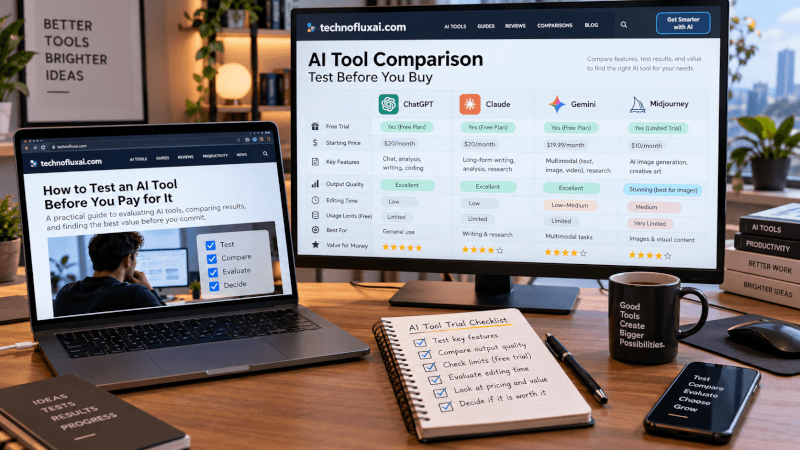
Before paying for an AI tool, test it with a real task you already need completed. Do not rely on the company’s demo prompt. Use your own material, measure how much editing the output still needs, compare it with tools you already use, check the plan limits, and decide whether the result saves enough time or creates enough extra value to justify another subscription.
How to Test an AI Tool Before You Pay for It
AI tools are everywhere now.
Every week, another app promises to write your content, edit your videos, automate your business, create images, manage your email, or somehow give you your entire afternoon back.
Some are excellent.
Some are basically ChatGPT wearing a different jacket.
Before you hand over your credit card, spend 15–30 minutes testing the tool properly.
Here is the system I use.
1. Start With a Real Problem
Do not begin with:
“What can this AI tool do?”
Begin with:
“What problem do I need it to solve?”
That immediately makes the test more useful.
Your real problem might be:
- Turn a blog article into a short video
- Remove background noise from an audio recording
- Create Pinterest images
- Research keywords
- Generate product photos
- Summarize customer emails
- Turn one video into five social posts
You are not really testing the technology.
You are testing whether the tool improves your workflow.
2. Give It Your Own Material
AI demos are designed to make AI tools look good.
Your real workflow is messier.
Upload one of your real articles. Use one of your real videos. Give it an actual product description. Try one of your difficult prompts.
Then see what happens.
This is one of the biggest differences between testing an AI tool and simply watching someone demonstrate it on YouTube.
If I would not normally use the sample input in my real workflow, it is probably not a useful test.
One Thing I have Learned while building TechnofluxAi is that Ai tools usually sound easier to use than they are in the real world. I like to try things myself, see where I get stuck, and figure out what actually saves time instead of just repeating promisies.That’s the approach I use throughout this site: keep what works, point out what doesn’t, and explain things in a way that makes sense for someone who is still learning. I started out searching for an image creator. That was my first interaction with Ai. I was frustrated by the vast tool list without any real direction on which tool was best. Then I realized how powerful this tool was .and was going to be in the future. Making mistakes has helped me in the choice of articles I write.
3. Measure How Much Editing You Still Have to Do
This is the part people often ignore.
An AI tool can create an impressive result and still waste your time.
Ask yourself:
How long did it take me to fix the output?
If an AI writing tool generates an article in two minutes but requires another 45 minutes of rewriting, the generation speed does not tell you much.
The same applies to images, videos, audio, SEO tools, and automation platforms.
The useful metric is not generation speed.
Total workflow time matters more.
4. Compare It With What You Already Have
Creators can easily end up paying for several AI tools that perform nearly identical jobs.
Before subscribing, compare the new tool with your existing stack.
- Can ChatGPT already do this?
- Can Canva handle it?
- Can CapCut do something close enough?
- Can your WordPress plugin already handle it?
- Can your current AI image generator produce a similar result?
A specialized tool does not need to be revolutionary.
But it should provide a noticeable advantage in quality, speed, reliability, ease of use, or capability.
If you want to see how I think about a focused creator stack, read My AI Creator Stack.
5. Test the Hardest Feature First
Do not waste a free trial testing the easiest feature.
Test the feature that is making you consider paying for the tool.
- AI avatar platform: Test lip sync and natural movement.
- AI video generator: Test motion consistency and difficult scenes.
- SEO tool: Test keyword discovery, competitor research, or the feature you cannot already get elsewhere.
- AI writing platform: Give it a difficult article that requires structure, context, and factual accuracy.
- AI image tool: Test the subject, style, or consistency problem you normally struggle with.
Find the weakness before you subscribe.
6. Check the Limits
AI pricing pages can look simple until you start actually using the product.
Look for:
- Monthly credits
- Message or generation limits
- Video generation limits
- Image limits
- Export restrictions
- Watermarks
- Commercial-use terms
- API restrictions
- Resolution limits
- Maximum video length
- Additional credit costs
- Features locked behind a higher plan
A $20 AI subscription is not really a $20 workflow if you burn through the included credits in three days and need to keep buying more.
For a deeper look at this problem, read How to Compare AI Tool Pricing Without Getting Misled.
7. Decide What One Successful Result Is Worth
This is where the decision gets easier.
Imagine an AI tool costs $30 per month.
If it saves you four hours every month, that may be an excellent deal.
If it helps you create something that earns more than the subscription costs, the value may also be obvious.
But if you only use it twice a month to perform something another tool already does reasonably well, you probably do not need another subscription.
“Is this AI tool cheap?”
Ask:“Does this tool create more value than it costs?”
My 15–30 Minute AI Tool Test
Choose one real task you already need completed.
Use your own files, prompts, content, or workflow. Test the feature you actually care about.
Measure how much cleanup, rewriting, editing, or correction is required.
Run the same or a similar task through a tool you already use.
Review limits, credits, exports, restrictions, and the likely cost of your normal usage.
My Simple AI Tool Purchase Test
I use a basic rule.
An AI tool should do at least one of these things:
- Save me meaningful time.
- Produce noticeably better results.
- Do something my current tools cannot do.
- Help me make or save money.
- Remove a repetitive task I do not want to keep doing.
If it does not accomplish at least one of those things, I usually do not need it.
Do Not Collect AI Tools
This is becoming its own problem.
Creators are building enormous AI tool stacks because every new platform looks useful.
Then the monthly subscriptions start piling up.
$20 here.
$29 there.
$49 somewhere else.
Suddenly you can be spending hundreds of dollars every month on software you barely use.
A smaller collection of tools you understand deeply is usually more valuable than dozens of subscriptions you occasionally open.
A Good AI Tool Can Still Be the Wrong Tool for You
You can test a tool, decide that it works well, and still decide not to pay for it.
Maybe you do not use the feature often enough. Maybe your existing software is good enough. Maybe the credit limits do not fit your workflow. Maybe it solves a problem you only have once every few months.
That does not make the tool bad.
It just means the subscription does not earn a permanent place in your stack.
Testing for Yourself Is Different From Recommending a Tool
A personal buying test can be fairly quick because you only need to know whether the tool solves your problem.
If you plan to recommend the same tool to readers, clients, or followers, the test should be more thorough.
That means checking accuracy, reliability, limitations, pricing, workflow fit, and who should probably skip it.
I cover that separately in How to Test an AI Tool Before You Recommend It.
AI Tool Testing Checklist
- Pick one real problem.
- Use your own material.
- Test the feature you would actually pay for.
- Measure total workflow time.
- Count how much editing or cleanup is required.
- Compare the result with a tool you already use.
- Check credits, limits, exports, and restrictions.
- Estimate how often you will realistically use it.
- Decide what the saved time or better output is worth.
- Skip it if the value is not obvious.
FAQ
How long should I test an AI tool before paying for it?
For a simple creator tool, 15–30 focused minutes can reveal a lot if you test a real task. More complex automation or business software may need longer testing across several workflows.
What should I test during an AI free trial?
Test the feature that is making you consider paying for the product. Use your own material, try a difficult real-world task, measure how much cleanup is needed, and check whether the paid plan gives you enough usage for your normal workflow.
How do I know if an AI subscription is worth it?
Compare the monthly cost with the value it creates. That value may come from time saved, better output, a capability you do not already have, additional revenue, lower costs, or removing repetitive work.
Should I pay for multiple AI tools?
Only when the tools solve meaningfully different problems or provide enough additional value to justify the overlap. If several subscriptions perform essentially the same job, compare them and keep the ones you actually use.
Should I trust an AI tool demo?
A demo can show what the product is capable of, but it does not tell you how well it will handle your files, prompts, workflow, or difficult edge cases. Run your own test before making the buying decision.
Final Thought
The best AI tool is not necessarily the one with the most features.
It is the one you actually use.
Before paying for another AI subscription, give the tool one difficult, real-world job.
Measure the result. Measure the time saved. Compare it with what you already have. Check what the plan actually includes.
Then decide whether it deserves a permanent place in your workflow.
That is a much better test than a polished demo video.