

Estimated reading time: 9 minutes
Email Newsletter Automation Workflow With AI
A good newsletter should not feel like a weekly emergency. With the right AI workflow, you can turn scattered ideas, blog posts, product updates, affiliate offers, and audience questions into a repeatable email system that saves time without sounding robotic.
Quick answer
An email newsletter automation workflow with AI uses AI to help plan topics, organize audience segments, draft newsletter sections, personalize messaging, create subject lines, prepare calls to action, and review performance. The best workflow still keeps a human in control of strategy, approvals, brand voice, and final sending. Marketing platforms now commonly support email automation through triggers, segments, and workflow builders, including examples like sending a welcome email after a form submission or adding contacts to a segment after they click a link. HubSpot’s email automation documentation explains these behavior-based workflow examples, while Mailchimp’s email best practices emphasizes basics like audience quality, compliance, and domain authentication.
The creator problem
Most newsletters fail because the creator waits until send day to decide what to write. That leads to rushed emails, weak subject lines, and inconsistent publishing.
The AI advantage
AI can help you turn raw ideas into drafts, summaries, outlines, hooks, CTAs, and audience-specific angles faster than starting from a blank page.
The key warning
Automation should support your newsletter, not replace your judgment. Your readers subscribed to hear from you, not a generic content machine.
Soft internal link suggestion: Link this post to “How to Prepare AI Content for WordPress Import” and a future guide called “The AI Blog-to-Newsletter Repurposing System.”
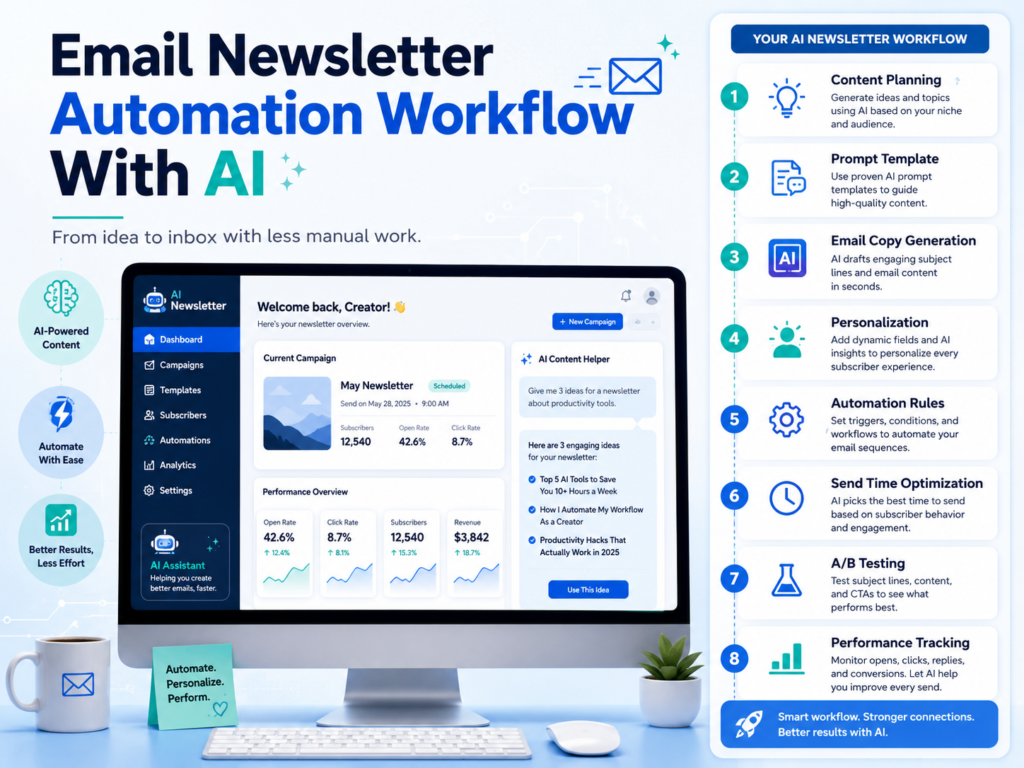
What an AI Newsletter Workflow Should Actually Do
A newsletter workflow is not just “ask AI to write an email.” That is the weakest version of the system. A useful workflow helps you decide what to send, who should receive it, what action the reader should take, and how the email connects to your bigger content engine.
Think of AI as the production assistant. It can summarize, draft, organize, repurpose, compare, and suggest. But you are still the editor, strategist, and final quality control.
Simple rule
Do not automate the relationship. Automate the repeatable work around the relationship: idea sorting, drafting, formatting, tagging, scheduling, and performance review.
Step 1: Build Your Newsletter Input System
The best newsletters are built from a steady stream of inputs. These inputs can come from your blog posts, YouTube scripts, product updates, customer questions, social media comments, affiliate offers, case studies, industry news, or personal lessons.
Newsletter input checklist
- Recent blog posts or drafts
- Audience questions from comments, emails, or DMs
- New products, offers, or affiliate links
- Helpful tools you tested this week
- Lessons learned from your own workflow
- Upcoming launches, webinars, videos, or resources
- One clear action you want the reader to take
AI works better when you give it real material. Instead of prompting, “Write a newsletter about AI tools,” give it source content: a blog post, three bullet points, a reader question, and the CTA you want to promote.
Step 2: Pick One Newsletter Goal
Every newsletter should have one main job. If the email tries to educate, sell, announce, entertain, promote five links, and ask for replies all at once, the reader will probably do nothing.
Educate
Teach one useful concept and link to a deeper article, video, or resource.
Nurture
Build trust by sharing a lesson, opinion, behind-the-scenes note, or practical checklist.
Convert
Move readers toward a product, consultation, affiliate recommendation, lead magnet, or reply.
Step 3: Use AI to Create the First Draft
Once you have the inputs and the goal, AI can help turn everything into a structured newsletter. The mistake is asking for “a newsletter” with no direction. Give AI the structure you want.
AI newsletter draft prompt
“Turn the notes below into a short email newsletter for beginner creators. Use a helpful, direct tone. Include one strong subject line, one curiosity-based preview line, a short intro, three practical points, one soft CTA, and one question that encourages replies. Do not sound corporate. Keep it skimmable on mobile.”
This gives AI a clear job. You can then ask for three different versions: practical, story-driven, and promotional. The best newsletter often comes from combining the strongest parts of each version.
Step 4: Add Segmentation Without Overcomplicating It
Segmentation means sending more relevant emails to different groups of subscribers. You do not need 50 segments. Start with simple groups based on interest, behavior, or customer stage.
Send a welcome sequence that introduces your best resources and explains what they can expect from you.
Send deeper tutorials, invitations, offers, and early access because they already show interest.
Tag readers based on link clicks, then send related content. For example, someone who clicks “AI blogging” can receive more AI publishing tips.
Send onboarding, usage tips, upsell education, support content, or loyalty rewards.
Modern email platforms commonly support behavior-based automation, such as enrolling contacts after a form submission, link click, or list membership change. HubSpot describes workflows that can send automated emails after a form fill and add contacts to segments based on clicks, which is the type of logic creators can adapt for newsletters. HubSpot automated email workflows
Step 5: Create the Automation Map
Your automation map shows what happens after someone joins, clicks, ignores, replies, purchases, or downloads something. Keep the first version simple.
Beginner automation map
- Trigger: Subscriber joins through a form.
- Email 1: Welcome message and best free resource.
- Wait: Two days.
- Email 2: Helpful tutorial connected to the signup topic.
- Wait: Three days.
- Email 3: Personal story, mistake, or case study.
- Condition: If they clicked, tag interest. If they did not click, send a simpler recap later.
- Ongoing: Add them to the weekly newsletter segment.
Step 6: Use AI for Editing, Not Just Writing
AI is often more valuable after the first draft than before it. Use it to tighten the message, improve clarity, remove fluff, create subject line options, and check whether the email matches one clear goal.
Warning card: do not let AI fake your voice
The fastest way to weaken a newsletter is to let AI smooth out every opinion, story, and human detail. Keep your real examples, strong opinions, small mistakes, and personal notes. That is what makes people keep opening your emails.
Advanced AI Newsletter Automation Tips
Once your basic workflow is running, the next step is optimization. This is where AI can help you analyze patterns, organize ideas, build reusable templates, and suggest improvements based on real campaign results.
Create a swipe file
Save your best intros, subject lines, CTAs, stories, and transitions. Feed those examples into AI so future drafts sound more like your brand.
Build topic clusters
Ask AI to group your newsletter ideas into themes like AI tools, WordPress publishing, affiliate marketing, automation, or creator productivity.
Review results monthly
Use AI to summarize which topics, subject lines, CTAs, and formats performed best. Then use that insight to plan the next month.
A Simple Weekly AI Newsletter Workflow
Gather blog posts, notes, offers, screenshots, reader questions, and one main CTA.
Ask AI for five newsletter angles and choose the one with the clearest reader benefit.
Use AI to create the first draft, then rewrite the intro, examples, opinion, and CTA in your own voice.
Add the email to your platform, check formatting, links, personalization tokens, tags, and mobile preview.
Schedule the campaign, then record the subject line, topic, CTA, segment, and expected outcome in a simple tracker.
Common Mistakes to Avoid
- Mistake 1: Automating before you understand your audience.
- Mistake 2: Sending every email to every subscriber.
- Mistake 3: Letting AI create generic subject lines that sound like everyone else.
- Mistake 4: Stuffing too many links and CTAs into one newsletter.
- Mistake 5: Forgetting to test links, personalization, and mobile layout before sending.
- Mistake 6: Measuring only opens instead of clicks, replies, conversions, and unsubscribes.
- Mistake 7: Sending AI-written emails without adding your own stories, examples, or point of view.
FAQ
Can AI fully automate my newsletter?
AI can automate parts of your newsletter process, but it should not fully replace human review. You should still approve the strategy, facts, tone, offer, links, and final send.
What is the best AI newsletter workflow for beginners?
Start with a simple weekly system: collect inputs, pick one goal, ask AI for a draft, edit it in your voice, add one CTA, test the email, schedule it, and review results later.
Should I use AI for subject lines?
Yes, but do not use the first option blindly. Ask AI for several subject line styles, then choose the one that matches the email’s promise without exaggerating.
How often should I send an AI-assisted newsletter?
Consistency matters more than frequency. Weekly is a strong starting point for many creators, but twice monthly can work better if you need more time to create useful content.
What should I track after sending?
Track subject line, topic, segment, CTA, clicks, replies, conversions, unsubscribes, and notes about what you would improve next time.
Final takeaway
The best email newsletter automation workflow with AI does not remove you from the process. It removes the repetitive friction around the process. Let AI help with planning, drafting, repurposing, segmentation ideas, subject lines, and performance reviews. Keep your human voice, judgment, and relationship with the reader at the center.
CTA
Before your next newsletter, build one repeatable workflow: inputs, goal, draft, edit, segment, test, schedule, and review. Once that system works, AI becomes your newsletter production assistant instead of a random writing shortcut.
TechnofluxAI
Practical AI for creators and website owners
Learn how to use AI, improve AI search visibility, build smarter workflows, and test what actually works.
Explore our other sites
TimewasterAI
— product reviews, buying guides, and useful finds.
Tina Trends
— fashion, beauty, pets, lifestyle, and fun discoveries.
Mistakenly Delicious
— simple recipes and practical cooking ideas.

About the Author
Jon Hicks
Founder of TechnofluxAI.
I’m the creator behind TechnofluxAI, focused on breaking down powerful AI tools, emerging trends, and practical strategies to help creators and entrepreneurs stay ahead in a rapidly evolving digital world.
Follow TechnofluxAI for the latest AI tools & strategies
Want more TechnofluxAI in Google?
Add TechnofluxAI as a Preferred Source to help Google show you more of our AI guides, tests, workflows, and research.