

Estimated reading time: 18 minutes
Key Takeaways
- AI terms can confuse beginners, but they describe how AI tools function and interact with users.
- Focus on understanding essential terms: prompts, chatbots, LLMs, automation, and workflows.
- AI is a broad technology for tasks requiring human-like thinking, and generative AI creates new content based on instructions.
- To use AI effectively, learn to write clear prompts and create repeatable workflows that incorporate tools for efficiency.
- Verify information from AI tools and maintain human judgment to ensure accuracy and relevance in outputs.
Table of contents
- Quick Answer
- Introduction
- What Are AI Terms?
- Artificial Intelligence
- Generative AI
- Prompt
- AI Tool
- Chatbot
- LLM
- Model
- Token
- Context Window
- AI Agent
- Automation
- AI Workflow
- API
- Training Data
- Fine-Tuning
- Custom GPT or Custom AI Assistant
- Hallucination
- AI Search
- GEO
- SEO
- SEO vs GEO
- Embeddings
- Vector Database
- Multimodal AI
- AI Image Generation
- AI Video Generation
- AI Voice Generation
- AI Detection
- Human-in-the-Loop
- What AI Terms Should Beginners Learn First?
- Simple AI Glossary for Beginners
- What Should You Actually Do Next?
- TechnofluxAI Take
- FAQ
- Verification Notes
- Conclusion
Quick Answer
Artificial intelligence can sound confusing because people use terms like prompts, agents, LLMs, automation, workflows, tokens, chatbots, and AI search all the time.
The simple version is this: AI terms are the words people use to explain how AI tools work, what they can do, and how humans interact with them.
You do not need to memorize every technical phrase. Start with the terms that affect how you actually use AI: prompts, tools, chatbots, LLMs, workflows, automation, agents, hallucinations, AI search, SEO, and GEO.
Once those words make sense, AI starts to feel less like a buzzword cloud and more like a set of tools you can use with better judgment.
Introduction
Artificial intelligence has its own language, and that language can make beginners feel lost fast.
You hear people talk about prompts, agents, large language models, automation, workflows, AI search, tokens, APIs, hallucinations, and custom GPTs like everyone is supposed to already know what they mean.
You are not behind. Most people are still figuring this out.
This guide explains common AI terms in plain English, with simple examples you can actually use. No hype. No technical flexing. Just the words you need to understand AI tools, workflows, and search a little better.
What Are AI Terms?
AI terms are the words people use to describe how artificial intelligence tools work, what they can do, and how humans interact with them.
Some terms describe the technology itself, like LLM, model, token, and training data.
Other terms describe how people use AI, like prompt, workflow, automation, and human-in-the-loop.
Learning these words helps you:
Understand AI tools faster
Follow tutorials without getting lost
Build better prompts
Choose better software
Avoid getting fooled by hype
Create better workflows
The goal is not to sound technical. The goal is to understand enough to use AI with more confidence.
Artificial Intelligence
Artificial intelligence is software designed to perform tasks that normally require human thinking.
That can include writing, summarizing, analyzing, planning, recognizing patterns, answering questions, generating images, or helping people make decisions.
When ChatGPT helps you draft an email, when Canva suggests a design, or when YouTube recommends videos, AI is being used in different ways.
AI is not one single tool. It is a broad category of technology.
Generative AI
Generative AI creates new content based on your request.
It can create:
Text
Images
Video
Music
Code
Ideas
Summaries
Generative AI does not just sort information. It generates something new from patterns, instructions, and context.
For example, when you ask an AI tool to write a blog outline, create an image prompt, summarize a report, or draft a product description, you are using generative AI.
Prompt
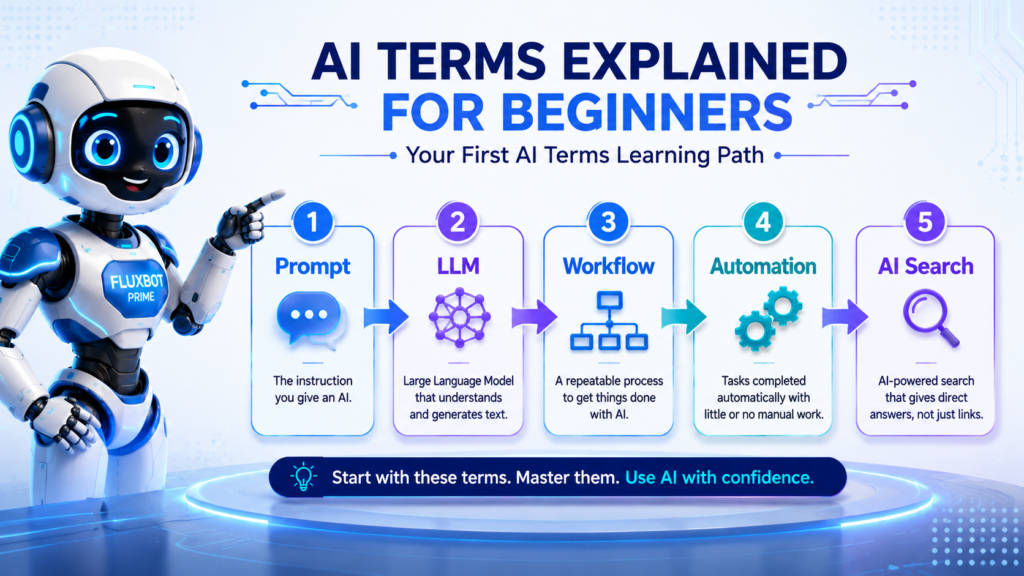
A prompt is the instruction you give an AI tool.
For example:
“Write a beginner-friendly blog intro about AI tools.”
That sentence is a prompt.
A weak prompt is vague. A better prompt gives the AI more useful direction.
Good prompts often include:
A goal
Context
Audience
Format
Tone
Examples
Instead of asking:
“Write about AI.”
Try:
“Write a beginner-friendly introduction to AI tools for small business owners. Keep it practical, avoid jargon, and include three real examples.”
That gives the AI more to work with.
AI Tool
An AI tool is software that uses artificial intelligence to help with a task.
Examples include:
ChatGPT for writing, planning, brainstorming, and analysis
Canva AI for design help
Notion AI for notes and productivity
Zapier for automation workflows
Perplexity for research
HeyGen for avatar-style video creation
Tool names, features, pricing, and usage limits can change. Before publishing specific claims about any AI tool, check the company’s current product pages, pricing pages, documentation, or official updates.
Chatbot
A chatbot is an AI system you can talk to through text or voice.
Some chatbots are simple and only follow scripts. Others can answer questions, generate content, summarize information, help with planning, and support more advanced workflows.
A basic customer support chatbot might only answer common questions.
A modern AI chatbot can help draft an email, explain a concept, review a document, or help build a content plan.
Not every chatbot has the same ability. The model behind it, the instructions it follows, the tools it can use, and the information it has access to all matter.
LLM
LLM stands for large language model.
An LLM is the type of AI model behind many modern writing and chatbot tools. It can understand and generate text.
Plain English version:
An LLM predicts and generates language based on patterns it learned from huge amounts of text.
That does not mean it “knows” things the same way a person does. It means it can process language, identify patterns, and generate responses that often feel natural.
Tools like ChatGPT use models that can help with writing, summarizing, brainstorming, coding, planning, and answering questions.
Model
An AI model is the system that powers an AI tool.
Think of it like the engine behind the app.
ChatGPT is the app people use. The model is the engine doing the language processing behind the scenes.
Different models can have different strengths. Some may be better at writing. Others may be better at coding, reasoning, image understanding, speed, or cost efficiency.
For beginners, the key idea is simple:
The tool is what you use. The model is what powers it.
Token
A token is a small piece of text that an AI model reads or generates.
A token might be a word, part of a word, punctuation, or spacing.
You do not need to overthink tokens as a beginner. Just know that AI systems break text into smaller pieces so they can process it.
Tokens matter because they affect how much text an AI tool can handle, how much it can generate, and sometimes how pricing works for API-based tools.
Context Window
The context window is how much information an AI model can keep in mind during one conversation or task.
For example, if you paste a long article into an AI tool, the context window affects how much of that article the tool can understand at once.
A larger context window can help when working with long documents, research notes, transcripts, or large projects.
But a bigger context window does not remove the need for clear instructions. You still need to tell the AI what to focus on.
AI Agent
An AI agent is a system that can take a goal, make decisions, use tools, and complete steps with less human input than a normal chatbot.
A basic chatbot answers your question.
An AI agent might research a topic, organize the findings, draft a report, and suggest next steps.
That sounds powerful, but agents still need human review. They can make mistakes, misunderstand instructions, use weak sources, or take the wrong action.
A good way to think about agents is this:
A chatbot helps with a response.
An agent helps with a process.
Automation
Automation means setting up a process to run with little or no manual work.
Example:
A form submission automatically creates a spreadsheet row, sends an email, and starts a task in a project management app.
That is automation.
AI can make automation more useful by adding writing, summarizing, classification, routing, or decision support.
For example, an automation could take a customer message, summarize it, tag the topic, and send it to the right person.
AI Workflow
An AI workflow is a repeatable process that uses AI to help complete a task.
Example workflow:
Research a topic
Create an outline
Draft the article
Generate social posts
Create image prompts
Review and publish
Workflows are where AI becomes useful, not just impressive.
A single prompt may save a few minutes. A good workflow can save time every week because it gives you a repeatable system.
For TechnofluxAI readers, this is one of the most important ideas to understand.
AI is strongest when it fits inside a workflow.
API
API stands for application programming interface.
That sounds technical, but the simple version is this:
An API is a way for different software tools to communicate with each other.
Example:
A WordPress form can send information to an AI service through an API and receive a generated draft back.
APIs are often used in automations, apps, dashboards, AI assistants, and business workflows.
You do not need to be a developer to understand the basic idea. APIs help software tools pass information back and forth.
Training Data
Training data is the information used to teach an AI model patterns.
For language models, training data helps the system learn how words, sentences, facts, styles, and ideas tend to relate to each other.
As a beginner, avoid assuming you know exactly what is inside a model’s training data unless the company clearly states it.
A safer way to say it is:
Training data helps an AI model learn patterns, but the exact data used depends on the model and company behind it.
Fine-Tuning
Fine-tuning means adjusting an AI model with additional examples so it performs better for a specific task.
Example:
A company might fine-tune a model to answer customer support questions in its own style.
Fine-tuning can help with tone, format, specialized tasks, and repeatable business use cases.
But fine-tuning is not always the first step beginners need. Many people can get strong results from better prompts, better examples, better instructions, and better workflows before they ever need fine-tuning.
Custom GPT or Custom AI Assistant
A custom AI assistant is a version of an AI tool that has specific instructions, files, or workflows built in for a certain purpose.
Example:
A creator might build a custom assistant for blog planning, recipe formatting, video scripts, or WordPress troubleshooting.
The benefit is consistency.
Instead of repeating the same instructions every time, you can give the assistant a defined role, style, process, and knowledge base.
Custom AI assistants are useful when you repeat the same kind of work often.
Hallucination
An AI hallucination happens when an AI tool gives an answer that sounds confident but is wrong, made up, or unsupported.
This is one of the most important AI terms beginners should learn.
AI can produce useful answers, but it can also invent facts, mix up sources, misunderstand dates, or create details that sound real.
That is why important facts should be checked before publishing.
Always verify:
Pricing
Features
Legal claims
Health advice
Financial information
Statistics
Current events
Company details
Tool comparisons
AI is helpful. It is not a replacement for judgment.
AI Search
AI search uses artificial intelligence to answer questions directly instead of only showing a list of links.
Examples include:
Google AI Overviews
Perplexity
ChatGPT search-style answers
Bing or Copilot-style search answers
Traditional search often gives you links to review.
AI search often tries to summarize the answer for you.
That can save time, but it also creates a new challenge: you need to care about whether your content can be understood, summarized, trusted, and potentially referenced by AI answer engines.
GEO
GEO stands for Generative Engine Optimization.
It means improving your content so AI answer engines can understand it, summarize it, and potentially cite or reference it.
For website owners, GEO matters because people are no longer only searching through traditional blue links. They are also asking AI tools for direct answers.
GEO is not about tricking AI systems. It is about making your content clearer, more useful, better structured, and easier to interpret.
Strong GEO-friendly content usually has:
Clear definitions
Direct answers
Useful examples
Strong headings
Source-backed claims
FAQ sections
Practical steps
Original insight
SEO
SEO stands for search engine optimization.
It means improving your website so search engines can understand, rank, and display your content.
SEO includes things like:
Keyword research
Content structure
Page speed
Internal links
Useful headings
Meta descriptions
Schema markup
Helpful content
Technical site health
SEO is still important. GEO does not replace it.
SEO vs GEO
SEO helps traditional search engines understand and rank your pages.
GEO helps AI answer engines understand, summarize, and potentially reference your content.
Both matter.
A strong article should work for human readers, traditional search engines, and AI answer engines.
That means the content should be clear, accurate, structured, useful, and easy to quote or summarize.
Embeddings
Embeddings are a way for AI systems to turn words, phrases, or documents into numerical patterns so they can understand meaning and similarity.
Plain example:
Embeddings help an AI system understand that “best AI writing tools” and “AI apps for writing blog posts” are related ideas.
This matters because AI systems do not only search by exact keywords. They can also search by meaning.
Vector Database
A vector database stores meaning-based patterns so AI systems can search by similarity instead of only exact keywords.
Example:
A user might search for “tools to help me write blog posts faster.”
A vector database may help an AI system find information about “AI writing workflows,” “content creation tools,” or “blogging automation” even if the exact words are different.
This is one reason modern AI search can feel more flexible than old keyword search.
Multimodal AI
Multimodal AI can work with more than one type of input or output.
That can include:
Text
Images
Audio
Video
Files
Example:
An AI tool that can read an image, summarize a PDF, and write a caption is multimodal.
This is useful for creators because content is rarely just one format. A blog post can become a video script. A video can become a summary. A screenshot can become a tutorial. A PDF can become a checklist.
AI Image Generation
AI image generation creates images from text prompts or reference images.
Creators use AI image generation for:
Featured images
Concept art
Product mockups
Social graphics
Thumbnails
Blog visuals
AI image tools can be useful, but you still need to check image rights, platform policies, realism issues, and whether the visual accurately represents the topic.
Avoid creating misleading images, fake screenshots, fake product claims, or visuals that look like real company branding when they are not.
AI Video Generation
AI video generation uses prompts, images, avatars, or scripts to create video content.
This can help with:
YouTube Shorts
TikToks
Product demos
Explainers
Cinematic experiments
Repurposed blog content
For creators, AI video can speed up production. But the strongest results still come from a clear idea, a good script, and human review.
Do not rely on the tool to create the strategy for you.
AI Voice Generation
AI voice generation creates spoken audio from text or voice input.
It can be used for:
Voiceovers
Narration
Accessibility
Training content
Short-form videos
Podcast-style content
Voice generation can be helpful, but disclosure and consent matter. Be careful when cloning voices, using realistic voiceovers, or publishing content that could confuse people about who is speaking.
AI Detection
AI detection tools try to guess whether content was written by AI.
The key word is guess.
AI detectors are not perfect, so do not treat them as absolute proof.
A better question is not “Can this pass an AI detector?”
A better question is:
Is this content accurate, useful, original, clear, and edited by a human?
That is what matters more.
Human-in-the-Loop
Human-in-the-loop means a person reviews, edits, approves, or guides the AI’s work.
This is one of the smartest ways to use AI.
Let AI speed up the work, but keep human judgment in charge.
For example:
AI can draft the outline.
You choose the angle.
AI can summarize research.
You verify the claims.
AI can create social posts.
You adjust the voice.
AI can suggest next steps.
You decide what gets published.
AI works better when a human is still steering the workflow.
What AI Terms Should Beginners Learn First?
Do not try to learn every AI term at once.
Start with the words that show up in real tools and workflows.
The most useful beginner terms are:
Prompt
AI tool
Chatbot
LLM
Workflow
Automation
Agent
Hallucination
AI search
GEO
These terms help you understand how to use AI, where mistakes happen, and how modern search is changing.
Once those make sense, terms like tokens, context windows, embeddings, APIs, and vector databases become easier to understand.
Simple AI Glossary for Beginners
| Term | Plain English Meaning |
|---|---|
| AI | Software designed to perform tasks that usually require human thinking. |
| Generative AI | AI that creates new content, such as text, images, video, code, or summaries. |
| Prompt | The instruction you give an AI tool. |
| Chatbot | An AI system you can talk to through text or voice. |
| LLM | A large language model that understands and generates text. |
| Model | The system that powers an AI tool. |
| Token | A small piece of text that an AI model reads or generates. |
| Agent | An AI system that can work toward a goal and complete multiple steps. |
| Automation | A process that runs with little or no manual work. |
| Workflow | A repeatable process for completing a task. |
| API | A way for different software tools to communicate. |
| Hallucination | A confident AI answer that is wrong, made up, or unsupported. |
| AI Search | Search that uses AI to answer questions directly. |
| SEO | Improving content so search engines can understand and rank it. |
| GEO | Improving content so AI answer engines can understand and potentially reference it. |
| Embeddings | Numerical patterns that help AI understand meaning and similarity. |
| Multimodal AI | AI that can work with text, images, audio, video, or files. |
| Human-in-the-loop | A process where a person reviews, edits, approves, or guides the AI. |
What Should You Actually Do Next?
Do not try to memorize every AI term at once.
Start with the words that affect your daily work.
If you write content, learn prompts, LLMs, hallucinations, and AI workflows.
you run a website, learn SEO, GEO, AI search, schema, and content structure.
you want to save time, learn automation, APIs, agents, and workflows.
If you create videos or social content, learn generative AI, multimodal AI, AI voice, AI image generation, and AI video generation.
The goal is not to sound technical.
The goal is to understand enough to use AI with better judgment.
Pick one real task this week. Do not study AI in theory only.
Try this simple workflow:
Choose one task you already do often.
Write a clear prompt for that task.
Ask the AI for structure before asking for a finished result.
Review the output carefully.
Verify any important claims.
Save the prompt if it worked.
Turn it into a repeatable workflow.
That is how AI starts becoming practical.
TechnofluxAI Take
Most beginners do not struggle with AI because they are not smart enough.
They struggle because the language around AI makes simple ideas sound more complicated than they are.
A prompt is just an instruction.
A workflow is just a repeatable process.
Automation is just software doing steps for you.
An agent is just an AI system that can move through more of the process.
The real skill is not memorizing every term. The real skill is knowing what to do with the terms that matter.
Start there.
FAQ
What are the most important AI terms for beginners?
The most important AI terms for beginners are prompt, chatbot, LLM, AI tool, automation, workflow, AI agent, hallucination, AI search, SEO, and GEO. These terms explain how most modern AI tools work and how people use them in real tasks.
What does prompt mean in AI?
A prompt is the instruction you give an AI tool. It can be a question, task, command, example, or full set of directions.
What is an LLM in simple terms?
An LLM, or large language model, is an AI system that understands and generates text. It powers many modern chatbots and writing tools.
What is the difference between AI automation and an AI workflow?
AI automation is when software completes steps automatically. An AI workflow is the larger repeatable process that may include AI tools, automation, human review, and publishing steps.
What is an AI agent?
An AI agent is an AI system that can work toward a goal, make decisions, use tools, and complete multiple steps. Agents can be useful, but they still need human review.
What does GEO mean in AI search?
GEO means Generative Engine Optimization. It is the process of making content easier for AI answer engines to understand, summarize, and potentially reference.
Verification Notes
Before publishing, verify any current product examples, tool names, pricing, feature claims, or model-specific details through official sources.
Check official sources for tools mentioned in the article, including ChatGPT, Canva, Notion, Zapier, Perplexity, HeyGen, Google AI search features, Microsoft Copilot/Bing, and any other tool examples added during editing.
Avoid publishing exact pricing, usage limits, model names, or feature comparisons unless they are checked right before publication.
? Creator AI Tools Update
AI creator tools are evolving quickly in 2026. Content creators now use AI systems for video editing, voice generation, thumbnails, workflow automation, scripting, image generation, social media planning, and AI-assisted publishing across multiple platforms.
Modern creators are combining AI tools with workflow systems to publish content faster, stay more consistent, improve engagement, and scale content production without large teams.
- AI video tools speed up content creation workflows
- Workflow automation helps creators stay consistent
- Short-form video content continues dominating social traffic
- AI image systems improve thumbnails and visual branding
- Cross-platform publishing workflows are becoming essential
Conclusion
AI terms become less intimidating when you connect them to real tasks.
You do not need to know every technical detail to start using AI well. You need to understand the basic language, use clear prompts, build simple workflows, and keep human judgment in the process.
Start with the terms that matter most: prompt, AI tool, chatbot, LLM, workflow, automation, agent, hallucination, AI search, SEO, and GEO.
Once those make sense, the rest of the AI world gets easier to navigate.

About the Author
Jon Hicks
Founder of TechnofluxAI.
I’m the creator behind TechnofluxAI, focused on breaking down powerful AI tools, emerging trends, and practical strategies to help creators and entrepreneurs stay ahead in a rapidly evolving digital world.
Follow TechnofluxAI for the latest AI tools & strategies