

Estimated reading time: 13 minutes
Key Takeaways
- AI job replacement tools help individuals enhance skills, automate tasks, and organize work most effectively.
- A strong starter stack includes ChatGPT, Microsoft Copilot, Google NotebookLM, LinkedIn Learning, and Notion.
- Focusing on AI assistants, learning platforms, and research tools can significantly aid in reskilling and adapting to changing job landscapes.
- One should document improvements made through AI tools to create proof of adaptability and skill growth.
- Avoid tool overload; start with one tool per challenge and gradually expand your practical toolkit.
Quick Answer
The best AI job replacement tools are not just chatbots. They are tools that help you build useful skills, automate repetitive tasks, organize your work, improve your writing, research faster, and create proof that you can adapt.
A strong starter stack includes ChatGPT, Microsoft Copilot, Google NotebookLM, LinkedIn Learning, Coursera, Zapier, Canva, and a personal workflow system like Notion or a simple task manager. The goal is not to collect tools. The goal is to use them to become the person who knows how to work with AI instead of the person waiting to be replaced by it.
Introduction
Most people do not fear AI because it exists.
They fear AI because they are not sure where they fit anymore.
That is a real concern. AI can already help with writing, research, customer support, coding, marketing, data analysis, design, scheduling, and repetitive admin work. But that does not mean the best move is panic. The better move is to build a practical tool stack that helps you do three things:
Learn faster.
Work better.
Show proof of useful skills.
The people who survive AI job replacement are not always the most technical people. Often, they are the people who learn how to combine human judgment with AI tools in a repeatable workflow.
What Are AI Job Replacement Tools?
AI job replacement tools are tools that help you protect your career by improving how you learn, work, create, organize, and automate.
That includes:
- AI assistants for writing, planning, and problem-solving
- Learning platforms for reskilling
- Automation tools for repetitive tasks
- Research tools for understanding complex information
- Creative tools for content and presentation work
- Portfolio tools that help you show what you can do
The mistake is thinking one tool will save your career. It will not.
A better approach is to build a small system around the work you already do.
The Best Tool Categories for Staying Useful
1. AI Assistants for Daily Work
AI assistants are useful because they help you think through tasks faster. They can draft emails, summarize notes, outline projects, compare ideas, rewrite messy text, and help you prepare for meetings.
Tools to consider:
- ChatGPT
- Microsoft Copilot
- Claude
- Gemini
ChatGPT Business includes access to advanced models and workspace features for business users, while OpenAI has also introduced workspace agents designed to handle shared team workflows under organizational controls.
Microsoft 365 Copilot is built around work productivity and connects AI chat with Microsoft apps and work context.
How to use this category:
Do not just ask, “Can you do my job?”
Ask better questions:
- “What parts of this task are repetitive?”
- “What would a faster version of this workflow look like?”
- “What skills am I missing for this role?”
- “Turn these messy notes into an action plan.”
- “Review this email and make it clearer without making it sound fake.”
AI assistants help most when you use them as thinking partners, not replacements for your judgment.
2. Learning Platforms for Reskilling
If AI is changing your job, the safest move is to keep learning skills that make you harder to replace.
You do not need to learn everything. Start with skills near your current work.
For example:
- Admin worker: AI scheduling, documentation, spreadsheet cleanup
- Marketer: AI content workflows, analytics, SEO, paid ads
- Designer: AI image tools, brand systems, layout workflows
- Writer: research, editing, content strategy, AI-assisted drafting
- Business owner: automation, customer support, email workflows
- Tradesperson: estimating, quoting, scheduling, local SEO, customer communication
Tools to consider:
- LinkedIn Learning
- Coursera
- Google AI Professional Certificate
- Microsoft and LinkedIn generative AI learning paths
LinkedIn Learning offers AI skill pathways for leaders, managers, and teams, and its Microsoft and LinkedIn generative AI learning path covers generative AI concepts, Copilot, workflow automation, and ethical considerations.
Google’s AI Professional Certificate on Coursera is designed to give learners hands-on AI skills that employers are looking for.
How to use this category:
Pick one skill lane for the next 30 days.
Do not start five courses. Finish one short path and turn it into proof:
- A sample project
- A workflow screenshot
- A before-and-after example
- A short LinkedIn post explaining what you learned
- A portfolio page showing how you used the skill
The certificate helps, but the proof matters more.
3. Research Tools for Learning Faster
One reason AI feels threatening is that information moves fast. A good research tool helps you understand reports, articles, PDFs, notes, and training material without drowning in tabs.
Tools to consider:
- Google NotebookLM
- ChatGPT file analysis
- Perplexity
- Claude Projects
Google describes NotebookLM as an AI research and thinking partner that can analyze your sources, turn complexity into clarity, and transform content.
How to use this category:
Use a research tool to build a “career notebook.”
Add:
- Job descriptions for roles you want
- Training notes
- Industry articles
- Your resume
- Your past projects
- Company documentation
- Skill gap notes
Then ask:
- “What skills keep appearing in these job descriptions?”
- “What should I learn first?”
- “Where does my resume look weak?”
- “Turn this into a 30-day learning plan.”
- “What examples should I add to my portfolio?”
This turns AI from a threat into a career research assistant.
4. Automation Tools for Repetitive Work
Automation tools matter because many jobs are not replaced all at once. Pieces of the job get automated first.
That can feel scary, but it also creates an opportunity. If you become the person who knows how to automate boring tasks, you become more valuable to a small team or business.
Tools to consider:
- Zapier
- Make
- Airtable
- Google Sheets automations
- Microsoft Power Automate
Zapier positions itself around AI automation across teams, tools, and processes, with integrations across thousands of apps and hundreds of AI tools.
How to use this category:
Start with one repetitive task.
Examples:
- Save form responses into a spreadsheet
- Send a follow-up email after someone fills out a form
- Create a task when a new lead arrives
- Summarize customer feedback into a weekly report
- Move files into the right folder automatically
Do not automate your whole job. Automate one annoying step and document the result.
That documentation can become proof of value.
5. Creative Tools for Content and Communication
AI job replacement is not only about coding or office work. Communication is becoming a core career skill.
If you can explain ideas clearly, make useful visuals, and create simple content around your work, you become easier to notice and harder to ignore.
Tools to consider:
- Canva
- Pollo AI
- CapCut
- Descript
- Adobe Express
Canva’s AI tools include features for turning AI designs into editable layouts and generating visual elements inside the editor.
How to use this category:
Create simple proof of your thinking:
- A one-page workflow diagram
- A before-and-after process graphic
- A short explainer video
- A visual resume section
- A case study slide
- A portfolio graphic
You do not need to become a full-time creator. You need to make your skills visible.
6. Productivity and Focus Tools
AI will not help much if your work is scattered across email, notes, screenshots, random files, and forgotten tasks.
Productivity tools help you keep track of what you are learning, what you are building, and what you can show later.
Tools to consider:
- Notion
- Google Drive
- Microsoft OneNote
- Trello
- Todoist
- Sanebox for email cleanup
Use these tools to create one simple dashboard:
- Skills I am learning
- Projects I have built
- Workflows I have improved
- Results I can prove
- Tools I know how to use
- Jobs or clients I am targeting
The tool matters less than the habit. Keep the system simple enough that you will actually use it.
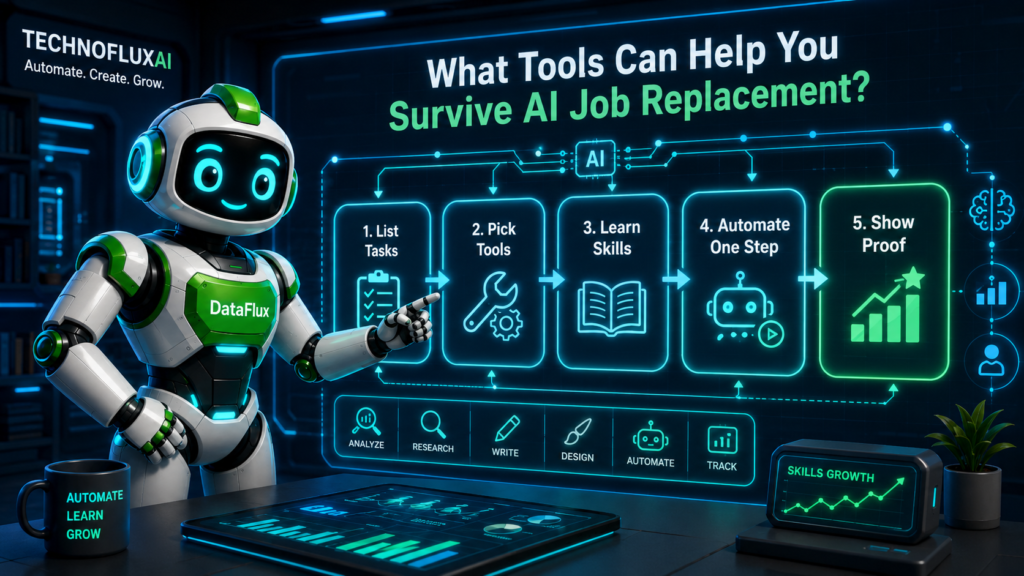
A Practical AI Job Survival Workflow
Step 1: List the tasks AI could affect
Write down what you do each week.
Then mark each task as:
- Repetitive
- Creative
- Communication-heavy
- Decision-based
- Relationship-based
- Technical
- Strategic
AI is more likely to affect repetitive, text-heavy, research-heavy, and pattern-based work first.
Step 2: Choose one tool for each problem
Do not build a giant tool stack.
Start with this simple setup:
- One AI assistant
- One learning platform
- One research tool
- One automation tool
- One portfolio or note system
That is enough.
Step 3: Learn the tool inside your real job
Do not learn AI in a vacuum.
Use it on real tasks:
- Rewrite an unclear email
- Summarize meeting notes
- Build a checklist
- Compare two options
- Draft a project plan
- Create a simple automation
- Turn a process into documentation
This is how you build practical AI fluency.
Step 4: Save proof of what you improved
Every time you use AI to improve a workflow, save the example.
Track:
- What the old process was
- What you changed
- Which tool helped
- How much time it saved
- What still needed human review
- What you would improve next
This can become portfolio material, resume material, or talking points in an interview.
Step 5: Build one visible project
Create something public or semi-public.
Examples:
- “How I used AI to organize my job search”
- “My 5-step AI workflow for weekly reports”
- “How I automated a basic client intake process”
- “How I used NotebookLM to study a new industry”
- “How I used Canva and AI to build a simple portfolio”
You are not just saying you know AI. You are showing it.
Tools by Goal
| Goal | Tool Type | Example Tools |
|---|---|---|
| Learn AI skills | Reskilling platform | LinkedIn Learning, Coursera, Google AI Certificate |
| Work faster | AI assistant | ChatGPT, Copilot, Claude, Gemini |
| Understand complex info | Research assistant | NotebookLM, ChatGPT, Claude |
| Automate repetitive work | Automation platform | Zapier, Make, Power Automate |
| Show your skills | Portfolio/content tools | Canva, Notion, LinkedIn |
| Reduce inbox chaos | Email productivity | Sanebox, Gmail filters, Outlook rules |
| Build business workflows | Custom AI assistants | CustomGPT, ChatGPT workspace agents |
Common Mistakes to Avoid
Mistake 1: Trying too many tools at once
Tool overload feels productive, but it usually creates confusion. Start with one tool per problem.
Mistake 2: Only learning prompts
Prompting matters, but workflows matter more. A good prompt inside a bad workflow still creates weak results.
Mistake 3: Publishing AI work without review
AI can help you move faster, but you still need to check facts, tone, accuracy, privacy, and context. Recent research on AI productivity also warns that AI assistance does not automatically guarantee better productivity, especially when skill development and reliability issues are ignored.
Mistake 4: Ignoring human skills
Communication, judgment, leadership, trust, taste, empathy, and problem-solving still matter. AI can help with output, but people still value someone who understands the goal.
Mistake 5: Waiting until your job is at risk
Do not wait for a layoff, reorg, or scary meeting. Build AI skills while you still have time to practice.
TechnofluxAI Take
The safest career move is not becoming “an AI expert” overnight.
The safer move is becoming the person who can look at a messy workflow and say, “I know how to improve this.”
That is where AI becomes useful. It helps you document, summarize, automate, draft, research, and organize. But your value comes from knowing what matters, what to check, what to ignore, and how to turn the tool into a better process.
Most people will use AI randomly.
You want to use it deliberately.
What Should I Actually Do?
Start with this simple 7-day plan:
Day 1: Write down the tasks you do every week.
2: Pick one repetitive task that wastes time.
3: Use ChatGPT, Copilot, or Claude to map a better workflow.
4: Use a learning platform to study one missing skill.
5: Use NotebookLM or another research tool to organize notes around your role.
6: Try one small automation with Zapier, Make, or Power Automate.
7: Create a one-page summary of what you improved.
Do not aim for a perfect career transformation in one week. Aim for one real improvement you can explain clearly.
That is how you start becoming harder to replace.
FAQ
What tools can help you survive AI job replacement?
The most useful tools are AI assistants, learning platforms, automation tools, research tools, productivity systems, and portfolio tools. A good starter stack includes ChatGPT, Microsoft Copilot, NotebookLM, LinkedIn Learning, Coursera, Zapier, Canva, and Notion.
Can AI tools really protect my job?
AI tools cannot guarantee job security. They can help you build skills, work faster, automate repetitive tasks, and show that you can adapt. That can make you more useful, especially in teams that are trying to adopt AI.
What is the first AI tool I should learn?
Start with a general AI assistant like ChatGPT, Microsoft Copilot, Claude, or Gemini. Learn how to use it for writing, planning, summarizing, research, and workflow improvement before adding more tools.
Should I learn coding to survive AI job replacement?
Coding can help, but it is not the only path. Many workers will benefit more from learning AI-assisted writing, automation, data organization, communication, documentation, and industry-specific workflows.
What skill is hardest for AI to replace?
AI struggles most when work requires judgment, trust, leadership, personal experience, taste, accountability, and real-world context. Build skills that combine technical fluency with human decision-making.
How do I prove I know how to use AI?
Create proof. Save before-and-after examples, workflow diagrams, automations, portfolio projects, case studies, or short posts explaining how you used AI to improve a real task.
Verification Notes
Before publishing, verify current tool names, pricing, plans, feature availability, and enterprise claims on official product pages. AI tools change quickly, especially model names, usage limits, workspace features, and automation capabilities. TechnofluxAI’s style guide recommends using verification notes for AI tools, pricing, software features, product comparisons, and current claims.
Conclusion
AI job replacement is a real concern, but the practical response is not panic. It is skill-building.
Use AI job replacement tools to learn faster, organize your work, automate small tasks, communicate better, and create proof that you can adapt. Start with one workflow, improve one task, document what changed, and build from there.
The goal is not to beat AI.
The goal is to become the person who knows how to use it well.
Helpful Resources
? Creator AI Tools Update
AI creator tools are evolving quickly in 2026. Content creators now use AI systems for video editing, voice generation, thumbnails, workflow automation, scripting, image generation, social media planning, and AI-assisted publishing across multiple platforms.
Modern creators are combining AI tools with workflow systems to publish content faster, stay more consistent, improve engagement, and scale content production without large teams.
- AI video tools speed up content creation workflows
- Workflow automation helps creators stay consistent
- Short-form video content continues dominating social traffic
- AI image systems improve thumbnails and visual branding
- Cross-platform publishing workflows are becoming essential

About the Author
Jon Hicks
Founder of TechnofluxAI.
I’m the creator behind TechnofluxAI, focused on breaking down powerful AI tools, emerging trends, and practical strategies to help creators and entrepreneurs stay ahead in a rapidly evolving digital world.
Follow TechnofluxAI for the latest AI tools & strategies