

TechnofluxAI Automation Guide
Zapier vs Make for Beginner AI Automations
Zapier and Make can both help beginners build AI automations, but they feel very different. Zapier is usually easier to start with. Make gives you more visual control. The best choice depends on whether you want simple setup or deeper workflow flexibility.
Quick Answer
Choose Zapier if you want the fastest beginner-friendly way to connect apps and create simple AI workflows. Choose Make if you want a more visual builder, more control over branching logic, and room to grow into more advanced automations.
The Beginner Problem
Most beginners do not fail because automation tools are weak. They fail because they build workflows that are too complicated too early. The right platform should help you create useful automations before you get buried in filters, paths, routers, tokens, tasks, credits, and error handling.
What This Guide Helps You Decide
You’ll learn how Zapier and Make compare for beginner AI automations, where each tool shines, what mistakes to avoid, and which one fits common workflows like AI email replies, lead follow-up, content repurposing, CRM updates, and customer support.
Start With the Automation, Not the Tool
Before choosing Zapier or Make, write down the exact result you want. A beginner AI automation should save time, reduce repetitive work, or help you respond faster. If the workflow does not have a clear business purpose, the tool choice will not matter.
Explore More AI Automation Guides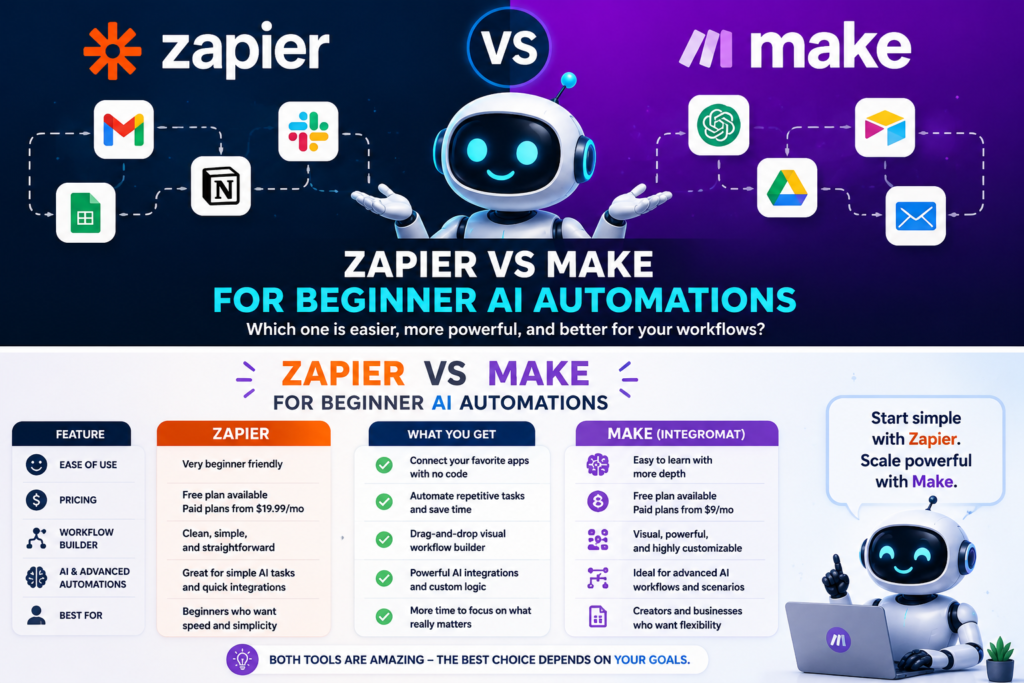
Beginner Comparison
Zapier vs Make: The Real Difference for AI Workflows
Zapier and Make both connect apps, move data, and trigger actions. The difference is how they help you think. Zapier feels like building a simple checklist. Make feels like designing a visual system.
Zapier: Best for Fast Beginner Setup
Zapier is usually easier for beginners because the workflow structure is straightforward. You pick a trigger, add one or more actions, test each step, and turn the automation on.
- Good for simple app-to-app workflows.
- Good for beginners who want less setup friction.
- Good for quick AI writing, summarizing, routing, and notification tasks.
- Good when your workflow is mostly linear.
Make: Best for Visual Workflow Control
Make is stronger when you want to see the full automation as a visual map. It gives beginners more visibility into how data moves, where conditions split, and how different modules connect.
- Good for visual builders and system thinkers.
- Good for branching workflows with multiple conditions.
- Good for cleaning, formatting, and transforming data.
- Good when you expect the automation to get more complex later.
The Main Beginner Tradeoff
Zapier is often faster to understand. Make is often better once your workflow needs more logic. Neither tool is automatically better. The right choice is the one that matches your first few automations.
- Simple workflow: Zapier usually wins.
- Visual multi-step workflow: Make usually wins.
- Lots of app options: Zapier is very strong.
- More logic on a canvas: Make feels stronger.
Beginner AI Automation Examples
Lead Follow-Up
A form submission triggers an AI-generated email draft, adds the lead to a CRM, and sends a notification to your team.
Content Repurposing
A new blog post turns into a LinkedIn draft, Facebook caption, email teaser, and short video script.
Customer Support Sorting
A new support message is summarized, categorized by urgency, and routed to the right inbox or team member.
Meeting Notes
A call transcript is summarized into action items, saved to a workspace, and sent to the people who need it.
Which Platform Should Beginners Choose?
Choose Zapier If…
- You want to launch quickly.
- You prefer guided setup.
- You are connecting common business apps.
- You want simple AI steps inside everyday workflows.
- You do not want to think deeply about data paths yet.
Choose Make If…
- You like visual workflow maps.
- You want more control over logic.
- You expect your automations to grow.
- You need filters, routers, conditions, and formatting.
- You are willing to learn a slightly more technical interface.
Beginner Decision Matrix
| Need | Better Starting Choice | Why |
|---|---|---|
| Fast setup | Zapier | The step-by-step flow is easier for many beginners. |
| Visual control | Make | The canvas helps you see the full workflow structure. |
| Simple AI email draft | Zapier | Linear workflows are usually quick to build. |
| Complex lead routing | Make | Branching logic is easier to understand visually. |
| Learning automation basics | Either | Both can teach triggers, actions, conditions, and data mapping. |
Practical Prompt You Can Use
“I am a beginner building an AI automation for [business goal]. The trigger is [what starts the workflow]. The result I want is [final output]. Compare whether Zapier or Make is better for this workflow. Keep the recommendation beginner-friendly and explain the steps I should build first.”
Implementation Advice
How Beginners Should Start With AI Automations
The smartest beginner move is not building a massive AI system on day one. Start with one small workflow that saves time every week. Once that works reliably, add more steps, better prompts, and stronger error checks.
Advanced Tip: Keep AI in the Right Place
AI is best used where judgment, summarizing, writing, classifying, or formatting is needed. Do not force AI into every step. Many automation steps should simply move data, update records, send alerts, or create tasks.
Advanced Tip: Add Human Review First
For beginner AI automations, let AI draft or summarize before it acts directly. Review AI-generated emails, quotes, replies, and recommendations before sending them automatically.
Advanced Tip: Name Every Step Clearly
Clear naming makes automation easier to troubleshoot. Use names like “Summarize Lead Message,” “Create CRM Contact,” “Send Internal Alert,” and “Draft Follow-Up Email.”
Common Mistakes to Avoid
- Choosing the platform before defining the workflow.
- Starting with a complicated multi-branch automation.
- Letting AI send messages without review too early.
- Ignoring pricing rules like tasks, operations, credits, or AI usage.
- Forgetting to test with messy real-world data.
- Not adding fallback steps when AI output is incomplete.
- Building automations nobody on the team understands.
A Safe Beginner Build Order
Step 1
Pick one repetitive task that happens every week.
Step 2
Build the workflow without AI first if possible.
Step 3
Add AI only where it improves the output.
Step 4
Test with real examples before trusting it.
FAQ
Is Zapier or Make easier for beginners?
Zapier is usually easier for total beginners because the workflow setup feels more guided and linear. Make can still work for beginners, but it asks you to think more visually about modules, routes, and data flow.
Which is better for AI automations?
Zapier is better for simple AI automations that need to launch quickly. Make is better when the AI workflow needs more branching, visual logic, formatting, or multi-step data handling.
Can I use ChatGPT with Zapier or Make?
Yes. Both platforms can be used to connect AI tools with everyday business apps. A common beginner workflow is sending form responses, emails, notes, or transcripts to an AI step for summarizing, drafting, classifying, or formatting.
Should beginners start with free plans?
Beginners should test simple workflows first before upgrading. Free or entry-level plans can help you learn the interface, but serious AI automations may require paid features, higher usage limits, or additional AI-related costs.
What is the best first AI automation to build?
A good first AI automation is a lead summary workflow. When someone fills out a form, AI summarizes the request, identifies urgency, drafts a follow-up, and sends you a notification before you reply.
Final Takeaway
For beginner AI automations, Zapier is the safer starting point if you want speed and simplicity. Make is the better starting point if you think visually and want more control. The best move is to build one small workflow first, prove that it saves time, then improve it step by step.
Build Your First AI Automation