

Affiliate disclosure: This article contains affiliate links. If you click a link and sign up or make a purchase, I may earn a commission at no extra cost to you. I only recommend tools I believe are genuinely useful.
AI Video • Creator Tools • Hands-On Review
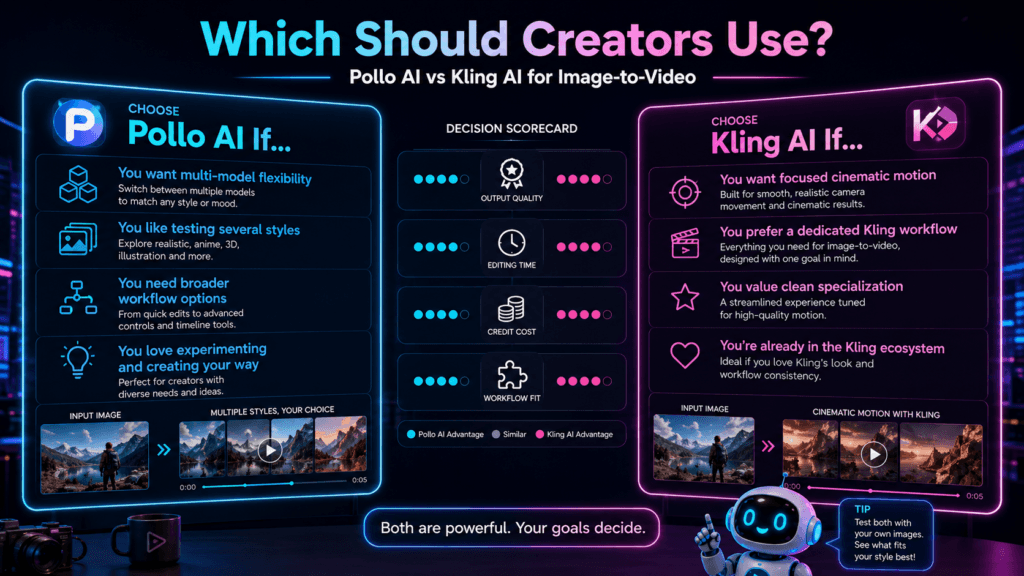
Pollo AI is an all-in-one AI creation platform that can turn text prompts and images into generated video without requiring a traditional editing workflow.
That’s the basic pitch. But AI video tools can look much more impressive on a product page than they do when you actually try to create something.
So instead of judging Pollo AI only by its feature list, I tested it and included one of my generated videos below.
Pollo AI is easy to start using and useful for quickly experimenting with short AI-generated video ideas. The trade-off is control: AI generation can speed up the first draft, but results aren’t always consistent and you may need multiple attempts to get a clip you actually want to use.
What Is Pollo AI?
Pollo AI is a creative AI platform with tools for generating and transforming visual content.
For video creators, the most useful capabilities include:
- Text-to-video generation
- Image-to-video animation
- Video-to-video transformation
- AI avatar videos
- Video effects and creative transformations
- AI image generation and editing
The appeal is pretty straightforward: instead of filming or manually animating every scene, you can start with a description or image and let an AI model create the initial video.
That doesn’t eliminate editing or creative decision-making. It gives you another way to get from an idea to something visual much faster.
Who Pollo AI Is For
I think Pollo AI makes the most sense for creators who want to experiment with video without building every shot manually.
Experiment with visual ideas for Shorts, TikTok, Reels, and other short-form formats.
Turn concepts from written content into visual clips that can support an article or social post.
Prototype product visuals, ad concepts, and social creative without starting every idea from scratch.
Test different prompts, models, images, and visual styles without needing a full production setup.
My Pollo AI Video Test
Here’s an actual video I generated while testing Pollo AI.
I wanted to create a cinematic futuristic creator workspace rather than rely on one of Pollo’s promotional examples.
Example AI-generated video created while testing Pollo AI.
This is the part I care about most when reviewing an AI generator: not whether the homepage demo looks amazing, but whether I can get something usable from my own prompt.
The test also shows the right way to think about a tool like Pollo. It can create an impressive starting point quickly, but you should still inspect motion, consistency, framing, details, and anything unusual the model introduced.
The speed from idea to actual video is the interesting part. You don’t have to build the scene frame by frame before you know whether the concept is worth pursuing.
One Thing I have Learned while building TechnofluxAi is that Ai tools usually sound easier to use than they are in the real world. I like to try things myself, see where I get stuck, and figure out what actually saves time instead of just repeating promisies.That’s the approach I use throughout this site: keep what works, point out what doesn’t, and explain things in a way that makes sense for someone who is still learning. I started out searching for an image creator. That was my first interaction with Ai. I was frustrated by the vast tool list without any real direction on which tool was best. Then I realized how powerful this tool was .and was going to be in the future. Making mistakes has helped me in the choice of articles I write.
How to Use Pollo AI
The exact controls depend on which generator or model you’re using, but the basic workflow is straightforward.
Step 1: Decide What You’re Trying to Create
Start with the purpose, not the prompt.
Is this:
- A cinematic B-roll shot?
- A social clip?
- An animated version of an existing image?
- A product concept?
- A character scene?
- A visual for an article or campaign?
That decision helps you choose between text-to-video, image-to-video, or another workflow.
Step 2: Give the Model a Clear Prompt
“Make a cool futuristic video” leaves most creative decisions to the AI.
A more useful prompt describes the scene, subject, movement, lighting, camera, and mood.
Cinematic futuristic creator workspace at night, glowing monitors displaying editing timelines and AI tools, slow camera push forward, subtle screen reflections, realistic lighting, clean professional atmosphere.
You don’t need to write a novel. You do need to communicate the details that actually matter.
Step 3: Choose the Right Generation Workflow
Text-to-video is useful when you’re starting with only an idea.
Image-to-video is useful when you’ve already established the composition or character appearance and want to animate it.
That’s an important distinction. If visual consistency matters, giving the AI a starting image can provide more direction than generating everything from text.
Step 4: Generate and Inspect
Don’t assume generation equals completion.
Watch for:
- Strange hand or body movement
- Objects changing shape
- Characters changing appearance
- Unwanted camera movement
- Background objects appearing or disappearing
- Text rendering incorrectly
- Motion that doesn’t match your prompt
Step 5: Iterate
This is where AI video becomes much more useful.
If the first generation is close, don’t immediately throw away the whole idea. Change one meaningful part of the prompt and try again.
For example:
- Slow the camera movement
- Change the lighting
- Reduce motion
- Use a different starting image
- Specify what the subject should remain focused on
- Change the framing
What I Like About Pollo AI
It’s Easy to Experiment
You don’t need to learn a professional video editor before testing whether an idea looks interesting in motion.
Text and Image Workflows Are in One Place
Being able to start from either a written description or an existing image gives creators more options than relying on one generation method.
It’s Useful for Short Visual Concepts
For quick scenes, B-roll concepts, social creative, visual experiments, and idea testing, AI video can shorten the distance between an idea and something you can actually watch.
You Can Try Different Approaches Without Starting Over
A single creative idea can be tested as text-to-video, built from a generated image, or reworked with another video workflow.
Where Pollo AI Still Has Limitations
The original version of this review said “no editing required.” I think that’s too broad.
You can certainly generate a clip without traditional editing skills, but creating something you’re ready to publish may still require trimming, audio, captions, sequencing, branding, or cleanup elsewhere.
AI video also isn’t completely predictable.
- One generation can look much better than another.
- Complex motion can introduce strange artifacts.
- Precise creative control is still harder than manual production.
- Credits can disappear quickly if you regenerate repeatedly.
- A prompt that worked well once may not produce an identical result again.
With credit-based AI video, several failed or mediocre generations may be part of getting one result you want to keep.
What About Pollo AI Pricing?
Pollo AI uses a credit-based system, and the number of credits used can vary based on the model, resolution, duration, and type of generation.
That means comparing plans only by the monthly subscription price can be misleading.
I would check three things before upgrading:
- How many credits your preferred video model uses
- How many attempts you typically need to get a usable clip
- Whether the plan includes the models and output settings you actually want
Pollo currently offers free access as well as paid options, so it’s easy enough to test the workflow before deciding whether a subscription makes sense.
Who Should Use Pollo AI?
Based on what I tested, Pollo is easier to justify when speed and experimentation matter more than frame-by-frame control.
Useful for testing short visual concepts, B-roll ideas, intros, and social media creative.
Useful when you want to add original visual content to articles or repurpose an idea into video.
Useful for rapidly prototyping social creative and campaign concepts before investing in larger production.
Useful for experimenting with AI video without learning an advanced editor first.
Who Should Probably Skip It?
Pollo AI may not be the right primary tool if you need:
- Precise control over every frame
- Long-form traditional video editing
- Predictable results every generation
- Complex professional post-production
- A workflow where every shot must match exactly
AI generation and professional video editing aren’t the same thing. They can complement each other, but one doesn’t automatically replace the other.
Can You Make Money With Pollo AI?
Pollo AI itself doesn’t create an income stream.
It’s a production tool.
You could use generated video as part of:
- A YouTube or short-form content workflow
- Affiliate marketing content
- Product demonstrations or advertising concepts
- Blog and social media promotion
- Client creative work where permitted by the applicable terms
But publishing AI-generated clips doesn’t automatically produce traffic, followers, or revenue.
The idea, audience, distribution, offer, and quality of the finished content still matter.
Pros and Cons
Pros
- Easy to start experimenting
- Text-to-video and image-to-video workflows
- Useful for rapid visual concept testing
- Can reduce the work required to create an initial scene
- Useful for creators who aren’t traditional animators
- Free access makes it possible to test before upgrading
Cons
- Generation quality can vary
- Credit costs matter if you regenerate often
- Less control than manual video production
- Complex scenes can introduce visual errors
- Generated clips may still need editing before publishing
Frequently Asked Questions
Is Pollo AI free?
Pollo AI currently provides free access that lets you try generation before moving to a paid plan. Usage and available features depend on the current plan and model.
Can beginners use Pollo AI?
Yes. You can start creating from text or images without needing traditional animation or professional video-editing experience.
Can Pollo AI turn an image into a video?
Yes. Image-to-video is one of Pollo AI’s main generation workflows. You upload a still image, provide direction, and generate motion from it.
Can Pollo AI generate video from text?
Yes. With text-to-video, you describe a scene and use that description as the starting point for the generated clip.
Is Pollo AI useful for TikTok and YouTube Shorts?
It can be useful for creating short visual concepts for those platforms. Whether the content performs well still depends on the idea, hook, execution, audience, and distribution.
Do I still need a video editor?
Not necessarily for every experiment, but often for finished content. You may still want to add cuts, captions, music, narration, branding, transitions, or other post-production elements.
Is Pollo AI worth paying for?
That depends on how often you generate video and which models you use. I would test the free access first, see how many attempts it takes you to produce something useful, and then decide whether the credit cost makes sense for your workflow.
Final Thoughts: Is Pollo AI Worth Trying?
Yes, I think Pollo AI is worth testing if you’re interested in AI video creation.
My reason isn’t that it magically removes all the work from video production.
It’s that it makes experimentation fast.
You can take an idea, turn it into a moving scene, see what works, change the prompt, and try another direction without building everything manually first.
My own test video is more useful to me than a polished company demo because it shows what happened when I actually gave the tool a concept and generated something with it.
That’s how I’d evaluate Pollo AI: don’t ask whether AI video looks impressive in theory. Give it one of your own ideas and see what comes back.
Pollo AI is most useful as an idea-to-video accelerator. The AI can generate the footage, but your prompt, selection, editing, and judgment are still what turn a generation into content worth publishing.

About the Author
Jon Hicks
Founder of TechnofluxAI.
I’m the creator behind TechnofluxAI, focused on breaking down powerful AI tools, emerging trends, and practical strategies to help creators and entrepreneurs stay ahead in a rapidly evolving digital world.
Follow TechnofluxAI for the latest AI tools & strategies