
AI Workflows • Prompting • Beginner Guide
If AI keeps giving you generic answers, the problem may not be the AI tool. It may be the way the task is being handed to it.
A lot of people use AI like a search box:
“Write a blog post.”
Then they’re disappointed when the answer sounds like something that could have been written for anybody.
The fix isn’t necessarily a giant 500-word prompt.
Usually, AI becomes more useful when it knows what you’re trying to accomplish, who the result is for, what information it should use, what constraints matter, and what the finished output should look like.
Don’t ask, “How do I write the perfect prompt?” Ask, “What information does the AI need to help me complete this task well?”
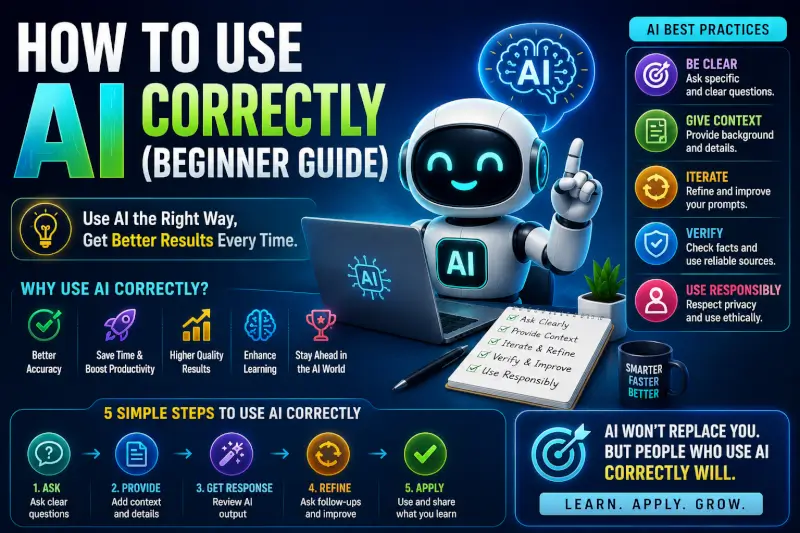
How to Use AI Correctly
A useful AI request usually contains some combination of five things:
What are you actually trying to accomplish?
What does the AI need to know about the situation?
What notes, data, text, files, examples, or source material should it work from?
What should it include, avoid, preserve, verify, or not assume?
Do you need an email, comparison, outline, table, explanation, plan, code, or something else?
You won’t need all five for every request. Simple tasks can use simple prompts.
The point is to provide information that reduces unnecessary guessing.
Bad Prompt vs Better Prompt
Here’s a simple example.
Too vague
Write a blog post about AI.
The AI has to guess the audience, topic, goal, depth, angle, structure, and what information matters.
Better
Create an outline for a beginner guide explaining how solo bloggers can use AI during research and article production. The reader already uses ChatGPT but struggles with generic output. Focus on practical workflows, fact-checking, and adding original value. Avoid hype and income promises.
The second prompt isn’t better simply because it’s longer. It’s better because it removes ambiguity that matters to the task.
10 Better AI Prompt Examples
You don’t need 50 variations of the same prompt. These ten patterns cover much more useful ground.
| Instead of | Try |
|---|---|
| Give me ideas | Give me 10 article ideas for solo bloggers learning AI. Group them by beginner, intermediate, and experimental intent. |
| Make this better | Rewrite this paragraph for clarity. Preserve my opinion and examples, remove repetition, and don’t add new claims. |
| Explain SEO | Explain search intent to a new blogger using one informational and one commercial example. |
| Summarize this | Summarize this document into five key findings. Separate facts from recommendations and flag anything the source doesn’t support. |
| Help with research | List the factual claims in this draft that should be verified before publication and tell me what type of primary source would support each one. |
| Write an email | Draft a short follow-up email to a customer who hasn’t replied in seven days. Friendly, professional, no pressure, under 120 words. |
| Compare these tools | Compare these tools for my specific workflow using price, learning curve, integrations, limitations, and who each is best suited for. |
| Analyze my data | Analyze this table for unusual changes and trends. Show the calculations and separate observations from possible explanations. |
| Make a content plan | Build a four-week content plan around this pillar article. Avoid overlapping search intent and explain how each supporting article connects to the pillar. |
| Fix my article | Review this draft for unsupported claims, repetition, weak explanations, outdated facts, broken links, and sections that don’t help the reader. Don’t rewrite it yet. |
Good prompting isn’t about secret phrases. Give the AI the information and boundaries it needs to make fewer bad assumptions.
One Thing I have Learned while building TechnofluxAi is that Ai tools usually sound easier to use than they are in the real world. I like to try things myself, see where I get stuck, and figure out what actually saves time instead of just repeating promisies.That’s the approach I use throughout this site: keep what works, point out what doesn’t, and explain things in a way that makes sense for someone who is still learning. I started out searching for an image creator. That was my first interaction with Ai. I was frustrated by the vast tool list without any real direction on which tool was best. Then I realized how powerful this tool was .and was going to be in the future. Making mistakes has helped me in the choice of articles I write.
The Bigger Upgrade: Stop Using AI One Prompt at a Time
Better prompts help, but prompting isn’t the whole skill.
The bigger improvement comes when AI becomes one step inside a repeatable workflow.
For example, using AI for an article might look like this:
Question → Research → Sources → Content Gap → Your Input → Draft → Fact Check → Edit → Publish → Measure
Notice that “write the article” is only one part of the process.
Example: Using AI to Create a Better Article
Step 1: Define the Reader’s Problem
Instead of asking AI for random keywords, start with a real problem.
Example:
My reader uses AI to draft blog posts but the output keeps sounding generic. What questions would help diagnose why?
Step 2: Research the Topic
AI can help you identify terminology, questions, competing explanations, and claims that need verification.
But important facts should still be checked against reliable sources.
Step 3: Find What’s Missing
Ask AI to compare your notes or draft against the questions the reader needs answered.
You’re looking for gaps—not an excuse to make the article longer.
Step 4: Add Something Original
This might be:
- A prompt you actually use
- A before-and-after result
- A screenshot
- A mistake you encountered
- A workflow you’ve refined
- A small experiment
- Your interpretation of the result
This is where the article becomes yours rather than another summary of information already online.
Step 5: Draft With Constraints
Now give AI the research and original material.
Tell it what must remain, what it must not invent, who the reader is, and what the article needs to accomplish.
Step 6: Challenge the Output
Don’t only ask AI to improve its own answer.
Ask it to find weaknesses:
Review this draft as a skeptical editor. Identify unsupported claims, generic advice, repetition, missing evidence, assumptions, and anything that sounds more confident than the sources justify.
Step 7: Verify Before Publishing
AI can help identify what needs checking, but don’t use the same generated answer as proof that its own claim is correct.
Go back to the relevant source.
A Useful Prompt Formula
When a task needs more direction, this framework is a useful starting point:
Goal + Context + Source Material + Constraints + Output
For example:
Goal: Help me decide whether this article needs updating.
Context: It’s an existing beginner guide on an AI website.
Source material: Use the article I’ve attached.
Constraints: Don’t invent traffic data or personal experience. Flag claims that need current verification. Look for duplicate search intent.
Output: Give me a short keep/update/remove recommendation for each major section.
That’s much more useful than adding phrases such as “act as a world-class expert” and hoping the model figures out everything else.
When Short Prompts Are Better
Not every request needs a framework.
If the context is already clear, a short follow-up can be better:
- “Make this 30% shorter.”
- “Keep my wording but fix the grammar.”
- “Put these results in a table.”
- “Explain the second paragraph more simply.”
- “Don’t change the numbers.”
Good prompting is about supplying the missing information, not maximizing word count.
Don’t Confuse Automation With Good Workflow Design
Automation is useful when a task is repetitive and predictable.
But automating a bad process just makes the bad process happen faster.
Before automating something, ask:
- Does this task repeat often?
- Are the inputs predictable?
- Can I tell when the output is wrong?
- Does a human need to approve the result?
- What happens if the automation fails?
Those questions matter more than how many AI apps you can connect together.
Common AI Mistakes
Expecting One Prompt to Finish a Complex Task
Some jobs require research, clarification, drafting, checking, and revision.
Breaking the work into stages often gives you more control than demanding a perfect final answer immediately.
Giving AI No Source Material
If the answer depends on your business, article, spreadsheet, customer feedback, or research, provide that information when possible.
Otherwise the model may have to fill important gaps with assumptions.
Assuming Specific Means Accurate
A detailed prompt can produce a detailed answer that is still wrong.
Specific instructions improve direction. They don’t eliminate the need to verify important facts.
Asking AI to Invent Experience
Don’t turn generated text into fake first-hand experience.
If you haven’t tested a product, don’t publish “I tested this for three weeks.” If you don’t have a result, don’t manufacture one because it makes the article sound more convincing.
Keeping Every AI Suggestion
You are still the editor.
Delete weak sections. Reject bad ideas. Question confident claims. Tell the AI when it misunderstood the task.
Buying Too Many AI Tools
You don’t need a separate subscription for every part of your workflow.
Start with the problem. Add another tool when it solves that problem better enough to justify the extra cost or complexity.
How to Know Whether Your AI Workflow Is Actually Better
Don’t judge a workflow because it feels futuristic.
Measure whether it improved the work.
Did the workflow reduce meaningful work, or did you spend the saved time fixing AI mistakes?
Is the finished result actually better, clearer, or more useful?
How often do you have to correct factual or reasoning errors?
Can you use the process again, or did it only work once by accident?
A Simple AI Workflow for Beginners
If you’re new to AI, you don’t need an elaborate automation stack.
- Choose one real task. Start with something you already need to accomplish.
- Give AI the relevant context. Explain the goal and provide useful source material.
- Ask for a defined output. Tell it what you need back.
- Review the result. Look for mistakes, assumptions, and missing information.
- Refine one thing at a time. Don’t restart from zero every time.
- Verify important claims. Especially anything current, financial, legal, medical, technical, or important to a business decision.
- Save what worked. Turn successful instructions into a repeatable workflow.
FAQ
How do you use AI effectively?
Start with a real task, provide the context and source material needed for that task, define the output you want, review the result, and verify important information before relying on it.
Do longer prompts produce better results?
Not automatically. A longer prompt is useful only when the additional information helps the model understand the task. For simple requests, short prompts can work perfectly well.
Why does AI give me generic answers?
One common reason is missing context. If the AI doesn’t know your audience, goal, source material, constraints, or what makes your situation different, a general answer may be the safest response it can produce.
Do I need to learn prompt engineering?
You don’t need complicated prompt formulas for everyday AI use. Learning how to describe the task clearly, provide useful context, and evaluate the output is more important.
Should I trust AI answers?
Treat AI output according to the consequences of being wrong. A brainstorming suggestion may need little verification. A current fact, financial calculation, legal claim, medical statement, or business-critical decision deserves much more checking.
Do I need lots of AI tools?
No. One capable AI assistant can cover many everyday tasks. Add specialized tools when they solve a specific problem in your workflow.
Final Thoughts
Using AI well isn’t about memorizing 50 clever prompts.
It’s about learning how to give the model the information it needs, recognizing when the output is weak, and keeping human judgment in the parts that matter.
Sometimes that means a detailed prompt.
Sometimes it means uploading a document.
Sometimes it means asking one short follow-up question.
And sometimes the right move is ignoring the AI’s suggestion completely.
Don’t chase perfect prompts. Build a repeatable process: give AI good context, use it for a specific job, inspect what comes back, verify what matters, and improve the workflow from there.

About the Author
Jon Hicks
Founder of TechnofluxAI.
I’m the creator behind TechnofluxAI, focused on breaking down powerful AI tools, emerging trends, and practical strategies to help creators and entrepreneurs stay ahead in a rapidly evolving digital world.
Follow TechnofluxAI for the latest AI tools & strategies