
Grok is an AI assistant originally developed by xAI and now operated within SpaceX’s AI business. In 2026, Grok is much more than the chatbot built into X. It can chat, search the web and X, analyze uploaded files, work with connected services, use voice, and create images and short AI videos through Grok Imagine. It is available through Grok’s web and mobile apps as well as X. For creators who already use X, its connection to real-time conversations and its built-in media tools are two of the biggest reasons to consider it.
I already use X, so Grok is more interesting to me than an AI tool that exists completely outside that ecosystem. X is tied directly to Grok, and Elon Musk’s involvement with xAI made the assistant hard to ignore from the beginning.
I also use ChatGPT, and I have tested Grok enough to know that I like several of its features. I don’t think that automatically means one has to replace the other. The more useful question is which tool fits the job you’re trying to finish.
That is what this guide focuses on. Instead of arguing over which chatbot wins a benchmark, we’ll look at what Grok can actually do for creators, bloggers, small businesses, marketers, and regular users in late 2026.
What Is Grok and Who Created It?
Grok is a generative AI assistant that can answer questions, write and analyze content, work with files, create media, search for information, and interact through text or voice.
Grok was created by xAI. SpaceX acquired xAI in February 2026, and the current company documentation identifies the organization operating Grok as SpaceX Super Intelligence, or SpaceXSI. You’ll still see the xAI name everywhere because the product website and developer documentation continue to use the x.ai domain, and most people still associate Grok with xAI and Elon Musk.
Grok also has an unusually close relationship with X. That matters because X is not simply another website Grok can search. Grok has tools designed specifically to search posts, accounts, threads, and conversations on the platform.
How Grok Works
At the center of Grok is a family of large AI models. As of November 2026, xAI’s current flagship model is Grok 4.7. The exact model you encounter can depend on your plan, product, and mode, so model names will continue changing faster than this article.
The useful part is the layer around the model. Grok can combine its language model with tools such as web search, X search, file analysis, image generation, voice, and connected applications.
That distinction matters. Grok does not magically know everything happening on X or the web in real time from its training data. Its current-information advantage comes from search tools that can retrieve live information when they are used.
Grok’s Main Features in 2026
Chat and reasoning
Use Grok for brainstorming, writing, explanations, coding help, planning, summaries, and multi-step questions.
Web and X search
Grok can search current web pages and use dedicated X search tools to retrieve posts, threads, users, and conversations.
File analysis
Upload PDFs, spreadsheets, images, code, audio, and other files for analysis, extraction, or summarization.
Grok Imagine
Create and edit images or generate short AI video clips from text, images, and supported references.
Voice
Talk with Grok through voice rather than limiting every interaction to a text prompt.
Connectors
Grok can connect with services including Gmail, Google Calendar, Google Drive, Outlook, OneDrive, Teams, SharePoint, Notion, GitHub, Canva, and others.
Grok for AI Image and Video Creation
Grok Imagine is one of the areas that makes Grok more interesting for creators than a text-only assistant.
The current Imagine system supports AI image generation and editing. xAI’s developer documentation lists Grok Imagine Image 2.0 as its current image model, with support for reference images, different aspect ratios, and multiple output resolutions.
Video has moved well beyond a simple image-animation experiment. Grok Imagine Video 1.5 can create video from text or images, generate audio and lip-synced speech, and support higher-resolution output. The developer version supports clips up to 15 seconds, while consumer features and plan limits can differ.
For a creator, I would think of Grok Imagine as an idea-to-asset tool rather than a replacement for a full editor. Generate the concept, test variations, turn a still image into a short moving scene, and then finish the content in the editor you already use.
How Content Creators Can Use Grok
Creators do not need another AI subscription simply because it exists. Grok becomes useful when one of its strengths removes a step from your existing workflow.
The most obvious example is X research. If you already spend time on X looking for reactions, questions, complaints, emerging topics, or competing opinions, Grok gives you a natural AI layer for organizing that information.
Other practical uses include turning research into a content brief, finding opposing viewpoints before writing an article, brainstorming hooks, analyzing uploaded material, generating visual concepts, creating short AI clips, and talking through ideas with voice when typing is inconvenient.
Five Practical Grok Workflows With Example Prompts
1. Find questions and conversation angles on X
Instead of asking Grok to “give me ten viral ideas,” start with an audience question and make the research job specific.
Search recent X conversations about AI image generators for content creators. Identify recurring questions, frustrations, misconceptions, and purchase concerns. Separate widespread themes from isolated opinions. Give me five article angles that would genuinely help a creator make a decision.
Do not treat a handful of posts as market research. X can show you what people are discussing, but it can also amplify outrage, jokes, promotional posts, bots, and unusually vocal users. Use it as a discovery layer, then verify important claims elsewhere.
2. Build a content brief from live discussion plus web research
Research this topic using recent web sources and relevant X discussion: [TOPIC]. Create a content brief for a practical 1,500-word article. Include the main reader question, five subquestions, what current articles already repeat, what readers still need, claims that require primary-source verification, and three opportunities for original testing.
This is much more useful than asking an AI to immediately write a finished article. Research first. Decide what you can add. Then write.
3. Turn a blog concept into a visual campaign
I am publishing an article called “[TITLE].” Give me three visual directions for the featured image. Each should work in a horizontal website crop and be adaptable into a vertical Pinterest graphic. Avoid fake UI screenshots, logos, and unreadable text. After I choose one, create the image prompt.
You can then move into Grok Imagine for the visual. For branded content, I would still add important headlines, logos, and final typography in a design tool instead of trusting generated image text.
4. Turn a still image into short social B-roll
Animate this image into a short vertical social clip. Keep the subject consistent. Use a slow camera push-in, subtle background motion, realistic lighting changes, and no new text. The motion should feel intentional rather than exaggerated.
The finished clip can become B-roll for a Reel, Short, X post, product concept, article promotion, or explainer. Review it carefully before publishing, especially if a product or real person must remain accurate.
5. Use connected files and email for a creator admin workflow
Search my connected Drive for documents related to [PROJECT]. Summarize the latest decisions, list unfinished tasks, and identify any deadlines mentioned in the documents. Do not send or modify anything without asking me first.
The connector layer is important because Grok can now reach beyond the conversation itself. That also means you should pay attention to permissions. Connect only the accounts you actually need, understand whether access is read-only or includes writing, and disconnect services you no longer use.
Grok Free vs. Paid Plans: Features and Pricing
Grok’s consumer pricing changed during 2026. For new customers, the current X Subscription combines Grok with X benefits and other services rather than treating every product as a completely separate subscription.
| Plan | Monthly | Best fit | Notable differences |
|---|---|---|---|
| Free | $0 | Trying Grok | Limited AI usage |
| Plus | $8 | Regular light use | Grok Chat, Voice, Imagine and Build with base usage |
| Premium | $30 | Creators and heavier users | 4× Plus usage, latest models, image/video creation and Grok Bot |
| Super | $100 | Heavy professional use | 15× Plus usage, higher media limits and priority access |
| Ultra | $200 | Very high-volume users | 50× Plus usage |
Paid Grok usage is based on a shared usage pool, so a simple chat question and a high-quality video generation do not necessarily consume the same amount of capacity. That makes the headline subscription price only part of the buying decision.
Existing X Premium or older SuperGrok customers may see different legacy arrangements. Check the current account and checkout screens before changing an existing subscription.
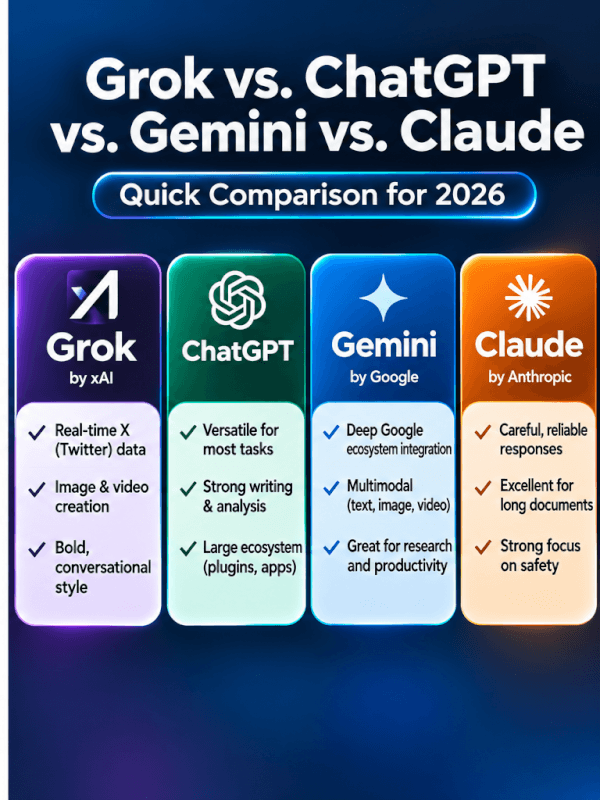
Grok vs. ChatGPT vs. Gemini vs. Claude
| Assistant | Strong reason to choose it | Common paid option | Creator fit |
|---|---|---|---|
| Grok | X search plus built-in image/video creation | Plus $8 / Premium $30 | Strong for X-heavy research, social ideas and generative media |
| ChatGPT | Broad general-purpose workflow and research toolkit | Go $8 / Plus $20 | Strong all-around option for writing, research, files and creator planning |
| Gemini | Deep fit with Google’s ecosystem | AI Plus $9.99 / AI Pro $19.99 | Useful if your workflow already revolves around Google services |
| Claude | Long-form knowledge work, writing and coding workflows | Pro $20 | Strong for substantial documents, analysis and structured work |
I would not choose between these tools based on one benchmark chart. Their models and scores change too quickly.
For someone already active on X, Grok has an obvious advantage because X itself can become part of the research workflow. ChatGPT is still a strong general-purpose tool for me, and using Grok does not require abandoning it. Gemini becomes especially attractive when Google services are central to your work, while Claude remains a strong option for people who spend a lot of time writing, coding, and working through substantial documents.
Grok’s Strengths, Limitations, and Privacy Considerations
Advantages
- Dedicated access to current X conversations through X search tools.
- Web search for current information.
- Image and video generation in the Grok ecosystem.
- Voice interaction.
- File analysis and increasingly broad connectors.
- Useful entry-level paid plan for people who also value X benefits.
Limitations
- Grok can still give incorrect or misleading answers.
- Social-media popularity is not the same as factual accuracy.
- Features and plan limits change frequently.
- Shared usage limits make heavy video generation harder to predict from the subscription price alone.
- Connecting email, files, calendars, or business systems requires additional privacy and permission decisions.
- Another assistant may fit writing, Google-centric work, or other specialized workflows better.
Do not confuse real-time conversation with verified information
Grok’s connection with X is valuable, but it deserves the same caution you would apply if you researched a topic manually on social media. A widely repeated post can still be wrong.
If you’re researching something important, ask Grok to separate claims from opinions, locate primary sources, show conflicting evidence, and tell you what it could not verify. Then open the important sources yourself.
Check the privacy settings before putting sensitive information into Grok
xAI’s consumer documentation says interactions may be used to improve its models unless applicable controls are used. Grok provides controls for model-training use, and Private Chat is described as excluding those conversations from model training.
Grok inside X has its own settings. X says users can control whether their public X data and Grok interactions are used for training and can separately control Grok personalization.
My basic rule for any consumer AI service is simpler: do not paste passwords, private client material, confidential business information, or personal data into a chatbot just because the prompt box is convenient.
Is Grok Worth Using in 2026?
Yes, Grok is worth trying in 2026, especially if you already use X or want an AI assistant that combines current social research, general chat, image generation, video generation, voice, and connected tools.
I would start with the free version instead of subscribing immediately. Give it several jobs you already perform in another AI assistant. Research a current topic. Ask it to analyze an X conversation. Build an outline. Upload a file. Try an image concept. Then compare the output with the tool you already use.
Paying makes more sense when you can name the limitation you’re paying to remove: higher usage, more media creation, the latest models, Grok Bot, or X subscription benefits you already wanted.
If your primary workflow is polished long-form writing, extensive document work, Google Workspace, or a mature ChatGPT workflow, Grok may make more sense as a second tool rather than a replacement.
Frequently Asked Questions
Is Grok AI free?
Yes. Grok currently has a free tier with limited AI usage. Paid plans increase usage and unlock additional capabilities.
Do I need X to use Grok?
No. Grok has its own website and mobile apps. X remains an important part of the ecosystem, but Grok is no longer limited to the X interface.
Can Grok create images?
Yes. Grok Imagine supports AI image generation and editing. The current developer image family includes Grok Imagine Image 2.0.
Can Grok generate videos?
Yes. Grok Imagine supports text-to-video and image-to-video workflows. Current Video 1.5 capabilities include generated audio and lip-synced speech, with resolution and duration depending on the model and product tier.
Is Grok better than ChatGPT?
Not universally. Grok has a distinctive advantage for X-centered research and includes strong generative-media capabilities. ChatGPT remains a strong all-purpose choice for research, writing, files, and broader AI workflows. The better choice depends on your actual work.
Who owns Grok now?
Grok was created by xAI. SpaceX acquired xAI in February 2026, and current company documentation identifies the organization operating Grok as SpaceX Super Intelligence.
Can Grok’s answers be wrong?
Yes. X explicitly warns that Grok can provide incorrect information, miss context, or mis-summarize material. Important claims should still be verified against reliable sources.
Final Verdict: Who Should Try Grok?
Grok is easy to recommend trying if you’re a creator, blogger, marketer, small-business owner, or heavy X user who wants to combine AI assistance with current online conversation.
Its strongest argument is not that it is automatically smarter than every competitor. It is that Grok now combines several useful jobs in one ecosystem: X research, web research, chat, files, voice, images, video, and connected applications.
For me, the interesting part is that I already use X and ChatGPT. Testing Grok doesn’t require choosing a team. I can use the feature that helps with the job in front of me and keep the tools that already work.
Try Grok on a real task before paying for it. If X research, Grok Imagine, voice, or its connected workflow saves you meaningful time, keep it. If it duplicates tools you’re already happy with, you probably don’t need another subscription.