

Best AI Website Builders for Beginners
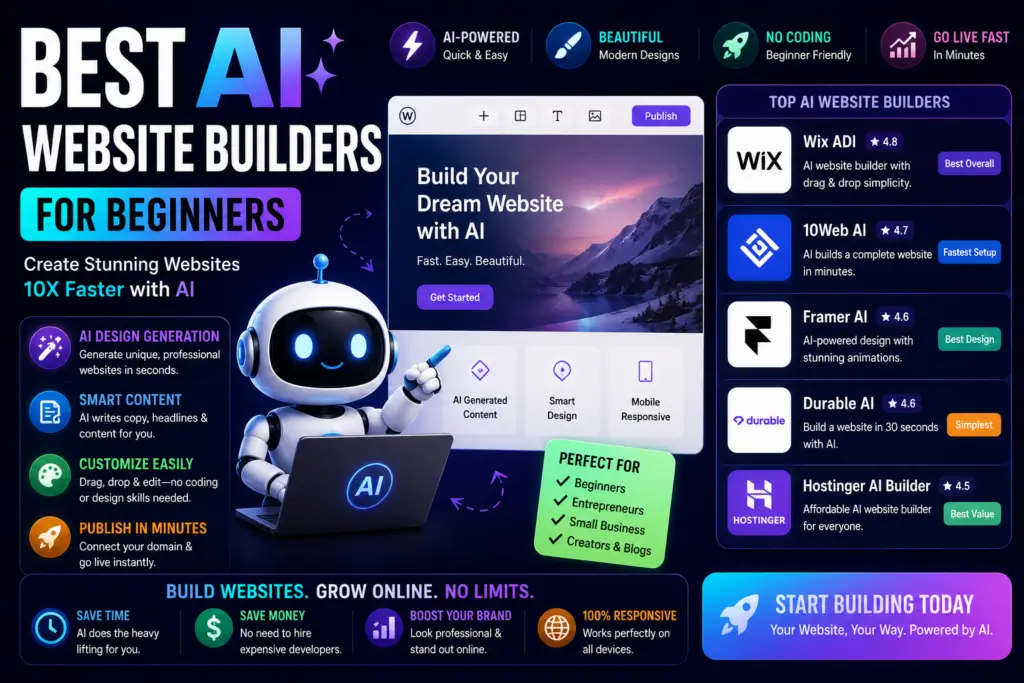
AI website builders can now take a beginner from an idea to a working website without requiring coding or traditional web-design experience.
The best tools do more than generate a homepage. They can help create page structure, draft copy, suggest layouts, build sections, add business features, and give you a starting point you can edit before publishing.
But they are not all built for the same user.
Some are better for small businesses. Some are stronger for ecommerce. Others give you more design control, WordPress flexibility, or a faster “describe it and build it” workflow.
This guide focuses on eight current AI website builders worth considering in 2026 and, more importantly, which type of beginner each one makes sense for.
Quick Answer
Wix
Strong choice if you want AI generation, visual editing, business tools, ecommerce options, and room to grow without changing platforms quickly.
Hostinger AI Builder
Good fit if you want hosting and AI website creation in one place with a relatively straightforward setup.
Framer
Better for creators and startups who want AI assistance without giving up control over layout, responsiveness, typography, and visual design.
10Web
Worth considering if you specifically want an AI-assisted workflow built around WordPress rather than a closed website-builder platform.
AI Website Builders Compared
| Builder | Best For | Learning Curve | Main Strength |
|---|---|---|---|
| Wix | Beginners & small businesses | Easy | Complete all-in-one platform |
| Hostinger AI Builder | Fast, affordable sites | Easy | Hosting + AI building |
| Durable | Service businesses | Easy | Fast business-site setup |
| Framer | Creators & startups | Moderate | Visual design control |
| 10Web | WordPress users | Moderate | AI + WordPress workflow |
| Squarespace | Portfolios & brands | Easy | Polished presentation |
| Jimdo | Local & solo businesses | Easy | Simple business workflow |
| Shopify | Ecommerce | Easy to moderate | Online selling ecosystem |
What Can an AI Website Builder Actually Do?
Most modern AI builders start by asking what kind of website you want, who it is for, and what the business or project does.
Depending on the platform, AI can then help with:
- Generating an initial website structure
- Creating page sections and layouts
- Drafting headlines and website copy
- Suggesting images and visual direction
- Building mobile-friendly pages
- Creating basic SEO metadata
- Adding forms, ecommerce, booking, or business features
- Editing existing pages with AI assistance
The important word is starting point. AI can get a site online faster, but a strong website still needs human editing, accurate business information, original images or examples, useful content, and clear calls to action.
Do Not Publish the First AI Draft
This is the biggest mistake beginners can make with an AI website builder.
An automatically generated website may look finished, but the copy can still sound generic. Replace vague claims with details AI could not know on its own:
- Your real services and pricing approach
- Your location or service area
- Original photos
- Actual customer questions
- Your experience and process
- Examples of completed work
- Real contact and trust information
AI should help you build faster. It should not erase the parts of the website that make your business different.
1. Wix AI Website Builder
Wix is one of the strongest starting points for beginners because it combines AI website creation with a mature visual editor and a large collection of business features.
You can describe the site you want, let Wix generate a first version, and then continue editing the layout, content, sections, and visual details.
AI site generation Drag-and-drop editing SEO tools Ecommerce Business toolsWhy Beginners May Like It
You do not have to decide between “AI builds everything” and “I build everything.” Wix lets you move between AI assistance and manual editing as you learn.
Best For
Small businesses, creators, service providers, and beginners who want an all-in-one website platform with room to expand.
Watch Out For
The number of features can become overwhelming, and the final cost can increase as you add more advanced business functionality.
One Thing I have Learned while building TechnofluxAi is that Ai tools usually sound easier to use than they are in the real world. I like to try things myself, see where I get stuck, and figure out what actually saves time instead of just repeating promisies.That’s the approach I use throughout this site: keep what works, point out what doesn’t, and explain things in a way that makes sense for someone who is still learning. I started out searching for an image creator. That was my first interaction with Ai. I was frustrated by the vast tool list without any real direction on which tool was best. Then I realized how powerful this tool was .and was going to be in the future. Making mistakes has helped me in the choice of articles I write.
2. Hostinger AI Builder
Hostinger is a strong option for beginners who want AI website creation and hosting inside the same ecosystem.
In 2026, Hostinger expanded its builder into a broader AI Builder workflow. It can help users start from prompts and then continue editing the site rather than treating the generated version as a finished product.
AI generation Hosting included Manual editing SEO controlsBest For
Beginners, freelancers, and small businesses that want a relatively simple website and hosting setup under one account.
Important 2026 Update
If you remember Zyro, do not treat it as a separate current website builder. Zyro was integrated into Hostinger and its standalone sales and services were discontinued.
3. Durable
Durable is aimed heavily at small and service-based businesses that want to get a basic business presence online quickly.
The appeal is not deep web-design control. It is speed. A solo business owner who mainly needs a homepage, service information, contact options, and basic business tools may prefer that simplicity.
Fast setup Business websites AI copy assistance Small-business focusBest For
Freelancers, contractors, consultants, and local service businesses that need a straightforward website more than an advanced design system.
Watch Out For
If design flexibility or a large content site is your priority, you may outgrow a highly streamlined builder faster than you would Wix, Framer, WordPress, or Squarespace.
4. Framer
Framer sits in a different category from the simplest AI builders.
AI can create a starting structure, sections, and draft copy, but the generated site remains editable on Framer’s visual canvas. That gives creators considerably more control over layout, typography, breakpoints, effects, CMS content, SEO settings, and responsive behavior.
AI website generation Visual canvas CMS SEO tools Responsive designBest For
Creators, startups, designers, landing pages, portfolio sites, and users who care more about the finished design than absolute simplicity.
Watch Out For
A complete beginner may need more time to understand the design controls than with a simpler builder.

5. 10Web
10Web is particularly interesting if you want AI assistance without leaving the WordPress ecosystem.
That matters because WordPress gives site owners more portability, plugin options, content-management flexibility, and long-term control than many closed website-builder platforms.
WordPress AI page generation Hosting options Performance toolsBest For
Bloggers, agencies, businesses, and creators who specifically want WordPress but would like AI to reduce some of the initial setup and design work.
Watch Out For
WordPress gives you more flexibility, but that flexibility also means more moving parts than a completely managed builder.
6. Squarespace
Squarespace has long been popular with creators, photographers, portfolios, and visually focused businesses. Its newer AI-assisted website workflows make the initial setup faster while keeping the platform’s emphasis on polished presentation.
Portfolio websites Brand design AI assistance EcommerceBest For
Photographers, artists, consultants, personal brands, restaurants, and businesses that care strongly about visual presentation.
Watch Out For
Users who want deep customization or a highly plugin-driven workflow may prefer WordPress or another more extensible platform.
7. Jimdo AI Website Builder
Jimdo remains relevant for beginners, but the old “Jimdo Dolphin” language is outdated.
Jimdo now promotes an AI-assisted website builder that can help create structure, copy, images, calls to action, and search-oriented content for small businesses. Its Companion AI assistant can also work with website and business information.
AI website creation Business assistance Simple editing Local businessesBest For
Solo operators, local businesses, and beginners who want a simple website without learning a complex design system.
8. Shopify for AI-Assisted Ecommerce
Shopify is different from most of the tools on this list because its main job is ecommerce.
If your goal is to sell products online, that specialization can be an advantage. Shopify’s ecosystem includes AI-assisted content and store-building tools, while the platform handles products, checkout, inventory, orders, payments, and the broader commerce workflow.
Ecommerce Products Checkout AI content Store appsBest For
Beginners whose primary goal is building an online store rather than a traditional brochure, portfolio, or content website.
Watch Out For
Do not choose Shopify simply because it has AI features. Choose it because you need its ecommerce infrastructure.
Which AI Website Builder Should You Choose?
Instead of looking for one tool that is supposedly “best” for everybody, start with what you actually need the website to do.
I Just Need a Business Website
Start by comparing Wix, Hostinger AI Builder, Durable, and Jimdo.
I Want an Online Store
Shopify deserves serious consideration because ecommerce is the center of the platform rather than an add-on.
I Want Better Design Control
Framer is the more interesting option when visual design, responsive control, and customization matter.
I Want WordPress
10Web is the most relevant option on this list if staying in the WordPress ecosystem is a requirement.
How to Choose an AI Website Builder
Before signing up, answer these questions:
- Do I need a blog, business site, portfolio, or store?
- How much do I want to spend after the free trial ends?
- Can I connect my own domain?
- Can I edit the AI-generated design manually?
- Can I control page titles, meta descriptions, URLs, and redirects?
- Can I add analytics?
- Can I export or move the site later?
- Does the platform support the integrations my business needs?
- Will I still be comfortable using it after the website grows?
The last question is easy to ignore. A builder that gets you online in ten minutes is not necessarily the best choice if you will have to rebuild the entire site six months later.
What About Free AI Website Builders?
Free access is useful for testing a platform, but “free website builder” usually comes with trade-offs.
You may encounter:
- Platform branding
- A subdomain instead of your own domain
- Limited storage or bandwidth
- Restricted AI generations
- Limited ecommerce features
- Fewer business tools
That does not make a free plan bad. Use it to learn the editor and decide whether you like the workflow before paying.
For a serious business website, expect to eventually pay for hosting, a custom domain, or a premium website-builder plan.
Are AI Website Builders Good for SEO?
They can be, but AI does not automatically make a website rank.
A useful SEO-ready website builder should let you control basic elements such as:
- Page titles
- Meta descriptions
- Heading structure
- Image alt text
- Clean URLs
- Mobile layout
- Site performance
- Internal linking
- Redirects when URLs change
The builder handles the infrastructure. You still need useful content.
A perfectly optimized AI-generated page that says the same thing as a thousand other websites is not a strong search strategy.
The SEO Advantage AI Cannot Generate for You
Use the builder to create the framework. Then add information that comes from you.
For a Local Business
Add real service areas, project photos, customer questions, scheduling details, pricing context, and examples of completed work.
For a Creator
Add original tutorials, screenshots, experiments, workflows, comparisons, videos, and your actual experience using the tools you discuss.
That is how an AI-built website becomes your website rather than another generated template.
AI Website Builders FAQ
What is the best AI website builder for beginners?
Wix is one of the easiest all-around starting points because it combines AI creation, visual editing, hosting, business tools, and room to expand. Hostinger is also worth considering if you want a simpler hosting-and-builder package.
Can AI build an entire website automatically?
Yes. Several builders can generate a working first version of a website from prompts or business information. You should still review the copy, images, layout, calls to action, SEO settings, and factual information before publishing.
What is the best AI website builder for WordPress?
10Web is one of the better-known options specifically focused on combining AI-assisted website creation with WordPress.
What is the best AI website builder for ecommerce?
If selling products is the main purpose of the website, Shopify is worth considering because the platform is built around commerce, checkout, products, inventory, and store management.
Can I build an AI website for free?
Several platforms let you begin or experiment for free, but connecting a custom domain, removing platform branding, increasing AI usage, or unlocking business features usually requires a paid plan.
Are AI website builders worth it?
They can be valuable for beginners who want to launch faster. The biggest benefit is reducing setup work. The biggest mistake is assuming the automatically generated version is finished and publishing it without adding original business information or useful content.
More TechnofluxAI Guides
Use AI to Build Faster — Then Make the Website Yours
AI website builders have dramatically lowered the technical barrier to launching a website.
For beginners, that is a real advantage. You can get past the blank page, generate the first structure, and start editing something tangible instead of spending days deciding where to begin.
But the builder itself is not your competitive advantage.
Your advantage comes from what you add after the AI finishes: real experience, original photos, useful information, customer questions, trustworthy details, and content that could only come from you or your business.
Pick the builder that matches what you need today without trapping you when the site grows tomorrow.

About the Author
Jon Hicks
Founder of TechnofluxAI.
I’m the creator behind TechnofluxAI, focused on breaking down powerful AI tools, emerging trends, and practical strategies to help creators and entrepreneurs stay ahead in a rapidly evolving digital world.
Follow TechnofluxAI for the latest AI tools & strategies