

Affiliate Disclosure: This post may contain affiliate links. If you purchase through one of them, I may earn a commission at no extra cost to you.
Quick Answer
A negative prompt tells a compatible AI image generator what you want it to avoid. Depending on the model, this can help reduce unwanted details such as blurry features, extra limbs, text, logos, cartoon styling, or overly smooth skin.
What Is a Negative Prompt in AI?
If an AI image keeps giving you blurry details, strange anatomy, plastic-looking skin, unwanted text, or the wrong visual style, a negative prompt may help.
A negative prompt tells an AI image generator what you would prefer it to leave out of the result.
Your main prompt describes what you want. The negative prompt describes what you want to avoid.
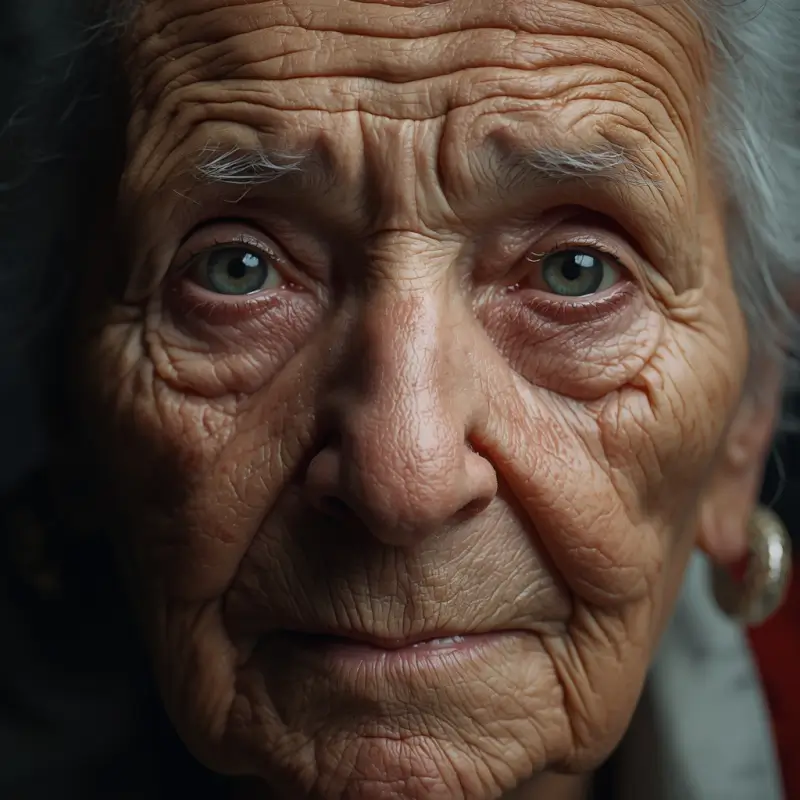
For example, if you are creating a realistic portrait, your main prompt might describe an elderly woman with detailed skin and cinematic lighting. Your negative prompt might exclude cartoon styling, plastic skin, text, logos, or blurry details.
Why AI Images Can Look Fake
AI-generated images can look artificial for several reasons.
- Skin may look too smooth or waxy
- Hands or fingers may be distorted
- Faces may look overly symmetrical
- Background details may blend together
- Unwanted text or logos may appear
- The style may drift toward CGI, illustration, or cartoon imagery
A negative prompt can sometimes reduce those unwanted traits, but it is not a magic quality switch. The result still depends on the model, your main prompt, the generation settings, and the image you are trying to create.
How to Use Negative Prompts
- Write your main image prompt.
- Find the negative-prompt field or exclusion control if the tool provides one.
- Add the specific elements or styles you want to avoid.
- Generate the image.
- Review the result and adjust the negative terms based on what actually went wrong.
Not every image generator handles negative prompting in the same way, so check the controls or documentation for the tool you are using.
One Thing I have Learned while building TechnofluxAi is that Ai tools usually sound easier to use than they are in the real world. I like to try things myself, see where I get stuck, and figure out what actually saves time instead of just repeating promisies.That’s the approach I use throughout this site: keep what works, point out what doesn’t, and explain things in a way that makes sense for someone who is still learning. I started out searching for an image creator. That was my first interaction with Ai. I was frustrated by the vast tool list without any real direction on which tool was best. Then I realized how powerful this tool was .and was going to be in the future. Making mistakes has helped me in the choice of articles I write.
Example: Negative Prompt for a Realistic Portrait
Here is a simple example based on a realistic elderly portrait.
Main Prompt
Extreme close-up portrait of a very elderly woman, deeply wrinkled skin, visible pores and natural texture, realistic facial details, cinematic side lighting, shallow depth of field, documentary photographyNegative Prompt
smooth skin, plastic skin, beauty filter, airbrushed, cartoon, anime, CGI, blurry, low detail, text, watermark, logoThe negative prompt does not guarantee realism, but it gives a compatible model additional guidance about the visual traits you are trying to avoid.
Useful Negative Prompt Keywords
For Image Quality Problems
blurry, pixelated, low detail, low quality, distorted, cropped, out of frameFor Hands and Anatomy
extra fingers, extra limbs, missing fingers, deformed hands, distorted anatomy, duplicated limbsFor Realistic Portraits
plastic skin, airbrushed skin, beauty filter, overly smooth skin, cartoon, anime, CGI, 3D renderFor Unwanted Text and Branding
text, caption, watermark, logo, signatureA Simple Negative Prompt Baseline
If your image generator supports negative prompts, this can be a useful starting point:
blurry, pixelated, distorted anatomy, extra fingers, extra limbs, deformed hands, distorted face, text, watermark, logo, cropped, duplicateDo not automatically paste the same list into every generation. Remove terms that do not apply to the image you are making.
Negative Prompt for Realistic AI Images
cartoon, anime, CGI, 3D render, plastic skin, airbrushed skin, oversaturated, blurry, distorted anatomy, deformed hands, text, watermark, logoTreat this as a starting point rather than a universal formula.
Example: Cinematic Vampire Scene
Main Prompt
An elderly woman transforming into a vampire, dark cinematic lighting, dramatic shadows, realistic skin texture, gothic horror photographyNegative Prompt
cartoon, anime, CGI, plastic skin, blurry, low detail, distorted face, extra fingers, oversaturated, text, watermark, logoThis type of negative prompt can help steer a compatible model away from unwanted styles or defects while the main prompt controls the actual look of the scene.
How to Improve a Negative Prompt
- Generate the first image.
- Identify the most obvious unwanted element.
- Add one or two relevant negative terms.
- Generate another version.
- Compare the results.
- Keep the terms that consistently help.
Common Negative Prompt Mistakes
Using Too Many Unrelated Terms
A giant negative prompt is not automatically better. If many of the terms have nothing to do with your image, they may add noise without solving the actual problem.
Using the Same Negative Prompt for Every Style
A negative prompt for photographic realism should not automatically be reused for anime, illustration, fantasy art, or 3D rendering.
Trying to Fix Everything With the Negative Prompt
Sometimes the real problem is the main prompt.
If your positive instructions are vague or contradictory, a long negative prompt may not fix the generation. Improve the subject, composition, lighting, camera style, texture, and environment in the main prompt first.
Assuming Every AI Image Generator Works the Same Way
Negative prompting is model-specific. Some tools provide a dedicated field, while others use parameters or different prompt controls.
Why Negative Prompts Can Work
A negative prompt gives the image model an additional signal about concepts, objects, styles, or visual characteristics you would prefer it to avoid.
It does not force the model to obey every exclusion, but it can shift the result away from unwanted features when the model supports that type of control.
A Better AI Image Workflow
- Describe the subject clearly.
- Add the visual style you actually want.
- Specify lighting, composition, texture, or camera details where useful.
- Generate a few variations.
- Identify specific problems in the output.
- Add targeted negative terms if your model supports them.
- Compare the next generation.
- Save combinations that work well for that model and style.
When Negative Prompts Are Most Useful
- Realistic portraits with overly smooth skin
- Images with recurring text or watermarks
- Scenes that keep drifting toward the wrong art style
- Hands or anatomy that repeatedly generate incorrectly
- Compositions with unwanted objects
- Images where a particular visual effect keeps appearing
Negative Prompt FAQ
What is a negative prompt in AI?
A negative prompt is an instruction that tells a compatible AI generator which objects, styles, qualities, or visual elements you want it to avoid.
Do negative prompts improve AI image quality?
They can help reduce specific unwanted traits when the image model supports negative prompting, but they do not automatically improve every image.
Why do AI images sometimes look fake?
Artificial-looking results can come from the model itself, vague prompting, unrealistic lighting, overly smooth textures, anatomy errors, or a style that does not match the intended result.
How long should a negative prompt be?
There is no universal ideal length. Start with a short list that targets the actual problems you are seeing, then adjust it based on the generated results.
Final Thoughts
Negative prompts are most useful when you treat them as a troubleshooting tool rather than a magic list of words.
Start with a strong main prompt. Generate the image. Look at what went wrong. Then use targeted negative instructions to reduce the specific things you do not want.
That approach is more reliable than copying one huge negative prompt and expecting it to work across every AI image generator.

About the Author
Jon Hicks
Founder of TechnofluxAI.
I’m the creator behind TechnofluxAI, focused on breaking down powerful AI tools, emerging trends, and practical strategies to help creators and entrepreneurs stay ahead in a rapidly evolving digital world.
Follow TechnofluxAI for the latest AI tools & strategies